 The OM System PEN is a good-looking and fairly affordable camera for those wanting to take their photography beyond a phone or as an everyday companion to a larger model. Sure it’s essentially a reskinned OM5 Mark II, with the same 20 Megapixel Four Thirds sensor, but you’re getting a stylish and splash-proof design with lots of control, industry-leading stabilisation, great-looking images out of camera, and access to a wealth of compact lenses. It also encourages you to experiment with powerful long exposure options, a collection of good-looking effects, and a neat interface for adjusting colour and monochrome profiles. But the PEN also inherits limitations of earlier models, lacking 10 bit video, 4k 60p and a broader array of subject detection. All are present on most rivals, but to be fair how many of them are deal-breakers for the target audience? So while the OM System PEN may not have a new sensor, nor leading video or autofocus specs, I feel it’ll still appeal to a lot of people, and it’s certainly a camera I enjoyed using. All I’d need to decide is whether to go for its rangefinder style body or the SLR-styled OM5 Mark II.
OM System PEN review
-
-
Written by Gordon Laing
The OM System PEN is a compact rangefinder-styled camera based on the Micro Four Thirds system. Yes, a new PEN, the camera we’ve all been asking for, and the first in this series since the EP7 back in 2021. But that doesn’t make it an EP8 or a Pen G, it’s just called the OM System PEN. And in great news for the patient OM faithful, this new PEN has a viewfinder, IBIS and weather-sealing, hallelujah!
But don’t assume this spec makes the new PEN an updated version of the beloved PEN F. Rather than targeting the high-end, it’s aimed at more of a mid-range or even entry market from anyone looking to take their photography beyond a phone, or existing OM owners after a smaller body for everyday use.
In terms of specs and image quality, the new PEN shares much the same innards as the OM-5 Mark II, so you’re getting the same 20 Megapixel sensor with phase-detect autofocus and the latest menus, but not the stacked sensor of the higher-end OM bodies. In fact, as you’ll discover, the new PEN is essentially the OM-5 II in a different body shape, and at a slightly lower price. Everything I know is in the video below, but if you prefer to read the written highlights, keep scrolling!
It launched in September 2026 at around $1000 or £850 for the body alone, or £950 in a kit with the new weather-sealed 14-42mm III kit zoom – check the links in the description for the latest pricing. The body is available with a silver top or in all-black, but the kit zoom is only black. So while the new PEN may not share the magnesium alloy shell of the PEN F or the stacked sensor of the OM-3, it still becomes one of the lowest-priced cameras with IBIS and a viewfinder, that’s also splashproof out the box. An impressive combination at this price point.
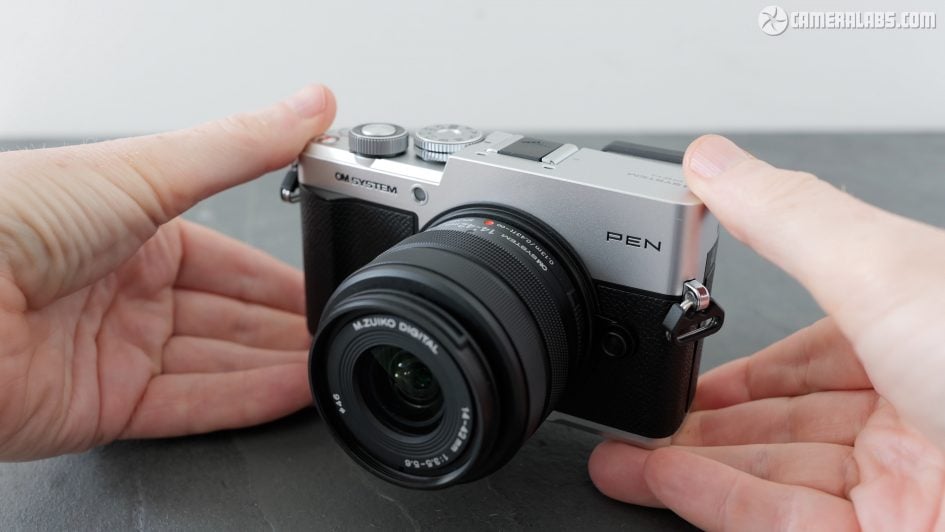
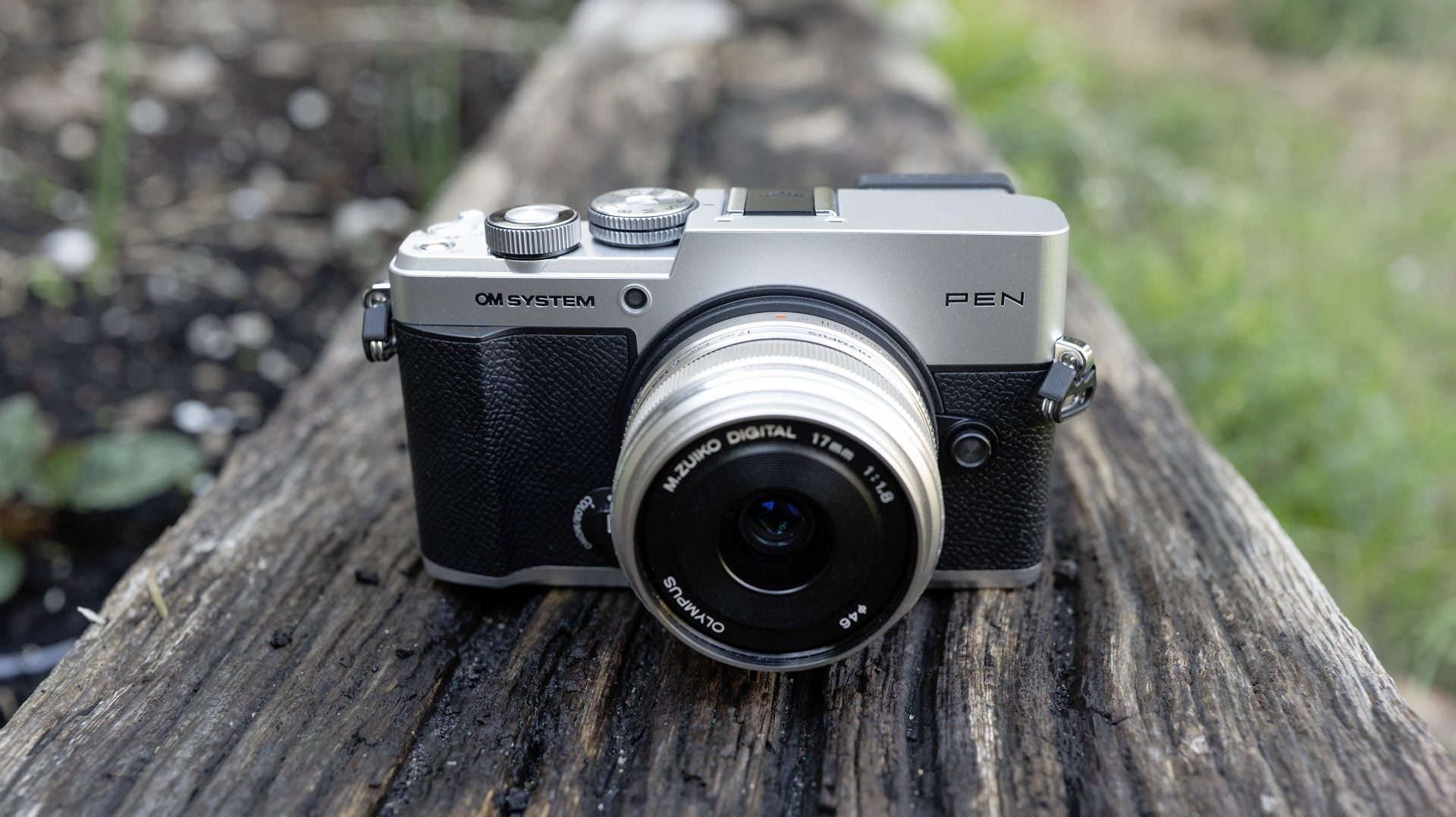
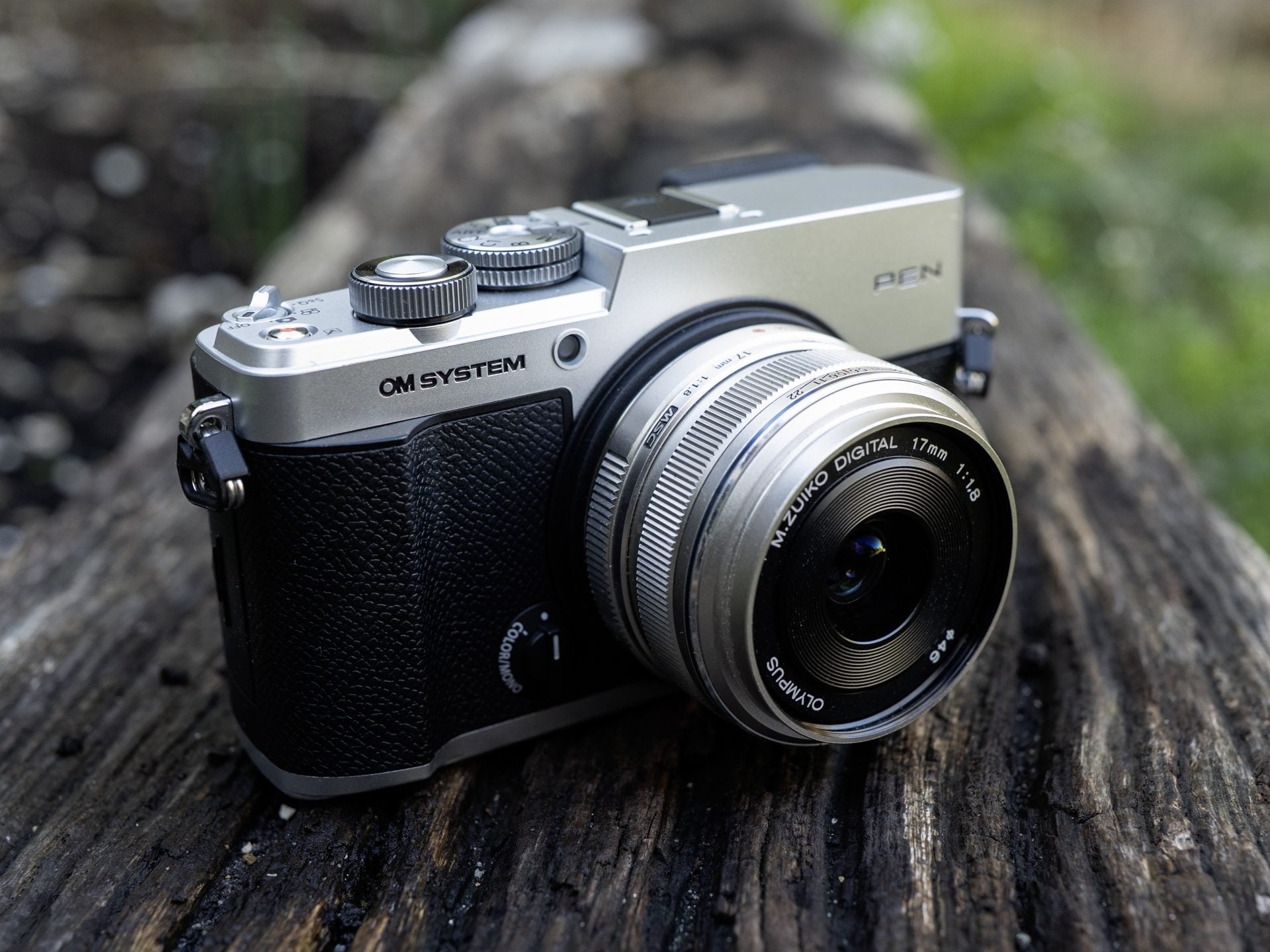
In terms of design, the OM System PEN is a classic rangefinder styled camera with a flat top and the viewfinder perched in the upper left corner. Unlike earlier models, the brand and model are on either side of the mount rather than above it. Also note the strap lugs which could rattle audibly for the vloggers out there.
Measuring 124x72x39mm and weighing 398g for the body plus battery, or 526g with the kit zoom, it’s roughly similar in size to the Lumix S9, Lumix L10 or Fujifilm X100 series. As I mentioned, the body doesn’t employ the magnesium alloy shell of the PEN F or higher-end OM bodies, and in your hands it definitely feels more mid-range. But the build seems solid enough and unlike rival cameras at this or even higher price points, OM system is sufficiently confident to quote an actual IPX1 splashproof rating, albeit contradicting previous suggestions the PEN couldn’t be sealed.
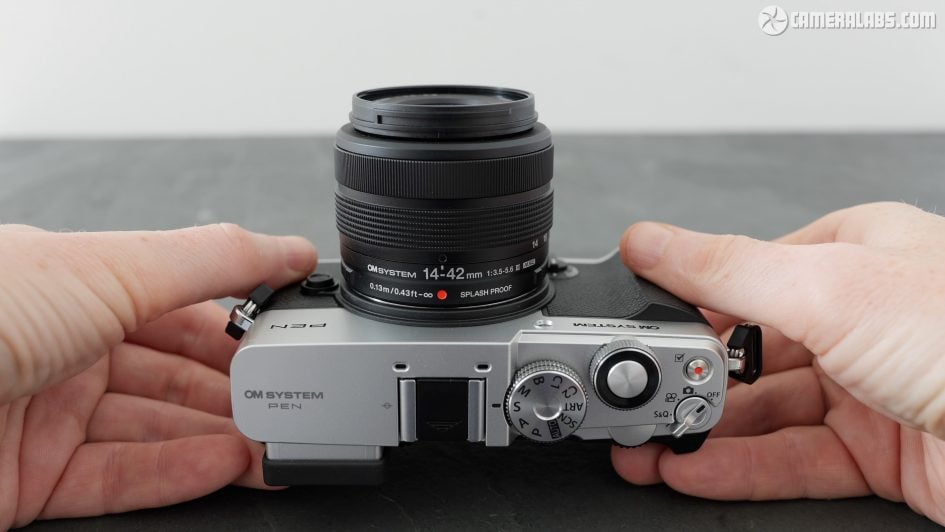
The overall thickness of course depends on the lens you mount, with the 14-42 kit zoom adding 50mm in its retracted state. Like most small kit zooms, this needs to be extended for operation with a twist, although unlike the previous EZ pancake zoom, this is a manual operation by hand. This does allow you to startup and adjust it faster though.
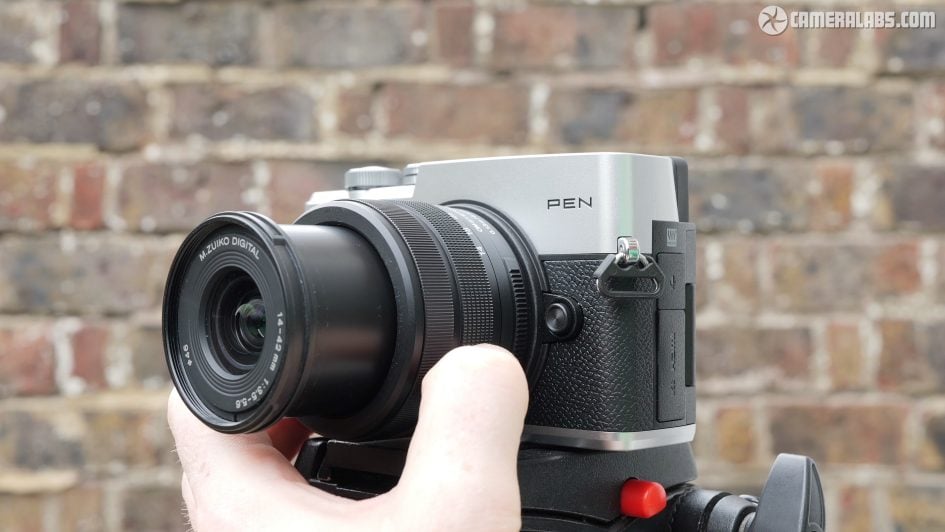
Quick note on the new kit zoom. It delivers a 28-84mm equivalent field of view, has an f3.5-5.6 variable aperture, a 46mm filter thread and a closest focusing distance of 13cm.
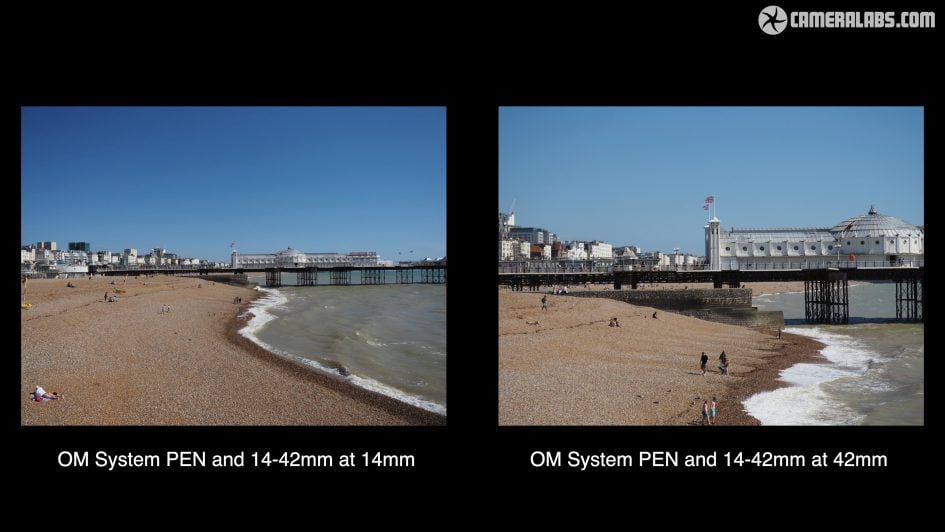
OM System describes it as being dust and splash-resistant and there’s certainly a rubber grommet at the mount, but it appears to be fully plastic in construction including a plastic mount and an extending barrel, so I wouldn’t expect miracles.
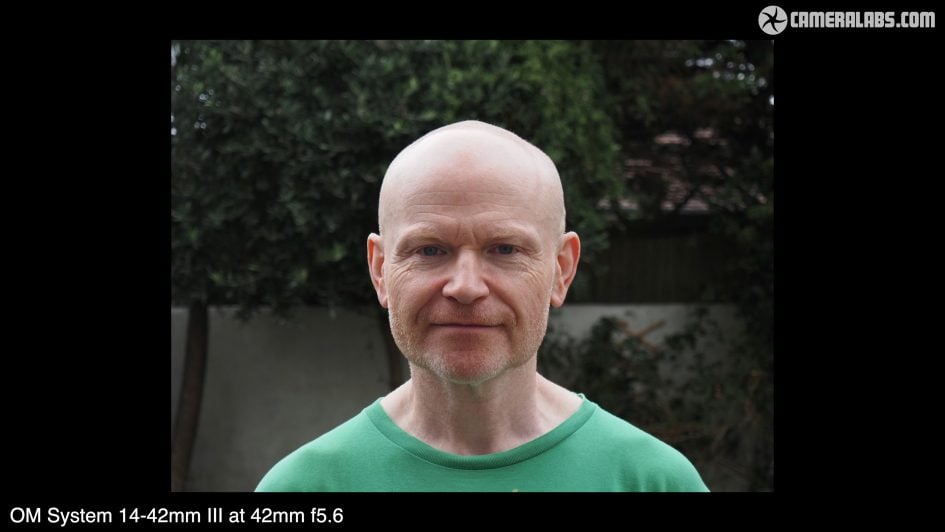
Unsurprisingly at 42mm f5.6 you’re not going to get much blurring in the background of portraits though, with samples looking more like something you could capture with your phone. If you want blurrier backgrounds, grab a nice bright prime lens.
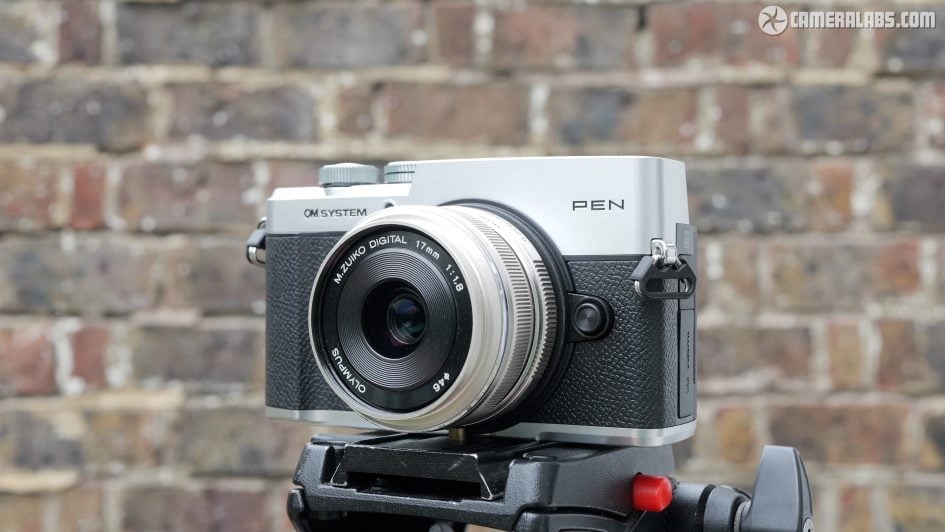
Returning to the new body, I personally feel the new PEN can be transformed with a smaller prime lens, such as my old Olympus 17mm f1.8 here in matching silver. I think this looks way better than the kit zoom and would be my preferred combo.
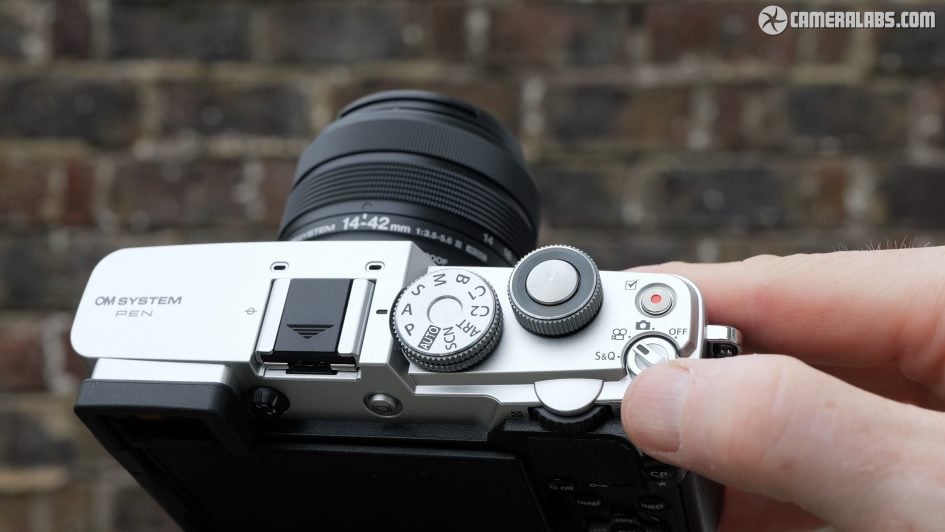
Like other rangefinder-styled cameras, the bulk of the controls are on the upper right plate. These start with a new power switch in the corner which also sets the camera to photo, video or S&Q modes. Above this is a dedicated record button and to their left a chunky finger dial with the shutter release. A second dial on the rear is operated by your thumb. As with previous bodies, these turn with very positive feedback. There may be no dedicated exposure compensation dial, but you can assign it to one of the dials if you like. Next comes the mode dial with the usual PASM and Bulb modes, along with full Auto, Scene presets, Art filters and two Custom positions. Thanks to the viewfinder, there’s no room for a popup flash, but there is a hotshoe with mics on either side.
Round the back, there’s a joypad with labelled functions for ISO, white balance, drive mode and focusing area. There’s sadly no joystick, but pushing left on the joypad highlights the AF area, allowing you to then use the joypad to move it around. You can of course alternatively do this by touch or use the screen as a touchpad while composing through the viewfinder, but left-eyed shooters should beware of accidental nose control. Note the CP button in the upper right corner to directly access the Computational Photography features, and the colour mono dial on the front, more about which in a moment. Like other OM models, pretty much everything is customisable from the buttons to the function and direction of the dials, including different assignments whether you’re in photo or video.
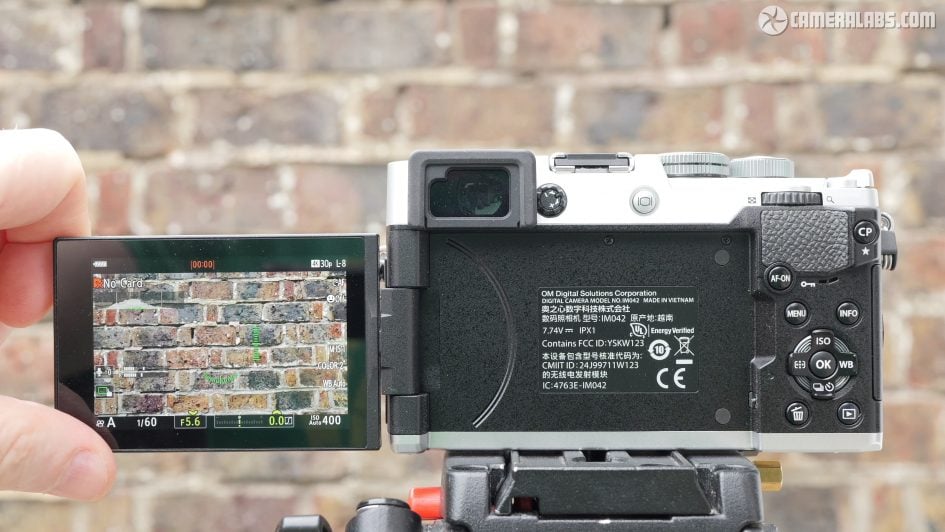
Next for composition with the PEN offering a built-in viewfinder. The OLED panel shares the same 2.36 million dot resolution as the OM5 II. It’s fairly small and not the most detailed, but I’m not complaining as I find viewfinders are essential and I very much welcome having one here. Meanwhile the 3in screen is side-hinged and fully-articulated, allowing it to flip-out and twist forward to face you or back on itself for protection. Some would prefer a vertical-only tilt that’s quicker and in-line with the optical axis, but others like the side-hinge. In terms of resolution, it looks similar to the OM5 II, so more on the budget side.
Like other OM cameras, you can push the OK button to fire-up a quick menu with the most common settings which you can navigate with the joypad or by touch. I’ve always liked this interface.
Behind two flaps on the left side you’ll find the ports. At the top is a 3.5mm microphone input, a nice addition to the PEN series even if the flap gets in the way of the screen, while below this are Micro HDMI and USB-C ports. The latter is used for charging, although like the OM5 II, I don’t think it supports Power Delivery sources.
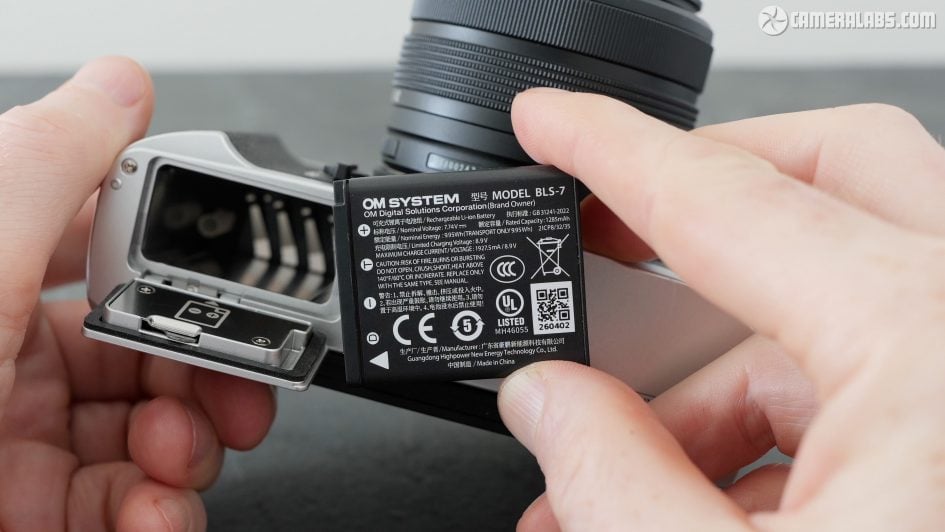
Meanwhile a door on the right side opens to access a single SD card slot, so at least this is easily accessible when the camera’s mounted on a tripod. Under the camera you’ll find a metal tripod thread in line with the optical axis and a compartment for the battery alone. Interestingly OM has switched to a new BLS-7 pack, maybe to fit the space, or perhaps due to availability. They quote 400 shots.
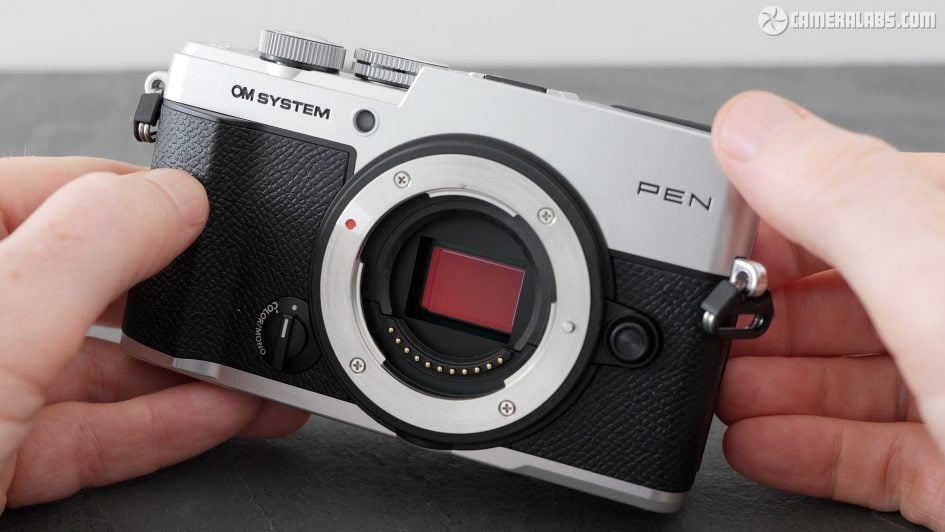
For imaging, the new PEN employs what appears to be the same 20 Megapixel Four Thirds sensor as the OM5 II, so you can expect similar quality and features. So while it means the stacked sensor remains exclusive to the higher-end models in the series, it does mean the PEN becomes the first in its series to sport phase-detect autofocus.
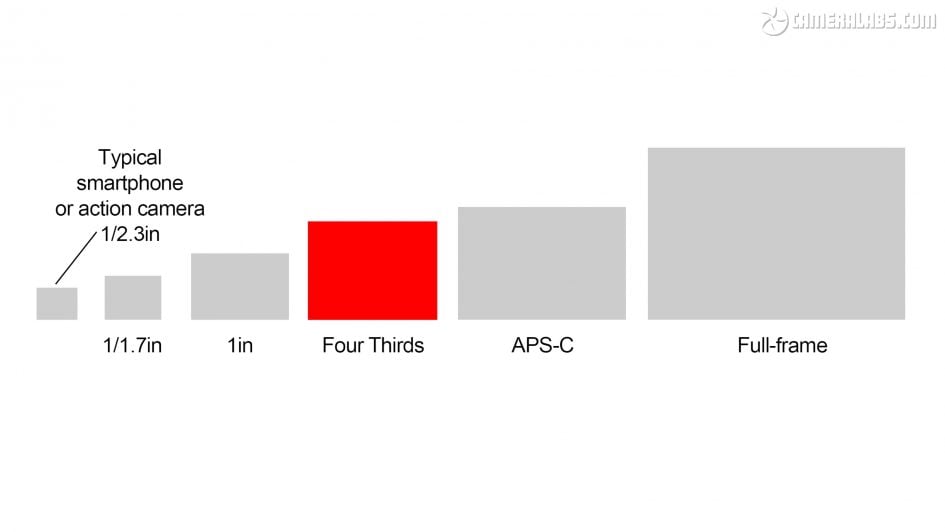
Quick sensor size comparison. I made this diagram to show how Four Thirds measures-up compared to other sensor types. You can see it’s larger than the 1in Type and smaller sensors commonly used in phones, but it is smaller than APS-C and of course full-frame. The smaller size means it can’t compete with larger formats on noise levels and dynamic range at the same ISO settings, but it does allow smaller lenses and bodies with potentially better stabilisation. And that in turn can allow you to handhold slower shutters to keep ISOs lower if you don’t need to freeze action. In short, there’s pros and cons to all formats.
Olympus was of course a pioneer in sensor-shift stabilisation, with the latest OM bodies inheriting that expertise, so what can the new PEN do? Well it claims to deliver up to 5.5 stops of compensation in the middle, a stop more than the PEN E-P7, but a stop less than the OM5 II – or two stops less if the OM5 II is fitted with a Sync IS compatible lens. I’m not sure why the new PEN doesn’t appear to have the same IBIS as the OM5 II as so much else is shared with it, but as a company that often avoids specs, I’m also not sure how seriously we can compare these quoted numbers.
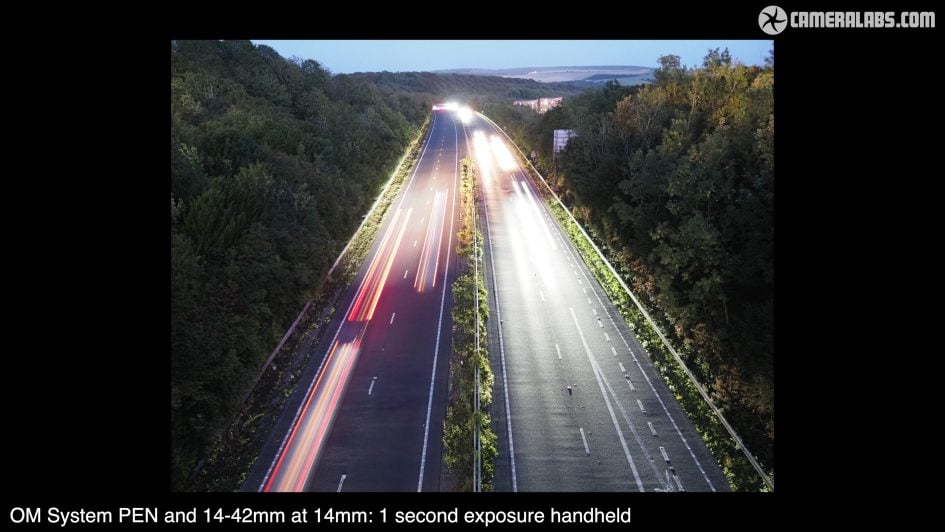
Above: What I can do though is show you what I could achieve with the new PEN in practice. So here’s a handheld shot I took using the 14-42 kit zoom at 14mm, so 28mm equivalent. Normally I’d need around 1/30 to hold this sharply without stabilisation, and here you can see a sharp result at one second with IBIS. So that’s around five stops right there.
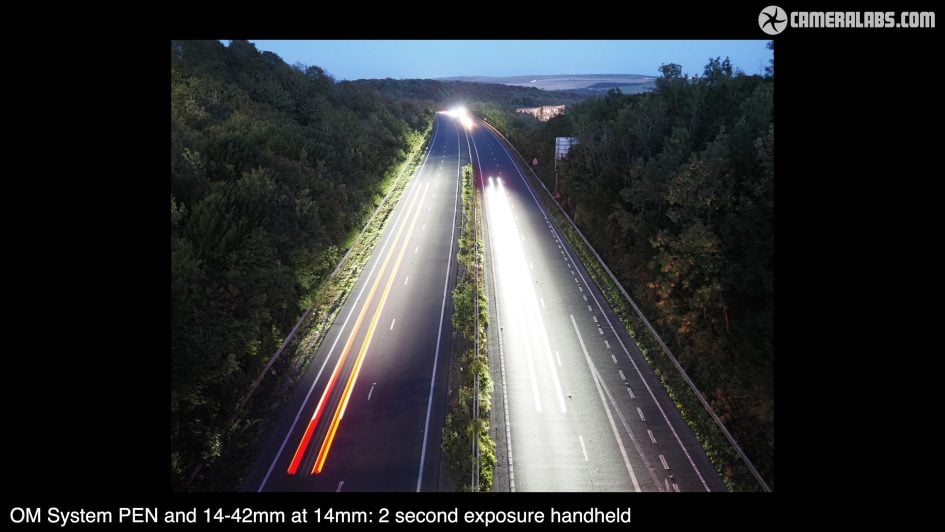
Above: Not bad, but wait, here’s another handheld shot I took at two seconds, representing around six stops of compensation. Still nice and sharp.
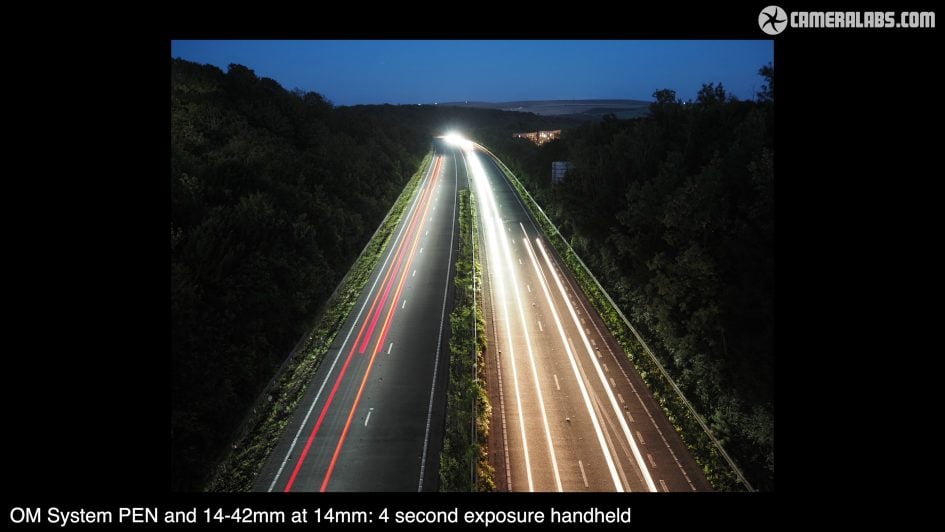
Above: and now here’s one at four seconds, still handheld and now representing about seven stops of compensation. Each has allowed me to capture light trails at night, very easily without a tripod. Handholding eight seconds at this focal length was a bit of a push for me, but could be possible if you’re steadier than I am. Your mileage will of course vary, but I can tell you I normally only achieve three to four stops of compensation from the IBIS on larger formats, so handholding an exposure of several seconds with those models is simply out of the question. On my travels with Micro Four Thirds cameras I’ve found this capability invaluable during dusk and dawn periods where I’ve been able to handhold multiple long exposures during brief blue hour periods when previously I’d be slowed down using a tripod.
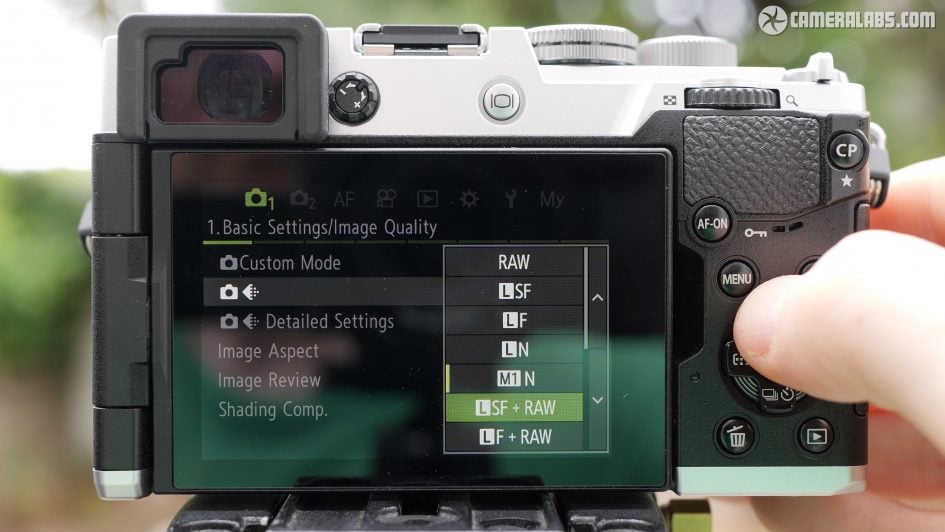
Next here’s the photo quality menus, again much the same as the OM5 II, so you can choose a variety of compression and resolutions for JPEGs and accompany them with a RAW or shoot RAW alone. I couldn’t find any RAW compression options, nor 10-bit HEIF as an alternative to JPEG, so it’s dated in that regard.
Also note the usual aspect ratio options, although unlike most cameras, the native shape of Four Thirds is 4:3, which I’m personally quite fond of, especially in the vertical orientation. I couldn’t however find an option that turns the shooting information around when framing vertically.
Ok, so now let’s take a look at the kind of resolution and detail 20 Megapixels will give you, starting with my usual view of Brighton Pier, composed here at 35mm equivalent for comparison with my other reviews. Taking a closer look reveals a similar amount of detail to 24 Megapixel sensors in larger formats, and if you keep the ISO low whether with good light or by exploiting the excellent stabilisation, the quality can be similar.
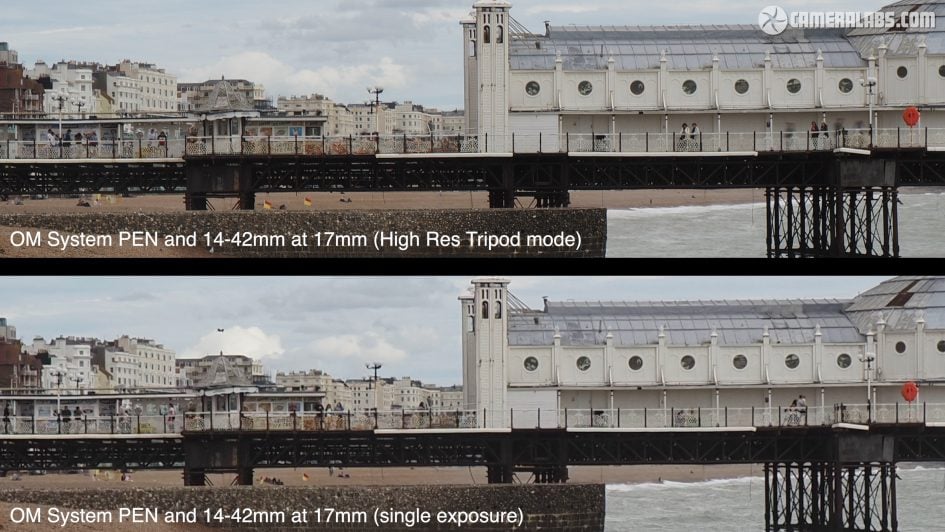
Like older models, the PEN also offers a high res mode which uses IBIS to shift the sensor during a burst, before compositing the images into a single image with potentially more detail. OM System reckons about 50 Megapixel’s worth. So let’s place the single frame at the bottom and compare it to a version using the high res mode at the top. Here you can see the pros and cons of a pixel-shift composite mode. There’s definitely greater resolved detail here, most obviously in the railings, distant chimneys and brickwork. But equally any subject in motion, such as the people, waves and birds have resulted in ghostly artefacts, so it’s best-reserved for completely static subjects like archive or reproduction work.
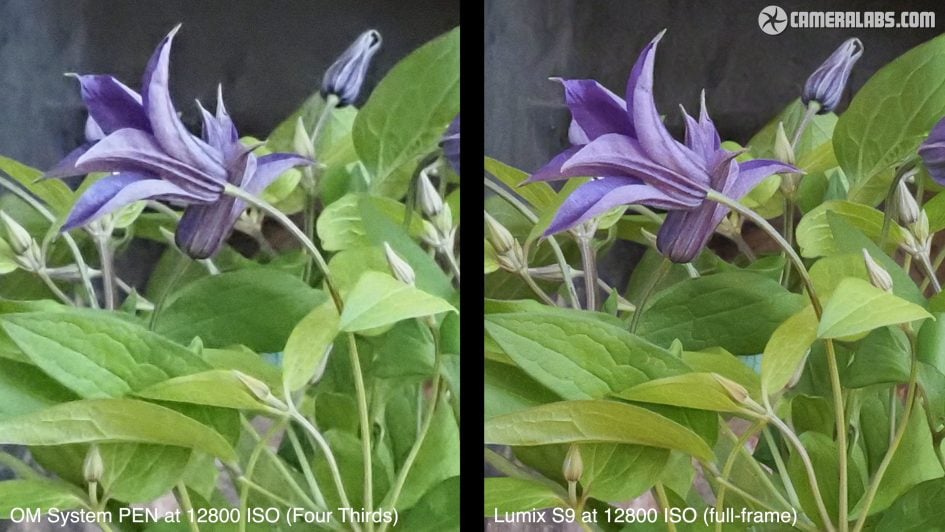
How about noise levels? I took a still life scene throughout the sensitivity range, and as you’d expect for a smaller format, evidence of noise – and noise reduction to combat it – becomes apparent at lower ISOs than larger formats, but again you have to ask yourself how important is the quality at high ISOs and how often will you actually need it?
For those needing to freeze action in low light it’s critical for the best results, but for others who can embrace slower shutters or even motion blur, it can be a non-issue. Certainly for travel and general use I’ve never been held back by the sensor size of Micro Four Thirds and half of the photos in my In Camera book were taken in this format. Plus third party noise reduction keeps getting better.
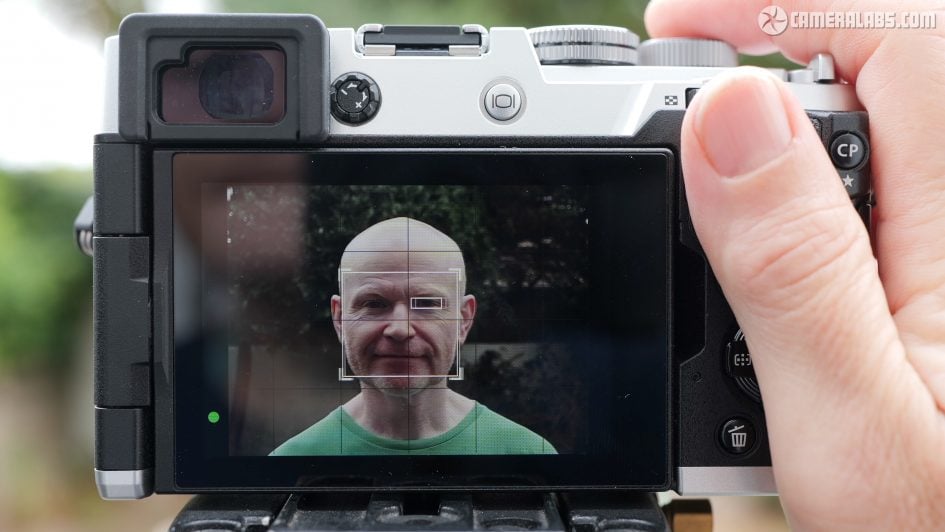
Ok now for focusing and in my video review you can see the camera and kit zoom in AFC mode with the full area and human face detection enabled. You can see the AF system doing a good job at placing a box over my head even when turned away, and one over my eye when visible. I did notice some minor wobbles on my pre-production sample, so it doesn’t feel as confident as the higher-end OM models, but it’s certainly good enough for day-to-day photography, and while there’s no subject detection for transport, I’m pleased to see cats and dogs are now recognised.
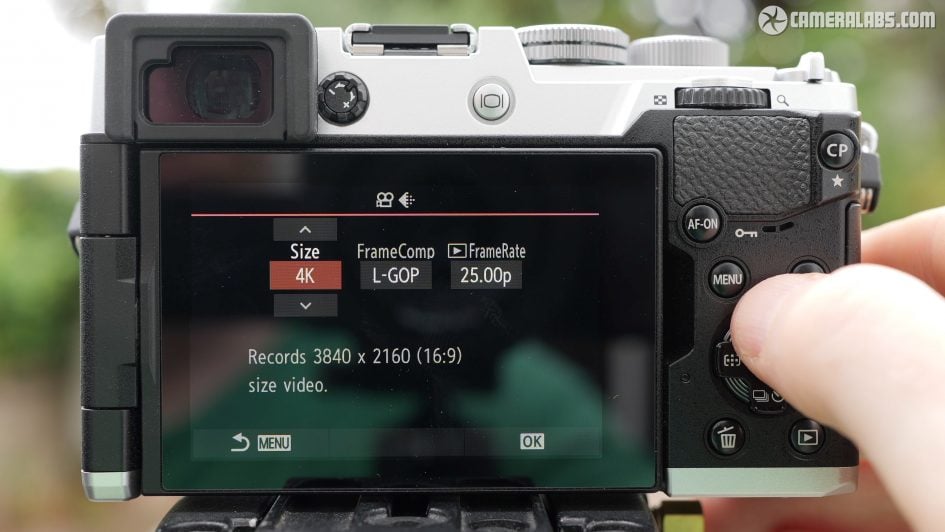
Moving onto video quality, the PEN unsurprisingly inherits the same capabilities as the OM-5 Mark II, so you can record 1080 at 24 to 60p, 4k at 24-30p, or the slightly wider Cinema 4k DCi shape in 24p only. All are uncropped horizontally when stabilisation is disabled or set to sensor shift only, while a digital boost mode incurs a crop.
Slow motion fans should turn the small mode dial to S&Q to access 1080 up to 120p which is automatically slowed down to a selected frame rate, but incurring a crop and without sound or continuous AF, and only supporting sensor-shift stabilisation.
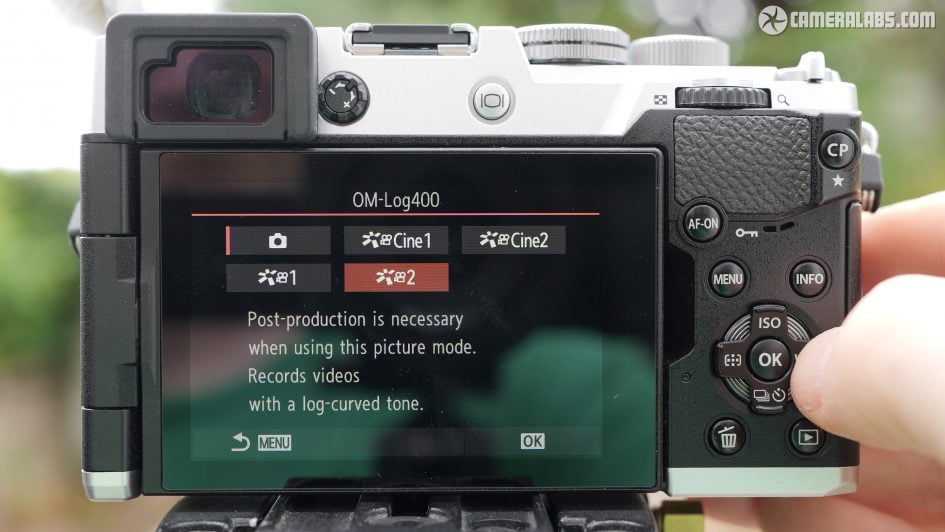
Graders will get their hopes up with OMLog 400, but will be disappointed there’s still no 10-bit video. Everything is recorded in 8 bit, while all 4k is encoded in Long-GOP, and there’s no 4k 60 even with a crop. Again this is looking dated today.
In my video review, you can see some focus tests for video, first with the 14-42 kit zoom. You can see a minor pause with the default settings before the AF system adjusts, which gives it a hesitant look here, but you can improve the response by adjusting the settings. And for a slightly more challenging depth of field, here’s the camera fitted with the old 17mm f1.8 prime. Again there’s some hesitation that can be improved by tweaking the menus, but equally you can see the camera can land on a target without wobbling if it pauses for a moment thanks to the phase-detect system.
Next for some of the photo modes that Olympus and OM System have become famous for, starting with Computational Photography, or CP for short. There’s a dedicated button for it in the top right corner of the body, or a traditional menu page if you prefer. From these you can choose High Res shot, Live ND, Focus Stacking, HDR and Multiple Exposure. I’ve already covered High Res shot that composites a series of pixel shifted images to boost the detail, so let’s check out Live ND which simulates and previews the effect of a neutral density filter on motion.
There’s four levels to choose from which simulate the effect of ND2 to ND16, in turn reducing the exposure by one to four stops, although note you will need to be in Shutter Priority or Manual for Live ND to work. It also lacks the Live Graduated ND mode of the higher-end OM’s.
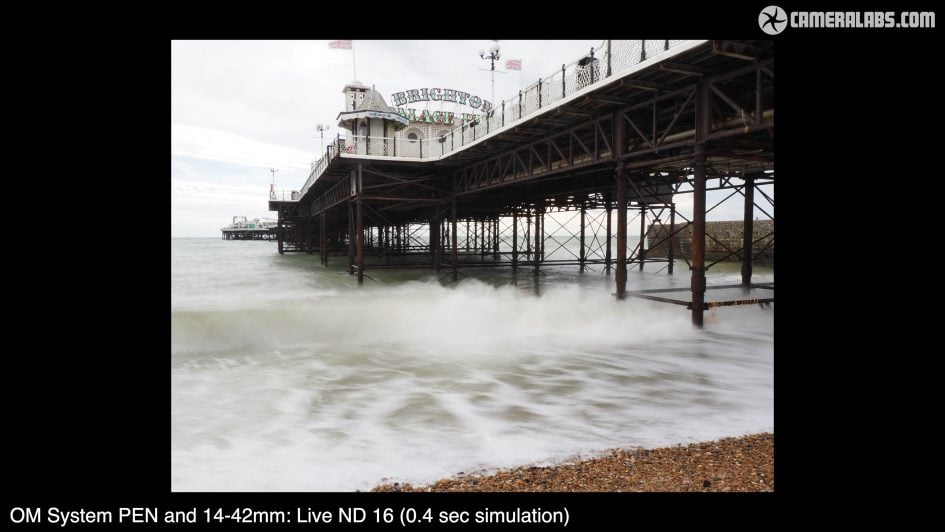
Above: Live ND then shows a preview on the live image, with anything in motion becoming blurred. To illustrate it in action, here’s the strongest ND16 effect applied, simulating an exposure of 0.4 seconds. Ideally I’d do this under slightly dimmer conditions to allow even longer exposures and greater blurring, but you get the idea. Not the same as using a real ND filter, but an interesting ethereal effect none-the-less without any extra gear.
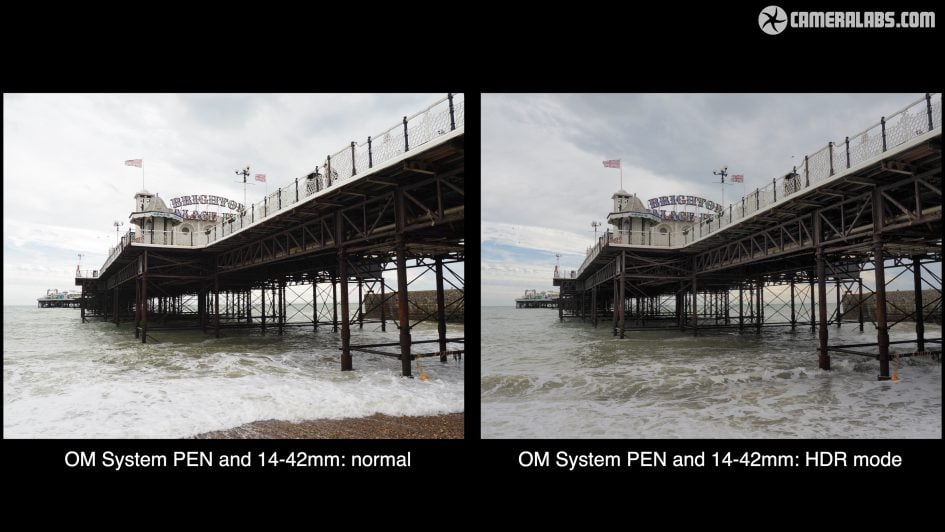
Above: Next the HDR mode, and first you’re looking at another standard single exposure where you can see the in-camera JPEG profile has crushed some of the shadow detail and washed out some of the cloud tones. And now here’s one of the HDR modes which again combines multiple images, but this time to extend the tonal range. This version has retained more interesting tones in the sky areas, and boosted the shadowy underside of the pier a little.
And next Multiple Exposure which allows you to combine two frames, using the first as a ghostly overlay to line-up the second. I don’t think you can choose previously captured images or retake the second one either, so proceed with care.
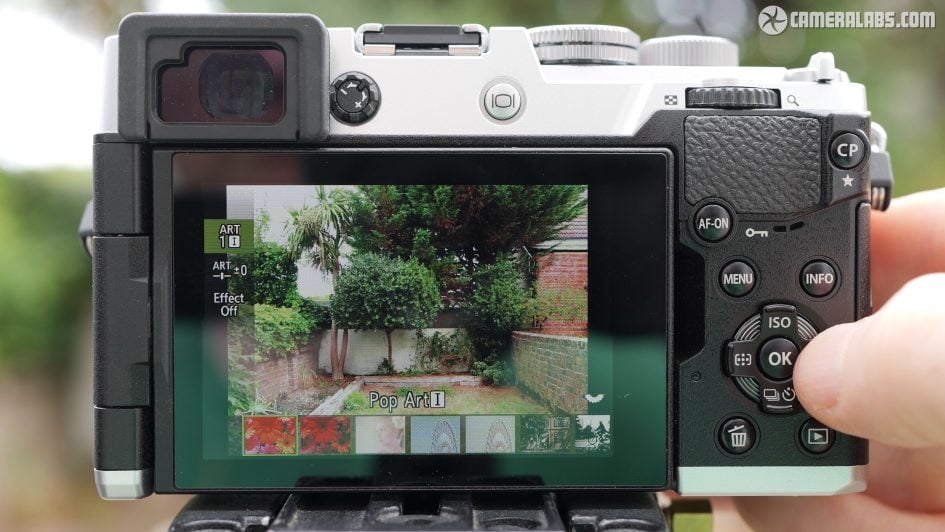
Next come the ART filters, selected from the main mode dial. These effects have been a staple of Olympus and OM for a long time, and while some can be pretty heavy-handed, they are fun and there’s some nice monochrome options amongst the 16 options. You can even choose to bracket a selection.
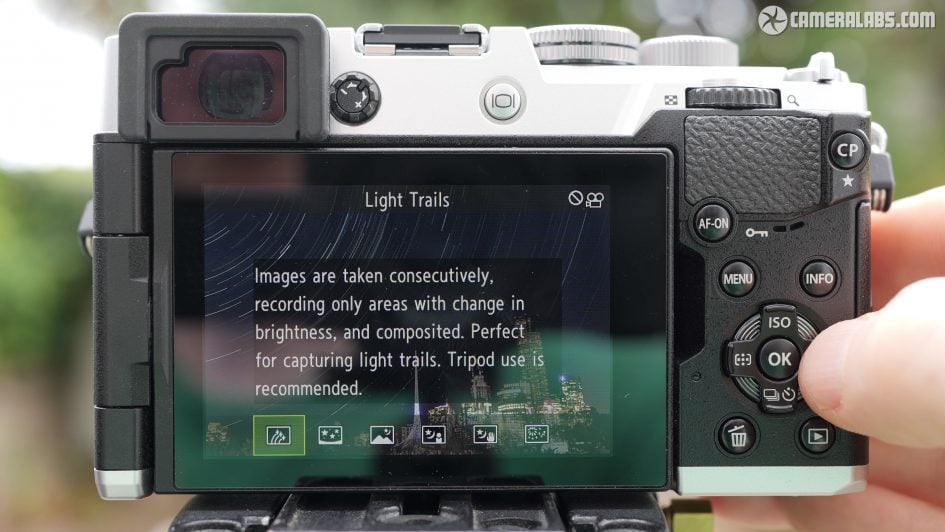
Turn the mode dial to Scene and there’s six main categories, but delve inside and you find each has a series of sub-options. Arguably most exciting is the Nightscapes and Trails category, where the Trails sub-option composites multiple images, only re-exposing those which have changed. So as the stars gradually move to leave trails, any static landscape or urban element is effectively protected from over-exposure. This is also explored in slightly different ways in the Live Time and Live Bulb modes which, along with various timer presets, make long exposure and experimental work a breeze compared to most cameras.
And finally the Colour and Monochrome control, activated using a dial on the front of the camera. Again this works like some previous models, but is still really fun. This lets you adjust four colour and four monochrome presets that can be saved and shared via the app, like a recipe or film simulation, but it’s the interface that really delights.
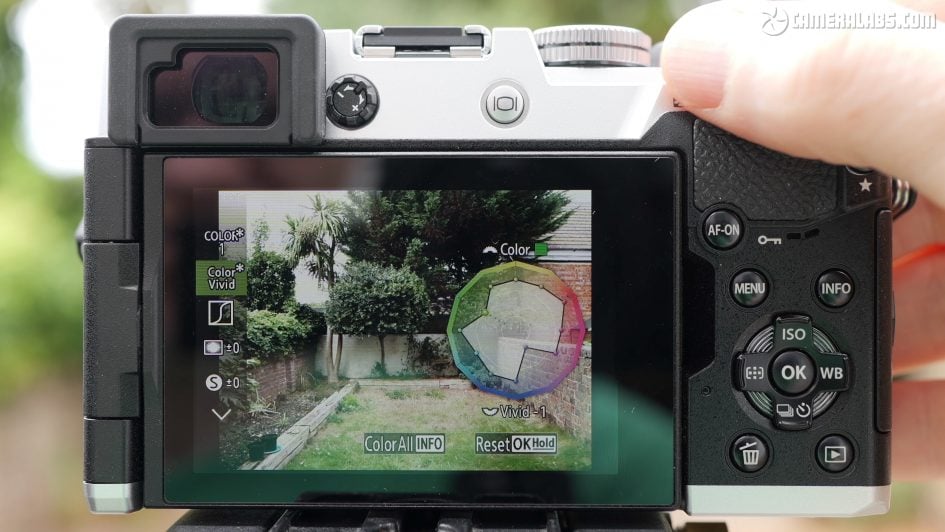
Colour profiles start with a circular presentation of saturation, allowing you to selectively boost or tone-down specific colours or adjust all together. Then there’s tone curves and traditional sliders for vignetting, sharpness and contrast. Meanwhile the Monochrome modes swap saturation for colour filters and add extra sliders for film grain and a tint like sepia. These are great fun to play with and allow you to not only fine-tune your shooting style but also share those recipes with others.
OM System PEN verdict
The OM System PEN is a good-looking and fairly affordable rangefinder-styled camera for those wanting to take their photography beyond a phone or as an everyday companion to a larger model. Sure it’s essentially a reskinned OM5 Mark II, which itself already shared a lot with previous models, but it’s testament to how much OM System and Olympus before them got right, that it still remains a compelling package today.
You’re getting a stylish and weatherproof camera with lots of control, industry-leading stabilisation, and great-looking images out of camera. It also encourages you to experiment with powerful long exposure options, a collection of good-looking filter effects, and a neat interface for adjusting colour and monochrome profiles. But the PEN also inherits limitations of earlier models, lacking 10 bit video, 4k 60p and a broader array of subject detection. All are present on most rivals, but to be fair how many of them are deal-breakers for the target audience?
I feel modern cameras are driven by specs, often at the cost of looks or practical usability. Here’s a camera that may not have pro-level video or autofocus, but which looks good, has a viewfinder, is dust and splash resistant and has some of the best stabilisation around. A combination that’s not only tempting but rare at the price point. We keep hearing about cameras aimed at taking you beyond phone photography, but the modes on the PEN and its amazing stabilisation will genuinely have you capturing images you couldn’t before.
So while the OM System PEN may not have a new sensor, nor leading video or autofocus specs, I feel it’ll still appeal to a lot of people, and it’s certainly a camera I enjoyed using. All I’d need to decide is whether to go for the rangefinder style body or the SLR-styled OM5 Mark II.
Check prices or buy the OM System PEN in the USA from B&H or Adorama. Buy it in the UK from WEX, or in Europe at Calumet.de. Buy used gear from MPB. Sell your used gear to MPB. Or why not treat yourself to a copy of my In Camera book, an official Cameralabs T-shirt or mug, or treat me to a coffee! Thanks!