 The instax mini EVO Cinema may be Fujifilm’s most expensive instant camera to date, but becomes their most desirable too. For starters there’s little else that looks like it, styled like a vintage Super-8 cine camera, with a pistol grip, trigger button, and removeable eyecup to complete the look. Sure the 5 Megapixel sensor falls way behind most phones and the screen is tiny and coarse, but this isn’t about high quality imaging. It’s about embracing a vintage camera look and feel, built around the effects which mimic the technology and aesthetic of ten eras from the black and white film of 1930 to the live streaming of the 2010s with a wealth of vintage options in-between, including tape-based camcorders and early digicams. And it’s not just for photos either, as the EVO Cinema can also apply these effects to short video clips, lasting up to 15 seconds each, complete with animated artefacts and optional sound effects and overlays. It’s all so much fun it’s easy to forget it also features a built-in printer for instax mini film, allowing you to output hard copies of photos or video grabs, or connect it to your phone as a wireless printer. Of course a genuine vintage digicam will be much cheaper, but won’t have the printer or the super-8 design and may have dated charging and connectivity. Ultimately while I’d have been happier if the mini EVO Cinema were a bit cheaper, I still feel it becomes the most successful and desirable in the current crop of retro digicams.
Fujifilm instax mini EVO Cinema review
-
-
Written by Gordon Laing
The instax mini EVO Cinema looks like a vintage cine camera, takes photos or short video clips, and features a built-in printer to make instant prints of them or pictures from your phone. Launched in January 2026, it’s actually the first instax camera that can record video, a natural evolution from the sound clips of the recent LiPlay+. Costing around $410 or £330 it’s also their most expensive instax camera to date, so let’s see what it can do and if it’s worth the money.
Check prices on the instax mini EVO Cinema at B&H, Adorama, WEX UK or Amazon UK. Buy used gear from MPB. Sell your used gear to MPB. Alternatively get yourself a copy of my In Camera book, an official Cameralabs T-shirt or mug, or treat me to a coffee! Thanks!
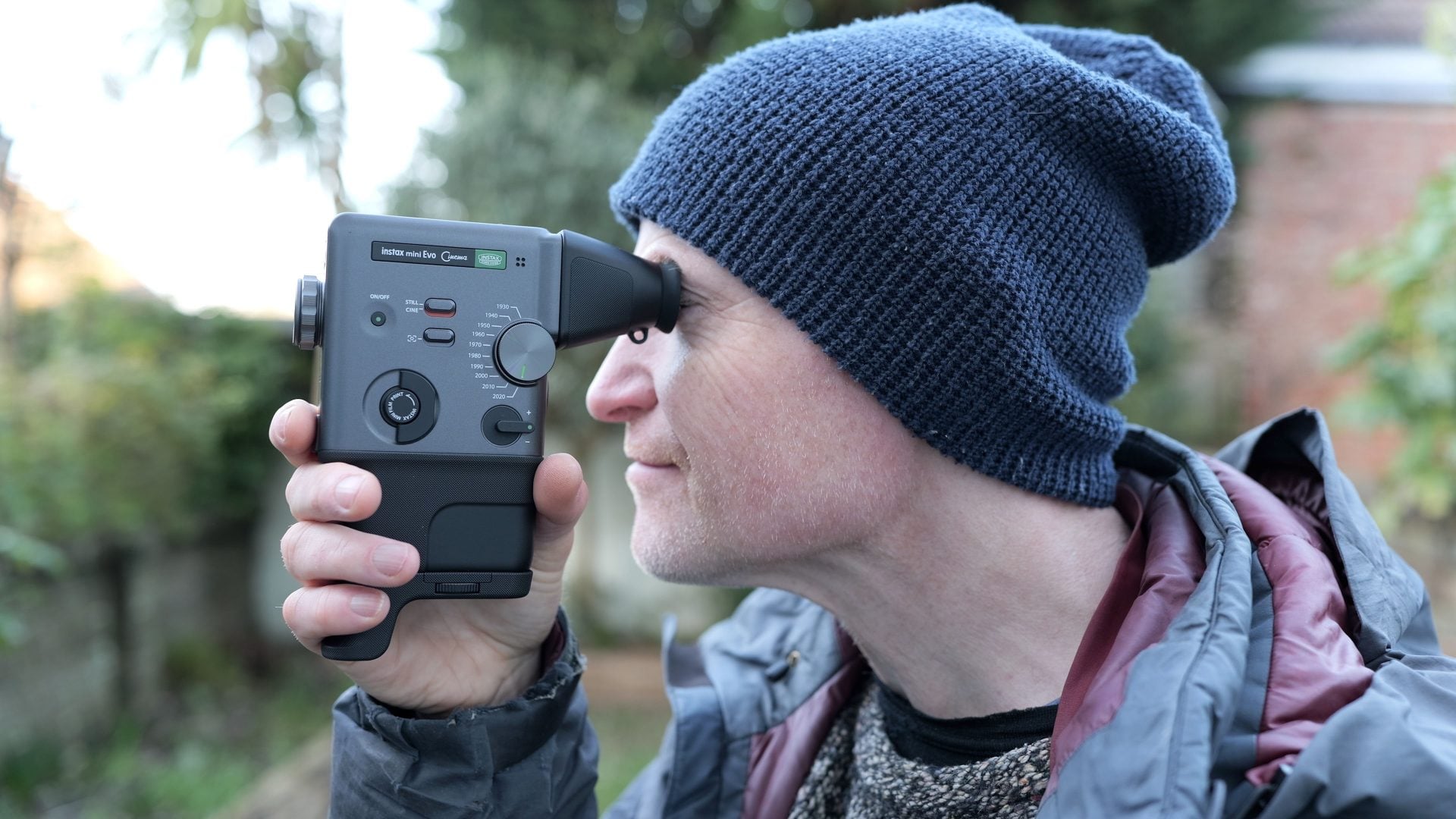
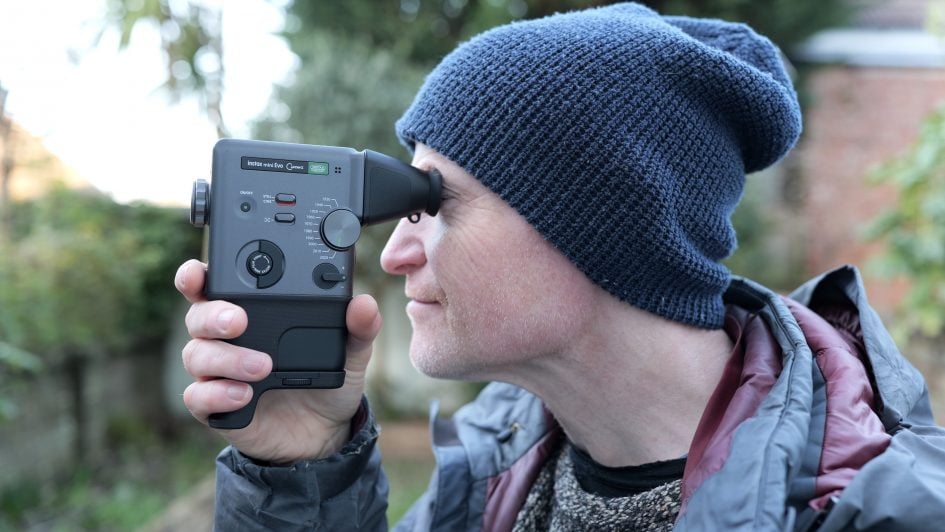
Fujifilm’s certainly had fun with the design, modelling the EVO Cinema on the vintage home cine cameras of the 60s and 70s, such as their own Fujica Single-8 series. These are gripped in one hand, with a trigger button to activate filming or in this case also take photos. Fujifilm also bundles eyecup and booster grip accessories with the camera which make it easier to compose and hold, although you can remove them if preferred.
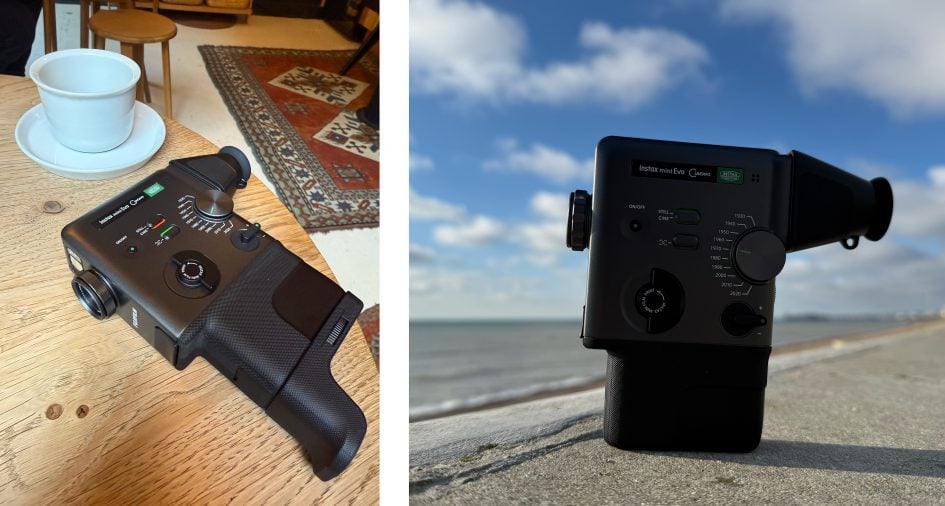
While it’s not the first Single or Super-8 inspired retro camera out there, it’s still a pretty unique look and one that earned a number of admiring comments from those who saw it.
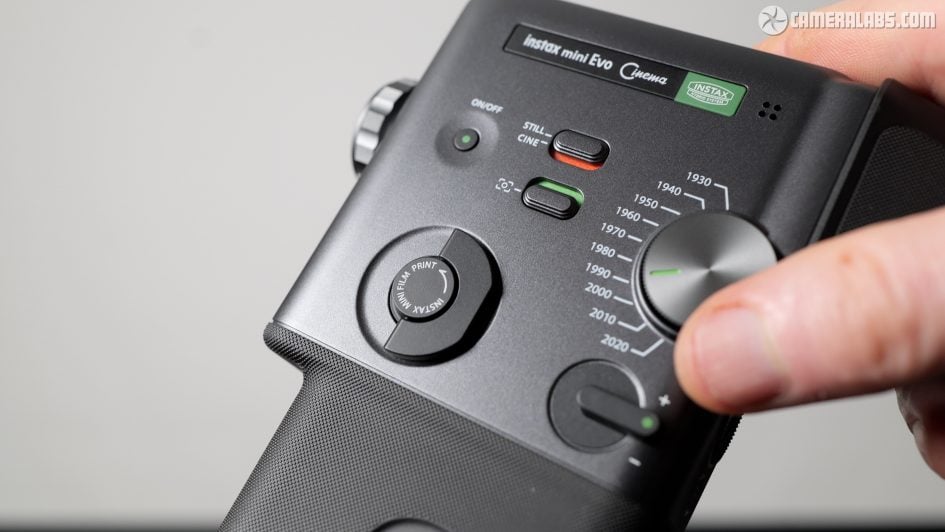
And further inspired by vintage cameras, Fujifilm’s revamped the digital effects with a new Era’s dial, mimicking the technology and aesthetic of ten decades from 1930 to 2020. These can be applied to photos or video, the latter including animations and even sound effects, and the strength of each effect can be adjusted in ten levels using a dial around the lens. Meanwhile a switch lets you choose whether to bake-in period-appropriate border and overlay graphics, like date and time stamps or recording icons.
Sidenote: the Era’s dial has nothing to do with Taylor Swift, although coincidentally instax fans may recall a 2018 collaboration with a branded version of the SQ6 which now sells for a small fortune on eBay. Don’t blame me.
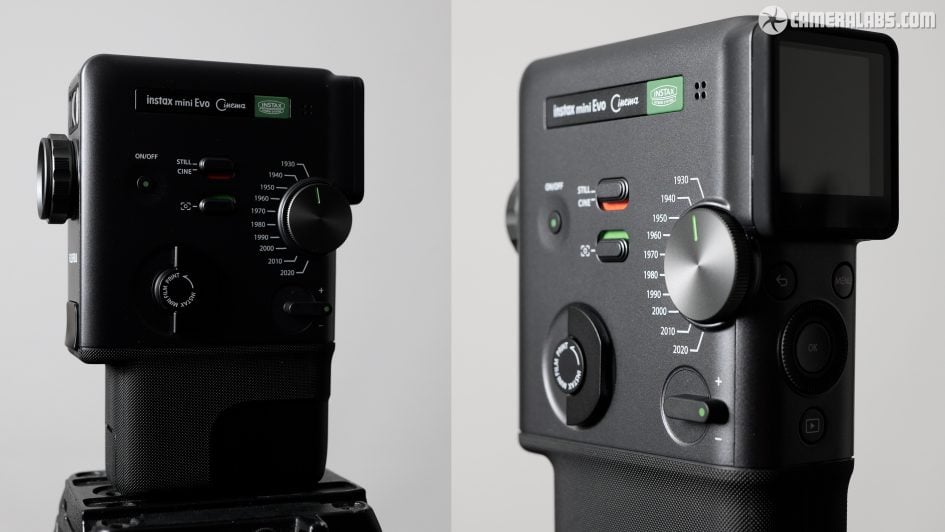
Let’s first look at the design and controls. It’s a tall, thin camera that’s gripped almost like a gun, with your thumb and middle and ring fingers wrapping around the base, leaving your pinky dangling below and your index poised above the trigger button. Careful not to grip with your index though or you may inadvertently take a photo or start recording.
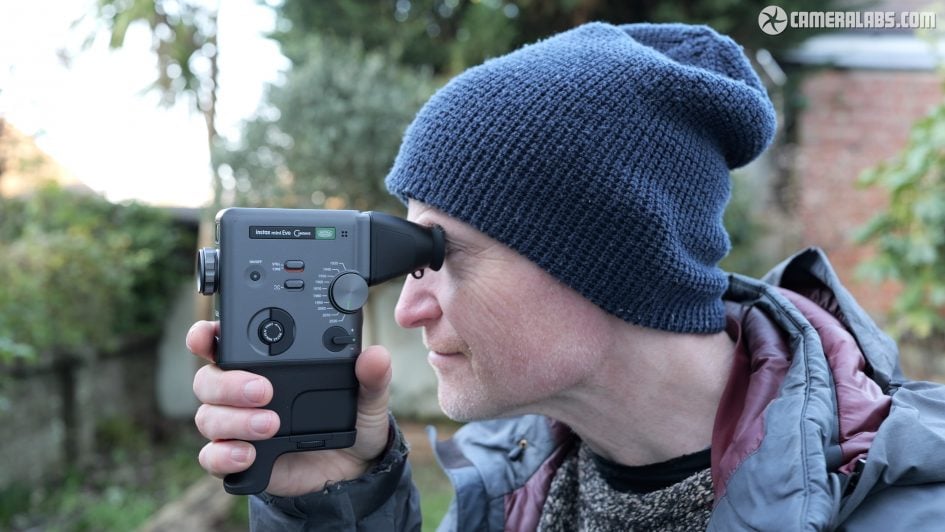
It’s quite comfortable, although the supplied booster accessory screws into the tripod thread below to give your pinky something to push up against for greater comfort and security. Bonus points by the way for including a tripod thread on the camera, which isn’t always available across the instax range.
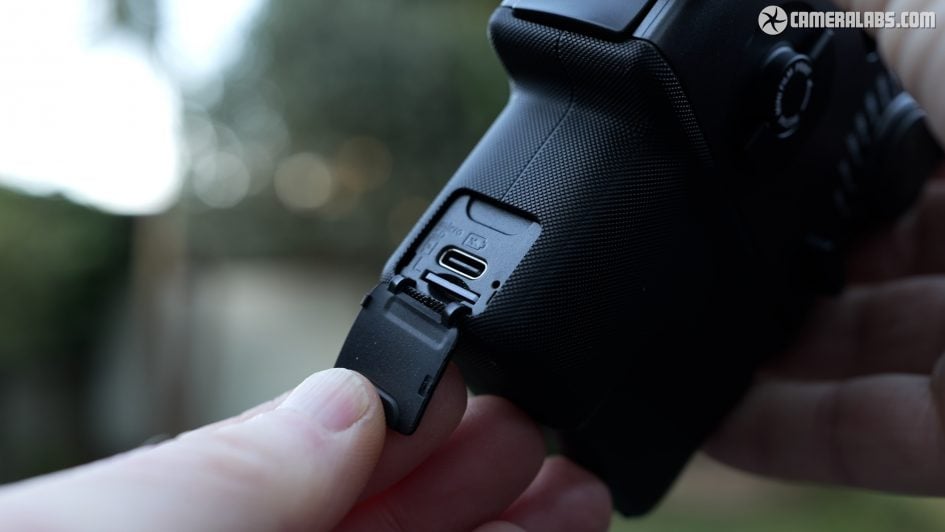
Behind a small flap on the front of the grip you’ll find a USB C port that’s only used to charge the internal battery, as well as a slot for a Micro SD card.
Like other instax hybrid cameras, there is a modest amount of internal memory – enough for about 50 photos or ten video clips – but subsequently extracting the files can be a challenge, so for the easiest access to the originals, just pop in a Micro SD card. The files are tiny, so you’ll get loads of them even on a modest card.
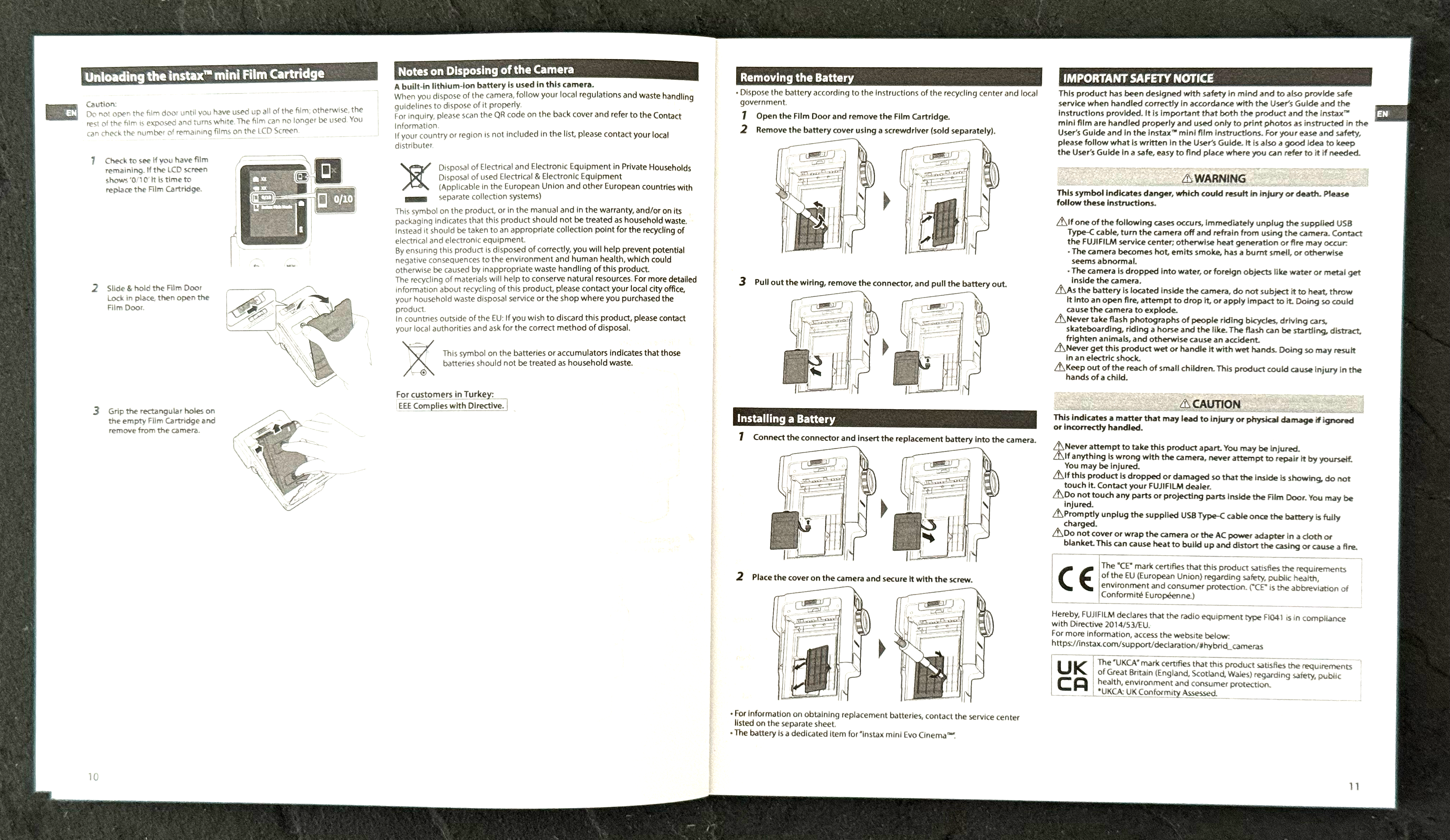
As for the battery, yes it is internal, but I’m pleased to report Fujifilm allows you to unscrew a panel to access and replace an expired pack, extending the life of the product, see above. Fujifilm quotes the usual 100 print lifespan, but if you;’re using it as a digital camera only, I managed 90 photos and 46 video clips on a single charge, shooting mostly outdoors on a cold day. This didn’t include any printing or phone transfers.
To start using the camera, push and hold the power button on the left side. Depending on the selected era effect, it’ll take about two to five seconds to start up; the 2020 mode, which essentially turns off any effects, is the quickest.
Two chunky switches to the right set the camera between stills and video, and allow you to overlay graphic overlays appropriate to each era which I’ll show you in a moment. Weirdly this second switch is labelled with an icon which looks like metering on a normal camera, but here toggles the graphics on or off.
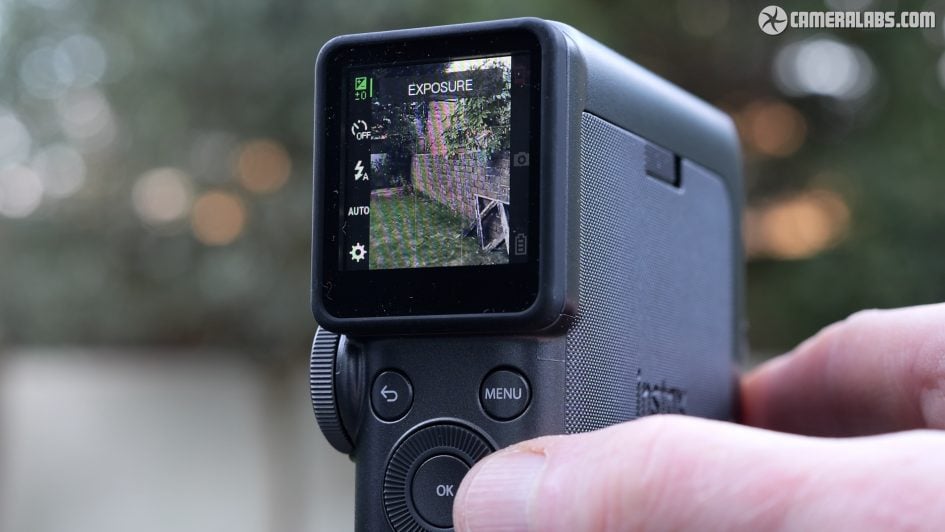
You then compose with the tiny 1.54in square screen on the rear surface, either held out in front of you, or if you prefer you can clip on the supplied finder accessory, gently held in place by magnets, which lets you compose against your eye.
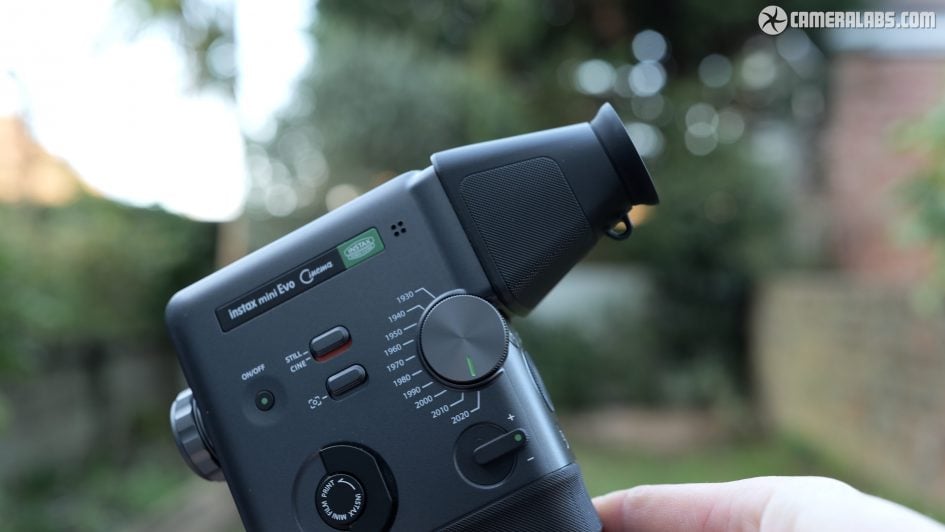
I preferred using the finder, as not only did it make it easier for my old eyes to focus on the screen, but it helped me hold the camera steadier and added to the vintage experience. Just be careful taking the camera out of a bag or pocket with the finder attached as it can be pushed off quite easily.
More importantly note the screen is very low resolution, just 170k dots, so the details are very coarse and this becomes more obvious when magnified in the finder. Even more so when any of the older Era effects are applied which further reduce the quality and make it harder to accurately frame your shots. Remember this is not a precision instrument, so just relax and embrace the vibe.
The camera employs what looks like the same imaging system as the mini EVO and LiPlay+, so you’re getting a 5 Megapixel sensor with a 28mm f2 equivalent lens that can focus between 10cm and infinity. Focus is automatic, using a single area in the middle of the frame, although if you have face detection enabled, the camera will prioritise a person instead, even if they’re off-centre.
The sensor itself is a tiny 1/5in type, capturing JPEG images with 2560×1920 pixels. That doesn’t sound like much (because it isn’t), but it’s more than enough to make an INSTAX Mini print or for sharing socially, but don’t expect the quality to come anywhere near a modern phone.
Meanwhile videos are recorded in the 3:4 shape at 600×800 pixels at 24 frames per second, and for up to 15 seconds, while a higher quality option is available for the 2020 era only that records an additional clip at 1080×1440 pixels. You can’t currently record longer clips, and you can’t connect an external microphone for better audio either.
As for making a recording, you can set EVO Cinema to act like a Super-8 cine camera and only record while you have the trigger held down, or set it to start with one push and stop with another. At the end of each recording, the camera asks if you’d like to keep it or start again. I’d have preferred an option that just keeps it regardless as it’s easy to forget to push OK to confirm every time.
Note if you hold the camera vertically as designed, the video orientation is also tall, albeit in the 3:4 shape which is less extreme than 9:16. If you prefer horizontal video, you could of course hold the camera on its side, but note the effects won’t turn with it. That’s no problem for the basic vintage faded looks, but the ones that mimic horizontal scan lines moving vertically will now become vertical lines moving sideways, which looks weird. Hopefully Fujifilm can add an update to rotate the effects for horizontal video.
There’s no optical zoom, but a spring-loaded lever on the side of the camera adjusts a digital zoom. There’s about 18 small steps between each push. You can operate the zoom while filming a video and hold the lever to keep zooming, but you’ll still see the small steps.
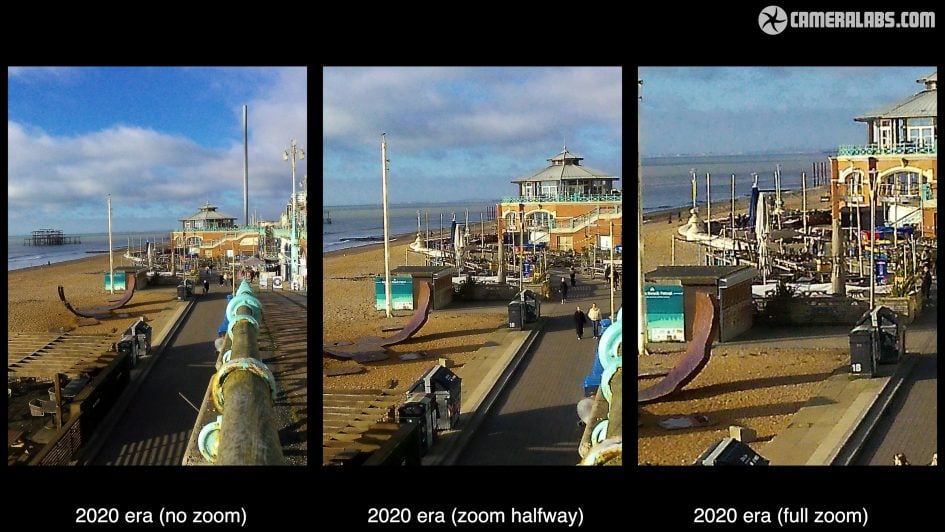
Above: Here’s three photos I took with the camera using the 2020 era, first on the left with the zoom set to zero for the full coverage, in the middle with the digital zoom roughly halfway, and on the right with it fully zoomed-in. As a digital zoom it’s just cropping the image and enlarging what’s left, resulting in reduced quality, so use with caution.
The camera is mostly automatic, but has access to exposures from quarter of a second to 1/8000, as well as having adjustable sensitivity from 100 to 1600 ISO – so a far broader range of conditions than an analogue mini can handle.
Pushing the menu button lets you adjust the exposure compensation to deliberately brighten or darken the image. You can also set a two or ten second self timer, choose whether the LED flash is on, off, or auto, and select either Auto White Balance or one of four presets. If you’re finding the menu button isn’t responding, it may be that you’re also accidentally pushing-in the trigger button on the front. I did that quite a lot.
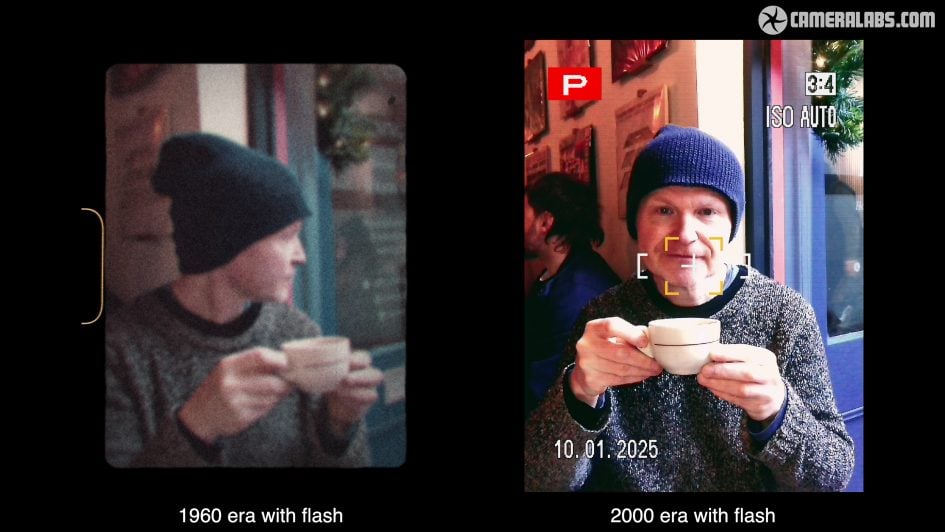
Above: A quick note on the flash, again an LED light on the front above the lens. Here you can see it providing a modest fill on an indoor photo. It has an effective range up to about half a meter. You can also activate it as a continuous light when filming video. Oh and if you’re taking selfies or filming a vlog, there’s the classic instax mirror on the front to help you compose.
Ok, I can’t leave it any longer, it’s time to look at the new Eras dial dominating the side of the camera and selecting ten decades from 1930 to 2020. Each setting applies an effect inspired by the technology of that era, particularly in terms of cinema or video capture. As you switch between them, there’s a pause of about three seconds before you see the effect live. So let’s go through them one by one.
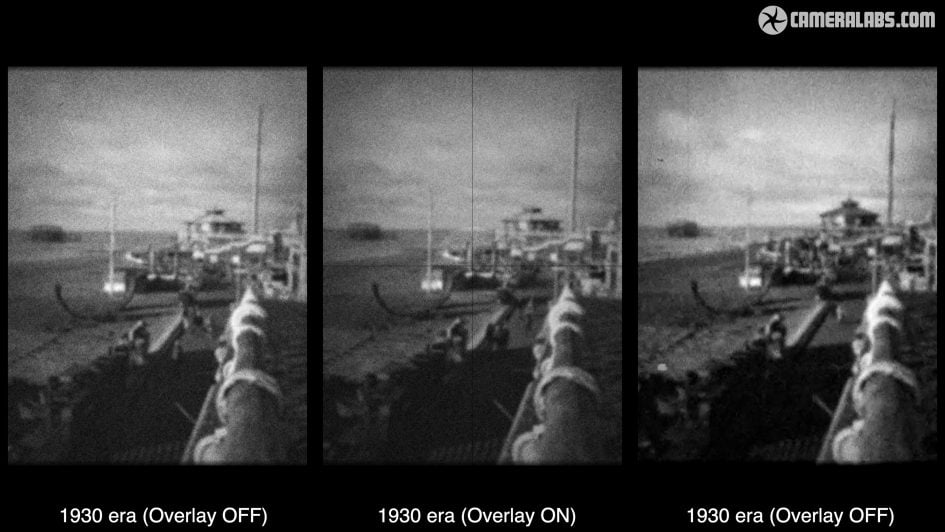
Starting with 1930 which delivers a wobbly and slightly faded black and white image with scratches.
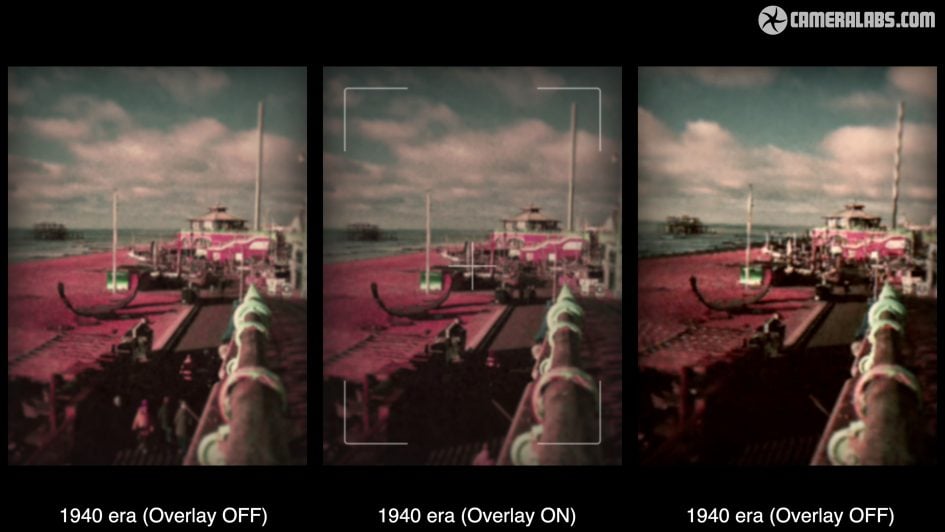
Next 1940 which applies a muted colour effect which will appeal to vintage fans.
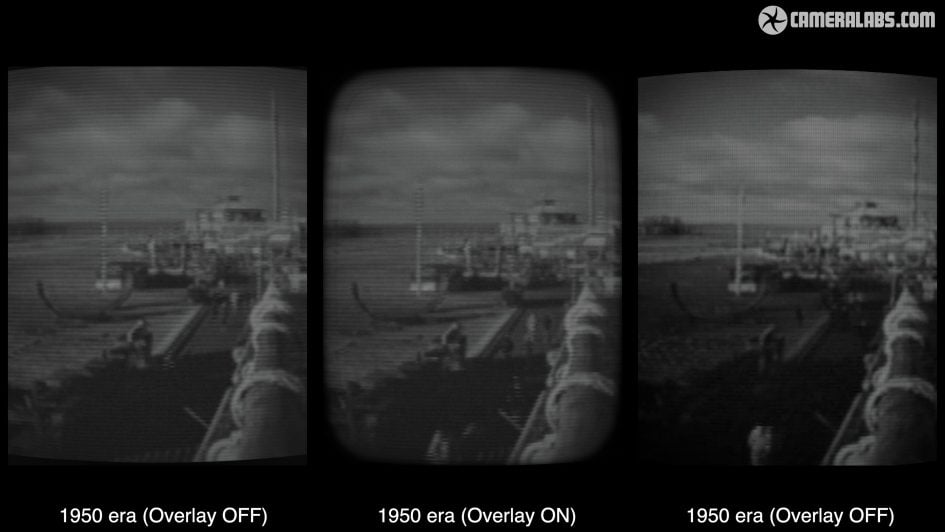
Turning to 1950 embraces the first TVs with a low resolution throbbing black and white image. Also note I have the optional borders and overlays enabled here.
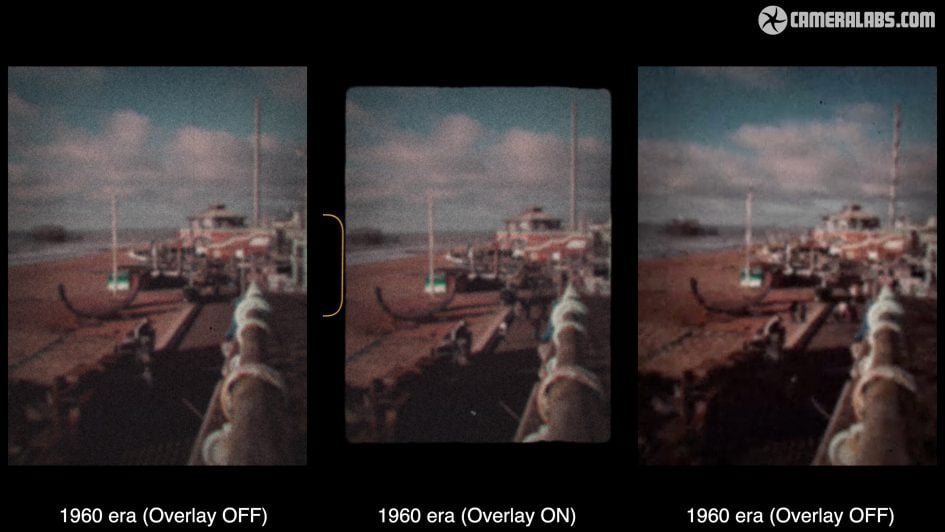
1960 is the decade of home cine cameras, so you’ll get a Super-8, or Single-8 styled effect with a wobbly faded colour image and optional sprockets.
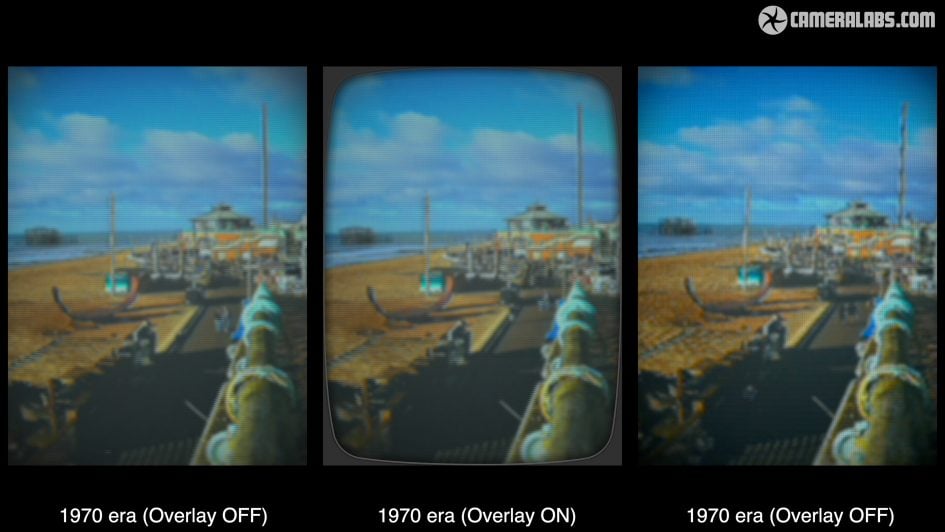
1970 is the decade of the first colour TV broadcasts, so again a faded image with scan lines and an optional curved border.
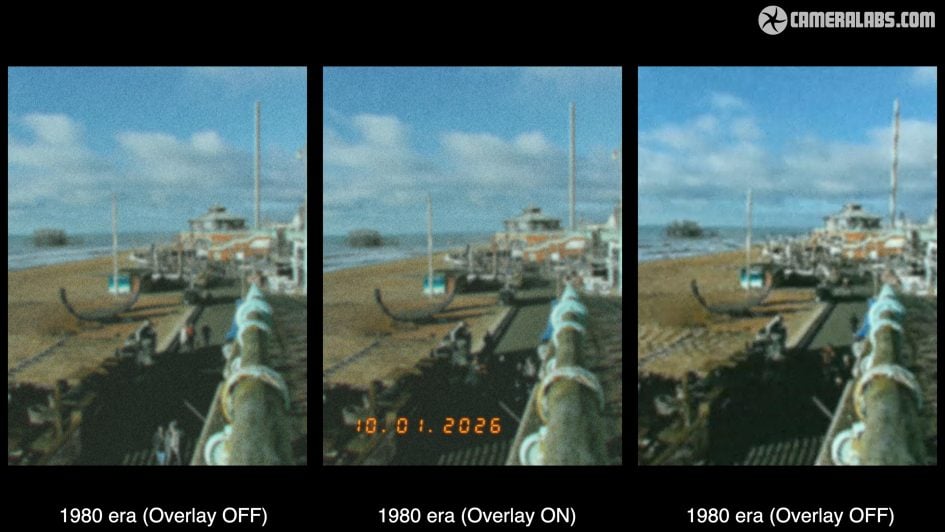
1980 mimics the look of 35mm negative film, with an optional timestamp.
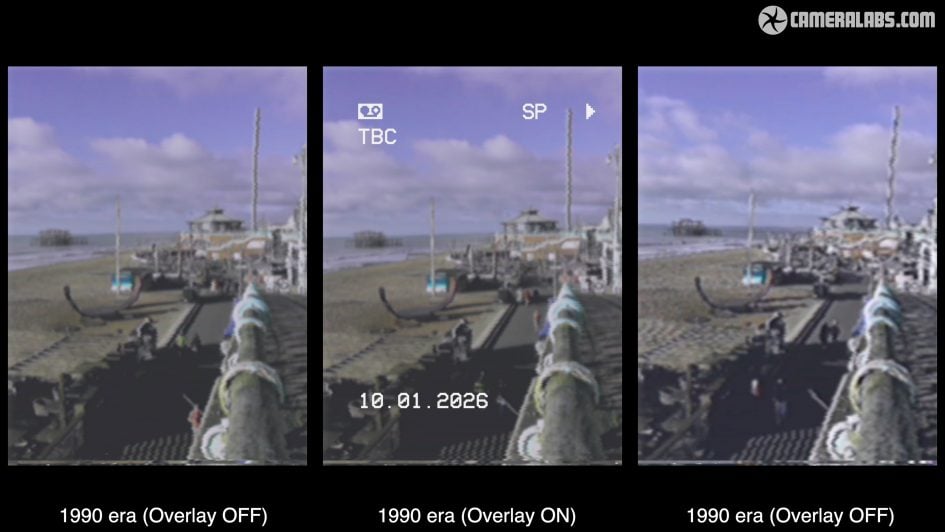
1990 embraces home camcorders with tape-based artefacts and an optional timestamp that again can be turned on or off.
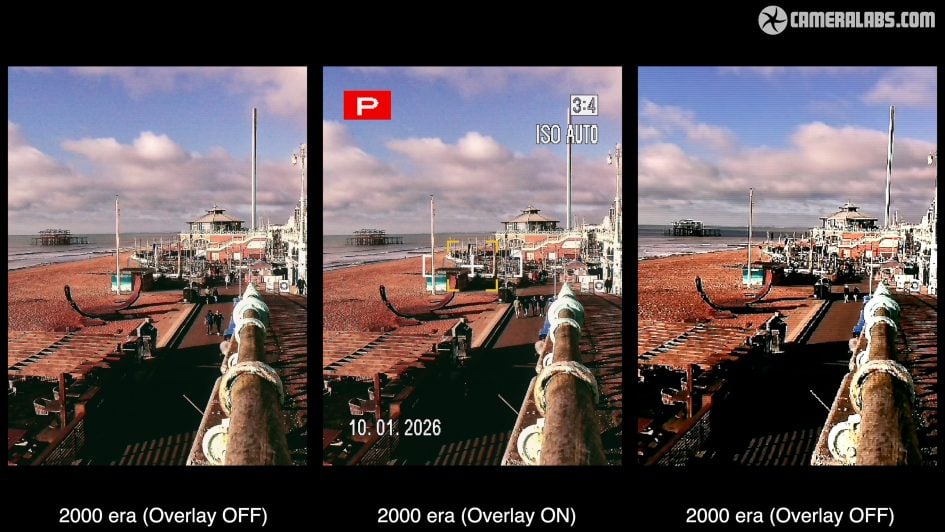
2000 brings us to the first digicams with video capabilities, low res, punchy contrast, slightly off colour and optional icons that can be switched on or off.
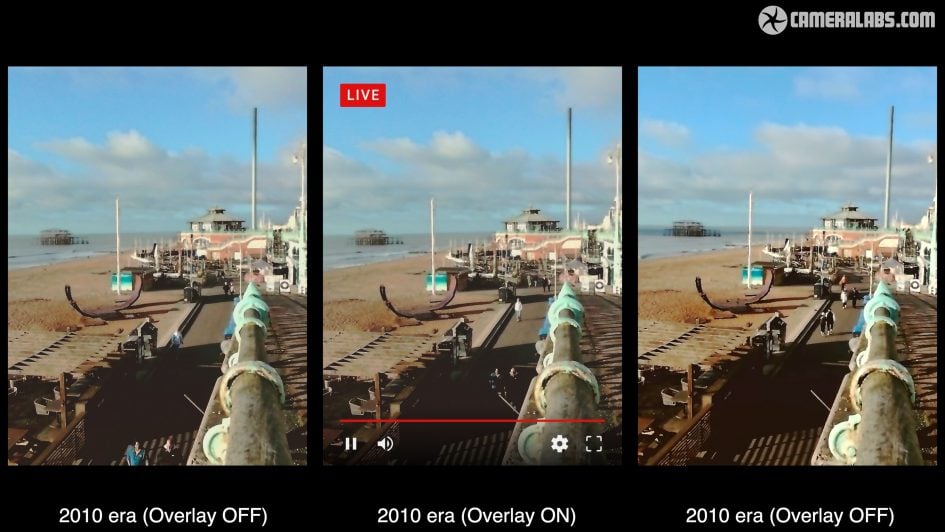
2010 adopts the era of live streaming with YouTube style graphics, which again can be enabled or disabled.
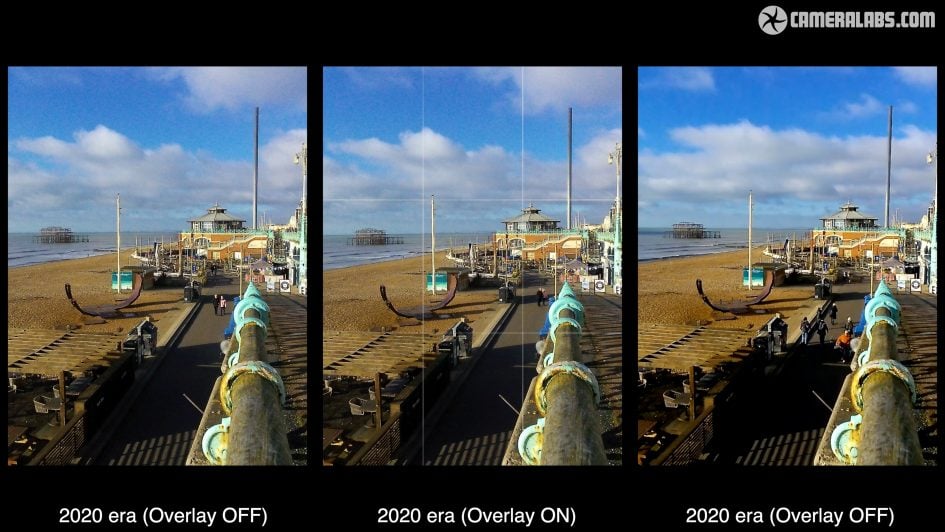
And finally 2020 is the era of, well, nothing really, as this setting essentially turns off the effects for a clean photo or video.
Indeed 2020 is the only era which offers an optional higher quality video mode, although you will need an SD card to support the higher 9Mbit/s bit rate. Note in this mode the camera records two versions of the same clip, one in the standard 600×800 resolution and the slightly improved one in 1080×1440, prefixed with a + in the filename.
Note some of the eras also record sound effects for video, like film running through a camera, and the volume of this can be adjusted.
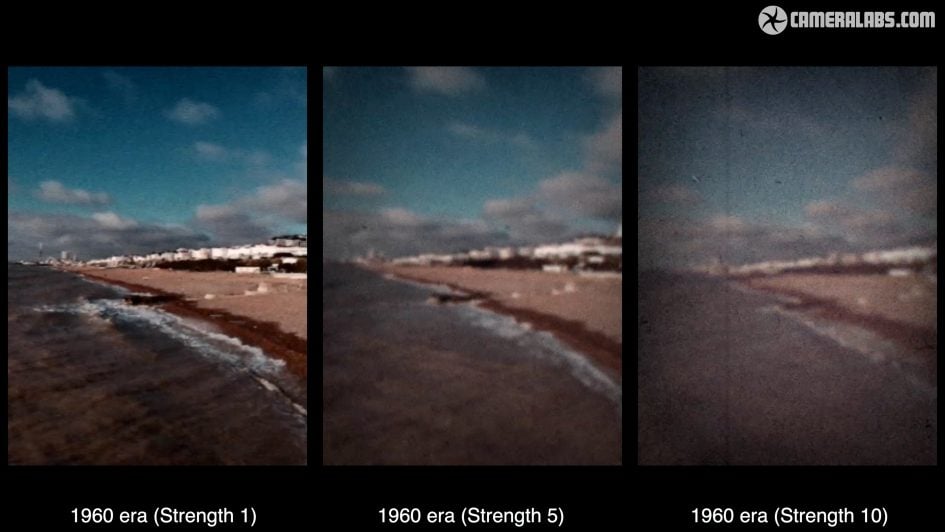
Above: Note it’s also possible to adjust the strength of each era effect using a dial control around the lens barrel. There’s ten levels from mildest to strongest and so far I’ve only shown you the default middle setting. So here’s some more examples comparing the weakest to the strongest setting.
At this point it’s easy to conclude the EVO Cinema is a fun camera for exploring vintage photo and video effects and forget that it also includes a built-in instant printer.
Push a lever on the right of the camera and the entire side opens to allow you to load standard instax mini film cartridges. Sadly there’s no window to indicate whether a cartridge is loaded or not, so you’ll need to check the icon on the top right of the screen when powered-up.
During playback if you see a photo you’d like to print, simply lift and twist the satisfying ratchet control to activate the process. You can also play a video on screen, pause it at any point, and choose to print that too.
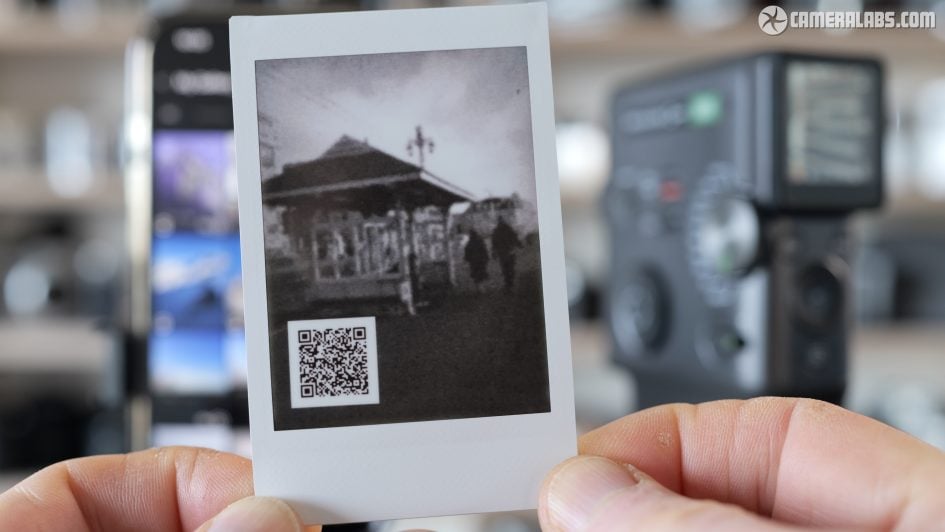
Prints from videos can overlay an optional QR code which links to a webpage showing the actual video clip itself which you can view or download, albeit with the same caveats as sound clips on the earlier LiPlay+.
First the camera needs to be connected over Bluetooth to your phone when you make the print, while running the latest EVO app. Then when you print, the video file is automatically uploaded to Fujifilm’s servers, with a QR code overlaid that links to it.
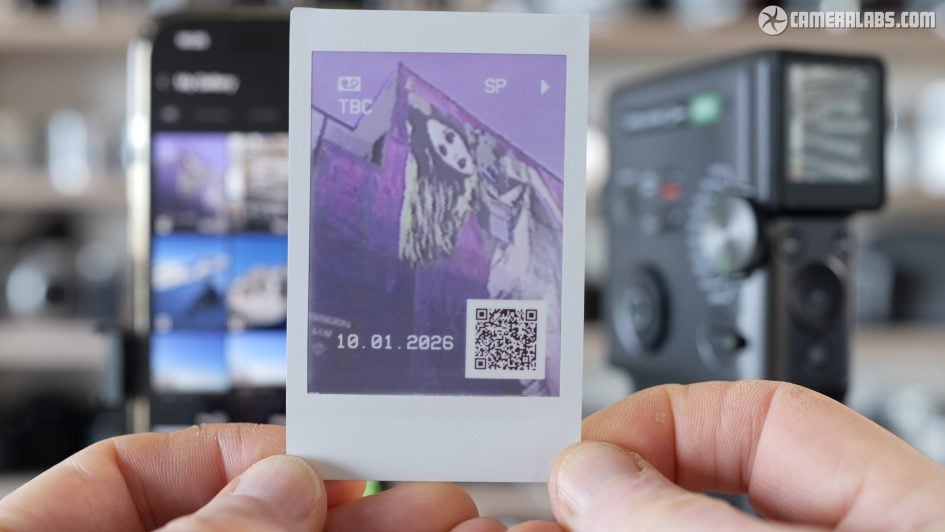
As before, Fujifilm will only host the video clips for two years after you uploaded them. Understandable as they’d rapidly find themselves overrun with files, but frustrating for anyone who tries to scan the code on a print over two years later to find it does nothing other than obscure part of the image.
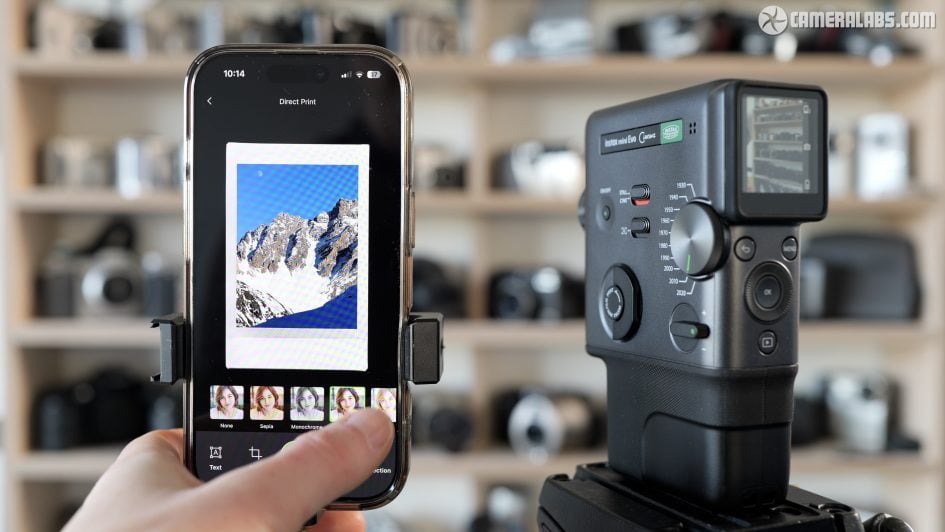
Speaking of the app, you can also use it to apply more effects and overlays, as well as using it to print any photo you have stored on your phone. Yep, lest we forget, the EVO Cinema is also a wireless phone printer.
Just before wrapping-up, Ai overviews or so-called reviews based on just reading the spec sheet may reveal the built-in printer operates at double the vertical resolution when printing its own photos versus ones from your phone.
This is true but doesn’t mention the fact that photos taken with the EVO camera are much lower quality than those with most phones – so printing from your phone camera will almost always deliver better quality.
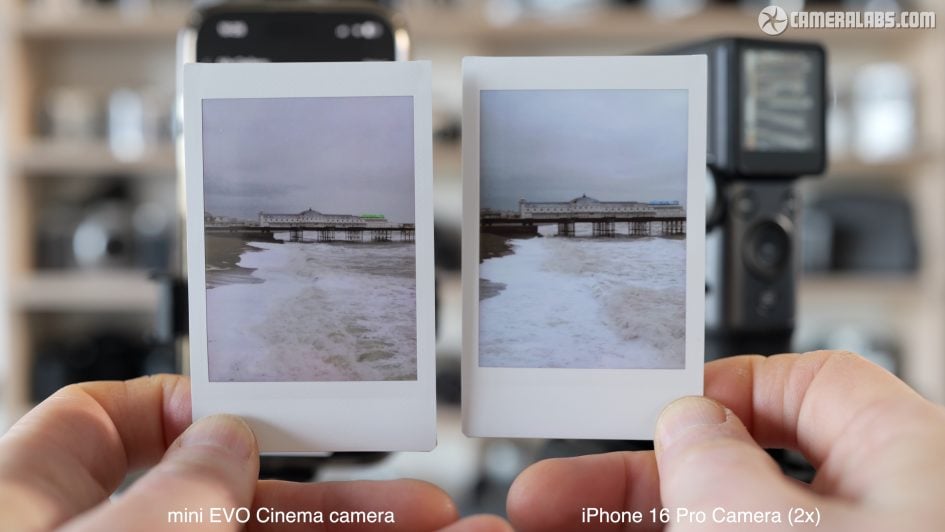
Here’s a print from a photo I took with the EVO on the left and one taken moments later with my iPhone 16 Pro and printed from the camera on the right. Now it’s no surprise an iPhone 16 Pro has a better camera, but it does prove that if you feed the EVO a half-decent file, it’ll produce a higher quality print than one from the built-in camera.
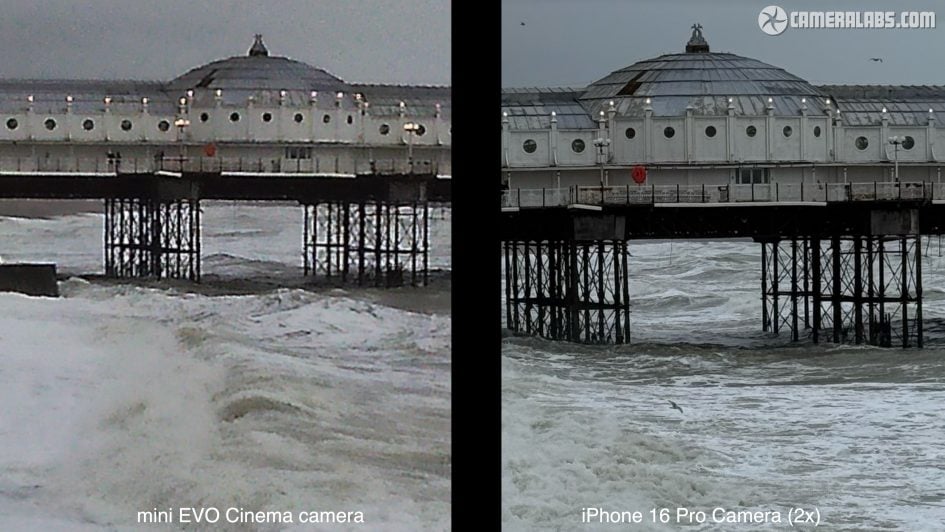
And here are the actual JPEG files from each camera, again the EVO Cinema on the left and my iPhone on the right. Clearly like other EVOs, it’s not attempting to replace a proper camera or even a phone if you’re searching for quality. And that’s why it’s important to read reviews by people who actually test the product!
Fujifilm instax mini EVO Cinema verdict
The instax mini EVO Cinema may be Fujifilm’s most expensive instant camera in the series to date, but arguably becomes their most desirable too. For starters there’s little else that looks like it, styled like a vintage Super-8 or Single-8 cine camera, with a pistol grip, trigger button, and removeable eyecup to complete the look.
Sure the sensor falls way behind most phones and the screen is tiny and coarse, but hey, this isn’t about high quality imaging. It’s all about embracing a vintage camera look and feel, built around the effects which mimic the technology and aesthetic of ten eras. These take you from the black and white film of 1930 to the live streaming of the 2010s with a wealth of vintage options in-between, including tape-based camcorders and early digicams. At least one of these is sure to deliver the vintage style you’re looking for.
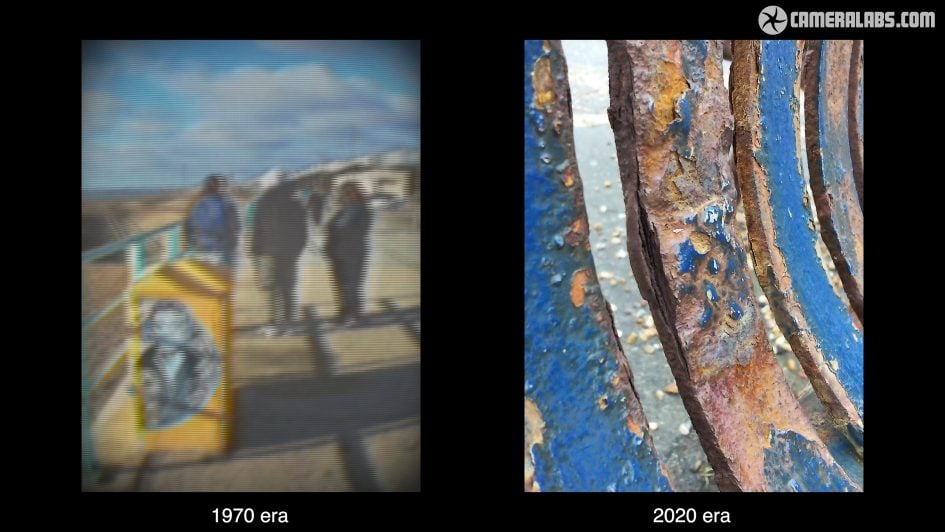
And it’s not just for photos either, as the EVO Cinema can also apply these effects to short video clips, lasting up to 15 seconds each, complete with animated artefacts and optional sound effects and overlays. Remember 15 seconds was the limit of many early digicam video clips, and the app lets you stitch some together if you like.
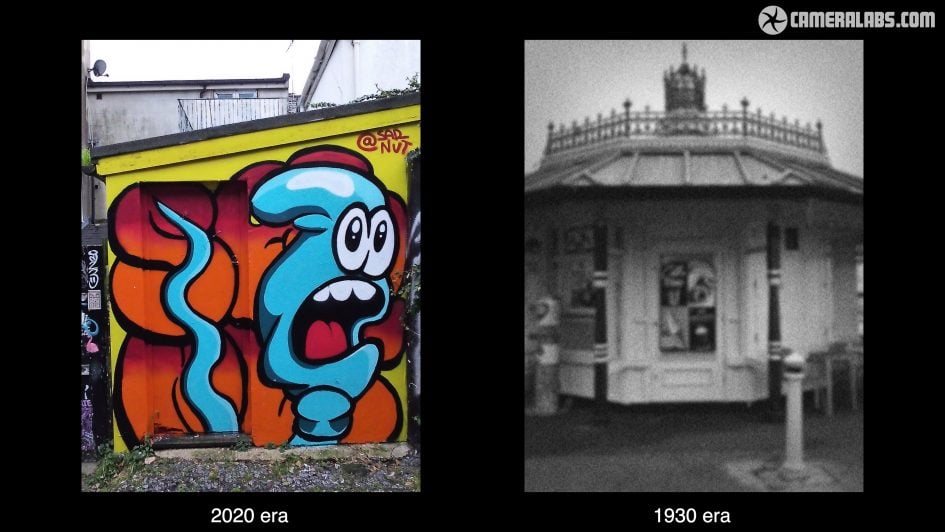
It’s all so much fun it’s easy to forget it also features a built-in printer for instax mini film, allowing you to output hard copies of photos or video grabs, or connect it to your phone as a wireless printer.
There’s nothing else with this feature-set and looks, although if your goal is to mimic the output of an early camcorder or digicam, you could of course just buy an old one of these instead. Sure, vintage cameras from trendy brands or in bold colours may now command well over £100 or even £200, but if you’re more flexible you could pick up a decent model for way less, maybe even ten times cheaper than the EVO Cinema for an early-2000’s digicam with similar-looking video.
That said, the problem with vintage cameras is they don’t work as seamlessly as a modern one. Their batteries often need replacing if you can even find them; they may use dated memory cards that need a special reader; and few if any early models have luxuries like USB or wireless connectivity. And even if you figure all of that out, they can just stop working with no guarantees. Don’t get me wrong, I love vintage digicams and review plenty of them on my DinoBytes channel if you’re interested, but a modern camera is just way easier to use and also comes with some kind of warranty.
Ultimately I feel Fujifilm’s nailed the look, style and features of the Evo Cinema, delivering the kind of vintage experience many people desire, both in physical handling and actual output, but without the hassle of an antique model. You’ll effortlessly create those vibey videos while being the envy of all the hipsters in town.
My only issue is the price, with the EVO Cinema costing roughly double that of a standard EVO or LiPlay+, which offer a similar proposition albeit without the video capabilities. Sure, the style and the extra features on the EVO Cinema do justify a higher price, but I’d have preferred it to land under £250. As such I feel the launch price is a bit too high for a fun camera that’s aimed mostly at scratching a vintage itch, and would make me seriously investigate whether a genuine old camera might be worth a punt instead.
But seeing the reactions this camera received during testing proves there’s an appetite for this kind of thing, and I feel the mini EVO Cinema becomes the most successful in the current crop of retro digicams. Whether it’s worth the asking price is down to you.
Check prices on the instax mini EVO Cinema at B&H, Adorama, WEX UK or Amazon UK. Buy used gear from MPB. Sell your used gear to MPB. Alternatively get yourself a copy of my In Camera book, an official Cameralabs T-shirt or mug, or treat me to a coffee! Thanks!