Sony Cyber-shot DSC-HX1
-
-
Written by Gordon Laing
Intro
Sony’s Cyber-shot DSC-HX1 is the company’s latest super-zoom digital camera, sporting 9 Megapixel resolution, a tilting 3in screen and a 20x optical zoom range that’s equivalent to 28-560mm. Announced in March 2009, it becomes the second mainstream compact camera to feature a CMOS sensor, following Canon’s PowerShot SX1 IS. Like that model, this equips the HX1 with both High Definition movies along with impressive continuous shooting capabilities, although there are key differences between both models.
The Sony Cyber-shot HX1 trumps its rival’s 4fps continuous shooting rate with one rated at 10fps. While it’ll only capture ten frames during this burst, and tie the camera up for a while as it writes them to the card, it remains a highly impressive capability – indeed for those ten images, the frame rate matches that of professional sports DSLRs. The HX1 also offers HD video recording, although interestingly its top 1080 mode shoots at 1440×1080 pixels rather than Full HD’s 1920×1080, but stretches it into a 16:9 shape during playback, like the HDV camcorder format.
Ever the gadgeteers, Sony’s also included a sweep-panorama feature on the HX1 which allows you to grab an automatically-stitched panoramic image by simply panning the camera while keeping your finger pressed on the shutter release button. This joins existing technologies like smile, scene and face recognition. Completing the specification are a Sony G lens, full manual exposure control and an HDMI port for connecting to HDTVs. It’s a compelling specification and one that’s priced a little more keenly than its arch rival, the PowerShot SX1 IS. So the big question is how they compare? Find out in our review where we’ll detail the HX1’s unique new features and directly compare the image quality against the SX1 IS, along with a DSLR to see how they measure-up.
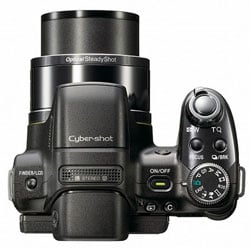
The Sony Cyber-shot DSC-HX1 resembles the company’s earlier super-zooms, and like other models in this category, it’s styled like a mini DSLR with a protruding lens barrel, viewfinder head and pronounced grip. Measuring 115x83x92mm, the Cyber-shot HX1 is noticeably narrower than the Canon SX1 IS (indeed by 13mm), and is also 5mm shorter, albeit 5mm deeper.
The HX1 is much lighter than the SX1 IS, weighing-in at 504g to its rival’s 705g when both are fitted with their respective batteries; the extra heft of the Canon is due to its use of four AA batteries. We haven’t come across anyone rejecting the SX1 IS (or its CCD-based twin the SX10 IS) on weight, but if every gram counts then you should pick them up in person and judge for yourself – certainly the Canon is deceptively heavy for its size.
 |
The build quality of both models is roughly the same, although while Canon’s SX1 IS features a taller grip, Sony has wrapped its in a rubber coating; it’s still not as tactile as it could be, but it’s certainly an improvement over the shiny plastic surface of the Canon, and easy to grip in one hand if necessary.
Unlike the Canon SX1 IS, there’s no flash hotshoe on the HX1, only a popup flash which either raises automatically or under instruction from a menu; this bucks the trend of its super-zoom rivals from Canon, Nikon and Panasonic which all require the owner to manually raise the flash by hand. The flash itself is small and quite low, so watch out for potential red-eye; luckily there’s a pre-flash option or auto-reduction when faces are detected. Behind the flash are stereo microphones for the movie mode.
The controls and their layout are similar to earlier Sony super-zooms, like the H9. There’s a four-way rocker on the rear, which like the H9 before it adjusts the Display, flash, self-timer and macro modes when you push up, right, down and left respectively.
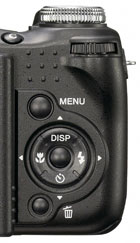 |
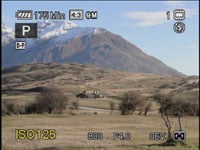
The flat thumb wheel of the H9 has however been switched for an ergonomically more traditional dial in the upper right corner; this falls naturally under your thumb and also has a push-action to confirm or switch options. This is used effectively for adjusting exposures. For example in Aperture Priority you’ll see three numbers running along the bottom of the screen which can be adjusted: sensitivity, aperture and exposure compensation. By pushing the thumb wheel in, you can cycle between each setting (highlighted with a larger yellow font), then simply turn the wheel to adjust it. This is quick and easy to operate in practice.
 |
 |
The upper surface is home to a number of buttons including ones dedicated to the focusing and continuous shooting modes, along with a custom button which can be configured to offer quick access to the White Balance, Metering mode or the Smile Shutter feature.
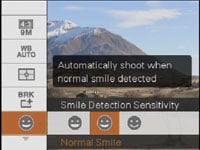
Smile Shutter is the default option and presents a bar on the left side of the screen which measures the subject’s ‘smiliness’. It’s surprisingly effective at doing it too, and fun to watch as the bar rises and falls as their expression changes. Then when the user-selectable trigger point is reached, the camera automatically takes a photo.
Finally, the main mode dial sits on the upper right side of the top surface and we have full details of the options available lower down on this page.
The Cyber-shot HX1 is powered by an NP-FH50 Info Lithium battery back, which like other Info Lithium models from Sony helpfully allows on-screen feedback on how many minutes of charge are remaining – this is a key advantage Sony has over the competition which normally only offer a rough indication of charge with a segmented battery icon. A recharger is supplied and an optional AC adapter available for mains operation. Sony reckons a full charge of the battery will be good for around 195 minutes solid use or approximately 390 images taken using the main screen. Switch to the electronic viewfinder, and these figures increase slightly to 200 minutes or 400 shots. These figures are a little below Canon’s claims for the SX1 IS when fitted with decent NiMH rechargeables.
The battery compartment additionally houses a Memory Stick Duo memory card slot, which like other Sony cameras ties you into the company’s card format; we’d much sooner see an SD slot here, but that’s unlikely to happen on a Sony compact. The metal tripod thread is positioned slightly off-centre, towards the door for the battery compartment; you’ll block this door with the camera mounted on a tripod or bracket.
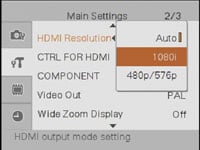 |
Two flaps on the left hand side of the body house the ports. Behind a small flap at the top is a DC input for the optional AC adapter, while underneath you’ll find a single larger proprietary connector. Like many other Sony cameras, this port has multiple uses and the HX1 is supplied with a cable which connects here and terminates with both USB and standard TV outputs. The HX1 is also supplied with a dongle which adapts the connector into a standard HDMI port. This is all very flexible, but the day you lose this cable or dongle is the day you’re looking at paying for a branded replacement. We’d much sooner the HX1 and other Sony cameras just employed standard USB, TV and HDMI ports which worked with bog-standard cables.
The optical range is of course the headline feature of any super-zoom camera, and the Cyber-shot HX1 features exactly the same range, both actual and equivalent, to the Canon SX1 IS. Both models (along with the Canon SX10 IS) have 5-100mm zooms which deliver an equivalent range of 28-560mm. This may sound like a huge range, but is actually relatively modest in the 2009 super-zoom stakes, where Nikon’s P90 and the Olympus SP-590UZ boast 26-624mm and 26-676mm respectively. Meanwhile Panasonic’s FZ28 is looking comparatively short with its 27-486mm / 18x range.
To be honest though, most of this is playing a numbers game. All the cameras listed here deliver vast ranges with enormous compositional flexibility, and the difference between them is more subtle than it looks on paper. You can see an example of the HX1’s coverage below, and further examples of how you can use it in our sample images Gallery.
|

Sony Cyber-shot DSC-HX1 coverage | ||
 | ||
5-100mm at 5mm (28mm equivalent) |
5-100mm at 100mm (560mm equivalent) | |
The focal ratio of f2.8-5.2 is roughly the same as rival super-zooms, although a little brighter at the telephoto end than the f5.7 of the Canon SX10 IS / SX1 IS. The closest focusing distance of 1cm sounds impressive, but is actually par for the course with today’s super-zooms: it matches the closest focusing distance of the Panasonic FZ28 and Nikon P90, although Canon’s SX10 IS / SX1 IS can actually focus at zero cm with the subject touching the end of the lens barrel – obviously best used for backlit subjects. You can see an example of a macro shot taken with the HX1 in our Sample Images Gallery.
Like Panasonic’s FZ28 and the Nikon P90, the lens cap clips to the static outer barrel of the lens housing, and as such will obstruct the lens as it extends during power-up. Unlike those models though, the HX1’s lens cap is easily prodded-off during the extension, but we’d still sooner have a cap which simply attached to the end of the actual extending lens section itself, like Canon’s SX1 IS / SX10 IS.
 |
With the cap prodded-off, the HX1 extends it lens barrel by 21mm and is ready for action in about two seconds. Zooming to the maximum focal length extends the barrel to 45mm, and there’s two zooming speeds depending on how far you push the lever. We counted around 42 steps across the range, with only minimal lurching as you zoomed-out.
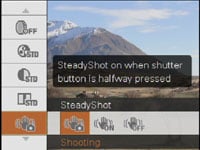
Sony’s equipped the Cyber-shot HX1 with SteadyShot facilities to counteract camera-shake, and like Canon and Panasonic’s super-zooms, it’s an optical system. There’s three options to choose from in a menu: Shooting (only active when you half-press the shutter), Continuous or Off.
Sony Cyber-shot DSC-HX1 SteadyShot off / on | ||
 |  | |
100% crop, 5-100mm at 100mm, 1/40, 400 ISO, SS off |
100% crop, 5-100mm at 100mm, 1/40, 400 ISO, SS on | |
Above are examples taken with and without SteadyShot with the Cyber-shot HX1 fully zoomed-into its maximum equivalent of 560mm. Traditional photographic advice would recommend a shutter speed of at least 1/560 to eliminate camera shake, so by achieving sharpness at 1/40 with stabilisation proves the system is good for almost four stops of compensation – that’s decent performance and a valuable facility.
 |
A dedicated focus button allows you to switch between Multi AF, Centre AF, a manually adjustable AF area, preset focus distance, or manual focus using a scale at the bottom of the screen and a temporarily magnified view. It’s possible to manually focus fairly accurately.
Earlier Cyber-shot super-zooms like the H9 were faster than average at auto-focusing, and we’re pleased to report the HX1 also excels in this regard. Under reasonable light, the HX1 snaps into focus in less than a second at any focal length, while continuous auto-focusing ensures it’s always close to delivering a sharp image (if not there already) by the time you press the shutter release. Don’t get us wrong, it’s still no match for a DSLR with a quick lens, but in compact terms, it’s about as fast as you can expect, and certainly allowed us to grab a number of spontaneous action shots.
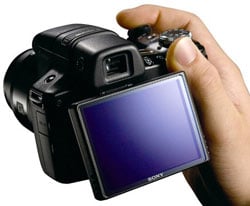 |
Round the back you’ll find a 3in screen with 230k pixels – the same resolution as its rivals, but slightly larger than most: the Panasonic FZ28 and Olympus SP-590UZ both have 2.7in screens, while the Canon SX10 IS has a 2.5in model. The Canon SX1 IS has a 2.7in screen, but with a 16:9 shape, so native 4:3 images only occupy a 2.3in portion. Nikon’s P90 matches the 3in size of the HX1, and again shares the same 230k resolution. In use we found the HX1’s screen looked slightly less vibrant than rivals like the SX10 IS and FZ28, but despite sharing the same size and resolution, looked a little less coarse than the P90.
Like the Nikon P90, the HX1’s screen is mounted on an adjustable platform which allows vertical adjustments, although the Sony enjoys greater flexibility. Both cameras can tilt their screens to face vertically upwards for easy composition at low levels, but while the Nikon will only tilt back by 45 degrees, the Sony can tilt its screen to face directly downwards, which certainly helps when holding the camera high over-head.
This gives the HX1 greater compositional flexibility than cameras with fixed screens like the Panasonic FZ28 and Olympus SP-590UZ, and indeed the P90 which can’t face directly downwards. But the HX1 can’t match the complete flexibility of Canon’s screen on the SX10 IS / SX1 IS which can flip and twist to face directly up or down, not to mention facing the subject or back on itself for protection.
Like most super-zoom cameras, the HX1 is also equipped with an electronic viewfinder (EVF) as an alternative means of composition; a lone button on the upper left side of the body switches between the screen and EVF. The 0.2in / 201k dot specification matches that of the Panasonic FZ28, with both models delivering a smallish but fairly detailed and usable view.
Both are however dwarfed by the relatively large (but subsequently coarse-looking) views of the EVFs in Canon’s SX10 IS and SX1 IS. The SX1 IS actually has a 16:9 shaped EVF to match its 16:9 shaped screen, but even when composing in the 4:3 aspect ratio with black bars running down either side of the image, the view remains bigger than the Sony’s EVF; switch the SX1 IS to 16:9 mode where the image fills its EVF and the size difference becomes even greater. But again there’s roughly the same actual detail in the image, so it just depends whether you prefer it blown-up or not.
 |
 |
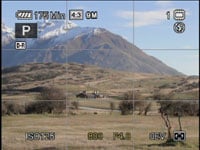 |
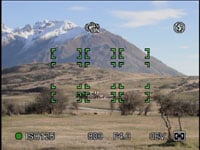
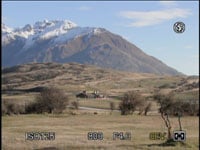
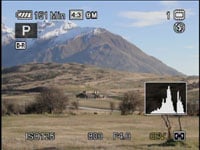
Pressing the DISP button on the HX1 cycles between four options: Standard brightness, Increased brightness, Increased brightness with a live histogram and full exposure details, and finally, Increased brightness with minimal shooting details. You can also choose to enable a three-by-three alignment grid in the menus, which is shown on all display modes if enabled. It’s nice to have a live histogram option, but slightly odd it’s only available with the screen brightness also increased.
During playback the DISP button essentially offers the same options, including a view with a histogram and exposure details, but only with the screen brightness also increased. Like earlier Sony cameras you can play music while viewing slideshows, and upload your own audio files to the camera if desired.
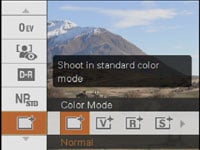
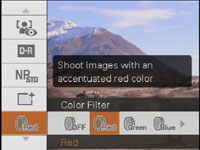
With no dedicated buttons for things like the ISO sensitivity, most settings are adjusted via a super-imposed menu system that will be familiar to users of previous Sony cameras. Pressing the Menu button overlays a vertically scrolling list of settings, which expand to the right with the available options for each in turn.
 |
 |
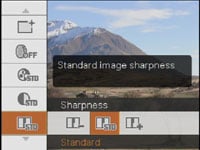 |
In Program mode, you can adjust the Image size, White Balance, Metering, Bracketing (including exposure, white balance and colour options), Smile detection sensitivity, Face Detection mode, Flash level, Red-eye mode, Dynamic Range Optimiser mode (Off, DRO Standard or DRO Plus), Noise Reduction (plus, minus or standard), Colour mode (five options), Colour filter (from five choices), Saturation, Contrast, Sharpness (all with plus, minus or standard settings) and finally the three SteadyShot options described earlier.
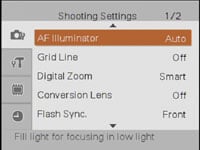 |
Below this is an option to enter the main menu pages, although they don’t actually appear until about three seconds after you press the button which can be infuriating if you impatiently need to change a setting. It’s strangely slow considering other aspects of the camera are very fast.
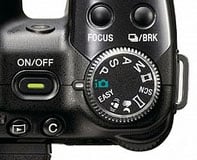 |
The Cyber-shot offers shutter speeds from 1/2000 to 30 seconds and ten aperture settings from f2.8 to f8 when zoomed-out. Like most super-zooms, you have complete control over both settings with the HX1’s Manual, Aperture and Shutter Priority modes; Program shift is also available. In each mode, the thumb wheel is pushed in to highlight the desired option, before being turned to adjust it.
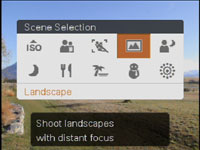
If you’d prefer an easier life, the standard PASM modes are complimented by Sony’s Intelligent Auto Adjustment with scene detection, a dedicated SCN position offering manual selection of ten presets on-screen, or an EASY option which minimises the available settings. Unlike Canon’s SX1 IS which has a dedicated movie button on the rear, the Sony HX1 opts for a more traditional filmstrip position on the mode dial.
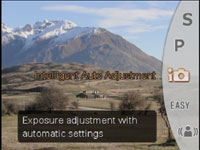 |  |
Scene Detection on the HX1 automatically switches between twilight, twilight portrait and twilight portrait using a tripod, backlight, backlight portrait, landscape, macro or normal portrait modes. In practice it does a good job too, rarely being fooled in our tests. Additionally security is offered by the iSCN+ option which takes two shots with slightly different modes or settings, allowing you to subsequently choose and keep your favourite.
So far so good, but the Cyber-shot HX1 has three additional and unique settings on its mode dial some of which exploit its fast continuous shooting capabilities. First is the Anti Motion Blur mode, which grabs six frames in quick succession and combines the sharpest elements of each into a single image. Second is the Handheld Twilight mode which again grabs six frames in quick succession, but this time stacks them to reduce visible noise. Finally, in one of the HX1’s headline modes, the Sweep Panorama grabs a series of images as you pan the camera sideways or vertically, before then automatically stitching them into a panoramic photo.
In tests with the Anti Motion Blur mode under very low light, the camera successfully assembled six frames into one sharp image. The exposure was 1/4 of a second, and noise levels were quite high due to an equally high sensitivity, but it’s still a handy facility if you’re finding camera-shake to be a problem.
The stacking technique employed by the Handheld Twilight mode has a solid foundation in specialist fields like astro-photography, and it adapts well to a consumer camera here. To put it to the test we shot a handheld scene in twilight conditions, during which the HX1 selected a shutter speed of 1/60 and a sensitivity of 400 ISO. We then matched these settings with a normal exposure for comparison and you can see 100% crops from each image below.
|

Sony Cyber-shot DSC-HX1 Handheld Twilight mode off / on | ||
 | ||
100% crop, 5-100mm at 100mm, 1/60, 400 ISO, Twilight off |
100% crop, 5-100mm at 100mm, 1/60, 400 ISO, Twilight on | |
The Handheld Twilight mode really has visibly reduced the amount of noise without compromising detail with noise reduction, although interestingly given the same exposure, it’s actually a little darker. As a handheld shot at the longest focal length, there would inevitably be some motion between the shots captured in the sequence, even at high speed, but the HX1 has generated a file with the same pixel dimensions as normal, and as seen in the crops, no less detail. It’s an impressive option to have at your disposal and sees Sony thinking carefully about the issues which face cameras with small sensors. Note to Sony’s engineers: could we have an auto HDR option next time too?
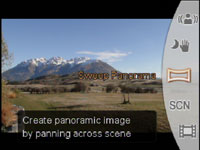 | 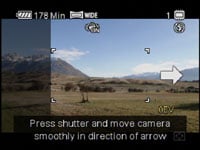 |
The Sweep Panorama function sounds great in theory but potentially fraught with problems; thankfully though that’s not the case in practice. In our tests, the camera easily guided us through the framing and capture process, before successfully stitching a number of panoramas despite panning the camera at variable speeds and wobbling it while doing so.
Unsurprisingly like all panoramas, close subjects can cause parallax errors, and any subject in motion could appear multiple times. Even under ideal conditions there can still be minor stitching errors, and before you get too excited, the mode doesn’t employ the sensor’s full vertical resolution. The Standard and Wide Panorama options offer maximum recorded sizes of 4912×1080 or 7152×1080 pixels when panned horizontally or 3424×1920 or 4912×1920 pixels when panned vertically. The presence of 1920 and 1080 in those dimensions implies the mode uses an extension of the HD movie mode.
We’ve included an example below which only suffers from minor stitching issues, as shown in the middle and right crops. Ultimately of the three unique shooting modes, the Sweep Panorama is arguably the most successful, useful and fun to use. Auto panoramas and image stacking may initially smack of Sony’s typical gadgetry, but there’s some genuinely useful functionality here, and the company should be commended for continuing to think out-the-box.
 | ||||
 |
 |
 | ||
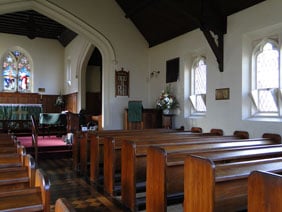
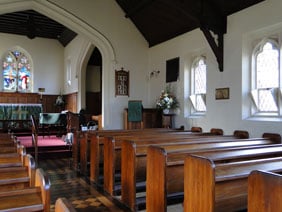
Like the company’s DSLRs, the Cyber-shot HX1 offers Dynamic Range Optimiser (DRO) capabilities to automatically adjust the contrast of images to avoid lost detail in dark highlights or bright highlights. The HX1 offers DRO Standard and DRO Plus settings, along with the option to switch it off altogether. Since DRO Standard is enabled by default, that’s what you’ll see in our HX1 sample images, although to compare what’s happening, we shot our standard indoor scene with all three options.
Below are samples with DRO set to Off and Plus and the difference is fairly subtle on this particular scene. Bright highlights remain saturated and you’d need to look at the histograms to notice any difference in the shadows. The only real visible change is a boost in the mid-tones, which has lifted the scene a little, although again, it’s fairly subtle on this composition.
|
Sony Cyber-shot HX1 Dynamic Range Optimiser (DRO): Off / Plus | ||
 | ||
 |  | |
DRO Off: 125 ISO, f2.8, 1/3 sec |
DRO Plus : 125 ISO, f2.8, 1/3 sec | |
One of the other headline features of the Cyber-shot HX1 is its HD movie mode, and Sony offers a variety of settings: 1080 Fine shoots at 1440×1080 at a bit rate of 12Mbit/s, 1080 Standard uses the same frame but with higher compression at 7Mbit/s, 720 shoots at 1280×720 at 6Mbit/s, while VGA shoots 640×480 at 3Mbit/s (these are all average bit rates).
Videos are encoded into MPEG-4 AVC/H.264 compliant files with an MP4 extension in their own MP_ROOT folder on the card. The maximum file size is limited to 2GB or a length of 29 minutes, whichever happens first. 2GB should squeeze-in around 21, 35 or 41 minutes worth of footage in the 1080 Fine, 1080 Standard or 720 modes respectively. Thankfully you are able to operate the optical zoom while filming.
Video enthusiasts will note the HX1’s 1080 mode doesn’t shoot square pixels at the usual 1920×1080 frame, but a horizontally compressed version at 1440×1080 pixels which is automatically stretched back into a 16:9 widescreen frame during editing or playback. Interestingly this employs the same technique as the HDV camcorder format to consume less bandwidth.
That said, Sony’s video compression is already turned-up pretty high here with its 1080 Fine and 720p modes operating at average rates of just 12 and 6Mbit/s respectively. Compare that to Panasonic’s TZ7 / ZS3, which offers 720p modes at 9, 13 or 17Mbit/s, while Canon’s 720p and 1080p HD modes typically operate at a much higher rate of around 24Mbit/s and 40-50Mbit/s respectively. So comparing 720p alone, Panasonic offers a mode with almost three times the bit rate, while Canon’s is a whopping four times higher. Admittedly Canon is arguably using too high a bit rate, and there’s no denying Sony manages to squeeze much longer recording times from its memory as a result, but does the quality suffer a result?
Here’s a clip taken with the HX1 in its 1080 Fine mode with the default settings and SteadyShot enabled; the clip starts with the camera fully zoomed-out and later demonstrates the full optical range. Given the slight reduction in horizontal pixel count and the tight bit rate, the video quality looks pretty good. Compare it to a clip filmed moments later using the Canon PowerShot SX1 IS and you’ll see they look roughly similar, with the Canon only enjoying a small edge in fine detail. Registered members of Vimeo can download the original files for evaluation on their computers: Sony HX1 original / Canon SX1 IS original.
The biggest difference between the two clips are their size. The Sony clip, with its high compression and 1440 pixel frame measures just 66.8MB for 45 seconds worth of footage, compared to the Canon’s 37 second clip which measures 193MB. Clearly Sony is using considerably higher compression, and while this will allow you to squeeze more recording time onto your card, it will almost certainly come at the cost of undesirable artefacts with faster or more complex subjects. In those situations, the higher bit rate of the Canon will give it much more breathing space. But considering the small file size, the HX1’s clip here is still impressive.
High Definition video is only one benefit of the HX1’s CMOS sensor: like Canon’s PowerShot SX1 IS, it also allows it to offer quick continuous shooting capabilities at the camera’s full resolution. Where the Canon SX1 IS shoots at an already respectable 4fps though, the Sony HX1 boasts nothing less than 10fps. This is right up there with top-of-the-range professional sports DSLRs and made possible by the inclusion of a mechanical shutter.
Unsurprisingly there are a number of caveats: most notably if you’re shooting at the top 10fps mode, the HX1 will only be able to capture ten frames after which it’ll be tied-up for around 18 seconds as it records them to the card. So you’d better get your timing right as it’ll all be over in just one second and you’ll have to wait a while before you can take any more (although you can cancel the recording process if you spot a better opportunity coming-up). Understandably the built-in flash can’t fire at this speed either, so you’ll be relying on available light.
While these sound like significant limitations, the HX1’s continuous shooting is actually quite usable. Most action sequences for which you’d want 10fps are generally over pretty quickly, and if you need any longer, the HX1 also offers slower rates operating at 5 or 3fps – albeit still for only ten frames.
We verified each of the continuous shooting speeds, but the big question of course is how well it works in practice. To put this to the test we headed to the World-famous Shotover Jet in Queenstown where the boats travel at up to 85kph and perform 360 degree spins.
As described earlier, the HX1 is a quick focuser, and managed to keep the boat sharp at equivalent focal lengths between 200 and 560mm as it sped through the canyons. The sequence below showing one second’s worth of a 360 degree spin at 10fps, was taken under bright conditions in Shutter Priority mode at 1/500 with a sensitivity of 125 ISO and the aperture wide open.
 |
 |
 |
 |
 | ||||
 |
 |
 |
 |
 |
Viewed at 100%, the 1/500 shutter speed wasn’t always sufficiently quick to absolutely freeze the fast action, but several of the frames were very sharp – you can see some 100% crops in our Gallery section. There’s also the possibility of shooting at up to 1/2000, although under the conditions of the day, it would have required a boost in sensitivity to 400 ISO.
We retested the Canon PowerShot SX1 IS at the same time, and it too was a quick focuser, managing to track the boats, while grabbing decent sequences at 4fps. The benefit of the SX1 IS is that it can keep shooting at 4fps while memory remains, whereas the HX1 is limited to ten frames, or just one second’s worth at its fastest speed. But the bottom line is the Sony HX1 delivers very impressive continuous shooting capabilities which are faster than anything we’ve seen before on a camera of its class. The sequence above proves it also works well in practice, at least under bright conditions anyway.
The sensor responsible for the HX1’s HD video and fast continuous shooting is a newly-designed Exmor CMOS chip, measuring 1/2.4in and sporting 9.1 Megapixels. This makes the HX1 only the second non-DSLR to employ a CMOS sensor, after Canon’s PowerShot SX1 IS. Technically-speaking, the HX1’s sensor is fractionally smaller than the 1/2.3in model in the Canon SX1 IS, although not enough to make much difference in real-life – and remember the Canon squeezes an extra Megapixel into that space.
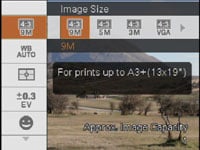 |  |
The HX1’s sensor delivers images with a maximum resolution of 3456×2592 pixels and offers three lower resolutions at the native 4:3 aspect ratio. There’s also a cropped 3:2 mode operating at 8 megapixels, along with a pair of cropped 16:9 modes at 6 and 2 Megapixels.
These are the only image quality settings, as there’s no option to adjust the JPEG compression, and as such, unsurprisingly no RAW mode either. This is an area where the Canon SX1 IS takes the lead with a variety of compression choices, along with a RAW option (for models running the latest firmware). Panasonic’s FZ28 also offers a RAW mode.
Set to 9M mode, the HX1 generates files which rarely deviate more than a few hundred KB of 4MB. The camera includes a meagre 11MB of internal memory for photos which is only good for a couple of best-quality images, so you’ll obviously want to equip it with an memory card sooner rather than later. As mentioned above, the HX1 uses Memory Stick Duo cards.
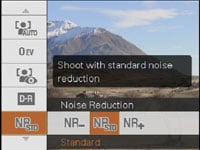
The sensitivity ranges from 125 to 3200 ISO at the full 9 Megapixel resolution. And there’s the choice of three noise reduction settings. To see how the quality of the Cyber-shot HX1 measures-up in practice, take a look at our real-life resolution and high ISO noise results pages, browse the sample images gallery, or skip to the chase and head straight for our verdict.