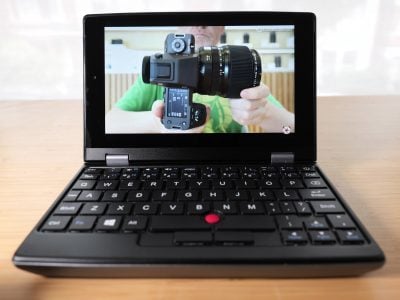
Sony Alpha NEX-7
-
-
Written by Gordon Laing
Intro
The Sony NEX-7 is the flagship model in Sony’s NEX compact system camera (CSC) range that also includes the NEX-5N, NEX-C3, along with the original NEX-5 and NEX-3. More than any Sony CSC to date though, the NEX-7 is aimed squarely at serious photography enthusiasts.
Like other NEX cameras, the NEX-7 features an APS-C sized sensor which is larger than many rival CSCs and indeed matches that found in most DSLRs. But what makes the NEX-7 really stand out is its 24 Megapixel resolution, shared with the SLT-A65 and A77, and packing 50% more pixels than the NEX-5N.
Other features include a 3in tilting LCD screen, ultra-high resolution OLED electronic viewfinder, and multiple control dials. It can also shoot 1080p movies with full exposure control, and is the first NEX to come with a built-in flash along with a hotshoe and external mic socket.
In many ways, the NEX-7 is the CSC enthusiasts have been waiting for. But its powerful specification also makes it one of the most expensive small cameras on the market, indeed more so than some mid-range DSLRs. Is it a premium worth paying for compactness, and does the extended feature set justify the cost compared to the considerably cheaper NEX-5N? To find out I compared Sony’s flagship NEX-7 with the 5N along with Canon’s EOS 60D – one of the most popular mid-range DSLRs that sells for substantially less. Read on to find out how they compare and which one is right for you.
 |
Sony Alpha NEX-7 Design and controls
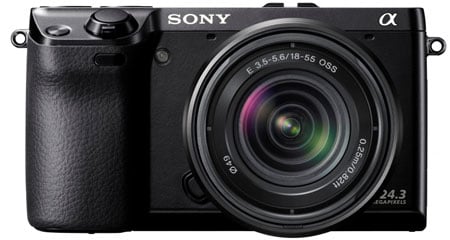
The NEX-7 may be relatively large compared to existing CSCs, but remains dwarfed by a mid-range DSLR like the Canon EOS 60D. With a body measuring 120x67x42mm and weighing 350g including the battery and card, compared with the EOS 60D at 145x106x79mm and 755g you begin to appreciate the difference in scale. Compared to other compact system cameras though, it seems a little less of a miracle of miniaturisation. The NEX-5N measures 111x59x38mm and weighs 269g with battery and card; it looks and feels a smaller and less substantial camera than the NEX-7, lacking the latter’s EVF, built in flash and additional controls. Alongside compact system cameras with a built in viewfinder though the playing field becomes more even: for instance, the Panasonic Lumix G3 measures 115x84x47mm and weighs 382g.
But on a camera with interchangeable lenses, the body is only half the story. Because of its larger sensor, the NEX E-mount lenses tend to be significantly larger than those of cameras with smaller sensors, which is almost every other CSC camera out there. The body may be a lot smaller, but the 18-55mm f3.5-5.6 OSS kit lens for the NEX-7 is 62mm in diameter, 60mm long and weighs 194g – almost as big and heavy as the equivalent 18-55mm F3.5-5.6 IS II kit lens on the Canon EOS 60D.
Panasonic employs the slightly smaller sensor of the Micro Four Thirds standard, but the basic Lumix G kit zoom is roughly the same size as the Sony and doesn’t collapse either: the 14-42mm kit zoom measures 61x64mm and weighs 165g. Olympus also employs the Micro Four Thirds standard, but has implemented collapsing lenses for some time, so the latest 14-42mm shrinks to 56.5x50mm and weighs 113g. Its smaller size can also be partly attributed to the fact that it doesn’t require stabilisation as that’s built-in to the PEN series bodies.
 |
But Panasonic has a trump card for the Micro Four Thirds system: its latest 14-42mm power zoom lens, which not only sports a motorised zoom but collapses to an amazing 61x27mm and weighs just 95g. Indeed with the 14-42mm power zoom mounted on the Lumix GX1, the entire package is impressively smaller and noticeably lighter than the NEX-7, but to be fair, the GX1 lacks a built-in viewfinder and the Panasonic power zoom adds considerably to the overall price. None of which alters the fact that Sony has nothing that comes close in terms of compactness, either now or on the E-mount roadmap, to compete with the Lumix G 14-42mm powered zoom.
One bit of good news on the lens front though is that Sony has produced a black version of the 18-55 kit zoom and it looks a lot better than it’s silver predecessor. In fact, though it may be slightly bigger and heavier, I much prefer the NEX-7 styling to the NEX-5. Its chunkier squared-off design and the larger handgrip, not to mention the control dials, add up to a camera that not only looks more ‘business like’ than the NEX-5N, but handles better too.
 |
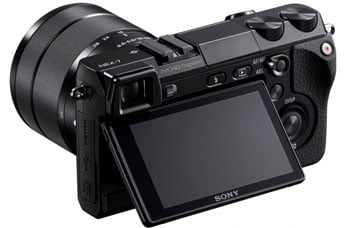 |
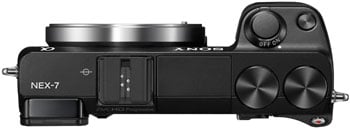
Central to the handling ethos of the NEX-7 are two configurable control dials mounted on the right side of the top panel. Designed to be operated with your right thumb these two dials are at the heart of exposure control on the NEX-7. Along with the rear wheel, they form a three-dial control system which, in PASM modes allows you adjust all three exposure inputs – aperture, shutter speed, and ISO sensitivity without pressing a button or entering a menu.
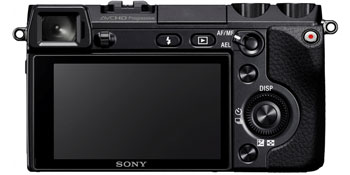
Relocating the on/off switch to surround the shutter release means the top panel actually looks cleaner and simpler than the NEX-5N. A ‘navigation’ button next to the shutter release toggles through a range of four customisable settings with defaults of focus mode, white balance, D-range and Creative Styles. The reminder of the controls occupy the rear panel above and to the right of the flip out LCD screen.
The control wheel and soft button layout is the same as the NEX-5N with an additional button that allows separate locking of exposure and AF. Customisation endows this button with a range of other possibilities which I’ll go into in more detail in the handling section below. The remaining buttons on the rear panel are the Flash pop-up button, playback and dedicated movie record button.
Sony has included a built-in flash on the NEX-7 (other NEX models have had to make do with a fiddly screw on accessory, albeit one that’s included in the box). The pop-up unit is extended by pressing a button just below it on the rear panel, it’s raised fairly high and well forward of the body and you’ll only get a shadow if you’re shooting close subjects or using longer lenses. The flash is pretty weak, with a guide number of 6 metres giving it a maximum range of of 1.7 metres at 100 ISO at f3.5. So far, so disappointing as far as most enthusiast photographers will be concerned, but you can fit a larger flash using the proprietary hotshoe which is compatible with the HVL-F58AM, F43AM and F20AM flashes as well as other Sony accessories. According to the Sony website the flash can also be used to wirelessly trigger remote units, but I didn’t test this feature.
The NEX-7 uses the same NP-FW50 infolithium battery as the NEX-5N. Battery life is quoted as 335 shots under CIPA conditions and my experience suggests that’s about right using the LCD and EVF in roughly equal proportions. The EVF consumes more power than the LCD screen so if you rely on it exclusively that figure will probably drop to around 300 shots, not bad, but certainly worth carrying a spare for events or if you’re out for the day. With the Infolithium battery providing a percentage read out of the remaining power, rather than the more usual segmented indicator, you’ll at least have a good idea of how much longer you’ve got. The combined battery and card compartment is in the handgrip, accessed by a door on the camera base. The NEX-7 is compatible with SD (HC and XC), Memory Stick Pro Duo and Memory Stick Pro-HG Duo cards. A door on the left of the camera body reveals USB and HDMI connectors and there’s an external mic socket behind a separate door. It’s great to find a standard jack for connecting third-party microphones, although since the hotshoe isn’t standard you’ll need a physical adapter to mount it on the top.
Sony NEX-7 Screen and EVF
The NEX-7 is the first NEX to include a built-in electronic viewfinder, a move that will delight everyone who prefers using an eye-level viewfinder to an LCD screen. Electronic viewfinders have had a bit of a mixed reception in the past and with the NEX-7 Sony has made a robust effort to address all the issues, with a display that can justifiably lay claim to being the most sophisticated and practical EVF yet devised for a mirrorless camera. First, the NEX-7’s OLED EVF boasts a resolution of 2.4 million pixels. Compare that with 1.44 million on the Olympus VF-2 and Lumix G3 and you’d expect to see a more accurate looking image through the eyepiece. You wouldn’t be disappointed.
The NEX-7’s EVF not only provides a much more detailed view than we’re used to seeing on cameras this size, it’s bigger and brighter. If you’re used to shooting with an APS-C DSLR, you’ll be pleasantly surprised to discover that the NEX-7 provides a bigger (though not brighter) view, closer in size to that of a full-frame DSLR.
In use, the EVF is a real delight and offers several advantages over the LCD screen or an optical viewfinder. It has a proximity sensor which automatically toggles between the EVF and panel when you raise the camera to your eye, although there’s a fraction of a second delay even if you choose to use the EVF exclusively from the setup menu.
Unlike the 16:9 LCD screen, the EVF matches the 3:2 shape of the sensor’s images, with exposure information displayed along the bottom and other info on top. There are two overlays – an electronic level gauge and a live histogram. Obviously, the EVF is much easier to see, particularly in bright sunny conditions, than the screen, and a detachable rubber eyecup is also supplied. If you’re left-eyed you’ll find the screen gets a fair smearing but, on the plus side, with the camera pressed to your face stability is greatly improved.
Outdoors in good light the view, though not as bright as an optical viewfinder is just as responsive. The viewfinder does’t show any evidence of tearing, but I did notice some instability whilst panning. It turns out this is due to the NEX-7’s continuous focus, as when switched to MF the viewfinder is rock steady even when panning.
In low light the EVF performs at least as well, and in some cases better than an optical viewfinder. Yes, it can get quite noisy, but there’s no discernible lag and with focus peaking enabled it’s possible to manually focus in situations where you’d struggle with an optical system. The only other issue I had with the NEX-7’s EVF was that it’s quite difficult to make out the shadows in high contrast subjects, for example when shooting against the light; in such a situation your eyes via an optical viewfinder are always going to be able to outperform an electronic sensor.
One other advantage of an Electronic viewfinder over an optical one is that it gives an indication of how your shot will look with the currently selected settings, so you can see if your exposure or white balance is off and preview effects. If you prefer a ‘straight’ view’ you can turn this off, but it does have one unintended consequence. The live histogram view appears to take its data from the EVF, so displays a ‘well exposed’ histogram regardless of the exposure settings. A bug that will hopefully be addressed in Sony’s first firmware update.
Of course you’re not restricted to the EVF as the NEX-7 also has a 3 inch 921 million pixel LCD panel. As on the NEX-5N the panel flips up, the only difference being it has a cantilevered hinge at the bottom to keep it out of the way of the viewfinder. Despite this, with the panel in the 90 degree ‘waist shooting’ position the viewfinder does obscure the top left corner of the screen, more so with the eyecup attached, but this can be avoided by tilting the panel back a few degrees and isn’t a major problem.
Unlike the 5N, the 7’s display isn’t touch-sensitive but that would probably have been impractical with the viewfinder. Though for many the choice of whether to use the EVF or the screen will be a personal preference, the LCD panel does provide more information than the viewfinder both in the black space to the right and overlayed on the image itself. I’ll go into more details about the various overlay modes in the handling section.
Sony NEX-7 lens and stabilisation
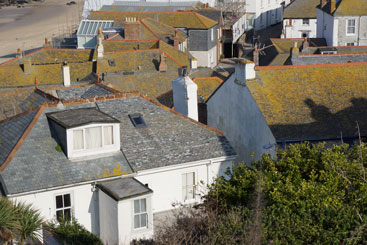
The NEX-7 is available as a body only or with the 18-55mm f3.5-5.6 OSS kit lens finished in a more attractive black, rather than silver colour shipped with previous models. The crop factor on the NEX models is 1.5 giving this lens a 35mm equivalent range of 27-82mm.
At the time of writing, the E-mount lens range consists of three zooms and three fixed focal length lenses. If you’re looking for additional lenses to complement the 18-55mm, the two obvious choices would be the 55-210mm f4.5-6.3 OSS zoom and the 16mm f2.8 pancake prime. In my view, the big hole in the E-mount line-up is a wide-aperture standard lens – the 30mm f3.5 macro is too slow for that and the 50mm f1.8 OSS, (the fastest optically stabilised lens for any interchangeable lens cameras including DSLRs) while good for portraiture is too long for everyday use. That just leaves the Carl Zeiss Sonnar T* 24mm f1.8 which costs almost as much as the NEX-7 body itself. The future looks more promising though, with several new lenses announced for 2012/13 as part of Sony’s E-mount roadmap including a ‘Large Aperture Standard’ a pancake prime and four new zooms, bringing the total of E-mount lenses to 15.
If you can’t wait for new E-Mount lenses you can attach pretty well any lens to the NEX-7 body using one of the myriad third party adapters available. This means relying on manual aperture control and focussing, but with the combination of a large EVF, focus peaking and MF assist that’s made much easier.
Sony Alpha NEX-7 coverage wide |
Sony Alpha NEX-7 coverage tele | |
 |  | |
| 18-55mm at 18mm (27mm equivalent) | 18-55mm at 55mm (82mm equivalent) |
I tested the NEX-7 with the 18-55mm zoom which, with the APS-C crop factor of 1.5 has an effective focal length range of 27-82mm. Though Optical Steady Shot (OSS) stabilisation is built into the lens and not the body you can turn it on and off from the NEX-7’s setup menu, though, disappointingly, you can’t assign it to a custom menu.
To test the stabilisation performance of the 18-55 kit zoom with the NEX-7 I zoomed it to its maximum 55mm (82mm equivalent) telephoto position and took a series of hand-held shots in Shutter priority mode at a range of shutter speeds with OSS enabled and turned off. As you can see from the crops above, OSS can produce blur-free shots down to 1/10, the equivalent of three stops better than conventional wisdom dictates is advisable without stabilisation. If you compare this with the results for the NEX-5N you’ll see it’s not quite as effective, despite the extra stability that results from using the EVF. This is likely due to the very high resolution of the NEX-7 being less forgiving than lower resolution models.
Sony Alpha NEX-7 18-55mm f3.5-5.6 OSS Off/On | ||||
 | 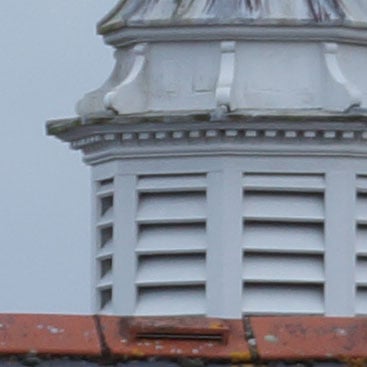 | |||
100% crop, 18-55mm at 55mm, 100 ISO 1/10th, OSS off. | 100% crop, 18-55mm at 55mm, 100 ISO 1/10th, OSS on. | |||
Sony Alpha NEX-7 shooting modes
The NEX-7 of course provides PASM shooting modes and its three-dial control system allows you to take full advantage of them; I’ll describe in more detail how that works in the handling section below. Intelligent Auto mode works similarly to Sony compacts, turning the NEX-7 into a point-and-shoot that can be used by anyone. Most of the NEX-7’s dials and buttons are disabled in Intelligent Auto mode, but you still have access to display modes (i.e. the live histogram and electronic level), drive modes and, curiously, manual focusing.
The cheaper NEX-5N’s Photo Creativity modes (which provide results-based control over background defocus, brightness, colour and allow the use of Picture Effects) are absent (though Picture effects are available in other modes). This makes some kind of sense given that this is an enthusiast’s model, but what’s harder to understand is why some controls including all three dials don’t function at all in Intelligent Auto, and others display an ‘unavailable except in PASM modes’ error message. When you put it all together it doesn’t feel like it’s been thought through and while point and shoot operation clearly wasn’t high on Sony’s list of priorities for the NEX-7 I’d hope to see these addressed in a future firmware upgrade.
The NEX-7 has the same stacking modes as the NEX-5N. Hand-held Twilight mode takes a burst of six shots and composites them to produce a single image with lower noise levels. See the results pages for examples of how effective this mode is. As on other models that include it, Hand-held Twilight mode is fully automatic – you can’t select ISO or other exposure settings, the controls are locked down as in Intelligent Auto mode. And if you were hoping the NEX-7 would include the same Multi Frame Noise Reduction feature as on recent SLT cameras you’ll be disappointed – a missed opportunity on a model aimed at enthusiasts.
It does of course include Sony’s D-Range Optimizer or DRO technology which attempts to improve recording of shadow and highlight detail in subjects with a high dynamic range and there’s also HDR, another stacking mode that takes three shots in quick succession and combines them. On the NEX-7 you can elect to have HDR automatically select the bracketing range, or you can specify it yourself in +/-1EV increments up to a maximum +/-6EV. A third composite mode, Anti Motion Blur combines six images to reduce the effects of camera shake in low light conditions. On a handling note, Anti Motion Blur won’t work with RAW+JPEG image quality, so temporarily sets image quality to Fine when selected. It would be good to see this approach extended to other modes (with a warning), like HDR which simply just don’t function if RAW+JPEG is selected.
It wouldn’t be a Sony if it couldn’t shoot panoramas and the NEX-7 includes all the Sweep panorama modes of the NEX-5N including the 3D panorama feature. You can shoot with the camera in landscape or portrait orientation (as shown in the two examples below) and record up to a 180 degree view at sizes up to 5536×2160 (portrait) or 12416×1856 (landscape). In wide mode the NEX-7 doesn’t always make the full 180 degree sweep, depending on your technique, the lens focal length and the subject.
Sony Alpha NEX-7: 2D Sweep Panorama samples (click for originals at flickr) |
| Top: 18mm in landscape orientation. Bottom: 28mm in portrait orientation. |
Picture Effects are exactly the same ones as on the NEX-5N and include Pop Colour, Posterisation, Retro, several Partial Colour modes, Soft Focus, HDR Painting and a versatile Miniature faux tilt / shift effect. As I mentioned before, Picture Effects can’t be accessed in Intelligent Auto mode on the NEX-7, as on the NEX-5N, but they can be used during video recording with the exception of Soft Focus, HDR Painting, Rich-tone Mono and miniature. Few will mourn the lack of the first three, but not being able to use the miniature mode for movies is a real shame, as well as a disadvantage compared with the latest Olympus, Panasonic and Canon models. Another thing the NEX-7 can’t do is shoot Picture effects in RAW+JPEG mode, so you don’t have a RAW file to fall back on if you want a version without the effect.
Sony Alpha NEX-7 Picture effects | ||||
 |  | |||
Retro | Toy Camera: Normal | |||
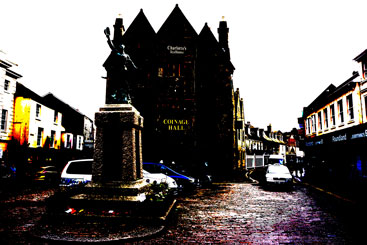 |  | |||
Posterization: Colour | HDR Painting: High | |||
Sony Alpha NEX-7 movie modes
The NEX-7 offers full HD 1080p video recording with stereo sound and continuous autofocus. You can shoot video in any recording mode using the dedicated movie recording button just below the exposure control dials and to the right of the thumb rest. With a 16:9 screen, you’d be forgiven for assuming the video will fill the display, but like earlier NEX cameras, this bizzarely doesn’t happen by default. Instead the existing 3:2 photo shape is cropped at the top and bottom to the wider 16:9 shape, wasting a great deal of space around the image. You can fill the NEX-7’s screen with video, but you’ll need to select the wide image full screen option from the setup menu first; this really ought to be the standard setting. Those who aren’t prepared to delve into the nether regions of the setup menu may never discover this and end up shooting all their movies using about 60 percent of the available screen area. It doesn’t arise if you use the EVF though, which uses the full width with black bars top and bottom.
The NEX-7 provides unprecedented control over exposure during movie shooting. You can record movies in any mode and adjust exposure and ISO sensitivity during recording. You can also use any of the view overlays for movie shooting and switch between them while recording. Having such a large degree of exposure control during shooting is something that takes a little bit of getting used to, but the three-dial system and the EVF make it possible without too much jogging around and with a little practice you could probably manage it without a wobble, but a tripod makes it a lot easier.
The NEX-7 has contionuous AF during movie recording and you can also control the focus area during shooting. although in practice this proved to be more difficult than making exposure adjustments. My efforts to move the flexible spot during shooting met with failure on several levels. First, using the control dial to move the focusing area is impossible without it looking like you’re experiencing a minor earthquake. Second, in low light, the NEX-7’s autofocus isn’t positive enough to smoothly and accurately lock focus on the new target. Thirdly, even when it works the continuous AF has a tendency to subsequently make up its own mind about what should be in focus and undoes all your hard work. There is a way around this, which is to set the AF/MF button to AF/MF Control, start the shot manually focused, then switch to AF during shooting using the AF/MF button. So you can make it work, but the NEX-7s movie focusing isn’t nearly as simple or effective as on touch screen cameras like the NEX-5N, the Olympus Pen E-P3 or the Panasonic Lumix G3 / GX1.
Like the NEX-5N the NEX-7 can encode movies in MP4 or AVCHD2 formats, and the available frame rates are dependant on region. In AVCHD mode video quality options are 1080i (at 50i or 60i) and encoded at 24 or 17Mbps, 1080p (at 50p or 60p) and encoded at 28Mbps, and 1080p (at 25p or 24p) and encoded at 24 or 17 Mbps. Switch to MP4 recording and you have 1440×1080 at 25fps or 30fps and VGA (640 x 480) at 30fps only. All of the sample videos below were recorded in 1080p50 mode.
| |
|---|---|
|
Great quality 1080p50 video from the Sony NEX-7. A little bit of wobble when you operate the manual zoom is inevitable, but the stabilisation does a good job otherwise.
| |
|---|---|
|
The NEX-7’s CMOS sensor copes well with against the light shots like this. The big-barelled zoom is easy to control (though you’ll never get the smoothness of a motorised zoom) and the focus remains rock steady.
| |
|---|---|
|
Indoors in the low light the metering responds smoothly and without stepping. This was shot in Program mode with Auto ISO but you have full control over all exposure settings should you choose.
| |
|---|---|
|
With a little fiddling around you can get the NEX-7 to ‘pull’ focus by switching between manual and AF operation during shooting. But it’s nowhere near as easy or sure-footed as touch-screen focusing.
| |
|---|---|
|
The NEX-7 provides full manual exposure control during shooting. Here I’ve set it to Aperture Priority with Auto ISO. Starting fully open at f5.6 (zoomed in to 55mm) as I start closing the aperture, (note the increasing depth of field) the shutter speed drops to compensate. When the shutter speed reaches its lower limit the ISO increases to compensate.
Sony NEX-7
handling
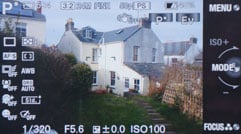
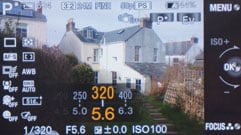
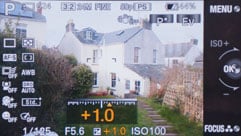
In terms of handling the NEX-7 provides more control in a more accessible way than any other compact system camera to date. The three-dial system works brilliantly, enabling you, depending on the shooting mode to control aperture, shutter speed, ISO sensitivity, exposure compensation, white balance and more, without ever removing your eye from the viewfinder. The function of the dials is mode-dependent, but in PASM modes the left dial controls aperture or shutter speed, the right dial adjusts exposure compensation and the control wheel changes the ISO.
There are however a few quirks that detract from the NEX-7’s otherwise smooth operation. While it’s great to have a dedicated movie recording button, it’s all too easily pressed when picking the camera up or putting it away in a bag. In the short time I had the camera this happened on at least a dozen occasions, resulting in missed shots, flat batteries and lengthy clips of the inside of my camera bag. This could be avoided if it were possible to de-activate or re-assign the record button as you can on the Olympus E-P3 for example.
 |
 |
 |
 |
 |
 |
And while the NEX-7 is replete with stacking options for improved noise control and HDR compositing its auto bracketing is limited to a three shot burst at either +/-0.3 or +/-0.7EV. That isn’t enough if you want to shoot images to produce your own HDR composites and I can’t see any reason why this couldn’t be expanded to, say, a five shot burst at +/-1 and +/-2 EV.
More generally, some of the NEX-7’s controls aren’t very accessible in the default configuration, but the customisability of the camera renders this irrelevant – provided you’re prepared to make the effort to set things up in the first place. With the right settings assigned to the functions activated by the navigation button the three-dial system once again makes it possible to access anything you’re likely to need without taking your eye from the viewfinder.
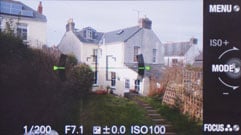
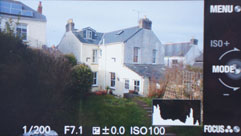
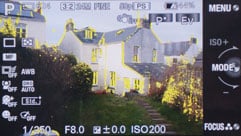
The DISP top button on the control wheel toggles through the basic info, electronic level and live histogram displays independently, so you can have one view on the EVF and another on the screen. Sony has clearly put some thought into how the EVF and screen can be used to complement, rather than just mirror one another. The screen can be configured to display no fewer than eight views one of which turns it into an information only screen with no Live View. The next logical step would be to make it interactive so that settings (other than those activated by the control dials) could be changed from this screen in the same way as on the PEN models’ Super Control Panel.
At this point I should mention the NEX-7’s front curtain electronic shutter. On cameras with live view the mechanical shutter’s first curtain must close to prepare the sensor for the exposure. The first curtain then opens, followed by the second curtain to make the exposure at the set shutter speed. The NEX-7’s electronic first curtain negates the need for the mechanical first curtain to close prior to an exposure, thus decreasing the time between pressing the shutter release and the actual exposure.
The NEX-7 has three focus modes – manual, AF and DMF or Direct Manual Focus which initially uses AF then allows you to fine tune manually. In AF mode you can set one of three focus areas – 25-area multi, centre and flexible spot and there’s also an object tracking AF mode. In bright conditions the contrast detect AF does a good job, but in low light the multi AF struggles. Generally though, AF is effective and fast, though not as fast as on the Olympus Pen E-P3.
Sony NEX-7 Continuous shooting
The NEX-7 has two continuous shooting modes, Continuous Shooting which autofocuses between frames and Speed Priority Continuous which locks focus on the first frame. I tested the NEX-7 with a freshly formatted Lexar Professional 16GB SDHC card with a class 10 speed rating. In continuous shooting mode with the quality set to fine JPEGs it managed a consistent 3.3 frames per second fairly indefinitely (for 100+ shots) without the buffer filling up. Shooting RAW, the NEX-7 maintained the same 3.3fps rate for 15 frames, dropping to 0.6fps once the buffer was full. It takes 22 seconds for the buffer to empty and you can start shooting again during that time, but you’ll get a shorter burst at the maximum frame rate. Having said that you rarely need to fire off fifteen frames in a row and if you wait for five or six seconds you’ll be able to fire off another short burst of five or six shots.
But it’s in Speed Priority Continuous Shooding mode that the NEX-7 really flies. A 17 shot burst of Large Fine JPEGs takes 1.7 seconds – exactly 10fps. Then the buffer full frame rate drops to 1.3fps. Switch to RAW and you can shoot a burst of 14 frames, again at 10fps. The buffer full rate shooting RAW is 0.6fps. A buffer full of RAW images takes the same time to empty as when shooting JPEGs – 22 seconds.
Whichever way you look at it this is impressive performance. The NEX-7’s continuous shooting performance outruns any other compact system camera on the market with the exception of the Nikon V1 and J1, which can shoot at 10fps with autofocus and up to an incredible 60fps with focus fixed using its electronic shutter.
But it doesn’t matter how fast a camera can shoot if you can’t see what you’re taking pictures of. The problem with many live view cameras is that when the shutter closes the viewfinder goes blank between shots and you quickly lose track of your subject. Not only that, but what you see is the shot that’s just been taken, so the viewfinder action lags behind the scene. The NEX-7’s fast continuous shooting speed combined with the electronic first curtain shutter results in hardly any blackout of the viewfinder, it’s no more intrusive than the mirror on an optical viewfinder. I’m not sure how the NEX-7 would cope with the kind of unpredictable movement you might get in sports or wildlife photography, but for predictable subjects that remain roughly the same distance from the camera, it works very well. The sequence below shows ten frames from a fifteen frame sequence and while I’ve managed to keep the rider reasonably well framed it does highlight one shortcoming of the NEX-7’s speed Priority Continuous mode – the motorcyclist is in sharp focus only in the first few frames. The only solution to this is to use a smaller aperture, manually prefocus on an intermediate spot, or switch to the slower Continuous Shooting mode.
 |
 |
 |
 |
 | ||||
 |
 |
 |
 |
 | ||||
The NEX-7 has a 24.3 Megapixel CMOS sensor with a sensitivity range of 100 – 16000 ISO. Images can be saved as RAW files in Sony’s ARW RAW format or as JPEGs using one of two compression settings, Fine and Standard. There’s also a RAW+JPEG mode which saves a fine quality JPEG in addition to the RAW file. Fine quality JPEG compressed files are around 4 to 6MB in size. The shutter speed range is 1/4000 to 30 seconds plus Bulb.
To see how the quality of the Sony NEX-7 measures-up in practice, take a look at my NEX-7 quality and NEX-7 noise results pages, browse the NEX7 sample images, or skip to the chase and head straight for my verdict.