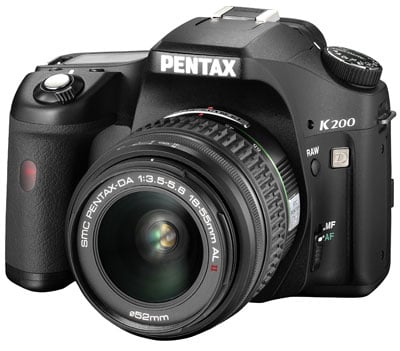
Pentax K200D design and controls The Pentax K200D is a dust and splash-proof 10 Megapixel DSLR with built-in Shake Reduction and an entry-level price tag. Numerically it may replace the K100D and K100D Super, but in terms of build quality and features, it’s actually closer to the K10D – Pentax’s former flagship model. We’ve pictured it below alongside what’s likely to be one of its biggest rivals, the Canon EOS 450D / Rebel XSi. Other rivals include the Sony Alpha DSLR-A300, Olympus E-520 and Nikon D60, along with Canon’s latest entry-level model, the EOS 1000D / Rebel XS.
Measuring 134x95x74mm and weighing 690g with a set of Lithium AA batteries, the K200D is comfortably larger than most entry-level DSLRs and heavier too. Pick it up alongside one of the other models mentioned above and you’ll immediately notice a big difference. Some portion of this heft is of course attributable to the built-in Shake Reduction which provides stabilisation with any lens you attach, but as mentioned above, the biggest factor is the tough construction. Typical entry-level DSLRs are lightweight cameras with mostly plastic construction, while any degree of weatherproofing is normally left to the more expensive semi-pro models in the range. In stark contrast, the Pentax K200D employs a high-grade steel chassis with a fibreglass-reinforced polycarbonate housing and no fewer than 60 seals to protect it against the elements; indeed Pentax describes it as dust and splash-proof and suitable for ‘all-photography weather’. We didn’t get a chance to use the K200D in a downpour, but it happily operated in drizzle, although for full protection, you’ll also need to fit one of the higher-end lenses with weather sealing. Either way, the K200D may be larger and heavier than most entry-level DSLRs, but it’s also considerably tougher and the additional weight lends it an air of confidence and solidity which is lacking from many others at this price. So if you frequently shoot in damp or dusty conditions, but can’t stretch to a semi-pro body, then the K200D is an ideal choice – indeed it gives the K200D a unique selling point in an increasingly busy market. If you’re after a small and lightweight DSLR though, it’s probably not your best bet. As always, we recommend you try picking it and rival models up for yourself (with the batteries and a typical lens fitted) as this is a very personal choice.
The K200D feels comfortable in your hands with a generously-sized grip featuring plenty of space between it and the lens barrel for your fingertips. Along with a tactile finish, there’s a decent ridge for your thumb to press against on the back, allowing you to hold the camera very securely, although the heavier weight of the body means it’ll rarely if ever be a one-handed operation. On the opposite side of the body there’s a modest ridge for your left hand to grip when using Pentax’s super-slim pancake lenses, but nothing like you’ll find on the K20D.
Inherited from the K10D and K20D is Pentax’s unique Sensitivity Priority (Sv) mode. This allows you to dial-in a preferred ISO setting, leaving the camera to automatically select an aperture and shutter to match – think of it like Program mode with easily adjustable sensitivity. Note the combined Shutter and Aperture priority modes and Hyper Program options are not available here – for those you’ll need either the K10D or K20D.
The K200D’s upper screen shows the aperture and shutter speed, drive and metering modes, focusing area, along with indicators for RAW shooting, White Balance correction, flash red-eye reduction and exposure compensation. Four digits in the bottom right corner have multiple duties, displaying the ISO sensitivity and compensation value when the corresponding button is pressed, or the number of shots remaining at other times. Sadly there’s no backlight for the display though, which greatly reduces its usefulness in dark conditions, but pressing the Info button will present a snapshot of the settings on the main colour screen - see below. Positioned to the front of the LCD screen is the shutter release button, surrounded by a rotary on / off switch. Twisting the switch clockwise from the ON position activates one of two previews depending on a custom setting. You can choose from a traditional optical depth of field preview through the viewfinder or a digital preview, which essentially takes a photo and displays it for previewing various settings; like the K20D, the K200D allows you to save this preview image if by chance you've captured the ideal moment. One preview mode you won’t find on the K200D though is Live View. For that on a Pentax DSLR, you’ll need to go for the K20D, although as we illustrated in our K20D review, it wasn’t a particularly useful implementation anyway.
The rear surface houses most of the K200D’s buttons, including the traditional four direction keys for navigating menus and scrolling around images in playback. Like the K20D, none of these double-up for direct access to settings like the White Balance, Sensitivity or Drive Mode. To access these you’ll need to press the Fn button and press the four-way rocker left for white balance, right for ISO, up for drive mode and down for flash settings. While it’s possible to adjust the ISO directly in the K200D’s Sensitivity priority mode, the lack of dedicated buttons to access it and other common settings is a little annoying, although not unusual for an entry-level DSLR. Pushing the Fn button does however reveal the K200D’s new custom image options, more of which on the Features page. You won’t find a dedicated button to adjust the K200D’s resolution or JPEG compression either, although they are at least on the first menu page; see our Features section. On the upside though, the K200D inherits the dedicated RAW button of the K10D and K20D which you’ll find to the side of the lens mount. Pressing it allows you switch between recording a normal JPEG, or a RAW file plus a JPEG. You can additionally configure this button to alternatively switch between RAW and RAW plus JPEG if desired, and also decide whether the settings stick or reset afterwards. It’s a nice feature to have, but arguably most entry-level DSLR owners would have found a dedicated button for another setting more useful. We’ll detail the quality and RAW options on the Features page.
An icon in the lower left of the screen indicates that turning the thumb dial will adjust flash compensation from -2-+1 EV. The fastest sync speed is 1/180, and as you’d expect for an entry-level DSLR, there’s no PC Sync port for external lighting. To support the wireless flash capabilities you’ll need to use with K200D with either the AF360FGZ or AF540FGZ flash guns which offer 100 ISO guide numbers of 36 and 54 respectively.
The Pentax K200D may inherit a number of features from the K10D and K20D, but the viewfinder isn’t one of them. So instead of a penta-prism viewfinder, the K200D employs a similar penta-mirror arrangement to most entry-level DSLRs. This delivers 96% coverage and 0.85x magnification (using a 50mm f1.4 lens).
Running along the bottom of the K200D’s viewfinder are the usual exposure details and mode icons, although there’s no exposure compensation scale; instead this is only shown numerically. Like most entry-level DSLRs, the ISO setting is not shown in the viewfinder as standard, although switch the K200D to Sensitivity Priority Sv mode and the current ISO takes the place of the shots-remaining counter. You can also check the current ISO setting in any mode by pressing the OK button.
As for its rivals, Live View isn’t a foregone conclusion on an entry-level 2008-model DSLR: the Canon 1000D / XS and Olympus E-420 / E-520 might have it, but the Nikon D40 / D60 and Sony A200 do not. While most entry-level DSLRs now use their main colour monitors for displaying all their shooting settings, the K200D takes a different approach. The upper LCD information screen is where you’ll find live details on settings like the aperture, shutter, exposure compensation, sensitivity and shots remaining. Other settings are shown on a variety of menus. Upon first powering-up, the K200D briefly displays the shooting mode along with handy guidance on what the main controls will do – for example indicating the thumb dial will shift the exposure line in Program mode.
As explained above, pressing the Fn button during record mode allows you to access the settings for the white balance, ISO, drive mode and flash. Pressing the OK button from this page presents the Custom Image settings which we’ll detail on the next page. Pressing the INFO button in Playback mode cycles between a clean view of the image, one with basic shooting info, another with either RGB or brightness histograms, and finally one showing a thumbnail of the image accompanied by a broad array of shooting details. You can also zoom-into images by up to 16 times.
Pushing the Fn button during playback presents four options selected using the four-way rocker control on the back of the camera. Pushing up presents the DPOF printing options, pushing right starts a slideshow, pushing down performs an internal RAW to JPEG conversion, while pushing left applies a choice of filters. Like the K20D, pressing the OK button on this page allows you to compare two images side by side.
The Digital filters can be applied to any image and include Black and White, Sepia, six different coloured tints with three degrees of strength each, softness, an illustration edge effect type filter, a digital HDR simulation, a slimming filter and a brightening option. Pentax K20D battery and connectivity
Pentax supplies a set of disposable Lithium models to get you started, and claims they’ll last for 1100 normal shots or 550 with 50% flash usage under CIPA conditions. While these deliver the best performance in terms of lifespan you’ll no-doubt be wanting to use a set of NiMH rechargeables in there sooner rather than later. A set of 2500mAh NiMH AAs should last around two thirds the length of the disposable Lithium models. If you’d like longer life and more to hold onto, Pentax offers the optional D-BG3 battery grip which takes an additional four AA batteries to double the number of shots, while also providing portrait controls. The battery grip also matches the K200D’s weather-proofed build and sealing. Behind a sealed door on the right side of the body you’ll find the SD memory card slot. Again it’s great to find rubber sealings on an entry-level DSLR, but the one on the K200D’s card door makes it slightly difficult to grab and remove the card comfortably by gripping its flat surface; instead it’s easier to turn your grip by 90 degrees and pull the card out by its corners. A door on the left hand side houses the K200D’s ports: one for an optional wired remote control, a combined USB and TV output and a DC input for an optional AC adapter. |
| USA readers |
|