Panasonic Lumix DMC-TZ18 / ZS8
-
-
Written by Gordon Laing
Intro
Panasonic’s Lumix DMC-TZ18, or ZS8 as it’s known in North America, is the simpler and more affordable version of the flagship Lumix DMC-TZ20 / ZS10. Announced alongside the TZ20 / ZS10 in January 2011, it replaces the earlier TZ8 / ZS5. Like its predecessor, it offers the same optical zoom range as the higher-end TZ / ZS version but with fewer features to keep costs down.Compared to the older TZ8 / ZS5, the new TZ18 / ZS8 features a broader 16x optical zoom range, enhanced automatic shooting and two extra Megapixels. From the old model, the TZ18 / ZS8 inherits 720p HD video recording, a 3in screen, and a wealth of shooting modes including full manual. The most important new feature is of course the new lens, which is a little wider and much longer than its predecessor: the earlier TZ8 / ZS5 employed a 12x zoom with a 25-300mm equivalent range, which the new model boosts to 24-384mm.
This is what the Lumix TZ / ZS series is all about: packing a big zoom into a relatively pocketable body, and that’s what’s made them so successful in the past. By offering two versions with the same zoom and body, but different features, Panasonic is also covering all bases. But the Lumix TZ / ZS is no longer the only pocket super-zoom on the block, with tough competition from the likes of Canon and Sony to name but two – and revealingly each of these also offers two versions of their 2011 super-zooms. In our full review of the TZ18 / ZS8 we’ll detail the differences in features and performance between the two Panasonics and their rivals. If you’re shopping for a compact super-zoom, read-on to find out which will be best for you!
 |
Before kicking-off the review, we’ll briefly detail the main differences between the Lumix TZ18 / ZS8 and its pricier counterpart, the TZ20 / ZS10, along with what they have in common. Starting with the latter, both cameras share the same 16x optical zoom range, the same 14.1 Megapixel resolution and the same-sized 3in screen, packed into essentially the same body with virtually the same controls and shooting modes. Sounds like the same camera, right? Well think again as there’s significant differences between each model, even within the apparently similar specifications above.
Most obviously, the pricier TZ20 / ZS10 features a built-in GPS receiver which can tag images with your current location and even cross-reference it with a large database of landmarks. So while you’re taking a photo, the TZ20 / ZS10 can identify the country, town and in many cases, also the building, park or facility you’re looking at. The TZ20 / ZS10’s screen may be the same size as the cheaper TZ18 / ZS8, but it’s higher resolution at 460k pixels and touch-sensitive too.
Both cameras film HD video, but where the TZ18 / ZS8 is stuck at 720p encoded with Motion JPEG, the TZ20 / ZS10 adds 1080i encoded with AVCHD for smaller files and longer recording times. The TZ20 / ZS10’s movie mode also supports i.ZOOM to extend the range to 21x and features a dedicated button to start recording in any mode.
Both cameras may share the same PASM and Intelligent Auto modes, but the TZ20 / ZS10 additionally sports 3D image capture and the composite Handheld Night Shot mode which stacks images taken in a burst to reduce noise. Speaking of burst shooting, the TZ20 / ZS10 is also much faster, boasting 10fps compared to around 2fps. It also has an HDMI port.
That’s an awful lot of features you won’t find on the TZ18 / ZS8, but if you’re only after the big zoom in a small body, the simpler model will give you it at a cheaper price. The battery also lasts longer, but perhaps the most interesting difference is with the sensor. Both cameras offer 14.1 Megapixels, but the TZ18 / ZS8 captures them with a CCD sensor as opposed to the MOS sensor in the TZ20 / ZS10. The MOS sensor is what allows the pricier model to support 1080i video and fast continuous shooting, but in our tests it delivered disappointing photo quality. The big question then is whether the CCD sensor in the TZ18 / ZS8 could actually deliver superior results, thereby making it a tempting alternative to its feature-packed counterpart.
We’ll reveal all in our full review of the TZ18 / ZS8 where we’ll closely compare the features, video and image quality of both cameras, allowing you to make the right choice.
Panasonic Lumix DMC-TZ18 / ZS8 design and build quality
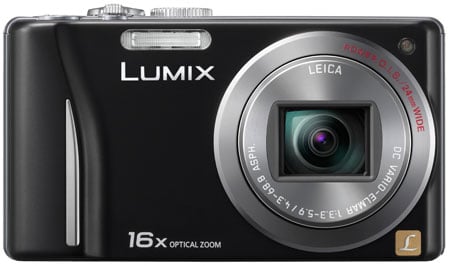
At first glance, the Lumix TZ18 / ZS8 looks very similar to the higher-end TZ20 / ZS10. It shares the same dimensions and styling, along with virtually identical controls. The biggest physical difference between them is the small bulge on the TZ20 / ZS10’s top surface for the GPS receiver, which contributes to the imperceptible 9g difference in weight.
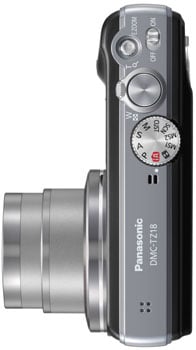
Viewed from above, you’ll find the mode dial is in the same position, but with minor adjustments we’ll mention later in the review, while the shutter release button and power switch also share the same space. The most significant difference between the TZ18 / ZS8 and the TZ20 / ZS10 in terms of controls is the function of the button found to the front right of the shutter release: on the TZ20 / ZS10 it’s a record button which lets you start filming in any mode, whereas on the TZ18 / ZS8, it’s labelled E.ZOOM and simply adjust the lens to its longest or shortest focal length with a single press.
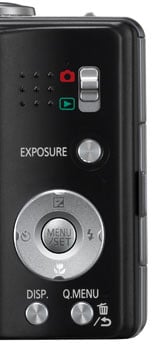 |
Round the back, the TZ18 / ZS8’s controls exactly mirror the TZ20 / ZS10. A four-way rocker provides access to the most common adjustments: push up to set exposure compensation, push right for flash options, push down to set the Macro mode and left to adjust the self-timer. Below this are two buttons which cycle through the Display options and fire-up the super-imposed Q.Menu. Above and to the right you’ll find the Exposure button offering the same control of aperture and shutter speed in the relevant modes.
 |
In the top right corner Panasonic has chosen to stick with a switch to set the camera between record and play – and our opinion of it remains unchanged. We’d prefer to have a play button instead as a prolonged press and hold could power the camera straight into playback, while a half-press of the shutter release could exit into record mode. Unfortunately as it stands, it’s easy to leave the switch set to play, then miss a spontaneous photo opportunity as a result – we found ourselves regularly powering-up the camera only to wonder for a few seconds why the screen showed a previous photo rather than a live image even with a press of the shutter. This approach feels less intuitive to us, although becomes more familiar over time. It is however revealing to see Panasonic gradually adopting the Play button approach of its rivals in this regard with models like the Lumix LX5.
In your hands, the TZ18 / ZS8, like the identically-sized TZ20 / ZS10, remains a relatively chunky compact that’s better suited to trouser and coat pockets rather than the one on the front of a shirt. It’s important to put this in perspective though, as there’s plenty of compacts which share similar dimensions yet have zoom ranges three to four times lower; indeed passers-by will still give the camera a double-take when you tell them it has a 16x optical zoom.
The build quality, like previous Lumix compacts, is excellent. The metal body feels confidently solid with no creaks or poor joins. As before, the camera bulges on the right side to provide a grip. This has been subtly reshaped on the TZ18 / ZS8 from its predecessor, but still forces the tips of your right fingers to press up against a relatively slippery surface, although the bulge of the grip itself and the raised dots on the rear for your thumb still allow you to hold the camera pretty securely; and if your thumb does accidentally stray onto the screen, it won’t inadvertently change the AF area, which can be a problem with the TZ20 / ZS10.
Unlike the four colour options of the TZ20 / ZS10, the TZ18 / ZS8 is only available in either silver or black. Since both models shares the same dimensions and control layout though, they can both use the same DMW-MCTZ20 underwater casing which protects the cameras to depths of up to 40m.
With essentially the same body as the TZ20 / ZS10, it’s not surprising to find the Lumix TZ18 / ZS8 powered by the same battery: the DMW-BCG10E, which coincidentally was also employed by each model’s predecessors. The quoted number of pictures under CIPA conditions is however quite different, with the TZ18 / ZS8 squeezing 340 pictures per charge compared to a relatively modest 260 on the TZ20 / ZS10, presumably due to the combination of a CMOS sensor and touch-screen display on the pricier model, since CIPA doesn’t take measurements with GPS active. As always Panasonic warns of using third-party batteries from non-certified companies, but doesn’t explicitly say whether the TZ18 / ZS8 will automatically block them or not. We didn’t have access to any third-party batteries so can’t comment on their compatibility. Either way, the TZ18 / ZS8’s longer battery life is an advantage it has over its higher-end counterpart.
The battery compartment also houses an SD memory card slot, and alongside the door, gratifyingly near the centre of the body, is a metal tripod thread. The TZ18 / ZS8 is compatible with the SDXC format to support cards bigger than 32GB. You’ll need a card rated at Class 6 or higher to support the Motion JPEG HD video mode. We used a Lexar Professional 16GB SDHC 133x model in our tests which is rated as Class 10 and worked fine. SanDisk’s Ultra III and Extreme cards are also rated as Class 6, so should be a great match for the TZ18 / ZS8; note the cheaper Ultra II cards are only Class 4, so while fine for still photography, will be too slow to support the Motion JPEG HD recording. See the movie section below for further details.
Behind a small flap on the right side of the body is the TZ18 / ZS8’s only port: a combined AV / USB socket. Unlike the TZ20 / ZS10, there’s no HDMI port here.
Panasonic Lumix DMC-TZ18 / ZS8 lens and stabilisation
The headline feature of the Lumix TZ18 / ZS8 is its 16x super-zoom lens, which it shares with the pricier TZ20 / ZS10. After two earlier generations sharing the same 12x range, Panasonic has chosen to upgrade its 2011 TZ duo with a broader 16x range. Yes, broader, not just longer: the new lens features a 24-384mm equivalent range, making it fractionally wider and noticeably longer than the 25-300mm of its predecessor. This is a very welcome extension to the range, and allows you to easily capture expansive views at one moment, before zooming-in to grab distant detail in the next. It’s a powerful and compelling range to have at your disposal in a pocketable camera.
The closest focusing distance remains 3cm. You can see an example of the coverage below, and further examples of how you can use it in our Sample Images Gallery.
Panasonic Lumix DMC-TZ18 / ZS8 coverage wide | Panasonic Lumix DMC-TZ18 / ZS8 coverage tele | |
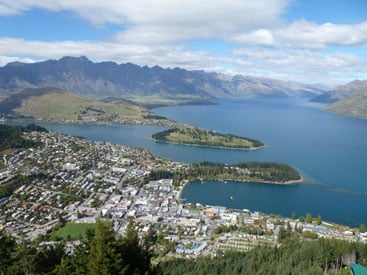 | 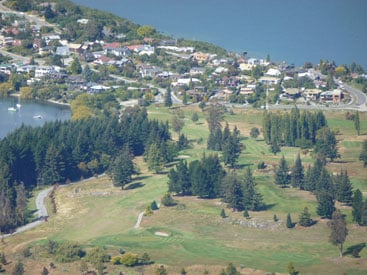 | |
| 4.3-68.8mm at 4.3mm (24mm equivalent) | 4.3-68.8mm at 68.8mm (384mm equivalent) |
The TZ18 / ZS8’s 16x range sits jointly at the top of the current crop of compact super-zooms. Along with the TZ20 / ZS10, Sony’s Cyber-shot DSC-HX9 shares exactly the same 16x / 24-384mm range, although the cheaper Cyber-shot HX7 has stuck with the same 10x / 25-250mm range of the earlier HX5. Meanwhile Canon also felt the 14x / 28-392mm range of its earlier SX210 IS was perfectly sufficient for its SX220 HS / SX230 HS models.
So Panasonic and Sony have taken a joint lead in compact super-zoom ranges, sharing a massive and very useful 24-384mm zoom. Technically Canon’s lens zooms 8mm longer at the telephoto end, but this is barely noticeable in practice. However at the wide end, the 4mm advantage of the Panasonic and Sony ranges makes a significant difference in coverage, capturing a significantly wider area.
The lens extends upon power-up with the camera showing an image in just under two seconds, and responding to controls a fraction later – it’s not the quickest by any means, but rarely holds you back. A rocker around the shutter release operates the dual-speed zoom with 40 steps between wide and telephoto, and little if any lurching between them. Push the rocker gently and the TZ18 / ZS8 will take about six seconds to zoom from full wide to tele, while a full push will do it in around three. Note to minimise the sound of the zoom motor while filming, there’s only one speed offered once you start recording and it takes a leisurely nine seconds or so to complete the full range; see more details in our movie mode section below. You can alternatively zoom the lens at either speed using touch-screen controls, or immediately go to the wide or telephoto extremes of the range.
Panasonic Lumix DMC-TZ18 / ZS8 Image Stabilisation off / on | ||
 | 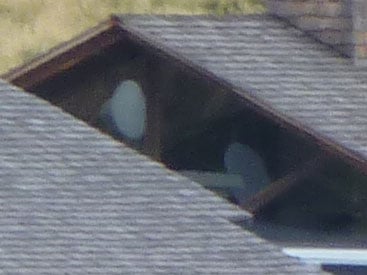 | |
100% crop, 4.3-68.8mm at 68.8mm, 1/30, 100 ISO, IS off | 100% crop, 4.3-68.8mm at 68.8mm, 1/30, 100 ISO, IS on | |
Like all Panasonic cameras, the Lumix TZ18 / ZS8 employs optical image stabilisation – that’s pretty essential on a compact with a minimal grip and a 384mm equivalent telephoto. Like its predecessor, the TZ18 / ZS8 employs Panasonic’s latest Power OIS system, claiming up to four stops of compensation. Unlike its predecessor though, you no longer have the choice of stabilisation modes: on the TZ18 / ZS8 it’s either on or off.
Above are examples taken with and without stabilisation using the Lumix TZ18 / ZS8 fully zoomed-into its maximum equivalent of 384mm, and at a shutter speed of 1/30. Traditional photographic advice would recommend a shutter speed of at least 1/384 to eliminate camera shake, but the stabilised TZ18 / ZS8 allowed us to capture sharp handheld shots at 1/30 or even slightly below. In contrast under the same conditions we required 1/160 without stabilisation to achieve the same degree of sharpness; this corresponds to around three stops of compensation. It’s a pretty impressive capability, and makes the long telephoto reach of the camera perfectly usable, although remember like all stabilisation systems it’ll only iron-out wobbles, not freeze a subject in motion.
Panasonic Lumix DMC-TZ18 / ZS8 screen and menus
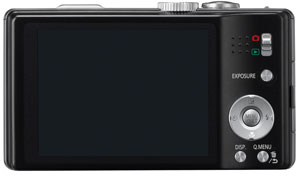 |
The rear surface of the Lumix TZ18 / ZS8 is dominated by its 3in screen. This is gratifyingly larger than the 2.7in screen of its predecessor, although the resolution remains an average 230k pixels. This is a specification where the higher-end TZ20 / ZS10 enjoys a larger gap, as it’s not only more detailed with 460k pixels, but now touch-sensitive too.
As we discovered in our review of the TZ20 / ZS10, the touch-control experience could often prove inconsistent, but there were times when it worked well, such as being able to tap the area you’d like the camera to focus on.
As for the TZ18 / ZS8’s screen, it looks fine in use, although like most becomes hard to see with direct sunlight shining on it. A Power LCD Mode offers a boost if desired, and there’s an auto option which can switch between Normal and Power modes. Unlike the TZ20 / ZS10, the TZ18 / ZS8 also offers the High Angle option from some previous models which adjusts the screen brightness to become more visible with the camera held above your head. In practice this helps a little, but you’ll still be composing with a fairly washed-out image.
At this point it’s also worth mentioning the screens of the competition, all of which employ 3in panels, but with quite different specifications. As mentioned above, the Lumix TZ20 / ZS10 features a 3in screen with 460k pixels and touch-sensitive controls; indeed it’s the only one of the current crop with a touch-sensitive screen. Sony’s opted to equip its Cyber-shot HX7 and HX9 with higher resolution 3in 921k panels for a more detailed view, while Canon has matched the 460k resolution of the Panasonic, but with a wider 16:9 aspect ratio that’s ideal for filming HD video, but significantly cropped when shooting or playing 4:3 shaped images.
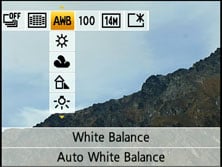 |
Like previous Panasonic models, the TZ18 / ZS8 offers quick access to common shooting options via a drop-down menu that’s super-imposed along the top of the screen when you press the Q.Menu button. Pressing the left and right buttons highlight particular headings, after which you use the up and down buttons to select the desired option from a drop-down list. Depending on the shooting mode, this allows you to quickly and easily adjust aspects like the burst and AF modes, White Balance, Sensitivity, Quality and LCD mode.
The direction buttons double-up outside of the Q.Menu to offer direct adjustments over the exposure compensation (and bracketing), flash, self-timer and macro modes.
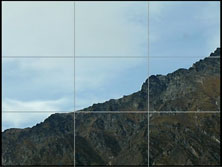
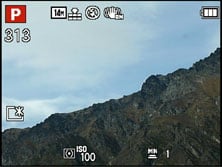
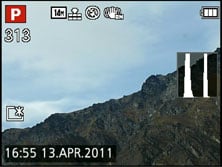
While shooting, the Display button switches between three modes: a clean view of the image, one with alignment guides (switchable between a grid and a cross), and shooting information. A live histogram can also be enabled in the Setup menus if desired.
 |  |  |
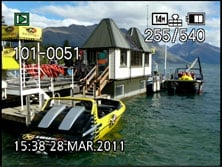 | 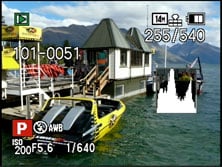 |
During playback, the DISP button cycles between a clean view and ones with basic details or exposure information, the latter including a brightness histogram if it’s been enabled in the menus. Sadly unlike Canon’s compacts, the TZ18 / ZS8 still doesn’t employ its orientation sensors to automatically rotate portrait images to fill the screen when the camera’s turned to the side during playback. You can however make slideshows based on user-defined categories, or perform tweaks in playback including fine rotation.
Panasonic Lumix DMC-TZ18 / ZS8 exposure modes
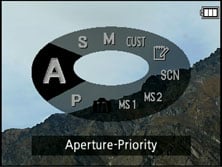
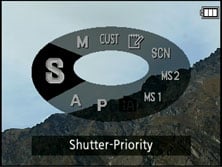
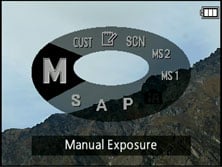
Like the higher-end TZ20 / ZS10, the Lumix TZ18 / ZS8 offers a wealth of shooting options via the main mode dial and a selection of on-screen sub-menus. Impressively, these include full manual control over exposures. While manual exposure control on a compact lacks the impact of a DSLR (at least when it comes to depth-of-field anyway), it can be useful in other areas which we’ll discuss in a moment.
 |  |  |
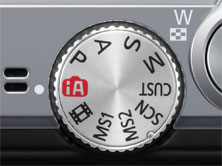 |
The TZ18 / ZS8 inherits all but one of the mode dial settings from the pricier TZ20 / ZS10, including Program, Manual, Aperture and Shutter Priority, along with a newly enhanced Intelligent Auto. The only option missing here is the TZ20 / ZS10’s 3D option, replaced by the Movie Mode on the TZ18 / ZS8.
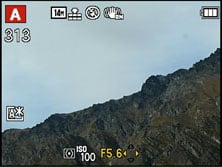
Since the lens is the same as that on the TZ20 / ZS10, the aperture settings are also identical: the TZ18 / ZS8 offers seven aperture settings (when zoomed-out) and the ability to adjust them in Aperture Priority or Manual modes. Switch to Shutter Priority and you can choose from exposures between 1/4000 and 8 seconds, with Manual further extending the maximum to an impressive 60 seconds. To make changes to the aperture or shutter, just press the Exposure button on the back of the camera, and then use the cross-keys to adjust the setting highlighted in yellow at the bottom of the screen. Unlike some earlier models, there doesn’t appear to be any restriction over shutter and aperture combinations, so it is possible to use the maximum aperture of f3.3 with the fastest shutter speed of 1/4000.
 | 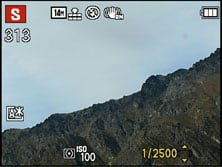 | 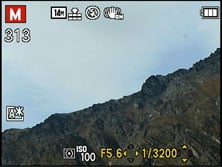 |
Like most compacts though, there are caveats involving the usefulness of manual exposure control. Most notably, the inherently large depth-of-field in most compacts, including this one, means it’s hard to achieve a blurred background on portraits even with the aperture wide open. Your best bet is to zoom all the way-in, position the subject close and the background as far away as possible. Macro shots allow a shallower depth-of-field, but neither these nor portraits will come close to the blurred background effect you can enjoy with a DSLR or a mirrorless ‘EVIL’ camera.
To illustrate the depth-of-field control of the Lumix TZ18 / ZS8 in a macro environment, we photographed a still-life arrangement in a cafe and focused on the front edge of the menu on the left; this was positioned approximately 5cm from the camera, with the lens set to its widest focal length of 4.3mm (24mm equivalent). We chose to shoot this composition with the lens zoomed-out in order to access the maximum range of apertures from f3.3 to f6.3.
As you can see below, there’s only a minor difference between the two images shot with the aperture wide open and fully closed when viewed at a reduced size. We tried several other compositions at a variety of focal lengths and distances in an attempt to maximise the depth-of-field effect, but the example below remained the most effective. The bottom line is while the minor change in depth-of-field does indeed confirm the presence of a physical iris, it ultimately has minimal impact on the visible depth-of-field in practice. The best you can hope for is in extreme macro situations like here. A handful of specialist compacts sporting f2 apertures or faster enjoy greater control over depth-of-field, but again it’s nowhere near the blurring effect that’s possible on a DSLR or EVIL camera. The bottom line is if you really want a significantly blurred background, you’ll either need to go for a DSLR / EVIL compact, or consider digital blurring.
Panasonic Lumix DMC-TZ18 / ZS8: Depth-of-field in Aperture Priority | ||
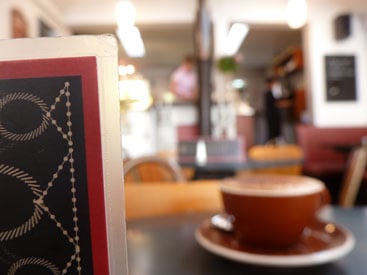 | 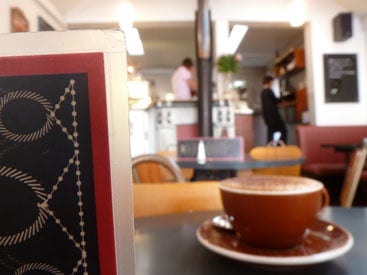 | |
| Aperture Priority: f3.3, 4.3-68.8mm at 4.3mm (24mm equivalent) | Aperture Priority: f6.3, 4.3-68.8mm at 4.3mm (24mm equivalent) | |
On a more positive note though, Aperture Priority does allow you to select the optimum f-number to avoid diffraction, although we’re pleased to report the TZ18 / ZS8 in Program or iA modes tends to automatically select the best setting. Shutter Priority also lets you choose deliberately slower-than-normal exposures to blur moving action, such as waterfalls or racing vehicles. You can find out how to achieve these effects in our Blurring Action and Photographing Water tutorials. Meanwhile, full Manual lets you choose combinations of aperture and shutter which go way beyond normal metering or compensation ranges, allowing you to achieve massive under or over-exposures. You can also choose very long exposures with ease. So while the presence of Aperture Priority doesn’t guarantee portraits with blurred backgrounds, the provision of manual exposure controls remains a useful feature.
The PASM modes are joined by Intelligent Auto, a pair of MyScene modes, SCN, Custom and the Movie Mode option. The latter continues to be a significant control difference compared to the TZ20 / ZS10. On the TZ20 / ZS10 you can start recording video from any mode by simply pressing the dedicated red record button. In contrast, the TZ18 / ZS8, you’ll need to turn the mode dial to the Movie Mode icon, and press the shutter release to start and stop recording. Note the TZ20 / ZS10 shares the same number of modes on its dial, but in place of the TZ18 / ZS8’s Movie Mode position is a new 3D option, absent on the cheaper model. This mode generates a 3D image by grabbing a series of photos taken while horizontally shifting the camera; the image can then be viewed on a compatible 3D TV over an HDMI cable.
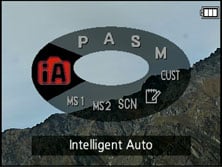 | 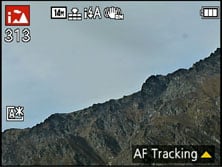 |
Intelligent Auto on the Lumix TZ18 / ZS8 combines Panasonic’s latest technologies to deliver a pretty foolproof experience. Like earlier models, these include Intelligent ISO and Scene Detection which both do a good job of figuring out what you’re trying to take and whether the subject’s in motion. In practice this works very well, with the camera automatically recognising and switching between portraits, landscapes, close-ups, night scenes (with or without people) and sunsets. If Face Recognition is enabled and spots a previously registered under-three year old, it’ll switch to Baby mode. The camera’s also good at detecting motion and increasing the sensitivity if necessary to maintain a quick shutter to avoid blurring – great when photographing unpredictable children, although obviously the quality reduces quickly at higher ISOs.
 |
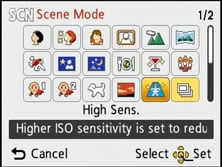 |
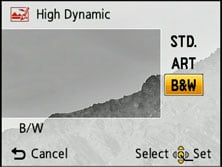
Turning the dial to SCN lets you choose from 29 Scene Presets which include a High Dynamic option. The High Dynamic scene preset simulates the effect of true HDR photography with a single frame, digitally boosting shadow areas while attempting to retain bright highlights; you also have the choice of applying Standard, Art or Black and White effects.
The High Dynamic preset employs the same technique as Intelligent Exposure but with two or three times the effect. This approach is however far from ideal, as significant brightness adjustments to a single exposure normally incurs loss of quality, such as increased noise in those shadow regions. This is further accentuated by the preset operating at a fixed sensitivity of 400 ISO. In use the High Dynamic preset can noticeably boost the shadow areas, albeit with increased noise artefacts when viewed at 100%. As such it’s best-reserved for small prints or emailed photos.
Note the TZ18 / ZS8 is lacking one scene mode found on the higher-end TZ20 / ZS10: the Handheld Night Shot option which combines several exposures taken in a burst into one to reduce noise.
The Lumix TZ18 / ZS8 does however share the Intelligent Resolution (IR) capabilities of the TZ20 / ZS10, which apply greater sharpening to images, and if i.ZOOM is also enabled, allow the camera to digitally extend its zoom from 16x to 20x (strangely a fraction below the 21x of i.ZOOM on the TZ20 / ZS10). To put this to the test, we photographed the same scene fully zoomed-in first with the normal settings, followed by Intelligent Resolution, then with i.ZOOM extending the range.
Panasonic Lumix TZ18 / ZS8 Maximum zoom with IR disabled | Panasonic Lumix TZ18 / ZS8 Maximum zoom with IR and i.ZOOM enabled | |
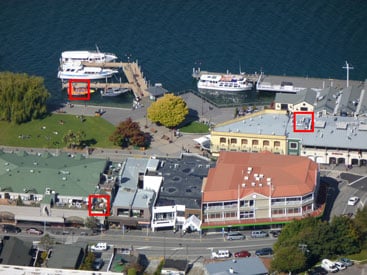 | 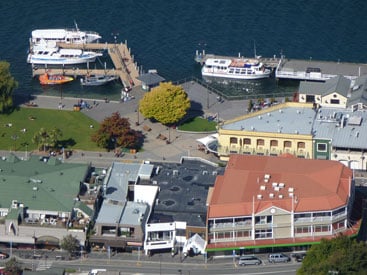 | |
| Uncropped image, 16x, 384mm equivalent | Uncropped image, 20x, 480mm equivalent. |
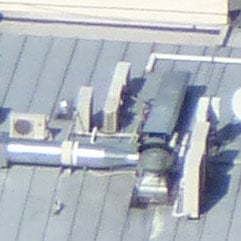
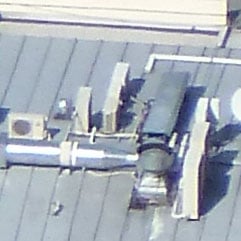
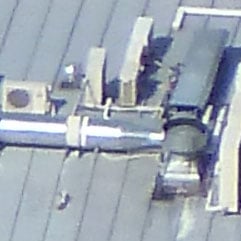
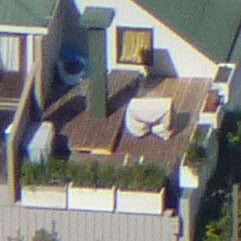
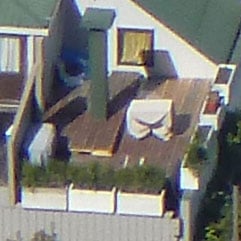
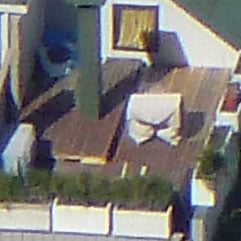
Above left is an image taken at the maximum zoom with IR disabled, while above right shows the image taken at the maximum zoom with IR and i.ZOOM enabled. When viewed at the reduced size above, the latter certainly delivers an effective boost to magnification, but how does it look at 100%? To find out we took three sets of crops with IR disabled, IR enabled, and both IR and i.ZOOM enabled. The cropped areas are marked with red squares in the image above left and pictured below.
TZ18 / ZS8 normal shooting | TZ18 / ZS8 with Intelligent Resolution (IR) | TZ18 / ZS8 with IR and i.ZOOM | ||
 |  |  | ||
 |  |  | ||
 |  |  | ||
100% crop, 4.3-68.8mm at 68.8mm, 100 ISO | 100% crop, 4.3-68.8mm at 68.8mm, 100 ISO | 100% crop, 4.3-68.8mm at 68.8mm, 100 ISO |
Judging from the crops above, Intelligent Resolution has delivered a punchier image than the version without, although edge artefacts have become more obvious. Meanwhile, the version with i.ZOOM just appears to magnify those artefacts at which point the edges become quite rough and jagged; pixel-peepers certainly wouldn’t want to view images taken with i.ZOOM at 100%.
But on the upside, the results above do at least look better than those from the pricier TZ20 / ZS10. The MOS sensor in the latter may support faster continuous shooting and 1080 video, but the photo quality suffered in our tests. Note the TZ20 / ZS10 could also apply i.ZOOM while filming video to extend the range (with less compromise due to the lower resolution frame), but this option was absent on our TZ18 / ZS8.
Panasonic Lumix DMC-TZ18 / ZS8 focusing and face detection
The Lumix TZ18 / ZS8 is equipped with five main AF modes which can be manually selected in the PASM modes, or left to the camera to choose from in auto. First is Face Detection, which can detect and track up to 15 human faces. This now works alongside Face Recognition, which can memorise up to six people (using one to three poses) along with their names and birthdays if desired. Once registered, these faces can have focusing priority over ‘strangers’, and it’s also fun to see their name popup under the tracking frame. If the subject’s age is less than three years old, the camera will also automatically switch to its Baby scene preset in auto modes.
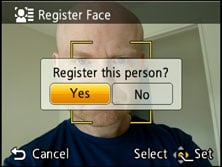 | 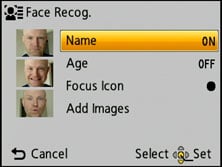 | 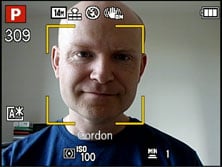 |
In practice it really works too, and is fairly tolerant of accessories like hats, although sunglasses can fool the system. The touch-screen also allows you to simply tap on the face you’d like to give priority.
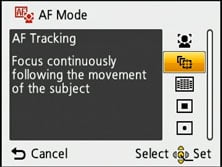
The second AF mode is AF Tracking, which is essentially like face detection for non-human subjects. This allows you to place a target over a subject, after which the TZ18 / ZS8 will track it across the frame and adjust its focus as required. Again, it’s possible to tap on the desired subject using the touch-screen.
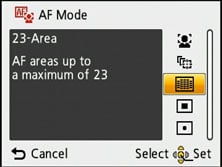
Next up comes the standard 23-area AF system, which the TZ18 / ZS8 defaults to in the absence of recognisable faces in the auto modes. The fourth AF mode is single-area, which as its name suggests, just uses one area for quicker response. The fifth option is spot focusing, which works the same way as single-area, but unsurprisingly with a much smaller square.
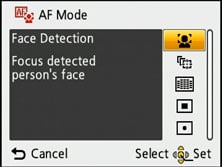 |  |  |
The focusing speed felt roughly the same as the higher-end TZ20 / ZS10, so given reasonable light conditions, it could be reasonably snappy. As mentioned earlier though, the TZ18 / ZS8 misses out on its counterpart’s ability to focus wherever you tap on the screen; not only is this fun, but it allows you to position the single or spot focusing area almost anywhere on the frame on the TZ20 / ZS10, whereas on the TZ18 / ZS8 they remain locked in the middle.
Panasonic Lumix DMC-TZ18 / ZS8 Movie mode
 |
 |
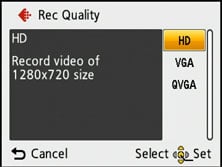 |
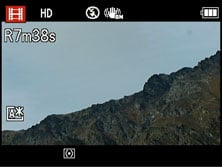
The Lumix TZ18 / ZS8 inherits the movie capabilities of its predecessor and earlier Panasonic compacts. As such, you can record at 320×240 (QVGA), 640×480 (VGA) or 1280×720 (720p) resolution, each encoded at 30fps using the ageing Motion JPEG codec and saved in a QuickTime MOV wrapper.
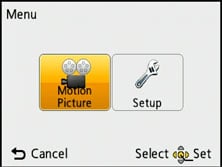
To start filming, you’ll need to turn the mode dial to the filmstrip icon, then press the shutter release button. There’s a built-in mono microphone to record audio, and you can adjust the optical zoom while filming, although there’s no opportunity to take a photo.
The maximum recording time is limited to 15 minutes or a file size of 2GB, whichever happens first. If you’re filming in the 720p HD mode, you’ll hit the 2GB limit after around eight minutes. You can start recording another clip straightaway, but obviously there’ll a gap between them. Panasonic recommends using a Class 6 card or quicker to support the HD mode.
These movie capabilities are pretty basic compared to the higher-end TZ20 / ZS10. That model shares the same three Motion JPEG modes described above, but additionally offers an alternative AVCHD mode at 720p or 1080i resolutions. Not only is 1080i higher resolution than 720p, but the AVCHD codec is more efficient, delivering smaller files. Better still, it also supports longer recording times: set the TZ20 / ZS10 to 1080i AVCHD and it can record for up to half an hour, or for as long as you have memory remaining at 720p AVCHD. The TZ20 / ZS10 also sports a slow motion video mode which drops the resolution to 320×240 pixels at 220fps. These recordings are then played back at 30fps, revealing the action taking place over seven times slower than normal.
To illustrate the difference in quality between 720p Motion JPEG on the TZ18 / ZS8 and 1080i AVCHD on the TZ20 / ZS10, we framed and filmed the same static scene, and took screen grabs from both. We’ve presented 100% crops from each below for comparison.
Panasonic Lumix TZ18 / ZS8 720p Motion JPEG crop | Panasonic Lumix TZ20 / ZS10 1080i AVCHD crop | |
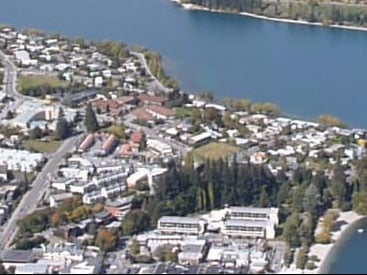 | 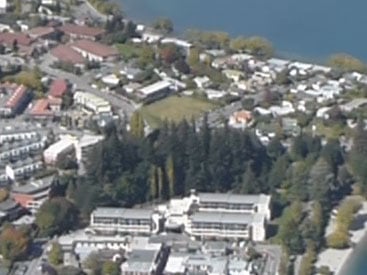 | |
| 100% crop from 720p image | 100% crop from 1080i image |
Judging from the crops above, the TZ20 / ZS10’s 1080i movie mode is definitely delivering a bigger image with a correspondingly tighter crop, although the actual difference in resolved detail may be smaller than you’d expect. Look closely and there is some finer detail on the TZ20 / ZS10 crop, but it’s pretty subtle. If you look at the white dots on the red roofing towards the far left side of the TZ20 / ZS10 crop, you can see they’re individually resolved, compared to a solid line on the TZ18 / ZS8. This suggests the TZ20 / ZS10’s 1080i mode is doing more than just upscaling a 720p image, but again the difference between them is less than the numbers suggest.
So don’t choose the TZ20 / ZS10 based solely on believing its 1080i mode will comfortably out-resolve the TZ18 / ZS8’s 720p video, but putting this aside, the higher-end model still boasts smaller file sizes, longer recording times, a slow-motion option and avoidance of vertical streaking thanks to its MOS sensor.
But back to the TZ18 / ZS8: here are a selection of sample videos filmed using its best-quality 720p Motion JPEG mode. Registered members of Vimeo can download the original files by clicking the links below each window; these take you to the Vimeo page where the video is hosted and the link to download the actual file can be found under the ‘About this video’ section in the lower right.
| |
|---|---|
|
Our first clip, above, was a handheld pan and zoom with the Lumix TZ18 / ZS8, and as always we started by filming bright reflections on the rippling water. Like all compact cameras with CCD sensors, saturated highlights like these can cause vertical streaks on the image, and these are quite visible at the start of the clip. This is something a model with a (C)MOS sensor, like the pricier TZ20 / ZS10 avoids. The streaking is certainly undesirable, but only you can decide if it’s going to be an issue for you personally. We found it most commonly occurring with sunlight on rippling water or brightly backlit windows in dark rooms, but if you generally avoid these or similar situations, it may not actually be an issue.
Once we moved beyond the rippling water, the clip looks very good. The camera manages to resolve a decent degree of detail, and the image processing delivers a punchier, more contrasty result that the (C)MOS-equipped TZ20 / ZS10 which could look relatively muted in comparison.
Towards the end of the clip we zoomed all the way in and panned around the scene and the stabilisation did a good job of keeping the image pretty steady. The TZ18 / ZS8’s continuous autofocus additionally kept the subject sharp while zooming, with only minor drifting quickly corrected. So vertical streaking aside, a good start for the TZ18 / ZS8.
| |
|---|---|
|
For our second clip, above, we mounted the TZ18 / ZS8 to a tripod and smoothly panned across the scene; note there’s no way to disable the stabilisation while filming, but it doesn’t appear to cause any problems here. As before the image is detailed and fairly punchy, although with arguably a little too much sharpening. This has resulted in some obvious edge artefacts around the mountain ridge while also revealing a little noise, despite very bright conditions.
| |
|---|---|
|
For our third clip, above, we kept the TZ18 / ZS8 mounted to a tripod and tested its full 16x optical zoom range. The image wobbles a little while zooming, but overall the effect is impressive with the camera managing to keep the image focused as the focal length increases. While zooming-out, the focus drifted a little, but again the camera managed to get it back under control before it became obtrusive. Note the TZ18 / ZS8 does not support i.ZOOM while filming, so the maximum range is 16x. The pricier TZ20 / ZS10 does support i.ZOOM while filming, extending the range to 21x with pretty good results. video offer the additional extension to the range.
| |
|---|---|
|
For our final clip, above, we tried the Lumix TZ18 / ZS8 in the dim environment of a bar. Here the noise and processing levels are understandably higher than the outdoor clips, but the result still looks pretty respectable, and there’s only minimal focus drifting too. Note towards the end of the clip, you’ll see a little vertical streaking associated with the brightly backlit windows, but it’s fairly discreet.
It’s revealing to compare this clip with one filmed with the pricier TZ20 / ZS10. The (C)MOS sensor in this model may deliver 1080i video and avoid the vertical streaking, but the actual image itself is noticeably noisier and less saturated than its cheaper counterpart.
Returning to the subject of zooming while filming, the TZ18 / ZS8 slows its motor right down to minimise operational noise, taking a leisurely 11 seconds to go from one end of the range to the other. If you’re filming in absolute silent conditions, you’ll still hear the motor whirring very faintly, but in our outdoor footage it was generally masked by ambient noise levels, with a much bigger issue being the sharp sound if you quickly let go of the spring-loaded zoom rocker. Slowing down the zoom also gives the TZ18 / ZS8 a decent shot at maintaining sharp focus, and as illustrated in the examples above, it does a fairly good job even when zooming all the way in and back out again repeatedly.
The stabilisation also does a good job at ironing out the wobbles while filmimg, although sometimes the image would jump a little sideways when handholding at the longest focal lengths; this is more to do with our own shake though than the TZ18 / ZS8’s ability to counteract it. Note the additional Active Mode of the pricier TZ20 / ZS10 is absent here, although in our tests it proved more susceptible to the sideways jumping, so we rarely used it. Note it is not possible to disable stabilisation while filming, but in our tripod-based tests it didn’t prevent smooth pans.
Panasonic Lumix DMC-TZ18 / ZS8 drive modes
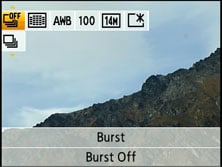
The Lumix TZ18 / ZS8 offers two main continuous shooting options with capabilities which roughly match its predecessor and the earlier TZ10 / ZS7. First up is the burst mode available from the Q.Menu which can capture up to three Fine or five Standard quality JPEGs at a rate of 1.9fps. We fired-off five Standard JPEGs in just over two seconds, corresponding to a slightly faster than quoted 2.2fps, albeit still too slow to get too excited about.
 | 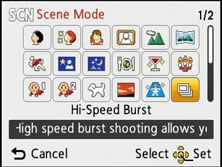 |
Alternatively you can choose the High Speed Burst Scene preset which reduces the resolution to 3, 2.5 or 2 Megapixels (at 4:3, 3:2 / 1:1 and 16:9 aspect ratios respectively) and the compression to Standard, but allows you to shoot up to 100 images at around 5.5fps in Image Priority, or up to 10fps in Speed Priority. Note both modes employ high sensitivities with 800 ISO not uncommon even under bright conditions.
The Normal Burst and High Speed Burst Preset modes both involve compromises, either in speed and depth or resolution respectively. They may be fairly par-for-the-course compared to other CCD-based compacts, but a new breed of (C)MOS-equipped models like the pricier TZ20 / ZS10 support much faster speeds. For example the TZ20 / ZS10 can capture 15 full-sized Fine JPEGs at 10fps, or more if you reduce the speed.
So what can you expect in practice with the TZ18 / ZS8? To find out we photographed Queenstown’s famous Shotover Jet boats in action using the standard burst mode (with standard quality for five shots) and the High Speed Burst preset set to Speed Priority. First here are the five frames captured with the standard burst mode at the camera’s full resolution.
You can clearly see from the sequence above how five frames is insufficient to capture the full rotation unless you waited until the absolute last minute to start taking shots – and remember, this reduces to three frames with Fine compression. Additionally the relatively modest speed means you could easily miss out on key poses in an action sequence. The bottom line is the standard Burst mode isn’t really practical in either speed or buffer depth to capture any kind of serious action.
Panasonic Lumix DMC-TZ18 / ZS8 Burst mode at approx 2.2fps | ||||||||
 |  |  |  |  | ||||
Moving on, the High Speed Burst mode (pictured below) fares much better, at least in terms of speed and depth. At approximately 10fps, the TZ18 / ZS8 has captured many images of the boat zooming past and was happy to keep shooting for some time. From the samples below it’s clearly the preferred choice for shooting action, although remember it’s recording images at a greatly reduced resolution of 3 Megapixels and also at often high sensitivities. As such, the quality when viewed at 100% isn’t anywhere near what you can achieve with the normal Burst mode at the full resolution and lower ISOs. We’ve included samples of both modes for you to view and download in our Gallery.
Either way, the TZ18 / ZS8 remains a far from ideal choice for shooting action if you demand decent quality output. If you want quicker shooting at the full resolution, you’ll need a (C)MOS equipped model like the TZ20 / ZS10.
Panasonic Lumix DMC-TZ18 / ZS8 High Speed Burst preset at approx 10fps | ||||||||
 |  |  |  |  | ||||
 |  |  |  |  | ||||
Finally in terms of self-timer, the TZ18 / ZS8 offers the usual 2 or 10 second modes without any frills. Canon’s recent compacts out-gadget these facilities with customisable self-timer and face timer modes, the latter cleverly exploiting face detection to wait for a new person to enter the frame, smile or wink before starting the countdown.
Panasonic Lumix DMC-TZ18 / ZS8 sensor
 |
 |
 |
The Lumix TZ18 / ZS8 is equipped with a 14.1 Megapixel CCD sensor measuring 1/ 2.33in. This gives the TZ18 / ZS8 two extra Megapixels over its predecessor, allowing you to make prints approximately 1.5in bigger on the diagonal. Note the pricier TZ20 / ZS10 shares the same resolution and sensor size, but switched from CCD to MOS technology to support 1080i video and faster continuous shooting, albeit as we discovered, with reduced photo quality as a result.
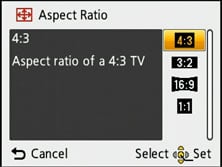
Both the TZ / ZS models offer multiple aspect ratios, but by simply cropping the image, resulting in fewer pixels and a reduced field of view. The multi-aspect ratio of some earlier models like the TZ10 / ZS7 which actually used ‘spare’ pixels around the edge of the sensor to maintain the field of view at different aspect ratios is no longer available.
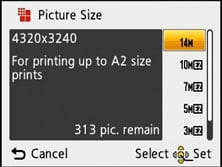
So the maximum quality on both TZ / ZS models is when shooting in the native 4:3 aspect ratio of the sensor, whereupon they deliver images with 4320×3240 pixels. Switch to 3:2 or 16:9 aspect ratios and the image height shrinks to 2880 or 2432 pixels respectively, while an additional 1:1 mode records at 3232×3232 pixels.
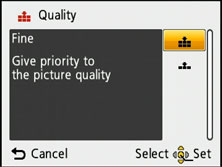
In each aspect ratio on the TZ18 / ZS8, five lower resolutions are available, and JPEGs can be recorded with Fine or Normal compression; no RAW mode is available. Set to 14M Fine mode, images typically measure around 5.5MB each, and Panasonic includes 70MB of internal memory to get you started.
This sounds like a lot more than the 18MB offered by the TZ20 / ZS10 due to the lack of an internal GPS landmark database, but in real terms it still won’t get you many photos and you should fit a card as soon as possible. Once again the camera is compatible with SD, SDHC and the latest SDXC cards, although for a smooth HD movie recording experience go for at least Class 6.
In terms of sensitivity, the TZ18 / ZS8 offers a range from 100 to 1600 ISO at the full resolution, and a High Sensitivity Scene Preset automatically working between 1600 and 6400 ISO – albeit at a greatly reduced resolution of 3.5 Megapixels (in 4:3 mode).
To see how the quality of the Lumix TZ18 / ZS8 measures-up in practice, take a look at our real-life resolution and high ISO noise results pages, browse the sample images gallery, or skip to the chase and head straight for our verdict.