Support Cameralabs by shopping at our partner stores or donating via Paypal
 

Follow me!
Camera Labs RSS Feed
Gordon Laing and Cameralabs on Google+
Camera Labs on Facebook
Camera Labs on Twitter

 
  Latest camera reviews

Olympus E-PM1
Nikon V1
Sony NEX-5N
Canon 100HS / 115HS
Canon 300HS / 220HS
Canon S100
GoPro HD Hero 2
Canon 510HS / 1100HS
Canon 310HS / 230HS
Canon SX150 IS
Olympus E-PL3
Canon SX40 HS
Sony NEX-C3
Panasonic GF3
Fujifilm HS20 EXR
Panasonic FZ150
Olympus E-P3
Panasonic FZ47 / FZ48
Nikon COOLPIX S9100
Sony Cyber-shot HX100V
Sony Cyber-shot HX9V
Panasonic FX77 / FX78
Canon SX230 HS
Canon EOS T3 / 1100D
Panasonic Lumix G3
Sony Cyber-shot TX10
Canon 500HS / 310HS
Nikon D5100
Sony Cyber-shot W510
Nikon COOLPIX L24
Canon PowerShot A1200
Panasonic FS18 / FH5
Canon PowerShot A800
Panasonic TZ18 / ZS8
Canon PowerShot A3300IS
Canon EOS 600D / T3i
Panasonic TZ20 / ZS10
Canon IXUS 1000/SD4500
Sony Alpha SLT-A33
Panasonic Lumix GH2
Nikon D7000
Canon PowerShot G12
Canon PowerShot S95
Panasonic Lumix LX5
Nikon D3100
Canon EOS 60D
Canon EOS 550D / T2i
Canon EOS 7D
Nikon D300s
Canon EOS 5D Mark II
Nikon D90

All reviews ....


  Best Buys: our top models
   
  Best Canon lens
Best Nikkor lens
Best Sony lens
Best budget DSLR
Best mid-range DSLR
Best semi-pro DSLR
Best point and shoot
Best superzoom
Best camera accessories


Camera Labs Forum

Any questions, comments or a great tip to share? Join our Forum and let everyone know.
   
 
  DSLR Tips


Support me by shopping at Amazon!
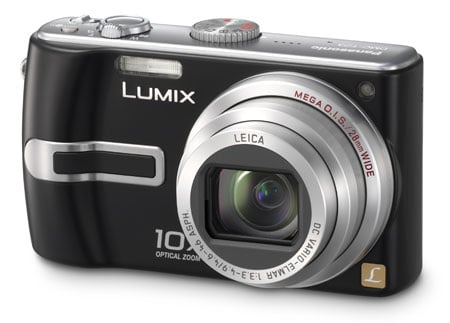
Panasonic Lumix DMC-TZ3 Gordon Laing, May 2007

More Features : Lenses and OIS / Screen and menus / Sensor and processing

Panasonic Lumix DMC-TZ3 sensor and files

The Panasonic Lumix TZ3 may record images with 7.2 Megapixel resolution, thereby offering an additional two over its predecessor, but it’s actually equipped with an 8.5 Megapixel sensor measuring 1/2.35in. This larger sensor allows the TZ3 to capture images with the full lens coverage regardless of the aspect ratio.

Normally if you’re using a camera with a 4:3 shaped sensor and switch to a wider aspect ratio, the camera would simply crop strips from the top and bottom, thereby both reducing the resolution and the angle of view. Not so with the TZ3 which maintains its 7.2 Megapixel resolution on both the 4:3 and 3:2 aspect images and its angle of view on 4:3, 3:2 and wide 16:9 images.

So you’ll still enjoy 28mm wide angle coverage regardless of the aspect ratio. We have an example of this below showing three shots taken from the same spot at 28mm using each of the aspect ratios: from left to right, 4:3, 3:2 and 16:9. The thing to notice is while the wider aspect ratios capture less vertically, they capture more horizontally, thereby maintaining the angle of view.


Panasonic TZ3 aspect ratios at 28mm: from left - 4:3, 3:2, 16:9

Set to 4:3 or 3:2 aspect ratio, the TZ3 records 7.2 Megapixel images with a maximum size of 3072 x 2304 pixels or 3216 x 2144 pixels respectively. Set to 16:9 mode the resolution drops slightly to 6 Megapixels, delivering maximum images of 3328 x 1872 pixels. Lower resolutions for each aspect ratio are also available.

   
Panasonic Lumix DMC-TZ3 - resolution menu Panasonic Lumix DMC-TZ3 - quality menu
   

Two JPEG compression settings are available: Fine and Standard, with Fine images at the 7.2 Megapixel 4:3 mode typically measuring around 3MB each. There’s no RAW option.

The TZ3 actually has slightly less built-in memory than its predecessor: 12.7MB versus 14MB, but neither are sufficient for more than a couple of shots in the best quality anyway, so you should budget for a memory card straightaway. The TZ3 can take SD or MMC cards and supports the SDHC standard for capacities beyond 2GB; SD or SDHC are required for the movie mode.

Support this site by price checking below

Panasonic Lumix TZ3 - silver

Panasonic Lumix DMC-TZ3 exposure and creative options

The Panasonic Lumix TZ3 has shutter speeds from 1/2000 to 8 seconds (up to 60 seconds in a Scene preset) and two aperture settings at its disposal, although there’s little or no means to manually adjust them. By carefully choosing one of the 21 Scene presets and adjusting exposure compensation though you can actually achieve a wide range of creative results.

Panasonic Lumix DMC-TZ3 - scene preset menu


The 21 scene presets, now presented across two pages, consist of Portrait, Soft skin, Self Portrait, Scenery, Sports, Night portrait, Night scenery, Food, Party, Candle light, Baby 1, Baby 2, Pet, Sunset and High Sensitivity on the first page, followed by Starry sky, Fireworks, Beach, Snow, Aerial photo and Underwater on the second.

It’s possible to use some of these to ‘trick’ the TZ3 into using preferred apertures or shutter speeds – for example, Portrait mode will select a small depth of field, while Sports will opt for a fast shutter speed. The Starry sky preset also allows surprisingly long exposures for a compact, offering the choice of 15, 30 or 60 seconds.

Panasonic Lumix DMC-TZ3 - sensitivity menu Panasonic Lumix DMC-TZ3 - ISO limit menu Panasonic Lumix DMC-TZ3 - intelligent ISO menu


The TZ3’s sensitivity ranges between 100 and 1250 ISO, with an ambitious 3200 ISO mode when set to the High Sensitivity preset; unsurprisingly at higher sensitivities the image quality suffers as can be seen in our results pages.

New to the TZ3’s mode dial is an Intelligent ISO setting which detects motion in the frame and can automatically increase the ISO to provide a sufficiently quick shutter speed to freeze it. In practice this works quite well and you can also set an upper limit for the ISO to maintain reasonable quality.

Panasonic Lumix DMC-TZ3 - clipboard Panasonic Lumix DMC-TZ3 - white balance
   

Another new mode for the TZ3 is Clipboard, which captures basic 1 or 2 Megapixel images and stores them in the built-in memory. The idea is to use these for grabbing quick shots of maps or timetables and to have them to hand even if you swap the memory card. It’s a neat idea and arguably more convenient to turn the mode dial than temporarily select a lower resolution to achieve the same effect.

White balance can be set to Automatic, Daylight, Cloudy, Shade, Tungsten or a custom preset calculated by taking a reading from a specific subject.


Panasonic Lumix DMC-TZ3 video mode

With the main mode dial set to the filmstrip icon you can record video clips in the Quicktime Motion JPEG format. The TZ3 can record in conventional 4:3 or widescreen 16:9 aspect ratios and at either 10 or 30fps.

Panasonic Lumix DMC-TZ3 - movie mode
 

Set to 4:3 the video resolution is either VGA 640x480 pixels or QVGA 320x240 pixels, while at 16:9 the TZ3 records a genuine widescreen WVGA mode of 848x480 pixels. Video recording is not supported on MMC memory cards – you’ll need to use SD cards or the built-in memory. Note if you are using the built-in memory though, the video resolution is fixed at 320x240 pixels.

Unlike the earlier TZ1, the optical zoom can’t be used during filming, although stabilisation using Mode 1 is available. You’re looking at about 1.3MB per second of widescreen video at 30fps. The video quality, like other Panasonic cameras, is very good with only a little tearing visible when panning. It’s also nice to switch the TV output aspect ratio to 16:9 and output anamorphic video ready to be stretched out to fill a widescreen TV.


Panasonic Lumix DMC-TZ3 handling

The Panasonic Lumix TZ3 starts-up in about 1.3 seconds, which is a little slower than its predecessor due to the lens now having to extend. The new model feels good in operation though, focusing quickly and responding promptly to the shutter release. When fully zoomed-in, the TZ3 inevitably takes a moment to snap into focus which can be annoying if you’re photographing a constantly moving child or animal, but that’s par for the course with most compacts.

Panasonic Lumix DMC-TZ3 - burst menu


Like its predecessor, the TZ3 has several continuous shooting options: High, Low and Infinity. Set to its fastest ‘High’ mode, it can take up to five best-quality frames at a quoted rate of 3fps. Set to Infinity, it’ll keep taking shots while there’s memory remaining, although the quoted rate falls to around 2fps.

In tests with a SanDisk Ultra II 1GB SD card we set the TZ3 to High mode and fired-off the five frames in just over two seconds, corresponding to a rate of around 2.3fps. Set to Infinity mode the TZ3 indeed seemed happy to keep shooting; we timed 20 frames in nine seconds, corresponding to a rate of just over 2fps.


Panasonic Lumix TZ3 features

Lenses and OIS / Screen and menus / Sensor and processing

If you found this review useful, please support us by shopping below!
All words, images, videos and layout, copyright 2005-2012 Gordon Laing. May not be used without permission.

/ How we test / Best Cameras / Advertising / Camera reviews / Supporting Camera Labs