Support Camera Labs by price checking using the flags below


Follow us!
Camera Labs RSS Feed
Camera Labs on Facebook
Camera Labs on Twitter


Latest camera reviews

Panasonic Lumix TZ10/ZS7
Canon EOS 550D / T2i
Canon PowerShot A3100IS
Olympus 'PEN' E-P2
Nikon COOLPIX S570
Canon IXUS 200 / SD980IS
Canon IXUS 120 / SD940IS
Sony Alpha DSLR-A550
Nikon COOLPIX L20
Canon PowerShot A1100IS
Canon PowerShot S90
Sony Alpha DSLR-A230
Panasonic Lumix GF1
Canon PowerShot G11
Canon IXUS 95 / SD1200IS
Canon EOS 7D
Sony Cyber-shot DSC-H20
Nikon D3000
Canon PowerShot SX120IS
Panasonic Lumix TS1 / FT1
Canon PowerShot D10
Canon PowerShot SX20 IS
Nikon D300s
Panasonic Lumix FZ38 / 35
Sony Alpha DSLR-A380
Sony Cyber-shot HX1
Nikon D5000
Nikon COOLPIX P90
Canon IXUS 100 / SD780IS
Panasonic Lumix TZ7 / ZS3
Canon PowerShot SX1 IS
Canon EOS 5D Mark II
Canon EOS 50D
Nikon D90
Canon EOS 1000D / XS

All reviews ....
   
 
  Best Buys: our top models
   
  Canon lenses
Nikkor lenses
Sony lenses
Budget DSLRs
Mid-range DSLRs
Semi-pro DSLRs
Point-and-shoot compacts
Superzoom / top compacts
Camera accessories


Camera Labs Forum

Any questions, comments or a great tip to share? Join our Forum and let everyone know.
   
 
  DSLR Tips


Panasonic Lumix DMC-TZ3 Gordon Laing, May 2007


Panasonic Lumix TZ3 design and build quality

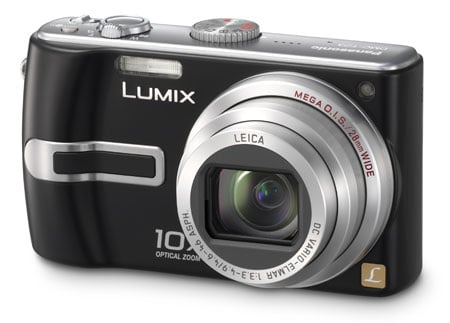
Like its predecessor, the Lumix TZ3 is a fairly plain-looking compact which gives few clues to the powerful 10x optical zoom lens housed within. Again like the earlier TZ1, the new TZ3 is available in black, silver or blue, although all three variations may not be sold in every region.

Panasonic Lumix TZ3 - front view
 

At first glance the Lumix TZ3 appears pretty similar to the TZ1, but place them side by side and you’ll notice the new model is slightly smaller. Most notably the relatively large grip of the TZ1 has slimmed down on the TZ3, with the benefit of the camera being more pocketable, albeit not something you’d slip into a shirt pocket. A slim horizontal strip on the front of the TZ3 along with a thumb rest on the rear allow you to grip it reasonably steady, although at longer focal lengths you should certainly use both hands – even with the TZ3’s stabilisation.

 
Panasonic Lumix TZ3 - top view
 
 
Support this site by price checking below

Panasonic TZ3 - blue


Following earlier Panasonic compacts there’s absolutely no complaints with the TZ3’s build quality. It feels very sturdy in your hands with smooth joins and absolutely no creaks, while the stainless steel exterior lends an air of confidence.

Like the TZ1, the upper surface houses the main controls. The mode dial now features three additional options, although there’s still no manual mode nor any way to select specific apertures or shutter speeds. The TZ3, like its predecessor, is pretty much automatic only, although careful use of exposure compensation and scene presets allow a reasonable degree of creativity.

Panasonic Lumix TZ3 - mode dial  

The TZ3’s mode dial switches between Auto, Macro, Movie, Print, Clipboard, two programmable Scene selections (from a choice of 21 presets), Simple Mode, Playback and Intelligent ISO mode. The Print, Clipboard and Intelligent ISO setting are new to the TZ3 and we’ll describe these and the full exposure details in our Features pages.

The shutter release button is housed within a circular zoom rocker and alongside are a button to adjust the Optical Image Stabilisation mode and an on / off switch.

Panasonic Lumix TZ3 - rear controls
 

The rest of the controls are concentrated in the lower right corner on the rear of the camera. Four buttons arranged like a joypad are used to navigate menu options, scroll across images during magnified playback, or select various options during shooting. A button in the middle of these four brings up the main menu system or confirms settings.

Pressing the top of the four buttons while shooting presents the exposure compensation settings, offering the traditional +/-2EV range for darkening or brightening exposures. Pressing the bottom button shows the last image taken (or viewed during playback), and like playback mode, you can magnify using the zoom lever.

 
Panasonic Lumix TZ3 - exposure compensation menu  


Pressing the left button lets you choose between a 10 or two second self-timer, while pressing the right button cycles through the five options for the built-in flash: Auto, Auto with red-eye reduction, Forced on (with optional red-eye reduction if you’re using the Party or Candle Light scene presets), Slow sync with red-eye reduction and Forced off.

  Panasonic Lumix TZ3 - flash menu

Below the main group are two further buttons: one dedicated to display options and the other used to delete images or fire-up the TZ3’s quick access menu, a great feature inherited from Panasonic’s higher-end LX and FZ range. We’ll describe all of these in the Features pages.


Connectivity and battery

A single small door on the right side of the body opens to reveal DC-in and a combined USB / video out port. A larger door under the grip side of the body houses the battery and memory card.

The Lumix TZ3 is powered by a CGA-S007E 1000mAh Lithium Ion battery pack and the camera is supplied with a mains recharger. Panasonic claims each charge is good for 260 shots under CIPA conditions. This seems slightly optimistic though as during our test periods we generally managed to fire off closer to 100 shots with stabilisation before the battery needed recharging. Investing in a spare would be advisable.


Support this site by checking prices below or shopping via our affiliate stores


USA readers


UK readers
Jessops discount voucher
All words, images, videos and layout, copyright 2005-2010 Gordon Laing. May not be used without permission.

About Us / How we test / Best Buys / Advertising / Home