Olympus E-PL2
-
-
Written by Gordon Laing
Intro
Launched in January 2011, the Olympus E-PL2 is the latest addition to the ‘PEN’ stable of mirrorless interchangable lens, or ‘EVIL’ (Electronic Viewfinder, Interchangeable Lens) cameras. Rather than replacing the E-PL1, the new model sits above it in the Olympus Micro Four Thirds PEN line up, beneath the E-P2.
The E-PL2 has the same 12.3 Megapixel sensor as the E-PL1, but a larger and more detailed 460k / 3 inch LCD screen. And where the E-PL1 was button-only operation, the E-PL2 gets a rear panel control dial. Other hardware changes include a new battery design and compatibility with the USB remote shutter release as well as the expanding range of accessories designed to fit the accessory port behind and below the hotshoe. Possibly in response to criticisms of the E-PL1’s poor dynamic range at 100 ISO, the sensitivity on the E-PL2 starts at 200 ISO and extends to 6400 ISO. The range of ART filters has been updated and they can now also be customised.
Aside from the camera itself, Olympus has also launched a redesigned M.Zuiko Digital 14-42mm f3.5 – 5.6 II kit lens which is more compact than its predecessor when extended, has faster and quieter AF, and is a better all-round performer particularly well-suited to movie shooting. While many people will opt for a more compact pancake prime, such as the M.Zuiko Digital 17mm f2.8, the new 14-42mm kit lens provides a compelling reason to forsake compactness for focal length versatility, especially for videographers. Read on to find out how the latest Olympus PEN compares against Panasonic’s Lumix GF2 and Sony’s NEX-3!
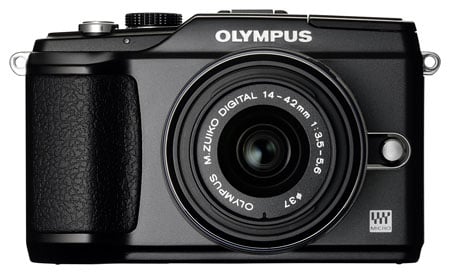 |
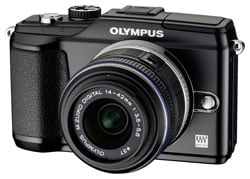
The E-PL2 body measures 115 x 73 x 42mm and without a lens attached or battery fitted weighs 317 grams. Pop the battery in and add the 17mm f2.8 pancake prime and the weight comes up to 432g. To put that into context, Canon’s high end PowerShot G12 compact weighs 401g, albeit featuring a built-in 5x zoom. Another comparison worth making is with the Panasonic Lumix GF2 which is not only a little smaller, but lighter, weighing only 265g without the battery or a lens attached.
The E-PL2 doesn’t depart radically from the styling of the E-PL1, though there is one major difference and that’s the addition of a control dial on the rear panel similar to that on the E-P1 and E-P2. It also has a bigger 3 inch LCD screen with 460k pixels.
Though the retro styling gives the E-PL2 a boxy look, it’s a surprisingly comfortable camera to hold. At 42mm it’s not the slimmest of EVIL camera bodies, but the extra width and restyled front grip provides a secure purchase for your right hand. Even with the comparatively large 14-42 kit zoom attached, it doesn’t feel natural to support the camera SLR-style from below with your left hand. It’s more comfortable to operate the zoom (or the focus ring when focusing manually) with your index finger on top and thumb on the bottom of the zoom ring where you can leave them while shooting or move your left hand to the left side of the body for extra support. And this is the natural position to adopt with any of the fixed focal length lenses.
Your right index finger rests naturally on the slightly larger shutter release, behind which is the recessed on/off switch. A pinhead sized blue LED illuminates when the camera is switched on. In addition to the PASM modes, the mode dial has iAuto, movie, SCN and ART positions, the latter two providing a menu from which further selections can be made.
 |
All the top panel controls are neatly positioned on the recessed right side. The surface then slopes upward, levelling off to accommodate the hot shoe and behind it the updated PEN accessory port which supports the optional viewfinders, the MAL-1 macro light and Penpal PP-1 Bluetooth transmitter. The mono mic is positioned to the right of the hotshoe, at the point where the top panel levels off. On the extreme left is the pop-up flash, activated by a mechanical switch on the rear. The top surface is finished in the same textured plastic as the hand grip and, like everything about the E-PL2, is evocative of the kind of quality that’s more often associated with the analogue era.
|

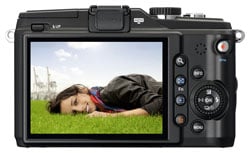
The back panel controls have undergone a re-arrangement of the layout used on the E-PL1 which improves the handling as well as making space for the larger 3 inch LCD screen and adding an E-P2-style control wheel. The zoom, multi-view, playback and erase buttons are arranged in a single column immediately to the right of the screen with info and menu buttons arranged above and below the control wheel further to the right. Finally in the top right corner conveniently situated below where your thumb rests is the dedicated movie record button. This button, like the multi-view button can be re-assigned to one of a number of custom functions. If you do that, though, you need to switch to movie mode before you can shoot Video. A hinged flap on the right of the camera body reveals a mini HDMI port and USB / A/V out port; the E-PL2’s USB port is compatible with the RM-UC1 remote release.
The camera’s metal tripod bush is located slightly to the right of centre on the bottom panel which means the lens mount is mostly to the left of it. It nonetheless provides a pretty stable base for a tripod. Alongside it on the right is the battery and memory card compartment, the latter supporting SD (HC and XC) formats, with Class 6 recommended to support HD movies and burst shooting.
That the E-PL2 has a built-in flash is taken by many a sign that this is a ‘step up’ camera – aimed at high-end compact owners looking to move up a notch in terms of control and versatility. Neither of the two cameras that sit above the E-PL2 in the PEN range has a built in flash and nor does Sony’s NEX-5/3, but the Lumix GF2 does.
The flash itself is an impressive and handsome piece of engineering. Expertly concealed in the top left corner of the camera body it’s mechanically activated by a small sliding switch at the rear. A double-hinged mechanism elevates it both upwards and forwards raising it well clear of the lens and reducing the potential for red-eye and vignetting.
The flash has a quoted guide number of 10 at 200 ISO. Dividing that by the E-PL2 14-42mm kit lens’ maximum aperture of f3.5 gives a maximum flash distance of 2.82 metres. That may not seem like a hugely powerful flash, and it isn’t, but it is comparable with many recent compacts (manufacturers of which are fond of quoting maximum flash distances at higher ISO settings). It’s fine for reasonably close subjects and, of course, the E-PL2 has a hot shoe which means you can mount an external flash, or use the built-in one to remote trigger models such as the Olympus FL36R
The BLS-5 Lithium Ion battery is newly designed for the E-PL2 and provides enough power for 280 shots using the CIPA (Camera Imaging Products Association) standard. It’s charged outside the camera in the supplied charger and remaining power is indicated on the screen with a three segment battery icon.
Olympus E-PL2 with 14-42mm f3.5-5.6 coverage wide |
Olympus E-PL2 with 14-42mm f3.5-5.6 coverage tele | |
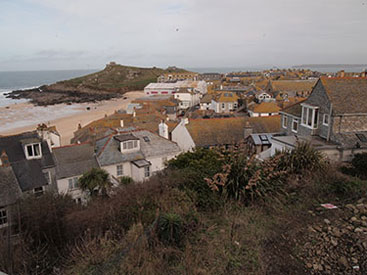 | 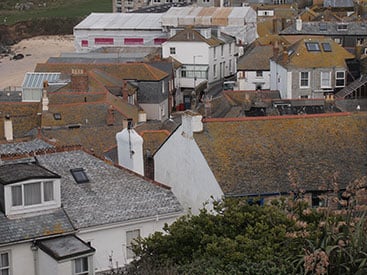 | |
| 14-42mm at 14mm (28mm equivalent) | 14-42mm at 42mm (84mm equivalent) |
We tested the E-PL2 with the redesigned M.ZUIKO Digital ED 14-42mm f3.5-5.6 Mark II kit zoom lens. Like the original Mark I version, this lens features a clever collapsible mechanism which allows it to shrink considerably when not in use. As before, a sliding catch on the zoom ring allows rotation beyond the 14mm stop which completely retracts the extending barrel into the main housing. If you switch the camera on with the lens in this retracted configuration a message is displayed on the screen and you simply rotate the barrel past the locking catch into the normal use range. It’s simple, elegant and it works.
The Mark II lens is actually a little larger than its predecessor when both are retracted for transportation, but the new model remains much more compact than the kit zooms on rival models. Extend both the new and old Olympus kit zooms for operation though and you’ll find the new one is a bit smaller, not to mention lighter too. Crucially the focusing on the new model is quicker and quieter than its predecessor, which adds up to a decent upgrade overall. Fit the new lens on the E-PL1 and you’ll enjoy the same benefits.
The ‘crop factor’ on the micro Four Thirds lens system is 2, so the 35mm equivalent focal length of this lens is 28-84mm – a 3x optical zoom range which takes you from wide angle to a short portrait telephoto. The MSC designation on the barrel stands for ‘Movie and Still Compatible’. Olympus claims that this lens is faster focussing and quieter than the one it replaces and in autofocus modes modes it certainly feels extremely quick and positive. Using the lens in C-AF mode while shooting movies the near silent focussing means there’s none of the distracting whirring and buzzing that frequently mars the audio on many compacts and SLRs.
The extending lens barrel is equipped with a bayonet mount that accepts a lens hood or one of three adapter lenses for macro, fish eye and wide angle shooting. The wide angle adapter converts the 14-42mm range to 11-22mm (22-44mm equiv.) and the macro adapter brings the close focussing distance in to 24cm with a 0.28x magnification factor. If you’re a fan of circular polarisers you’ll be pleased to know that the front section of the lens has a 37mm filter thread and doesn’t rotate when focused.
One of the big advantages of the micro Four thirds system is of course the range of interchangeable lenses. Those for whom the main appeal of EVIL cameras lies in their relative compactness might prefer to opt for a prime lens. As well as less bulk, the Zuiko 17mm f2.8 pancake prime offers a wider maximum aperture than the kit zoom, is about half as long when collapsed and much smaller when extended and, at 71g weighs about a third less. With the 17mm f2.8 prime attached, the E-PL2 is just about coat-pocketable. Other zoom lenses in the range include a 40-150mm f4-5.6, 75-300mm f4.8-6.7, and a 9-18mm f4-5.6 ultra wide angle zoom. You can of course also mount micro Four Thirds lenses from third parties, including a number of tempting options from Panasonic, including a 20mm f1.7 pancake, although you may find some focusing restrictions.
>
Olympus ‘PEN’ E-PL2 image stabiliser off/on | ||||
 |  | |||
100% crop, 14-42mm at 42mm, 1/15, 200 ISO, Shutter priority mode, image stabiliser off. |
100% crop, 14-42mm at 42mm, 1/15, 200 ISO, Shutter priority mode, image stabiliser on. | |||
The E-PL2 has built-in sensor-shift image stabilisation. The one obvious advantage of incorporating stabilization in the camera body is that you can take advantage of it regardless of the lens you’re using. If you’re thinking of buying an EVIL camera as a compact alternative to your dSLR, the ability to use your current lenses with an adaptor and still be able to take advantage of image stabilisation is a significant advantage that the E-PL2 has over the Sony NEX and Panasonic Lumix models.
The E-PL2’s stabilisation has three modes – 1, 2 and 3. Mode 1 applies stabilisation in both horizontal and vertical planes, while modes 2 and 3 only stabilise in the vertical and horizontal planes respectively, allowing you to pan with the camera in either landscape or portrait orientation.
To test the Olympus E-PL2’s image stabilisation with the 14-42mm f3.5-5.6 II kit zoom we took a series of hand-held shots using a range of shutter speeds with the camera set to shutter priority mode. The sensitivity was manually set to 200 ISO and the lens was set to its maximum focal length of 42mm (84mm equivalent). At this focal length the photographer’s rule of thumb would suggest a minimum shutter speed of 1/84 to avoid camera shake.
The crops above are taken from images shot at 1/15 with image stabilisation turned off (left) and set to mode 1 which enables it in both vertical and horizontal planes. The crop on the right is a tiny bit soft, but just about acceptable, which means that in our tests the E-PL2 manages between two and three stops of image stabilization.
 |
Like other mirrorless cameras and conventional compacts, the E-PL2 relies on contrast-based auto focusing. There are five focus modes in all. Single AF, Continuous AF, Manual focus, AF tracking and single AF with manual fine-tuning.
All of the autofocus modes use an 11-area system which is located in the centre of the frame arranged in three rows, with five areas in the middle row and three above and below. Press the right side of the control dial and you can select an individual AF area which is useful if, as is occasionally the case, the 11-area system selects part of the frame that doesn’t contain your main subject.
|

In Single AF mode the system is swift, sure and silent, locking onto subjects in well under a second. The manual and manual assisted focussing modes are really easy to use with the screen presenting a very clear 14x magnified view which makes it easy to precisely focus with very little fuss. Our initial delight at the silent operation of the lens in continuous AF mode was tempered a little by its tendency to hunt when shifting from near to distant objects and vice versa.
The E-PL2 also has face-priority AF which detects faces in the frame and sets both exposure and focus accordingly. As with other autofocus modes face priority is quick and decisive and, once faces are locked onto, it does an excellent job of tracking. Pupil detection is a new development which locks focus on the nearest of your subject’s eyes, if it’s able to detect them. In practice, we found this to be the least impressive of the E-PL2’s autofocus features with eyes only occasionally picked up.
With 460 thousand pixels the E-PL2’s 3 inch LCD screen provides a crisp clear image on which to compose and frame subjects. While the high resolution screen provides a crisp sharp image, even when magnified for manual focussing, it lacks the touch-sensitivity of the Lumix GF-2 and the articulation of the Sony NEX-3/5. Having said that, the E-PL2 provides more physical controls than either of those two competitors, it’s the only one with a physical mode dial, for example, and there’s an optional VF-2 electronic viewfinder which slides into the hot shoe and plugs into the accessory port behind it at the same time.
Of the Sony NEX-3/5, the Lumix GF2 and the E-PL2, the latter’s screen is the least contrasty and most difficult to see in bright conditions, so the VF-2 could be a must-have accessory. As well as allowing eye-level composition, the VF-2 rotates upwards to 90 degrees so you can look down into the viewfinder – useful for composing low-level shots, but you still need to have your eye to the viewfinder unlike the flip-out screen of the Sony NEX3/5 with which you can comfortably shoot from the waist.
The obvious drawback with this design is that you can’t mount a flash in the hotshoe while it’s occupied by the VF-2 or any other accessory like the SEMA-1 external mic. It’s also important to mention the VF-2 may be one of the best electronic viewfinders on the market, but also carries a price-tag to match, costing almost as much as some micro four thirds lenses. For a fuller evaluation of the VF-2 electronic viewfinder take a look at our earlier review of the Olympus E-P2.
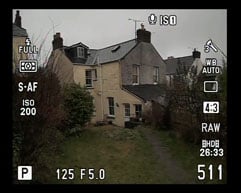
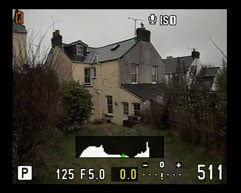
The 3 inch screen has a 3:2 aspect ratio, a good compromise which displays the full resolution 4:3 still image area with narrow vertical strips down either side and 16:9 movies with similar sized horizontal bars top and bottom. One of the advantages of a higher resolution screen is not only does the image look better, but information overlays in both text and icon format are much easier to read. Pressing the info button on the rear of the camera toggles overlays from the default view. In the PASM modes this displays, among other things, the exposure settings at the bottom of the screen flanked by the currently selected shooting mode and the remaining picture capacity. On the left side of the screen is the three-segment battery life icon, metering mode, and ISO sensitivity. Then on the left there’s picture (colour rendering) mode, still image and movie recording size.
 |
 |
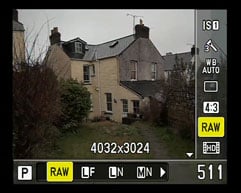 |
This is just a small subset of the information that’s available, the manual shows that there are no fewer than 34 info icons available, though obviously not all are displayed at one. Some are mode dependent and others, like the sequential shooting mode, only display when activated.
 |
 |
 |
Pressing the info button once activates the live histogram display and a second press turns all overlays off providing an unencumbered view of the scene. There are some other information display options that can be activated including one that indicates highlight and shadow clipping and a multi-view display that shows four-up comparisons of changes in white balance and exposure compensation. The info overlays can be similarly configured for playback mode.
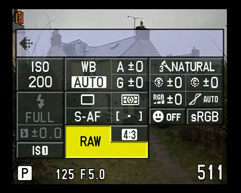
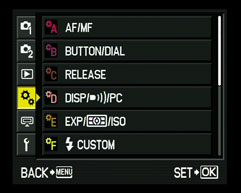
The E-PL2’s menu system is activated by pressing the menu button under the control dial. What it lacks in simplicity and navigability it makes up for in terms of flexibility and customisation and frequently used functions are on a shortcut menu activated by the OK button in the centre of the control dial. Olympus calls this quick menu ‘Live Control’. There’s also a ‘Super Control Panel’ – a display that shows all the important functions and their current settings on screen at once. As a means of quickly checking and changing settings for, among other things, ISO sensitivity, sequential shooting, flash mode, white balance, picture mode settings (including contrast, saturation and gradation), colour space, metering mode and image stabiliser, it really can’t be beat.
The main menu system is arranged on six tabs the first of which has card formatting, setting presets, image size and quality settings. A second shooting menu contains further options including image stabilizer, bracketing and multiple exposure shooting. By far the most extensive and detailed of the tabs, though, is the Custom menu which provides the opportunity to customize a huge variety of settings from display overlays to the size of EV increments for exposure and ISO sensitivity. You can also assign custom functions to several of the E-PL2 buttons including the Fn button, the dedicated record button and the control dial.
In iAuto mode the Live Control menu is replaced by Live Guides – results-based controls that allow novice users to achieve control over white balance, depth of field and other things without the need for understanding of the underlying principles. Rather than an aperture adjustment, for example, Live Guides provides a background blur slider. There’s also a selection of useful shooting tips. Locating this help in the iAuto mode is a smart move as it makes the E-PL2 a more attractive and less intimidating prospect for novices upgrading from compacts, but keeps it out of the way of advanced users more likely to be using the PASM modes.
|

Unlike the Panasonic Lumix GF2 and the Sony NEX-3/5, the Olympus E-PL2 has a physical mode dial. Its eight positions select the four PASM exposure modes in addition to iAuto, ART, SCN and movie.
In the PASM exposure modes available shutter speeds range from 60 to 1/4000 plus Bulb, which can be used conventionally or set between one and thirty minutes using a timer. Exposure control in PASM modes is via the control dial, using the top position to switch to aperture settings once the shutter speed has been set in Manual mode. The E-PL2 forgoes the scalar readouts favoured by Panasonic on the GF2 and Sony on the NEX-3/5 in favour of an unadorned numeric display with the currently active setting highlighted in yellow.
The 22 scene modes include Portrait, e-Portrait, Landscape, Landscape with Portrait, Macro, Sports, Night Scene, Night Scene with portrait, Children, High key, Low key, Digital Image Stabilisation, Nature Macro, Candle, Sunset, Documents, Panorama, Fireworks, and Beach and Snow. An additional three scene modes are provided for use with the fisheye, macro and wide converter.
The E-PL-2 offers the same five metering modes as the E-P1: Digital ESP, Center-weighted, and the choice of three spot-metering options. Along with normal spot-metering, the additional HI Spot and SH (Shadow) Spot modes are designed for scenes dominated by large areas of light and dark respectively; these modes then deliberately over and under-expose respectively to compensate.
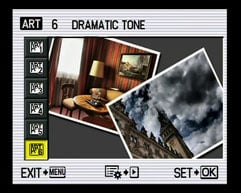
The Olympus E-PL2 is equipped with six Art Filters, Pop Art, Soft Focus, Grainy Film, Pin Hole, Diorama, and the new Dramatic Tone. Art Filters apply digital special effects to images, and while you can achieve the same results in software afterwards, the opportunity to do it in-camera is obviously more convenient. If you don’t want to permanently disfigure your JPEGs, it’s also possible to apply any of the Art Filters to the E-PL2’s RAW files using the supplied Olympus Master software. The Diorama Art Filter applies a tilt-and-shift effect which blurs much of the image, leaving a sharp strip in the middle. This in turn delivers the miniaturisation effect much-loved by owners of exotic tilt / shift lenses.
Some of the Art filters can now be modified – one or two variations on the original filter slightly adapt the effect. Grainy Film provides a second, less contrasty and grainy option, Pin Hole offers a choice of vignette styles and several of the filters now also provide a framing option.
Olympus ‘PEN’ E-PL2 Movie Mode
The Olympus E-PL2 features the same movie modes as the E-PL1 with the choice of either 640×480 (VGA) or 1280×720 (720p HD) video recorded at 30fps and encoded using the Motion JPEG format then stored in an AVI wrapper. You’re looking at about approximately 1MB per second of footage in the HD mode, with each clip limited to a maximum file size of 2GB; Olympus estimates this will get you around seven minutes of HD footage or 14 minutes in the VGA mode. Olympus recommends using a Class 6 SD card or faster to support HD movies; you can see two examples of the HD movie mode below using the 14-42mm f3.5-5.6 kit zoom lens; the first clip was handheld and in fully automatic with stabilisation enabled.
Like the E-PL1, the Live Control menu allows you to shoot video in Program, Aperture Priority or fully manual modes or with any of the six Art Filters. As on other PEN models, though, shooting movies with the more intensive Art Filters will greatly reduce the frame rate with jerky results.
The E-PL2’s accessory port also allows you to mount the SEMA-1 adapter which lets you connect an external microphone for far superior audio quality during movies.
| |
|---|---|
|
The Zoom on the 14-42mm f3.5-5.6 kit lens has a reasonable smooth zoom action and although the focus wanders a little during zooming, it’s quickly recovered. It’s also a lot quieter than the earlier version of the kit lens.
| |
|---|---|
|
In this tripod-mounted panning shot, the E-PL2 makes a fairly good job of difficult lighting condition and holds focus well during the zoom. The sensitive mono mic is prone to picking up wind noise
| |
|---|---|
|
Good exposure and white balance on this interior hand-held panning shot, but the overall quality of E-PL2 video fails to match the high standard of its stills.
Olympus E-PL2 Continuous shooting and sensor
The Olympus E-PL2 offers one continuous shooting option, rated at approximately 3fps; Olympus quotes around 12 Large Fine JPEGs or 10 RAW files. To put this to the test we fitted a formatted Lexar Professional 133x 8GB SDHC card, and fired-off 14 Large Fine JPEGs in five seconds before the camera began to slow; this corresponds to a rate of 2.8fps, and while the camera could keep shooting beyond 15 frames, it greatly slowed down.
Switching to RAW mode we measured 10 frames in a fraction over four seconds for a marginally slower speed of 2.5fps. This remains better than most compacts, but slower than a typical DSLR at this price point. In terms of a self-timer, there’s two and 12 second countdowns, and you can now also use a remote shutter release in the USB port.
The Olympus E-PL2 is equipped with a 12.3 Megapixel Live MOS sensor, which measures 17.3x13mm. This is the same size as the sensor in other PEN models and also in full-sized Four Thirds DSLRs and, while it falls below the APS-C dimensions of most DSLR sensors (and, more importantly, the Sony NEX-3/5), it’s simply massive compared to those found in typical compacts. This is one of the major selling points of the E-PL2 (and the Panasonic GF2): to pack a DSLR-sized sensor with its benefits of low noise, high dynamic range and potentially shallow depth-of-field into a compact form factor.
It generates 4:3 aspect ratio images, although a variety of cropped aspect ratios are also available: 3:2, 16:9 and a square 6:6 format. The maximum resolution is 4032×3024 pixels in the 4:3 format, with two lower resolutions and the choice of Fine or Normal JPEG compression. A compressed 12-bit RAW option is also available, accompanied by a JPEG if desired at a variety of resolutions. Large Fine JPEGs and RAW files typically measure 6 and 11.5MB each respectively.
The base ISO setting has been increased from the E-PL1’s 100 ISO to 200 ISO and the top sensitivity setting has increased to 6400 ISO from the E-PL1’s maximum 3200 ISO. The shutter speed range has also been extended and now runs from 60 seconds to 1/4000.
To see how the quality of the E-PL2 measures-up in practice, take a look at our real-life resolution and high ISO noise results pages, browse the sample images gallery, or skip to the chase and head straight for our verdict.