Compact digital camera group test
-
-
Written by Gordon Laing
Intro
Compact camera sales dominate the digital imaging market, appealing to a broad range of photographers, from those who want the simplest point-and-shoot, to enthusiasts who are after a pocketable alternative for when they can’t carry their more serious equipment.
To cater for such a wide range of customers, there’s an equally wide variety of models available. Some are truly tiny, slipping virtually un-noticed into shirt pockets, while others attempt to balance the comfort of a larger grip with reduced pocketability. Some appear almost bereft of controls so not to intimidate beginners, while others try to closely match the options of traditionally higher-end cameras.
Many of today’s models feature surprisingly high resolutions and are packed with features like huge colour screens, high sensitivities and respectable movie modes. There’s certainly plenty to compare when you’re in the market for a new compact camera, but it’s easy to become blinded by specifications, or playing a numbers game which could bear little importance to your requirements.
At Camera Labs we believe a good quality compact could be one of the best investments you’ll ever make. It will end up travelling almost everywhere with you and be responsible for recording some of your most memorable events. As such we strongly believe you shouldn’t skimp when buying a compact, but at the same time you don’t need to spend a fortune to enjoy excellent results.
So over the following pages we’ve taken four of the most popular mid-range models and put them through their paces in our first compact camera group test. We’ve tested Canon’s chunky but powerful PowerShot A620, Fujifilm’s highly sensitive FinePix F11, the tiny Pentax Optio S6 and the futuristic touch-screen action of Sony’s Cyber-shot DSC-N1.
Rather than review each camera in turn, we’ve singled out the most important features, such as resolution, lens and screen, and compared the models side-by-side so you can easily work out which will be best for you. For the less experienced photographers out there we’ve also explained exactly what these features actually mean and what you should be looking out for when buying.
Higher-end photographers may wish to skip these explanations and head straight for our Results pages where we’ve performed exactly the same gruelling tests we would for any high-end product. After all, optical and processing quality is equally important whether a camera’s slung round your neck or slipped into a pocket.
For examples of how each camera performs in day-to-day use, check out our Gallery section, or if you’re really busy, just click straight through to our Verdict page to see which camera impressed the most. Finally, to discover the best price on any of the cameras – while supporting us at the same time – simply click the price-check links through to the store websites or consider buying from Amazon using the links below.
Note: at the time of writing, the Fujifilm FinePix F11 was not on sale in the US. This may change in the future, but for now the US market will stick with the earlier F10 model. The main differences are the F11 has Aperture and Shutter Priority modes, a higher resolution LCD and a slightly better Macro Mode. Its gun-metal finish is also slightly darker than the silver F10.
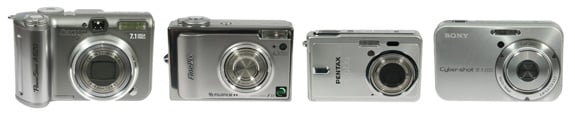 In terms of size and appearance, Canon’s PowerShot A620 is by far the largest and most traditional-looking of the group. Measuring 105x66x49mm, it’s more the kind of camera you’d carry in a small bag or coat pocket than slip discretely into a shirt. It’s the only one here with a grip of any description, and this certainly makes it easier to hold steady and avoid camera shake.
Sony’s Cyber-shot DSC-N1 may be the second largest camera here, but looks and feels a world apart from the Canon A620. Clever proportions allow it to look slimmer than its 97x61x23mm dimensions imply, which combined with rounded corners impart a classiness lacking from the others. While far from the smallest on test here, it’ll slip neatly into most pockets.
At 92x58x27mm Fujifilm’s FinePix F11 is slightly shorter and less wide than the Sony N1, but 4mm thicker. The proportions and styling give it a somewhat boxy appearance, although like the Sony N1, it’ll still fit into most pockets without complaint.
Finally the Pentax Optio S6 is easily the smallest camera out of the four, measuring just 86x54x19mm. This may not sound like a great difference written down, but place the S6 next to almost any other mid-range compact and it’ll be dwarfed. If you’re after a camera which could spend much of its time in a shirt pocket, this is already the model for you. That said, compromises must be made in a camera this size, and in terms of design the S6 is the hardest of the four to hold comfortably and steady.
Camera lens comparison
The lens is of course a crucial part of every camera, and the most important figure when choosing a compact is the optical zoom range. The Fujifilm, Pentax and Sony cameras all featured a standard 3x optical zoom range, equivalent to 36-108mm, 37-112mm and 38-114mm on a 35mm camera respectively – see note later about equivalent ranges.
Only the Canon A620 differed in this respect, offering a 4x optical range equivalent to 35-140mm on a 35mm camera. While getting fractionally wider than the other cameras at the short end, the big difference is when you zoom-in, with the Canon allowing you to enlarge your subject that bit more. It’s not going to make much difference when photographing sports, wildlife or celebrities, but it’s certainly appreciated for general use. The difference between the cameras when fully zoomed-in is shown below. All four photos were taken moments apart, from exactly the same point using a tripod.
All four cameras employed motors to operate their zooms, but like other compacts, they force you to jump from one focal length to the next in discrete steps. The Pentax Optio S6 had just six steps in its zoom range compared to eight each for the Canon and Sony, and nine for the Fujifilm. The Canon A620’s zoom lurched the most as it went from step to step.
If you’re into taking extreme close-ups of flowers, insects or other small subjects, the macro capabilities of the lens are very important. The key specification for a compact is how close to the subject the lens can physically focus. While distortion along with shadows cast by the camera become an issue as you move closer to your subject, the simple fact is, the shorter the focusing distance, the nearer you’ll be able to get to it and the bigger it will subsequently appear on your photo.
In terms of closest focusing distance, the four cameras varied greatly. Focusing least close was the Pentax Optio S6 at a mere 15cm. Next were the Sony N1 and Fujifilm F11 at 6 and 5cm respectively. Thrashing them all in this respect though was the Canon A620 which can focus as close as 1cm, allowing extreme close-ups. Check the Macro section of our Results page to compare how they actually perform in real-life.
Note: the focal lengths quoted earlier are described as being ‘equivalent’ to those on 35mm film cameras. The actual focal lengths of each camera are smaller because their imaging sensors are smaller than a frame of film, but equivalent ranges are quoted because most people have a better idea of what a ’35-105mm’ lens will deliver in real-life. If you’re interested in the actual focal lengths though, please check out the full specifications under the ‘cameras’ menu. There you’ll additionally find details of the lens focal ratios – we’ve not mentioned them here as they were all roughly the same.
Also note many digital cameras quote a digital zoom figure. These are best ignored though as they simply crop and enlarge the central portion of the image, thereby leaving fewer pixels and a lower quality result. Remember you can also do exactly the same thing with a computer later if desired, or select a cropped area with most printing services.
Camera screen comparison
Used for both composition and playback, not to mention navigating menus, the screen on a compact camera is one of the most important things to consider. Over the years screens have gradually been getting bigger and bigger, and even half an inch extra makes a large difference in practice. Bigger screens may be no more than a luxury, but they’re great when you’re viewing photos, especially with other people.
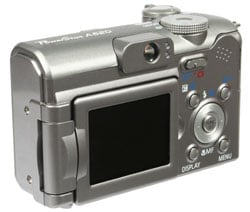
The Canon A620 has the smallest screen of the four at 2in, although this is still noticeably bigger than the 1.8in screens found on cheaper cameras. Crucially though, the A620’s screen is the only one here which can be flipped out and twisted round to almost any angle. This makes it easy to photograph from angles which would normally have you on tip-toes or scrabbling around the floor – you can even turn it round so you can see yourself on self-timer shots.
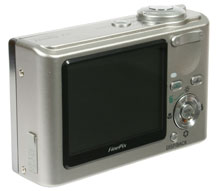
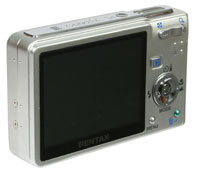
Next up are the Fujifilm F11 and Pentax S6 which both sport 2.5in screens. As described earlier, this is a big step-up from 2in, with both screens dominating the rear of each camera, especially the tiny Pentax S6.
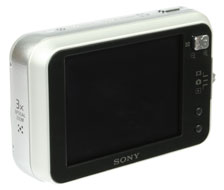
Biggest of all though is the Sony DSC-N1 which boasts nothing less than a huge 3in screen. Uniquely it’s also the only one here which is touch-sensitive. Indeed almost all the N1’s controls are operated by tapping on the screen, and while a different approach to other cameras, it’s both a fun and intuitive way to work.
For example in spot autofocus mode, you can actually point at the area you’d like the camera to focus on. The system occasionally becomes slightly sluggish though and if you’re the kind of person who can’t stand fingerprints on screens, it could end up annoying you.
Screens aren’t just about size though. Their number of pixels greatly affects the quality of images viewed on-screen, and the bigger the screen, the more pixels it’ll need to avoid looking coarse. It should be noted screen pixels won’t affect the actual image quality of the photo itself; more screen pixels are just a nice thing to have when viewing or composing with the camera.
The Canon A620 has the least number of pixels with 115,000 – this is just about acceptable on a 2in screen, although more would ultimately be preferred. While the Fujifilm F11 and Pentax Optio S6 both share 2.5in screens though, they sport 153,000 and 232,000 pixels respectively. While the F11 doesn’t look bad, the S6 is visibly sharper and more detailed. Sony’s N1 sports 230,000 pixels which is just about sufficient for a large 3in screen.
Interestingly, the trend for larger screens and smaller camera bodies has seen the old fashioned optical viewfinder become increasingly rare. Indeed the only camera you’ll find it on here is the Canon A620. Optical viewfinders were always a useful alternative when screens became washed-out under bright sunlight, but during our tests, the main screens of all four cameras performed fine under a bright conditions.
Finally we should mention the Canon A620, Fujifilm F11 and Pentax S6 all offered the option to overlay a three by three grid over the screen – like a noughts and crosses or tic-tac-toe board – which can really help when lining up subjects or horizons. The Pentax S6 and Sony N1 also offered an optional live histogram facility, which can provide useful feedback on exposure adjustments as you’re taking photos.
Camera flash comparison
All four cameras featured built-in, non-popup flashes. All offered red-eye reduction modes, along with the ability to force the flash on or off. The Canon A620, Fujifilm F11 and Sony N1 also offered slow synchro options for taking portraits against a night skyline; a similar effect could also be achieved with the Pentax by selecting the Night mode preset in conjunction with the flash.
The Canon A620, Pentax S6 and Sony N1 all allowed you to change the brightness of the flash (although on the S6 only to a soft setting), while the A620 additionally offered a rear curtain option which fires the flash at the end of a long exposure – ideal for photos of people twirling sparklers on bonfire night.
Camera memory comparison
Each of the cameras has a memory card slot, and in an increasing trend for compacts, two of them also feature a small amount of built-in memory. The two models without internal memory were supplied with modest-sized cards, although the particular bundle may vary in your region.
Canon’s A620 has no internal memory. It takes SD memory cards and ours was supplied with a 32MB card which could store nine pictures in the best quality mode. Fujifilm’s F11 also didn’t have internal memory. It takes xD memory cards and ours was supplied with a generous 64MB, good for 21 photos in the best quality mode.
The Pentax Optio S6 features 23MB of internal memory into which you can squeeze nine pictures using the best quality mode. It also has a slot for SD memory, although ours wasn’t supplied with a card.
Finally, the Sony N1 features 26MB of internal memory onto which you’ll squeeze six photos using the best quality settings, or an album of up to 500 pictures – see later. The N1 is also equipped with a slot for Sony’s own Memory Stick Duo (or Memory Stick Duo Pro) cards, although ours wasn’t supplied with one; note the Duo cards are shorter than the older chewing gum sized Memory Sticks.
So while all four cameras allow you to start taking photos out the box, you’ll run out of memory real quick. You could of course reduce the quality to squeeze on more pictures, but we strongly recommend using the best quality settings – after all, there’s no point hobbling your new camera. The important thing is to budget for a larger card straightaway. We’ll compare actual file sizes on the next page, but a 256MB card should store around 100 photos. It’s also worth mentioning SD cards typically cost less than xD or Memory Stick Duo cards.
Camera battery comparison
The Fujifilm F11, Pentax Optio S6 and Sony N1 all come with rechargeable lithium ion battery packs and mains rechargers.
In contrast the Canon A620 requires four AA batteries and while it’s supplied with a set of alkalines, these won’t last long before they need replacing. The answer is of course to buy a set of rechargeable AA batteries and a recharger, and while Canon could be criticised for not including them in the package, many homes already have a charger they can use. It’s wise to invest in a fresh set of actual rechargeable batteries though, and for the maximum lifespan go for ones rated at 2000mAh or above; if using an existing charger, check your new batteries will work in it.
As for AAs versus lithium packs, four of the former may be physically larger and heavier, but they are at least available all over the world. Ultimately though we prefer lithium ion packs, but always remember to take your charger away with you and preferably also a fully-charged spare in case you run-out of power.
Before moving on we’d finally like to note the battery packs for the Fujifilm F11 and Pentax S6 can both be mistakenly inserted the wrong way round. There’s thankfully no damage should you do so and of course you’ll notice the instant you try and (fail to) power-up, but owners of the F11 should beware: This model charges its battery inside the camera and nothing will happen if it’s inserted the wrong way round – a potentially disastrous proposition if you think your camera’s being charged for an important event. Luckily the Pentax S6 charges its battery in an external adapter, but it’s still no excuse: proprietary battery packs like these should only fit one way round.
Camera connectivity comparison
All four cameras can connect to a computer using a USB cable to transfer images, or to the video and audio inputs of a TV to make slideshows. The Canon A620 and Pentax S6 both have separate plugs for each, while the Fujifilm F11 and Sony N1 employ a single plug and a supplied cable which delivers USB and AV connectors; the F11’s also connects to its mains charger.




(29.2mm actual)
(24mm actual)
(18.6mm actual)
(23.7mm actual)