Support Camera Labs by price checking using the flags below


Follow us!
Camera Labs RSS Feed
Camera Labs on Facebook
Camera Labs on Twitter


Latest camera reviews

Panasonic Lumix TZ10/ZS7
Canon EOS 550D / T2i
Canon PowerShot A3100IS
Olympus 'PEN' E-P2
Nikon COOLPIX S570
Canon IXUS 200 / SD980IS
Canon IXUS 120 / SD940IS
Sony Alpha DSLR-A550
Nikon COOLPIX L20
Canon PowerShot A1100IS
Canon PowerShot S90
Sony Alpha DSLR-A230
Panasonic Lumix GF1
Canon PowerShot G11
Canon IXUS 95 / SD1200IS
Canon EOS 7D
Sony Cyber-shot DSC-H20
Nikon D3000
Canon PowerShot SX120IS
Panasonic Lumix TS1 / FT1
Canon PowerShot D10
Canon PowerShot SX20 IS
Nikon D300s
Panasonic Lumix FZ38 / 35
Sony Alpha DSLR-A380
Sony Cyber-shot HX1
Nikon D5000
Nikon COOLPIX P90
Canon IXUS 100 / SD780IS
Panasonic Lumix TZ7 / ZS3
Canon PowerShot SX1 IS
Canon EOS 5D Mark II
Canon EOS 50D
Nikon D90
Canon EOS 1000D / XS

All reviews ....
   
 
  Best Buys: our top models
   
  Canon lenses
Nikkor lenses
Sony lenses
Budget DSLRs
Mid-range DSLRs
Semi-pro DSLRs
Point-and-shoot compacts
Superzoom / top compacts
Camera accessories


Camera Labs Forum

Any questions, comments or a great tip to share? Join our Forum and let everyone know.
   
 
  DSLR Tips


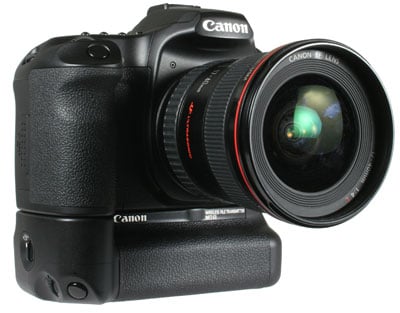
Canon WFT-E3(A) wireless file transmitter Gordon Laing, January 2008
   
  Canon WFT-E3(A) performance results

We tested the WFT-E3 with an existing wireless network using a Netgear DG834N broadband router. This model has the same facilities as the WNR834B router, but includes an ADSL modem. In terms of wireless settings, we were running a number of security options including a hidden SSID, MAC-address filtering and WPA2-PSK authentication. Despite this degree of security though, the WFT-E3 successfully connected to our network after running its Wizard, and subsequently took seven seconds to establish a link following a cold power-up or wake from sleep mode.

Unlike a direct USB connection though, you won’t see the camera listed under My Computer in Windows, and you may also need to fire-up Canon’s supplied WFT-utility in order to successfully pair your computer with it under Vista. But once paired, you can use the 40D / 50D’s supplied EOS utility to fully remote control your camera in exactly the same way as a USB connection, but without the inconvenience of cables.


Netgear DG834N router


Canon quotes a maximum wireless operating range of 150m, although this of course relies on perfect conditions not to mention a high-power antenna. To put it to the test we filled a 1GB CF card with 167 images, measuring 925MB and timed how long it took to transfer them all to the computer at a variety of distances. We performed these tests with the WFT-E3 mounted on an EOS 40D, although the EOS 50D should deliver the same results.

At 1m from the Netgear router, the entire folder was transferred in 10 minutes and 54 seconds. Moving the camera outside to a distance of 16m increased the time by just under 50%, to 15 minutes and 11 seconds. In contrast, a wired Ethernet connection with the WFT-E3 and a 10m CAT-5 cable took four minutes and 28 seconds, but coming in faster still was a direct USB connection which took just two minutes and 28 seconds. The USB connection also allows you to directly drag files from My Computer, and doing so was even quicker at one minute and 53 seconds.

So clearly the wireless transfers are much slower than the direct USB cable, and the latter is also comfortably quicker than the wired CAT-5 connection too. But of course the USB cable is little more than a meter long, whereas the wired and wireless connections allowed much greater distances along with the possibility of operating without a cable altogether.

Canon WFT E3 - rear view
 

Perhaps a 1GB file transfer isn’t a realistic application for the WFT-E3 though. A more common activity would be remotely monitoring the live view feed and transferring one image at a time as they’re taken, so we repeated the tests with the 40D set to RAW plus Large JPEG mode. The total file size was around 14MB.

As a base figure, the EOS 40D when connected directly using a USB cable took 2.5 seconds to transfer the RAW and Large files into DPP, and supported a very smooth frame rate in remote live view. Using the 10m CAT-5 cable saw no deterioration in the frame rate, although as before there was around a 50% reduction in file transfer speed to 3.7 seconds.

With the EOS 40D and WFT-E3 connected wirelessly at a distance of 1m, the live view appeared less smooth, but still quite acceptable, while same file transfer took 8.3 seconds. At 16m, the frame rate fell to around 2-4fps which might eliminate the chance of reacting to fast action, but was still adequate for monitoring slower subjects, while the file transfer took 14.5 seconds. You can see a demonstration of the WFT-E3 remote controlling a 40D in a garden at 16m distance in our video tour.

Out of curiosity we repeated the test at the maximum possible distance, which for our configuration was 35m from the router, outside and along a road. Here Live View fell to an unusable rate, and it took 68 seconds to transfer a single Large JPEG measuring 5.19MB without a RAW file.


Support this site by checking prices below or shopping via our affiliate stores


USA readers

 
UK readers
Jessops discount voucher

All words, images, videos and layout, copyright 2005-2010 Gordon Laing. May not be used without permission.

About Us / How we test / Best Buys / Advertising / Home