Support Cameralabs by shopping at our partner stores or donating via Paypal
 

Follow me!
Camera Labs RSS Feed
Gordon Laing and Cameralabs on Google+
Camera Labs on Facebook
Camera Labs on Twitter

 
  Latest camera reviews

Olympus E-PM1
Nikon V1
Sony NEX-5N
Canon 100HS / 115HS
Canon 300HS / 220HS
Canon S100
GoPro HD Hero 2
Canon 510HS / 1100HS
Canon 310HS / 230HS
Canon SX150 IS
Olympus E-PL3
Canon SX40 HS
Sony NEX-C3
Panasonic GF3
Fujifilm HS20 EXR
Panasonic FZ150
Olympus E-P3
Panasonic FZ47 / FZ48
Nikon COOLPIX S9100
Sony Cyber-shot HX100V
Sony Cyber-shot HX9V
Panasonic FX77 / FX78
Canon SX230 HS
Canon EOS T3 / 1100D
Panasonic Lumix G3
Sony Cyber-shot TX10
Canon 500HS / 310HS
Nikon D5100
Sony Cyber-shot W510
Nikon COOLPIX L24
Canon PowerShot A1200
Panasonic FS18 / FH5
Canon PowerShot A800
Panasonic TZ18 / ZS8
Canon PowerShot A3300IS
Canon EOS 600D / T3i
Panasonic TZ20 / ZS10
Canon IXUS 1000/SD4500
Sony Alpha SLT-A33
Panasonic Lumix GH2
Nikon D7000
Canon PowerShot G12
Canon PowerShot S95
Panasonic Lumix LX5
Nikon D3100
Canon EOS 60D
Canon EOS 550D / T2i
Canon EOS 7D
Nikon D300s
Canon EOS 5D Mark II
Nikon D90

All reviews ....


  Best Buys: our top models
   
  Best Canon lens
Best Nikkor lens
Best Sony lens
Best budget DSLR
Best mid-range DSLR
Best semi-pro DSLR
Best point and shoot
Best superzoom
Best camera accessories


Camera Labs Forum

Any questions, comments or a great tip to share? Join our Forum and let everyone know.
   
 
  DSLR Tips


Canon WFT-E3(A) wireless file transmitter Gordon Laing, January 2008


Canon WFT-E3(A) design, controls and build quality

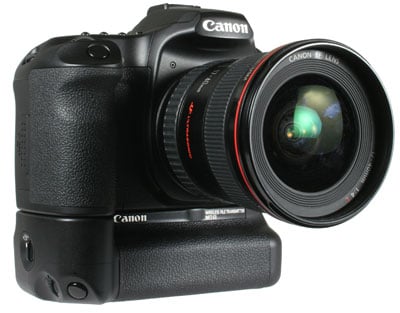
Externally, the WFT-E3 looks like a portrait battery grip, albeit without the traditional stem which would normally slip into the camera’s battery compartment. This is because the WFT-E3 doesn’t provide power to the host DSLR – instead the EOS 40D or 50D continues to be powered by its own battery, while the WFT-E3 is powered by its own BP-511A pack.

Canon WFT-E3 - front angle view


So the WFT-E3 doesn’t boost the 40D or 50D’s battery life, although neither does it draw power from it – both units are independently powered by their own batteries. Unfortunately this means you’ll need to unscrew and remove the WFT-E3 to access and replace the 40D or 50D’s battery pack when it’s drained. Canon also assumes you have a spare BP-511A, as one isn’t supplied with the WFT-E3 – at least you can re-use the charger which came with your DSLR.

 
Canon WFT E3 - battery
 

Apart from the absence of a vertical stem, the WFT-E3 mounts on the 40D or 50D like a normal battery grip – after removing the rubber door under the camera’s body to access the electrical contacts, you simply align the two metal guidance pins of the WFT-E3 with the corresponding holes in the camera's base, then use the WFT-E3’s thumb-dial to screw itself securely onto the tripod thread – you can see this dial on the rear of the WFT-E3. A duplicate thread on the base of the WFT-E3 lets you mount the combination on a tripod.

In terms of style and build quality, the WFT-E3 matches the EOS 40D / 50D and also shares the same degree of weather-proofing. The camera’s mottled rubber finish continues around the WFT-E3’s portrait grip and allows you to comfortably hold the camera in this orientation – and like other portrait grips a number of controls are replicated including the shutter release, finger dial, AF-On, AE lock and AF point selection buttons.


Canon WFT E3 - corner


A switch in one corner locks these duplicate controls from accidental operation. If you’re likely to use the 40D or 50D mostly in a portrait orientation, an additional lug allows you to attach the strap so the camera hangs naturally in this position. An optional E1 hand-strap could alternatively be used here.

The WFT-E3 adds 45mm to the height of the EOS 40D / 50D and 340g (minus battery) to the weight. This clearly transforms either body into a noticeably larger and heavier camera, but the overall package exudes physical confidence and remains very comfortable to hold and use.

Round the back is a small (non-backlit) LCD display which indicates internal battery life, wireless signal strength, wired LAN connectivity, and the image quality setting if you’re using the WFT-E3 to record separate files to an external storage device. A pair of LEDs indicate network and USB connectivity.

To the side of the unit are two chunky rubber flaps which open to reveal a 10/100 wired Ethernet port and a full-size USB socket. Finally, the WFT-E3 is supplied with two cases – one for the unit itself and a second to carry external storage like a portable hard disk; a dust-proof cap is also supplied to better-seal the USB port when a device is connected in rainy conditions.

Canon WFT-E3 wireless features

The Canon WFT-E3 works with standard 802.11b and g wireless networks and supports a wide range of security protocols including shared key, WPA-PSK and WPA2-PSK authentication, along with WEP, TKIP and AES encryption – this should cover the vast majority of wireless networks, and you can also choose whether to operate in ‘infrastructure’ mode for use with a wireless access point, or as ‘ad-hoc’ for direct connection to, say, a laptop in the field.

Canon WFT E3 - new menus
 

The WFT-E3 is powered-up by the main switch on the 40D / 50D, after which you’ll find two new options in the first setup menu page. The ‘WFT Settings option’ allows you to configure the unit for use on a wired or wireless network, while the ‘Recording func. +media select’ option lets you set your preference for recording duplicate or separate files to external storage devices – more of which later.

Under the WFT Settings menu you’ll find a Connection Wizard which guides you through the process. The first step is to choose between FTP, PTP and HTTP as your connection protocol. FTP allows you to upload files direct to an FTP server, HTTP allows basic remote control and file browsing and transfer using a website, while PTP should be used if you’d like to fully remote control the camera direct from a computer using Canon’s supplied EOS Utility. The latter is what we’ll concentrate on here, and offers the same functionality as using the camera’s USB cable, but with the flexibility of a wired or wireless network connection.

The next step in the wizard is to choose a wired or wireless network – the former may be tethered but essentially gives almost the same speed as a USB cable over much longer distances which may be preferred for studio work.

Canon WFT E3 - infrastructure Canon WFT E3 - authentication Canon WFT E3 - SSID
     

If you select wireless, the connection wizard then takes you through a variety of options, allowing you to select between ad hoc and infrastructure networks, the authentication and encryption type, along with manually entering an SSID if necessary. You can also set the IP address and Subnet mask manually or use automatic settings. Text is entered by choosing characters on-screen using a virtual-keyboard with the camera’s joystick or dials and can be a lengthy process. Preferences for up to five different networks can be saved for future use.

If you found this review useful, please support us by shopping below!
All words, images, videos and layout, copyright 2005-2012 Gordon Laing. May not be used without permission.

/ How we test / Best Cameras / Advertising / Camera reviews / Supporting Camera Labs