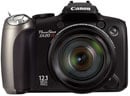
Canon PowerShot SX10 IS lens and stabilisation The Canon PowerShot SX10 IS’s headline feature is its massive 20x optical zoom range, which delivers an equivalent range of 28-560mm and a focal ratio of f2.8-5.7; the actual focal length is 5-100mm and we counted 28 discrete steps when zooming from wide angle to telephoto.
When powered-up the barrel extends by 18mm from its housing, with the camera ready for action in 1.3 seconds. As the camera zooms-in, the barrel steadily extends to 49mm from its housing and you’ll notice markings indicating actual and equivalent focal length. You can see how this looks in the photo to the left which from top to bottom shows the SX10 IS switched off, switched on, then fully zoomed-in. Like its predecessor, the SX10 IS employs a USM motor to power the zoom (not the focus), and it offers two speeds depending on how far you push the rocker. The slower of the two is virtually silent which allows Canon to enable the optical zoom during video recording – an unusual but very welcome facility which we’ve demonstrated in our video tour. Canon has once again redesigned the lens cap for its latest super-zoom, and it’s arguably the best solution to date. The cap on its predecessor attached to the outer lens housing and therefore impeded the barrel’s progress during power-up. Perhaps as a ‘fix’ for this, Canon’s cap on the earlier S5 IS was a loose fit and prodded off with ease, but this in turn meant it also came off easily during transportation. Now on the SX10 IS, the cap clips onto the extending portion of the lens barrel, so you can happily power-up the camera without worrying. This is more convenient than the Panasonic FZ28 which has a cap which clips firmly to the outer lens housing and blocks the extension during power-up, forcing the owner to remove it and press a key to proceed. Like its predecessor, The SX10 IS’s closest focusing distance is 10cm in Macro mode and 0cm in Super Macro with the lens locked to wide-only – that’s right, zero cm. This means the camera can stay focused even with the subject virtually pressed against the front of the barrel. Of course within a couple of cm, it’s hard to avoid casting a shadow on the subject, while at 0cm, you’re really looking at backlit objects, but it’s still an impressive and welcome feature to have at your disposal. The most impressive aspect of the SX10 IS’s lens though is of course its massive optical zoom range, which draws with the Olympus SP-570UZ as the longest on the market. Both are slightly longer than the 18x of arch rival the Panasonic Lumix FZ28, and make the 12x range of the earlier S5 IS seem almost pedestrian. The SX10 IS doesn’t just zoom-in closer than its predecessor – crucially it also zooms wider to 28mm, which is a big improvement over the 36mm coverage of the older model. To illustrate the new Canon’s coverage we mounted it on a tripod and shot the same scene fully zoomed-out, then fully zoomed-in. We then shot the same scene from the same position using its arch rival, Panasonic Lumix DMC-FZ28 which is equipped an 18x zoom with an equivalent range of 27-486mm.
Above you can see examples of both cameras fully zoomed out. Panasonic quotes the FZ28 as having 27mm equivalent coverage to the SX10 IS’s 28mm, but as you can see here they’re essentially delivering identical fields of view. But the important thing is they’re both offering true wide angle coverage, which is a big upgrade over models like the earlier PowerShot S5 IS which started at 36mm.
Above are examples taken with each camera fully zoomed-into their maximum focal lengths. The 560mm equivalent of the Canon SX10 IS is clearly capturing a tighter field of view than the 486mm of the Panasonic FZ28, but in practice it may not look as much as the 74mm difference implies on paper.
So while the SX10 IS beats the Panasonic in terms of overall coverage, the examples above illustrate there’s not a massive amount in it. Both cameras sport extremely broad zoom ranges which offer amazing opportunities in practice, and you can compare their quality in our results pages. Canon PowerShot SX10 IS image stabilisation
To put the SX10 IS’s stabilisation to the test we photographed a distant building with the lens fully zoomed-into its maximum equivalent focal length of 560mm, first with stabilisation disabled, then with stabilised set to the default Continuous mode. Traditional photographic advice would recommend a shutter speed of 1/560 to completely eliminate camera shake without stabilisation.
Above are 100% crops showing a rooftop antenna from the samples taken without, then with stabilisation at a shutter speed of 1/25 – the slowest we could reliably handhold with stabilisation. The version without stabilisation is unsurprisingly shaky, but the version with stabilisation is almost 100% shake-free. Achieving this at a shutter speed of 1/25 corresponds to over over four stops of compensation, which is a very impressive result for the SX10 IS. It makes the huge focal range very usable, even when handheld. Canon PowerShot SX10 IS focusing
Pressing the AF area button on the back of the camera while in FlexiZone mode, allows you to move the focusing area around most of the frame; pressing the DISP button switches between large and small focusing areas. An AF Point zoom option temporarily enlarges the active focus area when the shutter release button is half-pressed. If you’ve opted for Focus Check under Review Info, the camera will also display an enlarged portion of the active focus area immediately after taking the image – particularly handy for quickly checking the expressions of people taken with face detection.
There’s also the choice of two AF modes: the default Continuous option adjusts the focus all the time to ensure the camera is close or even spot-on when you come to take the photo, and Single, which only focuses when you half-press the shutter release to save power. In use, the SX10 IS was refreshingly quick at focusing, snapping onto subjects with the minimum of fuss or searching, even when fully zoomed-in. In low light it became slower and occasionally searched, but rarely gave us any issues. There’s a definite speed benefit to using the Continuous AF mode in normal operation, although there’s understandably reduced battery life as a consequence.
If you’d like a little extra help with manual focusing, the Safety MF option lets you get the focusing close by hand, then finishes it off automatically at a press of the focus point select button. Alternatively you can opt for the focus bracketing mode which takes three shots: one at the manually focused distance, and the others a little closer and further. The nearer and further increments can be set to small, medium and large. Canon PowerShot SX10 IS sensor and processing The Canon PowerShot SX10 IS is equipped with a 10.0 Megapixel CCD sensor, measuring 1 /2.3in and delivering 4:3 shaped images with a maximum resolution of 3648x2736 pixels. There’s the choice of four lower resolutions (6, 4 and 2 Megapixels plus a VGA mode) along with a cropped 16:9 aspect ratio. Images can be recorded in the choice of three JPEG compression settings of Normal, Fine and SuperFine; sadly unlike the PowerShot G10 or Panasonic FZ28, there’s no RAW option.
The sensor gives the SX10 IS two extra Megapixels over its predecessor, the S5 IS, and allows its images to be printed up to 12.1x9.1in at 300dpi – that’s an extra inch taller than before. Best quality Large Super-fine JPEGs measure between 4 and 6MB each; there’s no built-in memory, but Canon bundles a 32MB SD card to get you started. The sensor resolution of the FZ28 is identical, but to see how their resolving power compared in practice, see our results pages. The sensitivity at full resolution runs from 80 to 1600 ISO and is adjusted by pushing the thumb wheel right and then either turning it or pressing it left and right. A 3200 ISO option is offered through the Scene preset menu, but operates at a greatly reduced resolution of just 2 Megapixels.
Canon claims the SX10 IS’s DIGIC 4 processor delivers superior noise reduction, although like the G10, there’s no settings to adjust it. You can see samples using the complete range of sensitivities on our SX10 IS High ISO Noise results page.
The Function menu also lets you adjust the White Balance between Auto, Daylight, Cloudy, Tungsten, Fluorescent, Fluorescent High, Flash, or a single Custom setting; like most non-DSLRs, there’s no manual entry of colour temperature, nor fine tuning of the white balance. Finally, the DIGIC 4 processor offers automatic dynamic range adjustments using its new i-Contrast feature (disabled by default). I-Contrast automatically boosts shadow areas or faces darkened by strongly backlit scenes. To put it to the test we took two photos of a Church interior with and without i-Contrast set to its Auto option. This composition features dark shadow areas and strong window lighting which represents a challenge for any camera’s exposure system.
The example above shows i-Contrast selecting a slightly quicker exposure when set to its Auto mode, presumably to better-protect highlight areas, although it’s had no benefit on the saturated windows here. As the histograms reveal though, there’s a reduction in shadow tones with a shallower climb to their peak, and a slight boost in upper mid-tones. Their effect can be seen in the shrunken versions of each image, especially in the dark roof area in the upper right corner. Like other systems which boost shadow areas though, there’s inevitably an increase in visible noise as a result, especially if you’re using anything but the lowest sensitivity. Canon PowerShot SX10 IS Movie mode Video recording is a highlight of the PowerShot SX10 IS. Like its predecessor, there’s a dedicated button on the back to start recording regardless of your shooting mode. Unlike most cameras, Canon allows you to optically zoom the lens while filming, and thanks to the quiet USM motor which performs the operation, it’s also barely audible. Impressively the Continuous AF also manages to keep the subject sharp most of the time whether it’s in motion or the camera’s zooming. And again unlike most still cameras, the audio quality is very good, and even recorded in stereo thanks to the decent built-in microphones above the lens housing.
There’s two quality modes, recording at either 640x480 or 320x240 pixels, both at 30fps. The camera’s DIGIC 4 processor encodes these using the modern H.264 compressor and stores them in a QuickTime Movie wrapper. H.264 is more efficient than the previous Motion JPEG format used by DIGIC III models like the S5 IS, and allows the SX10 IS’s best quality VGA movies to occupy around 30% less space with no perceptible loss in quality; you’re looking at about 1.3MB/s compared to around 2MB/s on its predecessor. The maximum file length remains one hour or 4GB, whichever comes first. While it’s disappointing the SX10 IS doesn’t feature any kind of high definition, or even widescreen options, there’s no denying its movie mode delivers very good results. The video is clean and detailed, and the audio undistorted. It’s great to be able to zoom while filming, and the Continuous AF mode does a good job of keeping it (mostly) in focus as you do so.Its arch rival the Panasonic FZ28 also has a great movie mode which allows you to zoom while filming but boasts widescreen and 720P high definition options. Set to standard definition, the Canon has the edge in video quality, but while the FZ28’s HD mode has noise artefacts and is nowhere as sharp as a dedicated camcorder, it ultimately records more detail than the Canon. The SX10 IS does however feature clearer audio (in stereo too) and hunted less while focusing in our tests. If you’re happy with standard definition video, the SX10 IS is ultimately preferred. It would be remiss of us not to mention the SX1 IS version of Canon’s super-zoom which is identical other than its CMOS sensor and widescreen display. This sensor may have the same resolution as the SX10 IS for still photos, but allows the camera to record high definition video in the 1080P format, thereby trumping Panasonic’s 720P mode. It also features quicker continuous shooting – see next section. Canon PowerShot SX10 IS Drive modes The Canon PowerShot SX10 IS offers just one continuous shooting option, and disappointingly it’s a little slower than the already modest capabilities of its predecessor. The S5 IS could shoot at 1.5fps with its focus locked, or 0.9fps with autofocus. The SX10 IS drops this slightly to 1.4fps with fixed focus, or 0.7fps with autofocus.
To put this to the test we fitted the SX10 IS with a formatted SanDisk Ultra II 1GB SD card and captured 50 Large Superfine JPEGs at 80 ISO in 35 seconds, corresponding to a slightly quicker than quoted 1.42fps. Like the PowerShot G10 though, this is still too slow to effectively capture most action sequences, and the ability to keep shooting until you run out of memory is no real consolation. In contrast, the Panasonic Lumix FZ28 takes a more sensible approach to continuous shooting. Its buffer can capture five standard quality JPEGs at 2.5fps – a speed that may still not be that impressive, but is almost double that of the SX10 IS. Alternatively there’s the High Speed Scene preset which drops the resolution to a mere 3 Megapixels, but allows you to shoot up to 100 images at 7fps or up to 60 at 11fps. Both modes involve compromises and can’t match what you’d enjoy from a typical DSLR, but they do better-equip the FZ28 for action sequences than the SX10 IS. Finally, it’s worth noting the higher-end PowerShot SX1 IS along with its HD movie recording, also becomes the fastest continuous shooter in Canon’s 2008 compact range, firing off an unprecedented 4fps at its full 10 Megapixel resolution. Again, Canon attributes this to the fast readout of its CMOS sensor.
Cleverer still is the new Face Timer option, courtesy of DIGIC 4. This waits until a new face enters the frame before taking the photo two seconds later; you can also change the number of shots taken from one to ten. |
||||||||||||||||||||||||||||||||||||||||||||||||||||||||||||||||||||||||||||||||||||||||||||||||||||||