Canon PowerShot S100
-
-
Written by Gordon Laing
Intro
Canon’s PowerShot S100 is a pocket-sized camera aimed at enthusiasts who want a compact model which doesn’t compromise on features. Announced in September 2011, it replaces the earlier PowerShot S95 which proved to be one of Canon’s most popular models in the past year.
Externally the new S100 resembles its predecessor, but features many more changes than the previous S95 did over the S90. Most notably the 28-105mm 3.8x zoom of the S90 and S95 has been upgraded to a new 24-120mm 5x range while maintaining the fast f2.0 aperture when zoomed-out. The earlier 10 Megapixel CCD sensor of the S90 and S95 has been switched for a new 12 Megapixel CMOS sensor with Canon’s HS designation for improved low-light performance. The image processor has also been upgraded from DIGIC 4 to DIGIC 5, and you now have the chance to adjust the noise reduction on JPEGs.
The earlier 720p video mode of the S95 inevitably finds itself upgraded to 1080p on the S100, along with the ability to zoom while filming. Like other HS-series models, the S100 also enjoys slow motion video options (120fps at VGA or 240fps at QVGA) and the ability to apply a miniature effect to 720p video. The CMOS sensor also supports fast continuous shooting bursts and there’s even a built-in GPS. These all build-upon what remains one of the smallest cameras with full manual exposure adjustment, support for RAW files and twin control wheels. In my review I’ll see how the features, handling and quality of the S100 compare against its predecessor along with other compacts for enthusiasts, including mirrorless ILCs. If you’re in the market for a small but powerful camera you’ve come to the right place.
 |
Since the new S100 shares essentially the same shooting modes and menus as its predecessor, I won’t be going over them again here. Instead I’ll be concentrating mostly on the new features in this review, especially the coverage and specification of the new lens, the quality and features of the new movie modes, the GPS capabilities, and of course that new 12 Megapixel sensor. If you’d like more information on the previous model as a backgrounder, please see my Canon S95 review.
Canon PowerShot S100 design and controls
The Canon PowerShot S100 looks a great deal like its predecessor from the outside: it’s a fairly compact camera with a lens housing that protrudes a little from the body, but not so much to cause unsightly bulges in your pocket. Compare the specifications and you’ll see the S100 (at 99x60x26.7mm including protrusions) is 2mm taller than the S95, but 1mm narrower lengthways. The main bodies share a similar thickness of 22mm, but the lens housing on the S100 actually protrudes a little less than the S95, making it a good two or three mm thinner and a little more pocket-friendly; not bad considering the longer lens range within. Meanwhile the weight is essentially the same with the S100 weighing 198g including battery compared to 193g for the S95.
 | |
While there’s clearly been some minor changes in the overall dimensions, the S100 importantly remains one of the smallest and lightest cameras with enthusiast-level features like manual control, a fairly bright lens and RAW files. Its nearest rivals, the Olympus XZ-1 and Panasonic LX5 are both chunkier at 111x65x43mm and 110x66x26mm respectively (including lens protrusions) and weigh 275g and 271g respectively. Both the XZ-1 and LX5 also offer shorter zoom ranges (28-112mm and 24-90mm), although importantly they are optically faster as I’ll discuss later, and both models also sport a flash / accessory hotshoe which is absent on the S100. But while they feature brighter lenses and hotshoes, there’s no denying the S100 is noticeably smaller, lighter and ultimately more pocketable while also boasting a broader zoom range, 1080p video and GPS. It of course all depends on your priorities, but if you want the smallest enthusiast-level compact, the S100 leads the pack in pocketability.
Returning to the design of the S100, it inherits the same solid build quality and grippy finish as its predecessor, but keeps it more consistent with a matt top surface compared to the glossier top of the S95. The really big change though is the presence of a new ‘grip’ on the S100. Where the front surface was completely smooth on the S95, the S100 features a thin, hard plastic bar about an inch tall alongside a small indentation. Meanwhile the upper right corner of the rear panel features a small rubber rectangle with a slightly raised edge for your thumb. While these arguably spoil the clean aesthetic of the earlier S95, they certainly give your middle finger and thumb something very positive to press against and make the S100 easier to grip than its predecessor. Note third party grips which pad-out the front are also available from the likes of Richard Franiec.
The S100’s control layout is very similar to the S95 with only a couple of minor changes. Both feature a small but chunky mode dial in the top corners, although the S100’s is raised a little above the top surface which makes it easier to turn – although I should note it’s sufficiently stiff not to turn by accident when removing from a case or pocket. The small black shutter release of the S95 has been switched for a larger silver button on the S100, although I have no preference between them.
Round the back you’ll still find a tilting control wheel with stepped feedback, although it feels a little grippier and more tactile than the S95. It’s still surrounded by four buttons, although there’s been some changes in their function. The S95’s play button has shifted diagonally to the lower left side, and in its place is a dedicated record button which can start filming movies in any mode – handy.
 |
 |
In an interesting move, the programmable Shortcut and Ring Function buttons of the earlier S95 have now been combined into one on the S100, positioned where the Shortcut button was on the S95 – just to the top left of the control wheel on the back. Presumably the old Ring Function button which used to be on the top of the S95 had to move to make room for the new GPS circuitry on the S100.
Either way, in the default configuration, the Ring Function button can be used to define the function of the front wheel, more of which in a moment. Alternatively you can now reconfigure the function of this button to one of 20 different options, such as offering direct access to the ISO or White Balance, switching between JPEG and RAW modes or locking the exposure or focus. As such, this matches the functionality of the previous Shortcut button. And if you’re concerned changing the function of this button will mean you’ll no longer be able to change the function of the ring control, fear not: you can set the function of the ring from the main menu instead. So while it would have been nicer to keep the Shortcut and Ring Function buttons separate, it’s not a huge deal to have them combined on the S100.
Like its predecessor, the S100’s control highlight remains the ring control around the lens housing. If you’ve not used the S100 or its predecessor before, you’d be forgiven for assuming the knurled ring around the lens housing was simply decorative, but cleverly it can be turned as an additional rotary control. With tactile clicks it feels a little like turning the aperture ring on an older SLR lens, which evokes pleasant memories for enthusiasts.
Like the S95 before it, this control ring can be customised by pressing the Ring Func button on the rear of the camera. The available functions are the same as before: you can set it to adjust the ISO sensitivity, exposure compensation, manual focus, white balance and zoom in fixed increments, along with i-Contrast or the aspect ratio.
Alternatively you can set it to Standard, which configures it for context-sensitive operation, whereupon the function changes depending on the current mode or status of the camera. For example, this will adjust the ISO in Program mode by default, set the aperture and shutter in their respective Priority modes, or even the simulated age in the Nostalgic Scene Preset. The actual function at that time is indicated in the corner of the screen. It’s a really versatile control and one which gives the S100 a unique operational feel. Note the Olympus XZ-1 has a similar control.
Like its predecessor, the S100 features a small popup flash which rises vertically out of the body when required and neatly retracts back again when not in use. The clever part is it does this all by itself with a neat and unique motorised design, and the S100 performs the process swiftly. There’s the inevitable temptation to push the flash back down yourself, but the mechanism sits very firmly in place and resists any motion. Obviously you could press really hard and force it back with some potential damage, but again it’s sufficiently resistant to even a firm push, allowing you to realise your mistake and let go. It may be gadgety, but it’s certainly fun to switch the flash between forced on and forced-off and watch it popup and down unassisted. As mentioned earlier, there’s no room for a flash / accessory port or hotshoe, but if you need higher powered lighting, you can use Canon’s optional HF-DC2 flash.
 | |
Round the back you’ll find the same 3in / 460k / 4:3 display as the earlier S95. It’s a nice, sharp and bright display which remains fairly usable in direct sunlight, but Canon’s resisted the chance to fit a higher resolution VGA panel, and more importantly there’s still no room for any kind of optional viewfinder on the small body. This is where models like the Panasonic LX5 and Olympus XZ-1 score with hotshoes and accessory ports, allowing them to accommodate optional viewfinders. That’s one of the prices you pay on the S100 for having the smallest body of its peer group.
Under the S100 is a combined battery / memory card compartment, although surprisingly it no longer uses the NB-6L Lithium Ion pack of the S95 and S90 before it. Instead Canon’s switched to the NB-5L pack. This will annoy S95 owners with spare batteries looking to upgrade, although equally there the NB-5L has been used in other models, so some people may already own some spares which will work.
The NB-5L is rated at 1120mAh, compared to 1000mAh on the NB-6L, although Canon quotes the same 200 shots for the S100 as it did for the S95 under CIPA conditions. Do however note this does not take the GPS into account and I found the battery drained much faster with the GPS activated, especially so if logging had been enabled. I’d advise any new S100 owners to both buy a spare battery and to experiment with the GPS on and off before an important shoot in case they find themselves with minimal charge remaining at a crucial time.
In terms of memory, the S100 continues to use SD memory cards and supports SDXC and Eye-Fi wireless models. The jump to 1080p video however means Canon now recommends using Class 6 cards or faster with the S100.
Finally, there’s a metal tripod thread positioned just-off centre, but almost exactly under the lens axis. While the battery and card compartment will be blocked when mounted on a tripod, I prefer a centralised thread than one towards the corner, as Panasonic insists on using, even on the LX5.
Note there is also new underwater housing available for the S100: it’s the WP-DC43, and waterproof to depths of 40m. The earlier S95 used the WP-DC38 which is sadly not compatible with the S100.
Canon PowerShot S100 lens
After using the same lens on the S90 and S95, Canon’s broadened the range on the S100. So it’s out with the 3.8x (28-105mm equivalent) of the S95 and in with a new 5x (24-120mm equivalent). This is a very welcome improvement and no-doubt partly in reaction to the earlier Panasonic LX5 which also started at 24mm. Now the S100 boasts the broadest zoom range of its rivals, as the Olympus XZ-1 and Panasonic LX5 offer 28-112mm (4x) and 24-90mm (3.75x) lenses. There are however some important differences in terms of focal ratio which I’ll come to in a moment. You can see the S100’s zoom range below, taken from the same position with the lens zoomed all the way out and all the way in.
Canon PowerShot S100 coverage wide |
Canon PowerShot S100 coverage tele | |
 |  | |
| 5.2-26mm at 5.2mm (24mm equivalent) | 5.2-26mm at 26mm (120mm equivalent) | |
I counted 17 steps across the S100’s zoom range, although at the wide-end some of the steps are relatively coarse; note the LX5 offers 18 steps across its shorter range, giving finer control over the zoom steps. Like its predecessor, you can also configure the front control wheel to adjust the focal length in pre-determined steps: there’s seven here equivalent to 24, 28, 35, 50, 85, 100 and 120mm.
To illustrate how the S100’s compares to the earlier S95, I took the same scene with the older model moments later, again at the extremes of its lens range. In the image below left you’re seeing the S100’s wide-angle coverage with the outside edge of the red-frame representing the wide angle coverage of the S95. In the image below right you’re seeing the telephoto coverage of the older S95, and this time the outside edge of the red frame represents what you’ll get with the S100 when its fully zoomed-in. These frames were generated by resizing and super-imposing actual photos taken with both cameras from the same position, so reveal exactly what difference you’ll see in practice, rather than a calculation based on specifications alone.
Canon PowerShot S100 coverage wide Outside edge of red frame represents S95 wide angle |
Canon PowerShot S95 coverage tele Outside edge of red frame represents S100 telephoto | |
 |  | |
| 5.2-26mm at 5.2mm (24mm equivalent) | 6-22.5mm at 22.5mm (105mm equivalent) | |
It’s clear from the images above that the new S100 captures a comfortably wider and tighter view at the extremes of its focal range than its predecessor, and this again is a very welcome improvement, especially given the body isn’t any larger or heavier.
The image stabilisation is also improved with no fewer than seven modes for the S100 to automatically choose from, including panning, macro, dynamic and power IS, along with detecting when the camera’s mounted on a tripod and disabling the capability.
 |
Another nice addition on the S100 (also seen on the earlier G12) is a built-in Neutral Density (ND) filter, which reduces the incoming light by three stops. As you enable and disable the ND option from the Function menu, there’s an audible click, implying an actual physical filter. The ND filter is particularly useful for blurring action with a slow shutter speed under bright conditions – for example when metering running water on a sunny day at 80 ISO, the S100 required a shutter speed of 1/100 even at f8, freezing the action. Enabling the ND filter reduced the shutter speed to 1/13, allowing the water to blur for the dreamy effect. You can learn more about this technique in my Blurring Water Tutorial. In the meantime, the built-in ND filter is a nice upgrade over the earlier S95.
Note unlike the LX5’s filter extension tube, there’s still no standard filter mounting on the S100, but third parties like Lensmate offer discrete adapters which allow you to mount 37mm filters. Indeed their same adapter works on the S90, S95 and S100.
The S100 powers-up and is ready for action in just over a second – pretty much the same as the S95. Like its predecessor the S100 employs an automatic lens covering which closes when the camera’s powered-down, so unlike the Olympus XZ-1 and Panasonic LX5, there’s no caps to worry about. This may seem like a none-issue, but the lack of a lens cap makes the S100 quicker to respond to spontaneous situations than the XZ-1 and LX5, and quicker to put away again too.
 | |
There’s a reason the XZ-1 and LX5 require lens caps though and that’s because their lenses are physically larger due to brighter focal ratios. The S100’s lens has a focal ratio of f2.0 when zoomed-out to 24mm, which matches the LX5, although the XZ-1 enjoys a small edge with f1.8 at 28mm. All three are around one stop faster than typical point-and-shoot compacts when zoomed-out, which allows them to gather twice as much light under the same conditions, in turn allowing them to use either a shutter speed twice as fast (to freeze action or reduce camera shake) or select a sensitivity of half the value (for better quality). This bright focal ratio is a key advantage they have, but it’s important to consider what happens as they zoom-in.
The S100’s aperture slows significantly down to f5.9 when it’s fully zoomed-into 120mm. In contrast the XZ-1 and LX5 slow much less to f2.5 and f3.3 at their longest focal lengths of 112mm and 90mm respectively. To be fair, the S100 is zooming further, but zoom it back a bit to 100mm and the aperture only opens a fraction to f5.6, while at 85mm, it only manages f5.0. For the record, the S100’s maximum aperture at various focal lengths is: f2.0 at 24mm, f2.2 at 28mm, f2.8 at 35mm, f4 at 50mm, f5 at 85mm, f5.6 at 100mm and finally f5.9 at 120mm.
So at 85mm the S100 is operating at a maximum of f5.0 compared to f3.3 on the LX5 at 90mm, which means the Panasonic enjoys an advantage of just over one stop, allowing it to gather just over twice as much light and either double its shutter speed or halve its sensitivity under the same conditions. Meanwhile at 120mm the S100 is operating at f5.9 compared to f2.5 on the XZ-1 at 112mm, which means the Olympus enjoys over two stops, allowing it to gather over four times more light, in turn quadrupling its shutter or quartering its sensitivity under the same conditions.
Faster shutter speeds mean less potential for camera-shake. Alternatively, by reducing the sensitivity by one or two stops you’ll enjoy a big impact on the image quality on this type of camera. Basically when the S100 is shooting at, say, 800 ISO when zoomed-in, the LX5 could shoot at 400 ISO and the XZ-1 at 200 ISO under the same conditions. Zoom them all out to wide angle and they’ll all gather similar amounts of light, but as you zoom-in, the S100 gradually becomes worse-off.
Ultimately there’s pros and cons to both approaches. The LX5 and especially the XZ-1 enjoy greater light-gathering power when zoomed-in, but they’re bigger, heavier and require lens caps which may be tougher than automatic covers, but slow you down when preparing for a shot and packing away. In contrast, the S100 is smaller, lighter and, thanks to a built-in lens covering, is quicker to take the shot and pack away again, but again its quick focal ratio only applies when zoomed all the way out. Only you can decide where your priorities lie.
Canon PowerShot S100 autofocusing
 |
 |
Like its predecessor, the Canon S100 offers three autofocusing modes, although one has been changed for the better. Like the S95, there’s Face AiAF which automatically switches between a nine-area AF system and face detection if one or more human faces are recognised in the frame.
Tracking AF, first seen on the S95, lets you place crosshairs over the desired subject, then once you press the left button the S100 will track the subject back and forth and around the frame; think of it as face detection for non-human subjects.
The third AF option on the S95 was Centre, which simply focused on an area locked to the middle of the frame. Now the S100 thankfully lets you reposition this frame in its new FlexiZone / Centre AF mode. After selecting this mode in the Function menu, simply press the Menu button and you can use the four-way controller to adjust the position of the AF area anywhere on the screen (excluding the usual thin border around the edges). You can also turn the ring control to choose between two sizes, or press the ring function button to return the AF area to the middle of the frame. The ability to adjust the AF area position may sound like a minor update, but for me it’s an important and very welcome enhancement over the S95, and also brings this capability in-line with the Panasonic LX5.
Speaking of which, the LX5 still enjoys a small edge in AF speed, feeling snappier overall in this regard, but in general use I had no complaints with the S100. Importantly it will also now autofocus during movies, more about which lower on this page.
Canon PowerShot S100 GPS
One of the headline upgrades for the S100 is its built-in GPS receiver which can tag images with your exact location and altitude, along with ensuring the clock is set correctly. In this respect it’s taking a leaf from the popular travel-zoom category, while enjoying an advantage over its immediate rivals, none of which are equipped with GPS yet.
The GPS capability is not enabled as standard, so you’ll need to go to the GPS Settings page in the Setup Menu to switch it on. Once back at the main composition view, you’ll now see a new satellite icon in the top left corner. At first this will show a no-entry symbol to indicate no reception before starting to flash if you’re in an open area. Once the camera has locked-onto a signal the satellite icon will stop flashing and your co-ordinates with altitude data will be recorded in the EXIF file.
 |
 |
 |
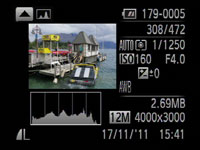
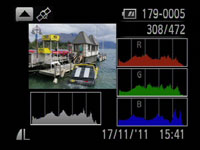
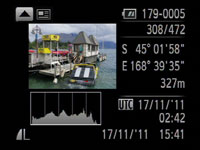
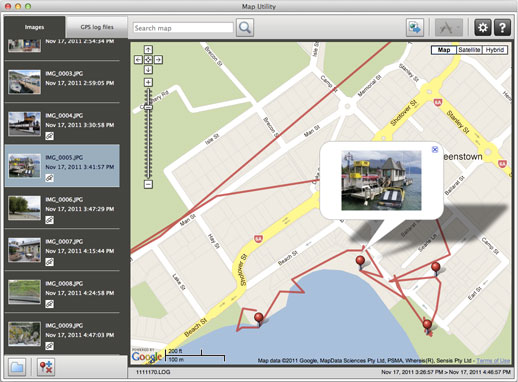
There’s no option to view your co-ordinates live on-screen, but during playback, one of the display views will show the position along with the altitude, along with universal and local time. The position data in the EXIF header is standard, so can be read by any mapping software. Canon includes a Mapping Utility with the S100 which can show your photos on a map powered by Google.
 |
 |
 |
The S100 goes one step further than previous Canon GPS implementations by additionally offering a GPS Logger feature. This checks your position at regular intervals even when the camera’s powered off, and stores it in a log file on the memory card. This can then be read by the Mapping Utility to superimpose your route on a map, again with the photos you took if desired. This can be a fun way to retrace your movements following a shoot.
In tests around Queenstown, New Zealand, the S100’s GPS generally locked-onto a signal within five seconds of powering-up from cold so long as it had a clear view of the sky. If the GPS Logger was running though, the camera would normally indicate a position immediately after switching on, again so long as it recently had a reasonable view of the sky.
 | |
Canon recommends keeping the camera near the top of a bag or pocket with the receiver pointing up if you’d like the Logger to keep track of your position. To put this to the test I snapped some photos around the Queenstown CBD, alternately keeping the camera in my shoulder bag, coat pocket, or simply in my hands when powered-down between shots. I then rested it on the dashboard of my car as I drove to the Shotover Jet location at Arthur’s Point, a few miles away.
When I opened the Logging file in the supplied Mapping Utility, the camera had recorded most of my route around town including the entire driving portion, only losing it from time to time near larger buildings – you can see where it’s lost the signal in the screengrab opposite with the long straight lines. As such, this aspect of the camera works fairly well, but like other in-camera GPS systems, there are downsides to be aware of.
Most notably, the S100’s GPS unsurprisingly eats through its already slim battery. If you have it enabled, you can expect considerably fewer shots per charge, and for it to possibly even start flashing after a good day’s shooting. Enable the GPS Logger facility and it’ll drain even quicker. Indeed when logging I experienced several occasions when the battery indicator started flashing alarmingly soon after charging, although to be fair with the Logger enabled the camera does warn you the GPS is still running when switched off, and thankfully disabling the logger and the GPS will normally see it regain enough strength to continue for a while if necessary. The bottom line regarding GPS and battery life? Be very aware of the increased consumption – especially with the Logger enabled – and always carry a spare if possible. Finally, it’s also worth reiterating that you should disable the GPS on any camera if you’d like to retain your privacy, such as photos taken around your home or those of friends.
Ultimately though I enjoyed having GPS on the S100 and it’s another nice upgrade over the S95.
Canon PowerShot S100 movie mode
The PowerShot S100 boasts a number of key improvements over the earlier S95 when it comes to video: it can now shoot Full HD 1080p at 24fps, there’s slow motion modes at 120 and 240fps, the option to apply a miniature special effect at up to 720p, and finally continuous AF and the chance to adjust the optical zoom while filming. Like other recent Canon models, you can additionally opt for a Movie Digest feature which grabs short VGA clips before each photo you take, then assembles them into a fun video of your day’s shooting. And while it’s often overlooked, the use of a CMOS sensor allows the S100 to avoid the vertical streaking around saturated highlights that plagued CCD-based models like the S95.
Returning to the movie quality, the S100 can shoot at 1080p at 24fps, 720p at 30fps or VGA again at 30fps. Like other Canon compacts, you can keep shooting HD video until either the file reaches 4GB in size or a second shy of half an hour in length. Set to either 720p or 1080p, you’ll hit the 4GB file limit long before the half hour mark: at around 20 and 14 minutes respectively. Canon recommends using a Class 6 SD card or quicker.
A new dedicated record button on the back allows you to start recording video in any mode, and if you’re in AUTO, the S100 will exploit scene detection to figure out the best settings as it goes along. You can also apply a variety of effects, although if you want to record the miniature effect in the highest possible quality of 720p, you’ll first need to set the still photo aspect ratio to 16:9; if you leave it at the default 4:3, video recorded in the Miniature mode will be in lowly VGA.
Those who prefer a degree of manual control can apply exposure compensation, lock the exposure, or set the focus manually prior to filming, but there’s no manual control over the exposure itself.
Now for some sample movies filmed with the S100and as always, registered members of Vimeo can download the originals for evaluation on their own computers.
| |
|---|---|
|
The first clip above was filmed handheld and demonstrates a 180 degree pan, followed by a short walk and a full zoom in and back out again. As always I started the clip by filming bright sunny reflections on the rippling water, and this is something which would have resulted in vertical streaks on the earlier S95, due to its CCD sensor. Now thanks to a CMOS sensor, the S100 avoids these issues. The stabilisation does a good job reducing the wobbles even when walking with the camera a little. New to the S100 over its predecessor is the ability to optically zoom the lens while filming, and you can see an example at the end of the clip. Under these conditions, the zoom process looks smooth and the camera manages to keep the subject in focus. A good start for the S100.
| |
|---|---|
|
For my second clip above, I mounted the S100 on a tripod with a fluid head and smoothly panned it from left to right to illustrate a calmer environment.
| |
|---|---|
|
My third clip was filmed from the same location and once again demonstrates the ability to optically adjust the focal length while filming. There’s a wobble as the zooming starts, and another as I begin to zoom back out again. You may also notice a little of the rolling shutter artefact as the camera is very slightly knocked while on the tripod. But while the motorised zoom isn’t the smoothest I’ve tested, it’s still a very welcome upgrade over the digital zoom of the S95 – and again the AF does a good job at maintaining a sharp image.
| |
|---|---|
|
To test the video capabilities in low light I moved indoors for my fourth clip. The S100 selected a sensitivity of 800 ISO at f2.0 for this clip. This is one of the benefits of having an optically bright lens, as most compacts at a maximum of f2.8 would be forced to use 1600 ISO under the same conditions. The S100’s clip here is obviously noisier than the outdoor samples at low ISOs, but it’s still impressively clean considering the size of the sensor. The still photo quality at 800 ISO is also impressive as you’ll see in my sample images.
| |
|---|---|
|
Also new to the S100 is the ability to continuously autofocus while filming, so to put it to the test I moved to a cafe environment, constantly moving the camera and pointing it at subjects at different distances; for the record, this clip was filmed at 500 ISO. One of the obvious limitations of AF is being within the actual focusing range, and for the S100, its closest focusing distance increases significantly as you zoom-in, so here I’ve had to zoom all the way out. As such, it’s not as tough a test as seen on other models, but the S100 is still clearly refocusing as it’s moved around. In other tests in the same location with the lens zoomed-in a little, the continuous AF continued to work well, although failed to refocus on the coffee cup at the end due to its proximity. Overall, the continuous AF didn’t feel as confident as some of the latest Panasonic models, but it’s still a very welcome upgrade over the S95. PS – I go through quite a few drinks and cakes in this cafe, for my – ahem – tests, so if you find my reviews useful and ever feel like treating me, feel free to buy me a coffee – cheers!
| |
|---|---|
|
In my sixth clip, above, I really put the continuous AF capabilities to the test with a subject steadily approaching the camera. I zoomed the S100 to its maximum focal length and kept the Skyline logo on the cable car in the middle of the frame. The S100’s done a good job at keeping the cable car in focus during the clip, although to be fair, its maximum equivalent focal length of 120mm means it’s nowhere near the same challenge as a typical super-zoom model. But once again, it’s a capability that was absent on the S95, so a very welcome one to have here.
| |
|---|---|
|
In my final 1080p clip above, you can once again see the S100’s optical zoom and continuous focusing while filming. It does a good job at keeping the jetboat in focus, although as mentioned on the previous clip, it’s nowhere near the same challenge as a super-zoom camera with its longer focal length. PS – please excuse the voices from nearby spectators during this clip!
| |
|---|---|
|
Like most recent Canon compacts, the S100 can also apply a variety of special effects to video, including its miniature mode. As explained earlier though, this will only record at its maximum resolution of 720p if you have previously set the still photo aspect ratio to 16:9. Here’s an example of how it looks with the default timing settings.
Before wrapping-up I have two more clips for you, both filmed using the new Super Slow Motion modes. As described above, the S100 offers two high-speed filming options: 240 fps at QVGA (320×240) or 120fps at VGA (640×480). You can see an example of the VGA mode below, where the footage played-back at 30fps, is effectively slowing the action by four times.
| |
|---|---|
|
| |||
|---|---|---|---|
You can see a similar clip opposite filmed with the QVGA option, where the footage has been slowed by eight times. Like other slow-motion modes on rival models, it’s a shame there’s no HD options at high frame rates, but in its favour, the S100 does at least offer a VGA option over Panasonic (albeit at half the frame rate of all of their QVGA options). So again a nice addition over the earlier S95.
Overall the movie quality of the S100 is very good. The bump from 720p to 1080p resolves finer detail and puts it ahead of the S95, LX5 and XZ-1, the various slow motion and effects modes are fun to use, and while the optical zoom isn’t as smooth as it could be, I’m just happy Canon has finally enabled this facility after locking it down on previous models.
Meanwhile the Continuous AF may not be as quick or confident as recent Panasonic models (which bodes well for an LX5 successor), but keep the movement gentle and the S100 does a fairly good job at refocusing. S95 owners will also welcome the elimination of saturated vertical streaks.
Canon PowerShot S100 continuous shooting
The Canon S100 enjoys a significant – and much needed – upgrade in continuous shooting over its predecessor. The earlier S95 quoted a continuous shooting speed of 1.9fps, but in my tests delivered closer to 1fps without AF. Now the S100 boosts this to a claimed 2.3fps (again without AF), while also boasting an additional High Speed Burst HQ mode which can grab 8 shots at 9.6fps.
To put the numbers to the test I fitted the S100 with a 16GB SanDisk Extreme Pro UHS-1 card rated at 45MB/s and photographed the fast action of Queenstown’s Shotover Jetboats. When set to Continuous without AF, the S100 happily took 50 Large Fine JPEGs in 25 seconds and was happy to continue at this speed while memory remained. The speed corresponded to 2fps, rather than the 2.3fps quoted, but is at least twice as fast as the S95. Switching to RAW saw the speed drop to about 1fps. You can see ten frames from the JPEG sequence below.
| Canon PowerShot S100: Continuous Shooting at 2.3fps | ||||||||
 |
 |
 |
 |
 | ||||
 |
 |
 |
 |
 | ||||
Switching to the SCN mode and selecting High Speed Burst HQ allowed the S100 to fire-off its burst of eight frames in a fraction under a second, confirming the quoted speed. The camera took about four seconds to flush its buffer before it was ready to shoot another burst of eight frames. You can see all eight frames from a burst below.
| Canon PowerShot S100: High Speed Burst HQ (9.6fps) | ||||||
 |
 |
 |
 | |||
 |
 |
 |
 | |||
The main continuous shooting mode brings the S100 roughly in line with the LX5 and XZ-1 (at least for JPEGs), while the new burst mode at the full resolution – despite being limited to about one second’s worth of action – is arguably more useful than the high-speed reduced resolution modes of its rivals. Overall, a good set of upgrades over the S95.
Canon PowerShot S100 sensor and processing
The 1080p video, slow motion and fast continuous shooting modes on the S100 are all made possible by its new CMOS sensor. This is a key difference between it and the earlier S95 which employed a CCD sensor. Another is the presence of Canon’s latest DIGIC 5 image processor.
The sensor itself remains a 1/1.7in type, that’s a little larger than the 1/2.3 or 1/2.5in type commonly found in point-and-shoot cameras, although interestingly Canon couldn’t resist a slight bump in resolution from 10 to 12 Megapixels. This was arguably unnecessary given the S100’s educated target market, but for better or worse it allows the S100 to numerically ‘trump’ the 10 Megapixels of its predecessor along with the LX5 and XZ-1.
The S100 allows you to record images at four different resolutions, in five different (cropped) aspect ratios and in the choice of two JPEG compression levels. Best quality Large Fine 4:3 JPEGs typically measure 2.5 to 3MB each. Like its predecessor you can also shoot RAW files, or opt for a RAW+JPEG option. Support for RAW is one of the major advantages of the S100 over lesser compacts, although it should be noted it’s also offered by the LX5 and XZ-1. You’re looking at about 14MB per RAW file.
Again like its predecessor, you can customise the white balance and adjust the sharpness, contrast, saturation, red, green and blue levels along with skin tone. New to the S100 though is the chance to set the noise reduction for JPEG images between Low, Standard and High; note this feature is disabled when shooting in RAW. You can see the impact of the different noise reduction settings in my S100 Noise Reduction results page.
As before you can adjust the tonal range using DR Correction and Shadow Correction facilities, accessible via the super-imposed function menu. Dynamic Range Correction claims to protect highlights from saturating and can be set to Off, Auto, 200% or 400%, while Shadow Correction brightens dark areas and is only available in either Off or Auto. DR Correction increases the sensitivity, using a minimum of 160 and 320 ISO for the 200 and 400% options respectively; you can see examples of this in action in my S95 review.
Canon makes big claims for the image quality from its new 12 Megapixel CMOS sensor and DIGIC 5 processor. There’s only one way to find out so over the following results pages you’ll see how the noise and resolution compares to the S95, along with several larger sensor models you may also be considering. I’ll also take a close look at the S100 Handheld Night Scene mode which captures a burst of images before combining them into one to reduce noise, along with seeing the impact of the different S100 noise reduction settings and S100 RAW versus JPEG shooting.
I’ll start with my main S100 quality test, which compares its resolution against the S95. Alternatively skip straight to my S100 sample images, or head over to my S100 verdict which sums-up my findings compared to the competition!