Canon PowerShot G1 X
-
-
Written by Gordon Laing
Intro
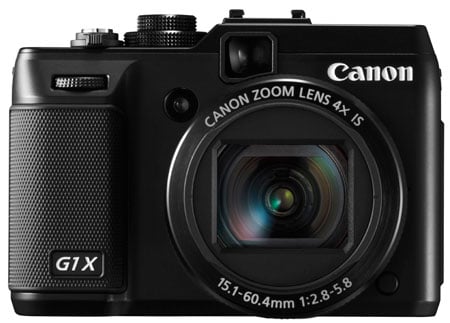
The Canon PowerShot G1 X is a compact camera with a large sensor, 4x zoom, optical viewfinder and articulated screen packed into a metal body. Announced in January 2012, the G1 X joins the PowerShot G series, but rather than replacing the existing G12, it’s positioned as a new premium model – because while the body is immediately identifiable as a member of the G-series, the sensor inside is closer in size to what you’d find in a DSLR or CSC.
Yes, this is Canon’s long-awaited first compact with a big sensor. Inside the G1 X is a new 14.3 Megapixel 1.5 inch CMOS sensor, which is considerably larger than the 1/1.7in sensor in its predecessors and other enthusiast-class compacts with fixed lenses. Indeed the G1 X’s 1.5in sensor is fractionally larger than the Micro Four Thirds format and only slightly smaller than the APS-C format employed by the Sony NEX system and most DSLRs.
While the G1 X features a large sensor, the thing which really makes it different from DSLRs and Compact System Cameras (CSCs) is its fixed lens. Rather than develop or adapt an interchangeable lens mount for its first large sensor compact, Canon has instead opted to fit a fixed lens, just like previous G-series models. The G1 X’s lens range may not quite match the 5x / 28-140mm equivalent range of the previous G12, but comes close with a 4x / 28-112mm range, while also matching the maximum f2.8 aperture at wide-angle; this makes the lens a little longer and brighter than most DSLR and CSC kit lenses, although of course you can’t swap it for anything else. Like its predecessor, the G1 X is also equipped with a fully articulated screen, optical viewfinder, flash hotshoe and a wealth of manual control. In my Canon G1 X review you’ll find out all about the new features along with seeing how the quality and handling compares against the G12 in addition to a selection of interchangeable lens / compact system cameras.
 |
Canon PowerShot G1 X design and controls
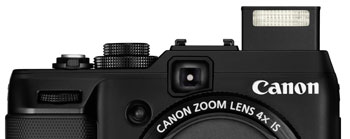
In terms of design the G1 X is quite obviously a member of the PowerShot G-series; indeed at first glance you’d be forgiven for mistaking it for the earlier G12, but place them side-by-side and a number of important differences become apparent.
Most obviously, the G1 X is a larger and heavier camera thanks to its bigger sensor and lens to go with it. Where the old G12 measured 112x76x48mm and weighed 401g with battery, the new G1 X measures 117x81x65mm and weighs 534g. So the G1 X is 5mm wider, 5mm taller, but most noticeably, 17mm thicker thanks to a lens which has to cater for a much larger imaging circle.
Since the earlier G12 was already fairly chunky, it’s well worth comparing its larger successor with a selection of mirror-less CSCs. Nikon’s V1 is slightly smaller from the front at 113x76mm, but is 13mm thicker overall when the 10-30mm kit lens is mounted; in terms of weight, the V1 kit is fractionally lighter at 498g, but in your hands it feels essentially the same weight as the G1 X. The Nikon J1 is more compact though: measuring 106x61mm from the front it’s 11mm narrower and 4mm shorter than the G1 X, and while the kit lens still makes it thicker, it’s only by 7mm. The J1 kit is however noticeably lighter at 392g.
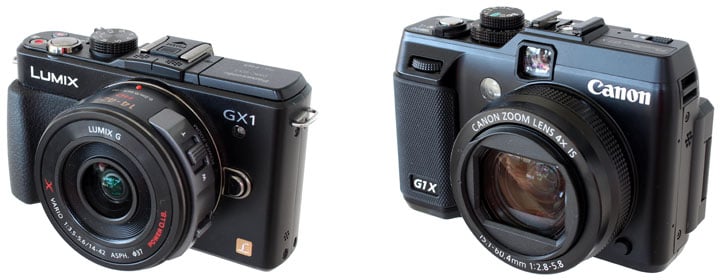 |
Arguably the most interesting comparison is against Panasonic’s GX1 fitted with its premium 14-42mm Power Zoom kit lens, see photo above. Like the G1 X, this lens features a motorised zoom which retracts when switched-off. The GX1 shares essentially the same width as the G1 X, although is a noticeable 13mm shorter. Fit the 14-42mm Power Zoom to the GX1 and the overall thickness is actually 5mm less, while the overall weight at 413g is an impressive 121g less than the G1 X. To be fair, the Canon G1 X sports a longer zoom range that’s also slightly brighter at the wide-end, in addition to an articulated screen and optical viewfinder, but it’s important to give credit to Panasonic for creating a tiny power zoom lens, which lest we forget could alternatively be mounted on the GF3 for an even smaller and lighter combination of 108x67x60mm and 359g. And remember this and the GX1 have interchangeable lenses, whereas the G1 X’s lens is fixed.
The bottom line is while the G1 X remains much smaller than a traditional DSLR, it’s huge in the point-and-shoot world, and larger even than some mirror-less CSC models. There’s no complaints over the build though: the G1 X feels reassuringly solid in your hands, and the textured grip surfaces on the front and rear allow you to hold it securely and comfortably. The lens barrel also features a coarsely-textured band which begs to be turned, although it’s fixed in position and unlike the S100 can’t be configured as an additional control. Indeed, the entire exterior barrel is designed to be unlocked and twisted-off in order to mount the optional filter tube.
 | |
 | |
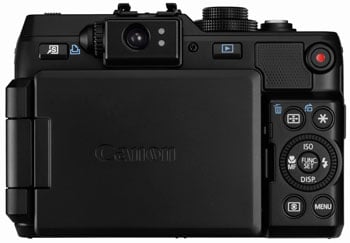 | |
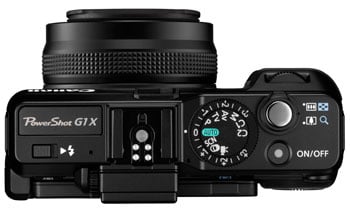
Moving onto the styling and layout, the G1 X shares a great deal with the earlier G12, even down to the top surface sloping down from the hotshoe to meet a dual-tiered control dial. Both cameras also feature a finger dial above their grips and a wheel control round the back. Look closer though and as mentioned earlier, several differences emerge.
First, the flash is no longer always visible, but instead raises out of the upper left surface to provide greater clearance with the lens; unlike the neat motorised flash of the S100 though, the G1 X’s flash is manually popped-up by flicking a small switch. Secondly, the position of the new flash has forced Canon to sacrifice the dedicated exposure compensation dial which used to be located here on the G12.
Well not entirely: the exposure compensation dial now finds itself as the lower of two tiered dials on the right side (now sporting a broader range of +/-3EV), with the smaller mode dial remaining on top; this means the earlier ISO dial is no longer present on the G1 X. The ISO value is now adjusted via the tilting wheel on the rear, forcing the previous self-timer control to the menus only.
The Shortcut button in the upper left corner can be configured to present direct access to 15 settings, including custom white balance, drive mode and servo AF, along with switching between RAW and JPEG recording or enabling the built-in ND filter. Finally, a new dedicated red button is positioned in the top right corner to start recording video at any time.
In terms of connectivity the G1 X features Mini USB and Mini HDMI ports along with a connector for the optional RS-60E3 cabled remote. Once again there’s sadly no microphone input, a missed opportunity which could have given it the edge over some CSCs. The hotshoe can however still accommodate Canon’s full range of Speedlite flashguns, although the built-in flash doesn’t have any wireless control, so you’ll need to employ an optional transmitter if you want to trigger any flashes off-camera. Note unlike the S100 there’s no built-in GPS, another missed opportunity, especially on a body this size.
The G1 X is powered by the NB-10L Lithium Ion pack which Canon claims is good for 250 shots with the screen or 700 without under CIPA conditions. Compare this to the more powerful NB-7L pack in the earlier G12 which was good for 370 or 1000 shots with or without the monitor. A disappointing downgrade, but not entirely surprising given the hungrier screen and sensor. A bigger battery would have meant a larger and heavier body.
Finally, the WP-DC44 underwater housing allows you to take the G1 X to depths of up to 40m.
Canon PowerShot G1 X Screen and viewfinder
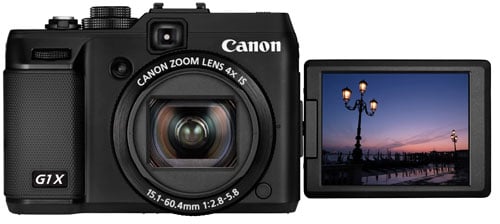
One of the joys of the G-series is an articulated screen and I’m pleased to report Canon’s made an upgrade here over the earlier G12. So rather than a 2.8in / 460k panel, the G1 X sports a larger and more detailed 3in / 920k panel. There’s been no sacrifice in articulation though, as you can still flip and twist the screen to any angle including forward to face the subject or back on itself for protection.
The screen itself is bright and very detailed, although in direct sunlight it can become hard to see. Having spent so long with rival touch-screen models, I also missed the chance to tap on the areas I wanted in focus.
 |
Like other higher-end Canon PowerShots, the G1 X lets you customise the information displayed on-screen. You can choose any combination of shooting details, grid lines, a live histogram and a new single axis leveling gauge which is handy although it would have been nice with dual axes. The chosen details can be applied to one of two screen views which are cycled with the DISP button. A third press switches the screen off.
The menus and on-screen settings are inherited from earlier PowerShot models, so most of the common adjustments are performed by pressing the central FUNC / SET button which fires-up a super-imposed menu of settings on the left side, with their respective options springing out to the right. So while the G1 X may house a DSLR / CSC sized sensor within, it’s most definitely a PowerShot in terms of menus and operation.
Like earlier PowerShot G models, the G1 X retains the optical viewfinder as an alternative means of composition, although with no proximity detectors, you’ll need to manually switch off the screen to prevent it from distracting you during composition.
Canon claims the G1 X’s viewfinder is more accurate than before, but it’s still a basic optical rangefinder system, which means there can be parallax errors, there’s no superimposed guides and you’ll still see the lens barrel in the corner when zoomed-out. You’ll also see comfortably less than 100% coverage.
But, and it’s a big but, the viewfinder is more visible when the screen becomes washed-out in bright conditions, it’s possible to hold the camera more stably when it’s held to your eye, and as an optical viewfinder, it’ll greatly extend the battery life. As stated above, you’re looking at 250 shots with the screen versus 700 with the viewfinder.
Another benefit is it doesn’t black out while shooting, which means you can more easily follow action with the viewfinder. That said, there’ll be those who’ll wish Canon fitted the G1 X with an electronic viewfinder, and others who’d prefer there was none at all for an ultimately smaller and lighter body; a future G2 X or S1 X perhaps?
Canon PowerShot G1 X lens
The PowerShot G1 X is equipped with a 4x optical zoom lens with an equivalent range of 28-112mm and an aperture of f2.8-5.8. It’s optically stabilised with four stops of compensation, retracts within the body when powered-down and features a built-in Neutral Density filter which can darken the incoming light by three stops – great for using large apertures or longer shutter speeds in bright conditions. The maximum focal ratio of f2.8-5.8 and the closest focusing distance is 20cm when zoomed-out. Here are examples taken from the same position with the lens fully zoomed-out and in; I counted roughly 18 increments on the motorised zoom.
Canon PowerShot G1 X coverage wide |
Canon PowerShot G1 X coverage tele | |
 |  | |
| 15.1-60.4mm at 15.1mm (28mm equiv) | 15.1-60.4mm at 60.4mm (112mm equiv) | |
In these respects it sounds fairly similar to lenses on previous PowerShot G models, albeit a little shorter than the 5x / 28-140mm zoom on the G12. But it’s important not to move-on as the G1 X’s lens is actually one of the most interesting parts of the new camera. For starters it has to generate an imaging circle that’s corrected for the much bigger sensor behind it. The actual focal length also has to be much longer at 15.1-60.4mm.
In theory, a longer lens and bigger sensor should mean a shallower depth-of-field, delivering those out-of-focus background effects loved by many DSLR owners. I decided to see if this was the case in practice, so here’s four examples to illustrate what you can expect.
Canon PowerShot G1 X depth-of-field at 112mm f5.8 |
Canon PowerShot G1 X depth-of-field at 112mm f5.8 | |
 |  | |
| 15.1-60.4mm at 60.4mm (112mm equiv), f5.8 | 15.1-60.4mm at 60.4mm (112mm equiv), f5.8 | |
In the two examples above I zoomed the lens to its maximum focal length and selected the largest aperture of f5.8 in Aperture Priority mode. In each case the subject was within two or three meters and the distant background effectively at infinity. These represent ideal conditions for achieving a shallow depth-of-field, but as you can see, the background remains fairly well-defined on both. So if you were hoping to capture portraits with a very shallow depth-of-field on the G1 X, you’ll be disappointed. For this you’ll need a lens with a brighter focal ratio (smaller f-number), and sadly you cannot change the lens on the G1 X.
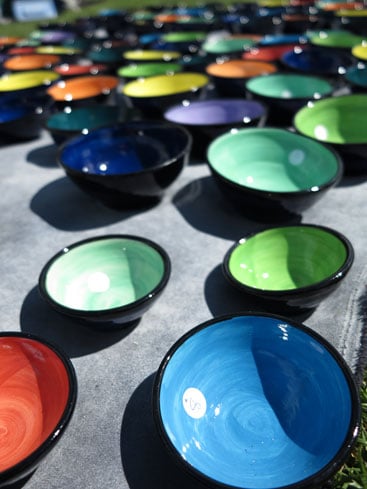
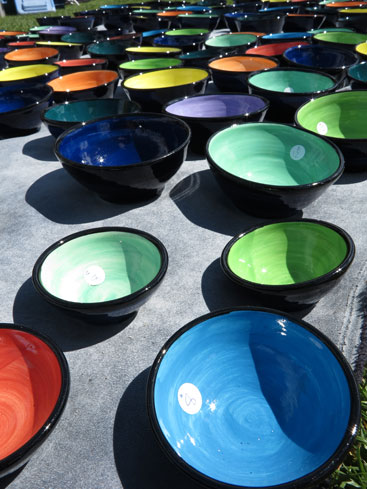
One technique for generating a shallower depth-of-field though is to get really close to your subject in macro mode, so to put this to the test I positioned the G1 X at its closest focusing distance of 20cm (when zoomed-out) and again set the largest aperture, this time f2.8 when zoomed-out. You can see the result below left, and to put it in perspective here’s the same shot taken moments later at f16 for a larger depth-of-field.
Canon PowerShot G1 X depth-of-field at 28mm f2.8 |
Canon PowerShot G1 X depth-of-field at 28mm f16 | |
 |  | |
| 15.1-60.4mm at 15.1mm (28mm equiv), f2.8 | 15.1-60.4mm at 15.1mm (28mm equiv), f16 | |
The version above left at f2.8 certainly has a shallower depth-of-field than the one alongside at f16, but the bowls in the distance are still fairly well-defined when you might hope they’d be much blurrier. The problem here is that the closest focusing distance of 20cm just isn’t close enough at an equivalent coverage of 28mm, and unlike a DSLR kit lens, zooming-in won’t help either as the focusing distance becomes longer; indeed when fully zoomed-into 112mm, the closet focusing distance becomes a whopping 85cm.
Not only does this rule-out any serious macro work with the G1 X, but it can even impact portraits when for tighter shots of kids, you could find yourself bumping against the closest focusing distance. Product photography can also be a challenge.
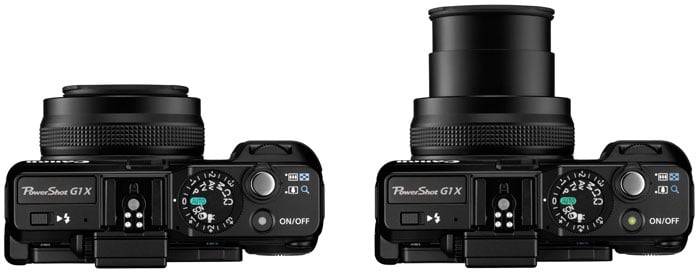
So the G1 X lens isn’t suitable for serious macro shots and it’s not capable of achieving a really shallow depth-of-field either. It’s important to note while a typical point-and-shoot struggles with a shallow depth-of-field too, many models can perform much better when it comes to macro photography – for example the PowerShot G12 can focus as close as 1cm when zoomed-out, allowing it to deliver much greater macro reproductions. Most point-and-shoots also enjoy the convenience of an automatic lens covering whereas the G1 X has a manual lens cap like a DSLR or CSC lens. But unlike a DSLR or CSC lens, there’s no standard thread for filters, just the chance to mount an optional adapter for either 58mm filters or a lens hood, but not both at the same time.
 |
At this point you’d be forgiven for feeling let down by the lens on the G1 X as it seems to inherit many limitations of both point-and-shoot and large sensor lenses, but misses out on their unique benefits. But it is important to point out some benefits. Compared to a typical DSLR or CSC kit lens, the G1 X lens will zoom a little further, while also boasting a slightly brighter focal ratio of f2.8 at the wide end and a handy built-in ND filter, the latter offering some consolation in the absence of a standard filter thread. The lens zoom is also motorised, which is handy for video, and also retracts into the housing when powered-off.
Of course the major benefit of a DSLR or CSC kit lens is you can remove it and fit something wider, longer, faster or better at close-ups, whereas the lens on the G1 X is permanently fixed in position. There’s no doubt 28-112mm is a great general-purpose range, but the fact the G-series is comparable in size to removeable lens cameras inevitably has you thinking critically about whether you really could live with this lens alone. Don’t assume a fixed lens eliminates dust worries either; it may greatly reduce the risk of dust entering the body, but I’ve heard from several G-series owners in the past who’ve found dust finding its way in. So there’s several pros and cons to weigh-up.
Canon PowerShot G1 X exposure modes
The Canon PowerShot G1 X offers direct access to a variety of shooting modes from its main dial, from fully automatic to full manual. The camera’s finger dial and thumb wheel also make it easy to adjust settings as required.
 |
Set the G1 X to Aperture Priority and you can choose from 16 f-numbers from f2.8 to f16 (when fully zoomed-out). Set it to Shutter Priority and you can access speeds from 1/4000 to 60 seconds with no restrictions and an impressive maximum flash sync speed of 1/2000. There’s no Bulb option, but being able to dial-in 60 seconds in Manual or Shutter Priority without the need for a cable release is some consolation.
Exposure compensation is available in a range of +/-3EV in 0.3EV steps using the upper dial, while three-frame exposure bracketing is offered in a range of +/2 EV, again adjustable in 0.3 EV increments.
By default, the G1 X’s front finger dial is used to adjust the aperture and shutter speed in these respective modes. Switch the G1 X to Manual and the finger dial controls the shutter, while the rear wheel adjusts the aperture. It’s all very intuitive, although anyone wanting to shift the Program combination with a simple spin of the wheel will need to remember to press the AE Lock button first.
While it’s impressive to have such control over exposures, there are caveats involving the usefulness of aperture adjustments on the G1 X. The sensor and actual lens focal length may be larger and longer than a traditional PowerShot camera, but the limited maximum aperture and closest focusing distance means there’s no way to really throw the background out of focus on portraits or macro shots. You can see examples in the lens section above.
On a more positive note though, Aperture Priority does allow you to select the optimum f-number to avoid diffraction. Shutter Priority also lets you choose deliberately slower-than-normal exposures to blur moving action, such as waterfalls or racing vehicles. You can find out how to achieve these effects in my Blurring Action and Photographing Water tutorials. Meanwhile, full Manual lets you choose combinations of aperture and shutter which go way beyond normal metering or compensation ranges, allowing you to achieve massive under or over-exposures. You can also choose very long exposures with ease.
At the other end of the scale is the G1 X’s Auto mode, which employs scene detection in an attempt to identify what you’re pointing the camera at. The PowerShot G1 X doesn’t just recognise people or close-up shots, but also the lighting conditions for each, differentiating between bright conditions, blue skies, spot-lit or night-time, and whether the subject is backlit or not; the G1 X can also detect whether the person is in motion or has strong facial shadows. In each instance, the exposure and flash are adjusted accordingly, and the camera will even attempt to recognise a Sunset and boost the colours.
In Auto the G1 X can also choose from six different stabilisation options: still, panning, macro, dynamic and power (when filming), or switched off when the camera detects it’s mounted on a tripod or somewhere steady. The actual conditions or subject recognised by the camera is indicated by an icon in the top left corner, which you’ll see adjust as you recompose. You’ll need to check the manual to confirm what each icon means though, for example those taken under normal, blue or dark skies feature grey, blue or dark blue icons respectively, while backlit situations have a Sun in the corner.
Or rather than learning the icons and second-guessing the camera, you could simply relax and trust the G1 X as like other recent Canon compacts it does a pretty good job of recognising the scene and choosing the best settings for it. In practice, the camera seamlessly switches between portrait mode with face detection when pointed at a person, or into macro mode when placed close(ish) to a subject.
In use the Auto mode worked well in my tests, so long as the subject was within the focusing range of the lens. As mentioned earlier, the closest focusing distance varies between 20 and 85cm depending on the lens focal length, so if you’re shooting macro or even tight shots of kids faces, you may bump up against the limit more often then you’d think.
If you like the automatic life, but prefer a little extra control, turn the mode dial to SCN to access 15 presets. Like other recent Canon compacts, the G1 X also uses the SCN position to house an eclectic range of other shooting modes including Movie Digest, High-speed Burst, Handheld Nightscene, panoramic-stitch assistance. Strangely the SCN mode is also where you’ll find the Smart Shutter options which trigger the shutter after detecting a new face, a smile or a wink. Surely it would be more sensible to find these in the self-time or drive section, but there you go. In protest, I’ll detail them in the drive section below.
Making more sense is the Creative Filters Mode position on the dial which offers HDR, Nostalgic, Fisheye, Miniature, Toy Camera, Monochrome, Super Vivid, Poster, and Canon’s Colour Accent and Colour Swap modes. Like the G12 before it, the HDR mode automatically combines three exposures to extend the tonal range, but there’s no control or even indication of the bracketing range or tone map technique.
Here’s some examples of the filters in action, starting with Fisheye and Miniature effects using their default settings; it’s possible to vary the strength of the fisheye distortion along with adjusting the position of the band of focus in the Miniature mode.
Canon PowerShot G1 X: Fisheye preset |
Canon PowerShot G1 X: Miniature preset | |
 |  | |
| Fisheye preset: 6.1-30.5mm at 6.1mm (28mm equivalent) | Miniature preset: 6.1-30.5mm at 61mm (73mm equivalent) | |
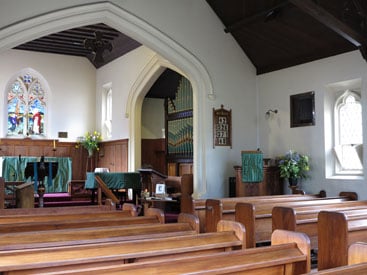
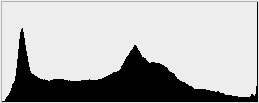
To illustrate the G1 X’s HDR mode in action, I shot my indoor low light composition with it, then checked the ISO in order to take a matching image in Aperture Priority with the same sensitivity. Below are the two images, with histograms under each to reveal what’s happening to the tonal range. The EXIF data for both versions reported identical exposures of 1/20 at f4 and 1600 ISO.
Canon PowerShot G1 X Aperture Priority mode |
Canon PowerShot G1 X High Dynamic Range mode | |
 |  | |
 |  | |
1/20, f4, 1600 ISO |
1/20, f4, 1600 ISO |
You don’t need to look at the histograms to see the version taken in HDR mode has greatly boosted the shadow brightness, with much more detail in the dark roof. Some of the saturated highlight detail in the stained glass window has also been retrieved, but there’s still some clipping. Overall this is a fair result for an Auto HDR mode, but like previous implementations of Canon’s HDR mode, I wonder why the camera didn’t select a lower sensitivity given it ‘knew’ it was going to be mounted on a tripod. To be fair, lower sensitivities might be automatically selected for brighter compositions, but if you’re serious about HDR – especially in lower light conditions – I’d recommend taking your shots (and assembling them) manually.
So far so similar to the earlier PowerShot G12, but there’s two modes on that model which are missing here, one an expected omission, the other less so. The G12’s ‘Low Light’ mode, indicated by a candle icon on the mode dial, is no longer present on the G1 X, but unecessary since the G1 X can deliver the same high sensitivities without reducing the image resolution.
The second missing mode is ‘Quick Shot’, which on the G12 switched-off Live View, forcing you to compose with the optical viewfinder while the screen was filled with useful shooting information. The idea being that Quick Shot mode could deliver faster response than the traditional Live View composition modes and in practice it worked quite well too, although the forced use of continuous AF coupled with the fact the screen was still powered-on resulted in considerable battery drain. Well despite the G1 X arguably benefitting from anything which could improve its handling speed, Canon’s chosen not to implement Quick Shot here.
Finally, there’s two Custom positions on the dial which let you register shooting settings and only the menu options you want. They can even remember the zoom position and manual focus distance, which is handy when shooting portraits or products.
Canon PowerShot G1 X autofocus
The PowerShot G1 X inherits the same three auto-focusing modes of the G12 and S100: FlexiZone, Face AiAF and Tracking AF.
As before, FlexiZone focuses on a single area, the position of which can be adjusted to almost anywhere on the screen; you can also choose from two different sizes for the AF area. The Face AiAF mode automatically employs face detection if a person is recognised in the frame, or switches to a traditional nine-area system in the absence of a suitable face. In my tests this worked quickly and seamlessly, and like other recent Canon compacts, the G1 X tracked human faces with great success. If you’d like to check the focus before taking the shot, the G1 X offers AF-Point Zoom, which enlarges either the selected AF area or the primary face when you half-press the shutter. Alternatively you can set the camera to display an enlarged view of the focusing area after taking the photo.
The Tracking AF option displays cross-hairs in the middle of the screen which should be placed over the subject you want to track. Then after pressing the AF area button, the camera will attempt to follow the desired subject. The G1 X automatically enables Servo AF in Tracking AF mode, allowing it to continuously adjust the autofocus until the point of capture. In use this worked pretty well, managing to track a variety of non-human subjects and keeping them in focus, so long as they were within the focusing range of course. Note: Servo AF can be independently selected for the other focusing modes if you need continuous AF capabilities, although if you want continuous AF during burst shooting, you’ll need to choose it in the drive options, see later.
The G1 X additionally offers Blink Detection, which as its name suggests, can spot when a subject has blinked at the moment the photo was captured. This works in practice, briefly displaying a blinking face icon in the corner of the screen as a warning immediately after taking the photo. It will however only work if the subject in question has already been acquired by the face detection system. Blink detection is also exploited in the Face Timer mode which I’ll detail in the drive section later.
The autofocusing on the PowerShot G1 X feels fairly responsive and generally locks-onto a subject in less than a second, although it’s not as snappy as the quickest CSCs like the Panasonic GX1. Indeed general handling felt slower overall, ruling it out for very spontaneous or action shots.
Pushing the rocker control to the left puts the G1 X into its Manual Focus mode, after which you can use the thumb wheel to adjust the focusing distance in many fine increments, indicated by an on-screen scale. Sensibly the middle portion is now magnified during manual focus by default – combined with the high resolution screen, this gives you a good idea of whether the subject’s sharp or not.
If you’d like a little extra help, the G1 X’s Safety MF option lets you get the focusing close by hand, then finishes it off automatically at a half-press of the shutter release. Alternatively you can opt for the focus bracketing mode which takes three shots: one at the manually focused distance, and the others a little closer and further. The nearer and further increments can be set to small, medium and large.
Canon PowerShot G1 X movie mode
It comes as no surprise to find the G1 X supporting Full HD 1080p video, although it’s worth noting this is an upgrade over the G12 which offered no more than 720p. While the G1 X’s big sensor is close to that in a DSLR though, its actual movie modes and capabilities are similar to compacts like the S100. As such the G1 X gives you the choice of 1080/24p, 720/30p or 640×480/30p, along with an optional Miniature effect (at a maximum of 720p), Canon’s Movie Digest compilation at VGA and the iFrame-friendly 720/30p mode; sadly the slow motion video mode of recent PowerShots is missing here.
Unlike the PowerShot G12, you can zoom the lens while filming and the camera will also attempt to continuously autofocus while recording. What you won’t get are the choice of frame rates of Canon’s DSLRs and there’s also no manual exposure control when filming beyond exposure lock or compensation. The maximum recording time is a second shy of half an hour or when the file reaches 4GB, which for the G1 X in 1080p and 720p modes will be after about 14 and 20 minutes respectively; Canon recommends using a Class 6 SD card or quicker.
Audio is recorded by built-in stereo microphones, but sadly there’s no external microphone input. This is a real missed opportunity especially as the G1 X is equipped with a standard hotshoe which would have been ideal for mounting external microphones. Now let’s have a look at a selection of clips to demonstrate its capabilities, all filmed in the best quality 1080/24p mode unless otherwise stated.
| |
|---|---|
|
In the first clip above, I filmed a handheld pan and zoom, starting as always on some bright reflections on rippling water, which pose no issues for the G1 X’s CMOS sensor. The stabilisation does a good job in the clip as I panned the camera around by 180 degrees and walked a few paces forward. At the end of the clip you’ll see the full zoom range, in and out, and while it’s not unusualy to see a motorised zoom on a PowerShot camera, it is on a camera with a large DSLR-class sensor. Indeed apart from the G1 X, the only other power zooms for large sensor cameras are the 14-42mm and 45-175mm Panasonic models and the Nikon 1 10-100mm. A motorised zoom is a key advantage the G1 X has over most DSLR and CSC kit lenses. The major problem in this clip is noise from the relatively high wind. The G1 X offers an electronic wind filter, which I’ve enabled in the clip below, but as you’ll hear it doesn’t make a great difference. Sadly there’s also no chance to connect an external microphone (with a potentially much more effective wind filter) either.
| |
|---|---|
|
| |
|---|---|
|
In the next clip, above, I mounted the camera on a tripod with a fluid head and smoothly panned it from left to right. Some cameras focus-hunt as the lake dominates the frame, but luckily it wasn’t an issue here – and if it was, you could re-film with manual focus locking the lens.
| |
|---|---|
|
In the third clip, above, I’ve kept the camera mounted on the tripod and zoomed-in and out again to demonstrate the range, refocusing and smoothness of the motion. It’s all good here as the G1 X manages to avoid much of the initial lurching and subsequent wobbling which accompanies many zooms while filming, and the image is kept sharply in focus too. The only real issue is that you must push and let go for the zoom control / collar very carefully to avoid the sound of it bouncing back.
| |
|---|---|
|
For my fourth clip I moved inside to a relatively dimly-lit bar, where the video from many traditional ‘compacts’ becomes quite noisy or ill-defined. Not so for the larger sensor of the G1 X, which in this situation may not be as clean and detailed as the bright outdoor examples, but is still recording lots of real-life detail with few artefacts to worry about.
| |
|---|---|
|
In the fifth clip, above, I’ve stayed in the dimmer surroundings of a cafe to demonstrate the continuous autofocusing. On other reviews you’ll see I normally start close to the surface of the coffee or sandwich before reframing to include the counter at the far end of the room and back again. But I had problems filming this sequence with the G1 X simply because its closest focusing distance isn’t all that close at all. When fully zoomed-out to 28mm wide angle, it won’t focus closer than 20cm, and when zoomed-into 112mm telephoto, you’re looking at 85cm. As such it was impossible to get close to the objects on the table and what you see here is as close and as large as the reproduction can be in practice. This renders the test less interesting, but you will notice the background coming smoothly and confidently into focus when I reframe the shot, and impressively for a contrast-based system, there’s no apparent searching either. So a bitter-sweet result for the G1 X which enjoys smooth refocusing, but only for subjects which are within the modest focusing range.
| |
|---|---|
|
Next up comes another continuous focusing test, this time outdoors on a tripod and with the lens zoomed-in. Since the depth-of-field on the G1 X is already fairly broad, it’s hard to really evaluate whether the camera is effectively keeping the approaching cable car in sharp focus, but once it gets close, it’s visibly not as sharp as it could be. I ensured the camera was more than a meter away, so the cable car should fall within the focusing range at all times, but as you can see it fails to keep a moving subjects sharp once it’s within a few meters. I repeated the test several times with the same result.
| |
|---|---|
|
Above and below are two more handheld clips again showing the optical zoom, stabilisation and continuous AF in action with more distant subjects under bright conditions. There’s no issues here to report.
| |
|---|---|
|
| |
|---|---|
|
And finally, here are two videos filmed with the G1 X’s Miniature mode. Note like other Canon point-and-shoot cameras, you’ll only have the option to film the Miniature effect in HD if you first set the photo aspect ratio to 16:9. Once you do, you can capture the clip in 720p, but if you keep the photos in the default 4:3 aspect ratio, the Miniature video is filmed at 640×480 VGA resolution. You can choose 5x, 10x or 20x speed and like shooting stills, you can adjust the position of the strip that’s in focus. The videos here, both filmed at 10x with the lens zoomed-in for a greater effect, are easy to capture and produce fun results.
| |
|---|---|
|
Canon PowerShot G1 X continuous shooting
The Canon G1 X may sport a big sensor akin to a DSLR, but its continuous shooting performance is closer to a standard point-and-shoot, and worse, a standard point-and-shoot from Canon, which has a reputation for unremarkable burst speeds. Continuing this poor tradition, the main continuous shooting mode on the G1 X fires at a disappointingly slow rate of 1.9fps without AF, falling to an almost offensive 0.7fps if you’d like autofocus or live view between shots. Yes, that’s comfortably less than one frame per second.
Offering some consolation is the High-speed Burst HQ mode which increases the rate to 4.5fps, but only for six shots, thereby grabbing about one and a half seconds of action. It’ll come as no surprise then to discover the G1 X does not exploit the additional speed of UHS-1 SD cards either.
To put the numbers to the test I fitted a freshly formatted 16GB SanDisk Extreme Pro UHS-1 card, set the shutter speed to 1/500 and started timing. With the G1 X set to its normal continuous shooting mode without AF, it seemed happy to keep taking photos while the shutter release button was held down. I fired-off 50 Large Fine JPEGs in 29.75 seconds, which corresponds to a rate of 1.68fps, slightly slower than quoted. In High-speed Burst HQ mode, the G1 X captured the quoted six frames, but took 1.13 seconds to do so, corresponding to a slightly faster than quoted 5.3fps.
| Canon PowerShot G1 X: Continuous Shooting without AF at 1.9fps (1.68fps actual) | ||||||||
 |
 |
 |
 |
 | ||||
 |
 |
 |
 |
 | ||||
So what does this mean in practice? I headed down to Queenstown’s Shotover river to photograph the famous jetboats. The sequence above was taken using the normal continuous shooting mode without autofocus and it illustrates the problem of shooting at just over one and a half frames per second: namely not capturing sufficient frames when things get interesting. As the boat spins 360 degrees, there’s large gaps between consecutive frames which could mean missing the perfect moment.
Canon PowerShot G1 X: High-speed Burst HQ mode at 4.5fps (5.3fps actual) | ||||
 |  |  | ||
 |
 |
 | ||
Switching to the High-speed Burst HQ mode lets you shoot at a much more useful 5fps or so, but this time the restriction of six frames is the limiting factor, see above. With the ability to capture just over one second’s worth of action you’d better press the shutter release at exactly the right time, or you’ll waste your buffer of six shots before anything interesting has happened. This is hard enough when the action is predictable, as with the jetboat’s final spin, but when the action is unpredictable, it’s next to impossible to capture.
So the normal continuous shooting mode is too slow to be useful and the Burst preset has too small a buffer to be useful. These capabilities are the low-point of what is after-all a relatively expensive camera aimed at enthusiasts. Even Canon’s own PowerShot S100 does better, shooting at 9.6fps for eight frames in its High-speed Burst HQ mode.
These figures simply pale alongside Canon’s big rival Nikon though, who’s J1 and V1 can shoot at 10fps with autofocus for long bursts up to 100 frames, or up to 60fps if you’re willing to lock the focus. Sure the J1 and V1 are only shifting 10 Megapixels per frame, but with the G1 X Canon once again proves it doesn’t believe fast frame rates are for anyone below the semi-pro DSLR market. An increasingly foolish decision in my book.
Canon PowerShot G1 X sensor and processing
The PowerShot G series has long been a favourite of enthusiasts looking for a high quality compact with lots of manual controls, but its appeal has declined of late with the increasing popularity of mirror-less CSCs with larger sensors. Models like the PowerShot S100 have managed to carve a niche thanks to their tiny size, but the G-series models have always been unashamedly chunky and as such found themselves uncomfortably close to the size of mirror-less ILCs. Canon’s solution for the G1 X is one that’s been discussed by enthusiasts for years now: find some way to squeeze a large sensor into a G-series body.
For the G1 X, Canon’s developed a new 1.5in format CMOS sensor which measures 18.7x14mm. This is considerably larger than the 7.4×5.6mm of the 1/1.7in type sensors in the G12 and S100 – indeed in terms of surface area the G1 X’s sensor is 6.3 times greater.
This is clearly illustrated in the diagram below where the G1 X’s sensor is coloured red and shown to scale alongside other formats. It’s slightly smaller than the 22.3×14.9mm of Canon’s APS-C format, but a tad larger than the 17.3x13mm of Micro Four Thirds, a decision which was almost certainly driven by Canon’s marketing team: numerically trump one the big rivals without stepping on the toes of your own DSLRs. Meanwhile all of the above are comfortably larger than the 13.2×8.8mm of Nikon’s CX format introduced for the J1 and V1.
Digital camera sensor sizes compared (scale diagram) |
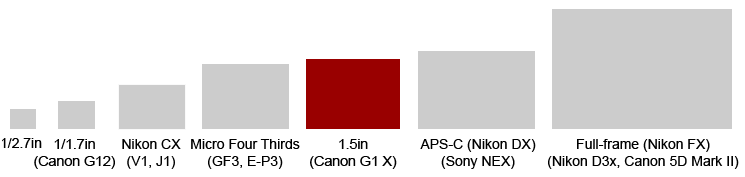 |
One of the more interesting things which is apparent from the diagram above is the shape of Canon’s new sensor: the squarish 4:3 format, shared by Micro Four Thirds and most compacts, rather than the wider 3:2 format of most DSLRs along with Sony’s NEX and Nikon’s CX formats. Maybe this was chosen to further differentiate it from Canon’s own DSLRs and align it more closely with existing compacts.
What the new 1.5in sensor does share with Canon’s DSLRs though is virtually the same pixel-pitch as the company’s 18 Megapixel APS-C sensor. This implies similar noise performance to the 600D / T3i, 550D / T2i, 60D and 7D models, and you can find out if that’s the case in my results pages.
As for the actual resolution, the G1 X sports 14.3 Megapixels, delivering 4:3 shaped images with 4352 x 3264 pixels. You can also choose from four alternative aspect ratios (16:9, 3:2, 1:1 and 4:5) all of which are cropped, along with three lower resolutions for each. Images can be saved as JPEGs with the choice of two compression levels or as RAW files with 14 bit tonal range. Canon estimates best quality JPEG and RAW files weigh-in at around 3.5 and 20MB each. The sensitivity ranges from 100 to 12800 ISO at the full resolution and it’s also possible to embed author and copyright data in images.
Image processing duties are carried out by Canon’s latest DIGIC 5 processor, although as described earlier, this hasn’t resulted in lightning-fast burst shooting. Like Canon’s existing compacts there’s also some composite shooting modes on the G1 X with Handheld Night Scene reducing noise and HDR extending tonal range.
You can also adjust the tonal range using DR Correction and Shadow Correction facilities, accessible via the super-imposed function menu. Dynamic Range Correction claims to protect highlights from saturating and can be set to Off, Auto, 200% or 400%, while Shadow Correction brightens dark areas and is only available in either Off or Auto. DR Correction increases the sensitivity, using a minimum of 200 and 400 ISO for the 200 and 400% options respectively; I’ll share some comparisons soon.
Now it’s time to see how the PowerShot G1 X’s image quality stacks-up, so take a look at my Canon G1 X quality and Canon G1 X noise results pages, browse the Canon G1 X sample images, or skip to the chase and head straight for my verdict.