Canon PowerShot G12
-
-
Written by Gordon Laing
Intro
Canon’s PowerShot G12 is the latest model in the company’s flagship G-series, designed to satisfy the demands of enthusiasts who want a powerful compact or a pocketable backup to a DSLR. Announced in September 2010, it’s the successor to the PowerShot G11.
The G12 shares a number of key specifications with its predecessor, including a 10 Megapixel sensor, 5x (28-140mm equivalent) zoom, fully articulated 2.8in screen, full manual control, flash hotshoe, RAW recording, and a retro-styled body that’s packed with physical controls.
New to the PowerShot G12 over its predecessor are 720p HD video with stereo sound, in-camera HDR, Hybrid Image Stabilisation, Dynamic Range enhancement, Tracking AF, new special effects, a choice of aspect ratios, an electronic levelling guide, finger control dial, finer ISO increments, and support for an optional filter adapter. There may be nothing revolutionary in this list, but put together they represent a fair upgrade over the earlier G11, addressing some criticisms of that model, while also delivering a couple of nice surprises. In our full review of the PowerShot G12, we’ll see if it remains one of the best choices for demanding enthusiasts.
Like its predecessor, the PowerShot G12 is not alone in targeting enthusiasts with a powerful pocket camera. Once again the G12 faces a tough rival from Panasonic, with its latest Lumix LX5, not to mention Canon’s own PowerShot S95 which packs many of the G12’s quality and features into a much smaller package with a brighter lens to boot. But since 2009, the market for small and powerful compacts has been transformed by the arrival of cameras which pack genuine DSLR-sized sensors and removeable lens mounts into relatively pocketable bodies. These may typically be larger, heavier and pricier than both the PowerShot G12 and Lumix LX5, but many enthusiasts are willing to pay the extra and accommodate the size for their performance and flexibility.
The question then is not only how well the G12 performs against other small-sensor premium compacts, like Panasonic’s LX5, but whether it’s still relevant in today’s market. Is there still room for a high-end enthusiast’s compact with a small sensor and fixed lens? Find out in our Canon PowerShot G12 full review where we’ll pitch it against both types of cameras to see how it measures-up. If you’re shopping for a premium compact, you’ve come to the right place.
Testing notes
We tested a final production PowerShot G12. Unless otherwise stated, the G12 was set to Program mode with Auto White Balance and My Colours set to Off. Image Stabilisation was enabled for all handheld images and disabled for tripod-based tests. We used the default processing settings for our sample images gallery, so DR correction was disabled, but we do have additional comparisons of this mode in our review.
Canon PowerShot G12 design and controls
Externally, the PowerShot G12 is virtually unchanged from its predecessor. Like the G11, it’s a solid block of a camera which borrows design cues from classic rangefinders to greatly appeal to photographic enthusiasts. Measuring 112x76x48mm and weighing 401g with battery, the G12 is certainly a substantial ‘compact’ and requires a coat pocket or small bag to accommodate it.
Indeed, the PowerShot G12 is comfortably the biggest and heaviest of its rivals. Panasonic’s Lumix LX5 measures 110x66x26mm (WHD), or 43mm thick if you count the protruding lens barrel, and weighs 271g including battery. Meanwhile, Canon’s truly pocket-sized PowerShot S95 measures just 100x58x22mm (WHD), or 30mm thick with its lens housing, and weighs 193g including battery.
 |
 |
It’s revealing at this point to compare these traditional enthusiast compacts against the new breed of ‘EVIL’ cameras which pack DSLR-sized sensors and removable lens mounts in relatively compact bodies. The Olympus E-PL1 body measures 115x72x42mm and weighs 343g; add, say, Panasonic’s excellent 20mm f1.7 lens and the thickness increases by 26mm and the weight by 100g to 443g. Panasonic’s Lumix GF2 measures 113x68x33mm and weighs 365g with the 14mm f2.5 pancake prime. Sony’s NEX-5 is the smallest and lightest of all the EVIL compacts to date – not to mention boasting the biggest sensor – with a body measuring 111x59x38mm and weighing 287g. Sony’s 16mm f2.8 pancake lens adds 23mm to the thickness and increases the total weight to 354g.
We’d say this poses a problem for traditional compacts like the Lumix LX5, and especially the PowerShot G12. The LX5 is only a little smaller and lighter than an EVIL model, but the G12 is actually bigger and heavier than many. Now to be fair, all of the measurements above are for EVIL cameras fitted with their smallest prime lenses, and once you fit a zoom they all become much larger and heavier. In contrast, the Lumix LX5 and PowerShots G12 and S95 all feature built-in zooms which retract back into their bodies when powered-down, but it’s certainly important to see what you can get from a body that may only be a little larger.
With that comparison out of the way, it is worth saying the G12’s solidity certainly lends it a great air of confidence, and while the front grip remains little more than a raised plateau, it provides a reasonable degree of purchase. Like its predecessors, the G12 feels good in your hands and ready for serious use.
In terms of controls, the G12 is virtually identical to the G11 – as such it’s packed with physical dials which would put many DSLRs to shame. Indeed there’s no fewer than three on its upper surface alone: a recessed dial on the upper left to adjust exposure compensation (in a range of +/-2EV), and a two-tiered dial on the right with sensitivity on the lower dial and the exposure mode on the top. In a nice update, the G12’s sensitivity dial now spreads its values around the whole circumference, allowing finer 1/3EV increments to be set.
These dials give the G12 satisfyingly tactile operation, and they’re sufficiently stiff to avoid accidental movement in a pocket. They’re also easy to turn independently without one affecting the other, even when gloved. Owners of older analogue film cameras may wonder why Canon chose to perch the Command dial on top of the ISO dial rather than the traditional compensation control, but that’s being a little pedantic.
These upper dials are now joined by a new finger dial on the front, a welcome enhancement which allows independent control over the aperture and shutter in manual, just like a higher-end EOS DSLR. This also means the G12 beats the single thumb dial of the Lumix LX5, while additionally responding to the unique lens control ring of the S95.
The rear controls are identical to the G11, dominated by a thumb wheel with tactile feedback as you turn it. The new finger dial may now take the lead by default in Aperture and Shutter Priority, but you can customise which dial does what in the PASM modes. Like its bigger EOS brothers, the thumb wheel provides a very tactile and satisfying experience, and one which will be familiar to owners of Canon’s better DSLRs.
As before there’s a rocker control in the thumb wheel with a FUNC / SET button in the middle. Pushing the rocker up, down, left or right will set the G12’s manual focus, self-timer, macro mode and flash modes respectively, while pressing the FUNC / SET button either confirms an action or fires-up the superimposed Function menu for quick access to various settings – see further details below.
Above the thumbwheel are buttons to adjust the AF area and metering modes, while below are buttons to cycle through the display options and enter the main menu system. In the upper right corner of the body is an AE / Flash exposure lock button, while in the upper left is a customisable Shortcut key.
 |
The G12 now allows you to assign one of 19 functions to the Shortcut key: i-Contrast, White Balance, Custom White Balance 1 and 2, My Colours, Bracketing, Drive mode, flash compensation, the Neutral Density filter, Aspect Ratio, RAW or JPEG, Compression, Movie quality, Servo AF, Red-eye Correction, AF Lock, Digital Teleconverter or Display Off; or you can choose not to assign the Shortcut button at all.
What really strikes you about the G12 in use is how there’s a dedicated button or dial for almost everything, greatly reducing or even eliminating the need to enter any menus. Once you’ve customised the Shortcut key, finger dial and thumb wheel, you’ll have the G12 optimised for swift and very satisfying operation. It’s arguably the best compact in terms of physical controls.
The Canon PowerShot G12 is equipped with a built-in (non popup) flash that can be set to On, Off, Slow Synchro or Auto. A dedicated flash control menu offers flash compensation between +/-2EV, rear curtain and red-eye correction. In Manual mode you can also choose from three flash power levels.
 |
Like its predecessors, one of the G12’s highlights is a fully-functional flash hotshoe which can be used to mount an external Speedlite flashgun. With the 220EX, 270EX (pictured left), 430EX II or 580EX II mounted, the flash control menu switches to external control, offering similar options to Canon’s latest DSLRs.
These allow you to again adjust flash compensation (albeit with a broader +/-3EV range), set rear curtain and slow sync options along with red-eye correction and wireless control. The maximum sync speed is 1/250. If you’d prefer something smaller, there’s also an optional HF-DC1 High Power flash unit which attaches to the side of the camera using a tripod bracket and supplements the built-in flash. Alternatively close-up fanatics will appreciate the optional ring light or twin ring light accessories.
Support for external flashguns, especially proper Speedlite units, was always one of the aspects which took the G-Series beyond normal compacts and we’re pleased to find it the on the G12 along with similar built-in control to the company’s DSLRs. The only caveat is the G12’s relatively modest grip can make it a bit of challenge to hold comfortably with large guns like the 580EX II mounted, although you can alternatively fit the flashgun on a bracket instead.
Finally if you want to make a splash with the G12, it’s compatible with the same optional WP-DC34 underwater housing as the G11 before it, rated to depths up to 40m.
Canon PowerShot G12 lens and stabilisation
 |
Canon hasn’t seen any reason to update the lens, so the PowerShot G12 features the same 5x optical zoom as its predecessor, delivering an equivalent range of 28-140mm and a focal ratio of f2.8-4.5; the actual focal length is 6.1-30.5mm and we counted 14 discrete steps when zooming from wide angle to telephoto. The closest focusing distance in Macro mode with the lens set to wide is just 1cm, the same as the Lumix LX5, which allows both to focus much closer than the 5cm of the PowerShot S95.
Upon power-up the lens barrel extends by 24mm with the camera ready for action in a fraction over one second. When powered-down, the barrel retracts within the lens housing which protrudes by 8mm from the main body itself – that’s only a couple of mm beyond the G12’s grip, meaning the camera when powered down has a fairly flat front.
The G12 also employs an automatic lens covering which closes when the camera’s powered-down, so unlike the Lumix LX5, there’s no caps to worry about. Coupled with the faster startup time, the lack of a lens cap makes the G12 quicker to respond to spontaneous situations than the LX5. To illustrate the G12’s coverage, we mounted it on a tripod and shot the same scene fully zoomed-out, then fully zoomed-in. You can see examples of this below.
Canon PowerShot G12 coverage wide | Canon PowerShot G12 coverage tele | |
 |  | |
| 6.1-30.5mm at 6.1mm (28mm equiv) | 6.1-30.5mm at 30.5mm (140mm equiv) |
In use the G12’s 5x optical zoom provides a useful general-purpose range, delivering both wide-angle coverage for capturing expansive landscapes, large buildings, cramped interiors or big group shots, or zooming-into a reasonable telephoto for detail shots.
Anyone wanting longer coverage may be interested in fitting the optional TC-DC58D converter which fits onto the optional LA-DC58K accessory mount and multiplies the G12’s range by 1.4 times, effectively extending it to 196mm. These accessories do greatly increase the size of the G12 though.
A very welcome new accessory for the G12 is the FA-DC58B Filter Adapter, which lets you mount standard 58mm filters. The adapter attaches directly to the lens barrel, allowing it to move with the lens while zooming, and avoid vignetting. This is yet another feature aimed at addressing the balance with its rival from Panasonic, and while third-parties have offered filter mounts for previous G-series models, it’s great to now finally have an official option from Canon.
The G12 also continues the G-series tradition of including a built-in Neutral Density filter, which can be enabled from a menu and reduces the incoming light by three stops. This also works in the movie mode if desired. Handy for achieving slow shutter speeds or open apertures in bright conditions.
At this point it’s important to compare the G12’s optics against the competition. Arguably its biggest rivals are Panasonic’s Lumix LX5, and to a lesser extent, Canon’s own PowerShot S95; these employ lenses with 24-90mm and 28-105mm equivalent ranges, and f2.0-3.3 and f2.0-4.9 focal ratios respectively. Looking at the coverage first, the Lumix LX5 zooms a little wider than both Canons, but doesn’t zoom as long. There’s not a massive difference between the LX5 and S95 ranges, but the G12 will get noticeably closer than either.
Looking at the focal ratio, the PowerShot S95 and Lumix LX5 share the same f2.0 setting when both are zoomed-out. This allows both cameras to gather twice as much light as the G12 or other cameras at f2.8. At the other end of their zoom ranges the LX5 would seem brighter at f3.3 compared to f4.9 and f4.5 for the S95 and G12 respectively, but it’s important to compare like with like and note at which focal lengths the aperture values change.
The PowerShot G12 only offers its maximum f2.8 aperture when fully zoomed-out to 28mm. It closes to f3.2 from 37mm, f3.5 at 55mm, f4 at 83mm and f4.5 at 115mm onwards.
The PowerShot S95 only offers it maximum f2.0 aperture when fully zoomed-out to 28mm. It closes to f2.2 at 33mm, f2.8 at 42mm, f3.2 at 51mm, f3.5 at 61mm, f4.0 at 70mm, f4.5 at 84mm and finally f4.9 at the maximum focal length of 105mm.
The Lumix LX5 only offers its maximum f2.0 aperture when fully zoomed-out to 24mm. It closes a fraction to f2.1 at 26mm, f2.2 at 30mm, f2.3 at 35mm, f2.4 at 37mm, f2.5 at 40mm, f2.6 at 47mm, f2.7 at 50mm, f2.8 at 55mm, f2.9 at 65mm, f3.0 at 70mm, f3.1 at 75mm, f3.2 at 80mm and finally f3.3 at 90mm.
Looking at some of those cross-over focal lengths, the G12, S95 and LX5 operate at a maximum of f3.2, f3.2 and f2.7 at around 50mm and at f4.5, f4.5 and f3.3 at around 90mm This gives the LX5 an advantage of around one third of a stop at 50mm, and a whole stop when all three cameras are at around 90mm. You’d expect the LX5 to enjoy a focal ratio benefit over the G12, but it may come as a surprise to find it staying ahead of the S95 at longer focal lengths too. While both the S95 and LX5 start their focal ranges at an impressive f2.0, the LX5 maintains a relatively bright aperture throughout its range whereas the S95 becomes roughly equivalent to the G12 beyond the halfway mark.
It is however important to reiterate the LX5, like its predecessor, employs a separate lens cap. This clips on and off easily enough and can dangle from a cord attached to the body, but it’s neither as quick nor convenient as the built-in sliding lens covers on the PowerShot S95 or G12. Leave the cap attached as you switch the camera on to record and you’ll be told to remove it before pressing a button to continue. The counter-argument is the cap will offer better protection than the sliding shutter on its rivals. Swings-and-roundabouts, but if you use the cap, you’ll find the LX5 is noticeably slower to get ready and put away again than the S95 and G12.
 |
The PowerShot G12 employs optical Image Stabilisation to counteract camera-shake. Canon offers three modes: Continuous where the system operates all the time, Shoot Only which only applies stabilisation as you take the photo, and Panning which only stabilises in the vertical axis for when you’re moving the camera horizontally as you take the photo – for an example of using the latter, see the Blurring Action tutorial at our sister site, DSLR Tips. New to the G12 over its predecessor though is Hybrid stabilisation, which additionally counteracts angular twisting, and Canon claims the camera is good for four stops of compensation.
To put the G12’s stabilisation to the test we photographed a nearby coffee machine in a cafe with the lens fully zoomed-into its maximum equivalent focal length of 140mm, first with stabilisation disabled, then with stabilised set to the default Continuous mode. Traditional photographic advice would recommend a shutter speed of 1/140 to completely eliminate camera shake without stabilisation, so we started our test at 1/160, then reduced the shutter speed by one stop at a time until all the images suffered from shake.
Canon PowerShot G12 Image Stabilisation off / on (Continuous) | ||
 |  | |
100% crop, 6.1-30.5mm at 30.5mm, 1/2, 200 ISO, IS off | 100% crop, 6.1-30.5mm at 30.5mm, 1/2, 200 ISO, IS on | |
The slowest shutter speed we could use for consistently sharp results at 140mm when handheld was 1/20 with stabilisation and 1/80 without. In this case, the stabilisation provided two stops of compensation, but there were other occasions when it proved remarkably effective. We’ve shown one above, taken at a shutter speed of just 1/2 of a second, where the unstabilised version is unsurprisingly very shaky, but the stabilised one is almost 100% sharp. Achieving this at a shutter speed of 1/2 corresponds to five stops of compensation over our non-stabilised version, or a whopping six over conventional wisdom, which is a great result for the G12.
Canon PowerShot G12 viewfinder
With essentially the same body as its predecessor, the G12 also inherits the optical viewfinder. Like most (non-SLR) optical viewfinders, the view is pretty small and the coverage not particularly accurate. On the G12, the viewfinder coverage is actually only 77%, so you’ll be capturing a fairly wide border around the image, and you’ll also see the end of the lens barrel in the corner when zoomed-out.
 |
But there’s two big advantages: first is the viewfinder is much easier to use for composing when the screen becomes hard to view under harsh direct sunlight. Secondly, when using the viewfinder alone, the battery life more than doubles to around 1000 shots.
Now we wouldn’t suggest that anyone uses the G12’s viewfinder exclusively, especially not when there’s a such a lovely screen (see below), but at times when your battery is effectively depleted for normal use, switching to the viewfinder may let you squeeze out a few extra shots. As such it’s a great backup option.
Canon PowerShot G12 screen and menus
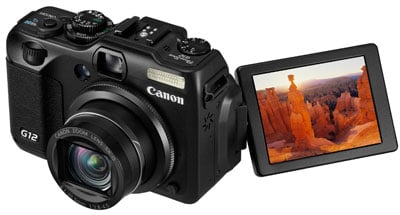 |
The PowerShot G12 also inherits the fully-articulated 2.8in screen of its predecessor, although the panel has been updated to Canon’s latest PureColor II VA.
A 2.8in screen may be a tad smaller than the 3in models on the PowerShot S95 and Panasonic Lumix LX5, but all three share the same 460k resolution to deliver an image which looks much more detailed than average 230k monitors. Most would be happy to trade the slight decrease in size for the G12’s full articulation, which allows you to tilt the screen for easier composition at high or low angles, not to mention flipping it around to face the subject or back on itself for protection. It’s one of the key advantages the G12 has over the competition.
The screen panel itself also delivers a good quality image that’s easily visible in all but the most extreme conditions, especially if you exploit the articulation to angle it away from harsh light. But as described above, the G12 is also equipped with a built-in optical viewfinder as an alternative means of composition.
Pressing the DISP button while shooting cycles between two viewing modes. Like the G11, you can choose what information you’d like to see in these modes, customising them with shooting information, a live (semi-transparent) histogram, a three-by-three alignment grid, and new to the G12 over its predecessor, an electronic levelling guide, more of which in a moment.
 |  |  |
 |  |
The electronic levelling guide is a neat addition to the G12, which graphically indicates the amount of tilt using a small bar scale towards the bottom of the screen. The scale can indicate pretty fine increments with 15 on either side. Once levelled, the scale shows a green square in the middle. If required, the level can be recalibrated by the owner.
It may only represent a single axis, but the electronic level is geuninely useful and gives the G12 an advantage over the competition; potential PowerShot S95 owners will however be a little annoyed Canon reserved this new feature for the G12 only though.
Moving onto exposure display, the G12 inherits a smart piece of graphic design from its predecessor where the current aperture or shutter are not just shown numerically, but additionally on a scrolling scale which reveals the settings on either side. For example in aperture priority mode, if you select f5.6, you’ll see f4.0 to the left and f8.0 on the right in the graphical scale, with marks for the third-stop increments between them.
 |  |
The graphics are used particularly well during AE lock, where scales are shown for both the aperture and shutter speed. As you turn the thumb wheel, the scales indicate what alternative shutter and aperture combinations could maintain the desired exposure. So if you locked the exposure with the camera reading, say, f5.6 and 1/60, the scales would show you could alternatively head in one direction for f8 matched with 1/30, or go the other way for f4 matched with 1/120. In practice it’s an intuitive way to see what exposure options are available.
 |
The PowerShot G12 has also inherited the useful Function menu system of recent Canon compacts, providing quick and easy access to common settings. Pressing the FUNC SET button overlays a list of options running vertically down the left side of the screen which you can select using the up and down buttons. The currently selected item reveals its available settings in a horizontal line at the bottom of the screen and you can use the left and right buttons or the thumb wheel to adjust them.
 |
In Program Mode for example, the options running vertically consist of the i-Contrast options, White Balance, ‘My Colours’ options, Bracketing (for both exposure and focus), Drive mode, Flash Compensation, the Neutral Desnity filter options, Aspect Ratio, RAW plus JPEG mode, and image quality. Several categories present further options when pressing the DISP button, for example White Balance and image quality present WB tuning or JPEG Compression respectively. It’s a really quick and easy way to make adjustments to these settings, although the i-Contrast options positioned at the very top of the tree feel a little like an after-thought. This is because the function menu shows White Balance at the top of the screen by default, with all the other options running below it, so it’s easy to only scroll down and not realise there’s an additional option just one notch up.
Pressing the MENU button presents three tabs for recording options, settings and the configurable My Menu. If Hints and Tips are enabled, the S95 helpfully offers a brief description at the bottom of the screen to explain the highlighted setting.
During Playback, pressing the DISP button cycles between a clean full view, a full view with basic file information, a thumbnail view with flashing highlights accompanied by a brightness histogram and full exposure details, and finally a focus confirmation option which shows two thumbnails, one of the entire frame, and a second showing the active focus area enlarged. This last option comes into its own when you’re viewing photos taken with the G12’s face detection as it allows you to quickly cycle-through close-ups of people’s faces to check for focus, red eyes or blinking.
 |  |  |
In a nice update over the G11 and a trump over the LX5, the G12 now offers a playback view with RGB histograms. Simply cycle through to the view with the brightness histogram, then push the thumb wheel upwards to switch the exposure details for RGB histograms instead. Very classy, and thankfully Canon also implemented this on the S95.
The G12 also uses its orientation sensor to flip images by 90 degrees during playback if you physically turn the camera. This can be handy for viewing portrait aspect images full-screen.
 |  |
The thumb wheel on the back can also be used to quickly scroll through thumbnails, using an interface first seen on the G11 which optionally varies the thumbnail size depending on the speed at which you turn the wheel. Turn it slowly and the thumbnails pass by one at a time, automatically expanding to fill the screen. Turn it quickly and you’ll see a line of smaller thumbnails, and pressing Set will fill the screen with the one you settle-on. It’s a fun way to navigate the images.
Pressing the G12’s Menu while in playback presents a number of options for adjusting images including a red-eye correction mode. This uses face detection to frame the eyes of the subjects on your photos. You can then choose which frames to apply correction to and also whether you’d like the result to overwrite the original or create a new file.
Canon PowerShot G12 exposure modes
The Canon PowerShot G12 offers direct access to a variety of shooting modes from its main dial, from fully automatic to full manual. The camera’s finger dial and thumb wheel also make it easy to adjust settings as required.
 |
Set the G12 to Aperture Priority and you can choose from 10 f-numbers from f2.8 to f8 (when fully zoomed-out). Set it to Shutter Priority and you can access speeds from 1/4000 to 15 seconds with no restrictions and an impressive maximum flash sync speed of 1/2000. Interestingly the maximum shutter speed is quicker than the 1/1600 of the PowerShot S95.
By default, the G12’s new front finger dial is used to adjust the aperture and shutter speed in these respective modes. Switch the G12 to Manual and the finger dial controls the aperture, while the rear wheel adjusts the shutter speed. It’s all very intuitive, although anyone wanting to shift the Program combination with a simple spin of the wheel will need to remember to press the AE Lock button first.
It’s worth noting the Panasonic LX5 offers a broader range of shutter speeds from 1/4000 to 60 seconds, although speeds faster than 1/2000 are only available at apertures of f4 or smaller.
While it’s impressive to have such control over exposures, there are caveats involving the usefulness of aperture adjustments on a compact with a small sensor and short actual focal length. Most notably, the inherently large depth-of-field in most compacts, including the G12, means it’s hard to achieve a significantly blurred background on portraits even with the aperture wide open. Your best bet is to zoom all the way-in and select the smallest f-number available, before positioning the subject close and the background as far away as possible, and you can see an example under these conditions in our Gallery. Macro shots allow a shallower depth-of-field, especially if you exploit the G12’s minimum focusing distance and get really close to your subject. Below is a ‘best-case’ scenario taken close to the G12’s minimum focusing distance at just 2cm from the corner of the magazine. There’s a nice blurred effect here, but remember the impact is much diminished for portraits at more normal distances, and if that’s the thing you’re after, you’ll need a DSLR or EVIL compact.
Canon PowerShot G12: Depth-of-field in Aperture Priority | ||
 |  | |
| Aperture Priority: f2.8, 6.1-30.5mm at 6.1mm (28mm equiv) | Aperture Priority: f8, 6.1-20.5mm at 6mm (28mm equiv) | |
On a more positive note though, Aperture Priority does allow you to select the optimum f-number to avoid diffraction. Shutter Priority also lets you choose deliberately slower-than-normal exposures to blur moving action, such as waterfalls or racing vehicles. You can find out how to achieve these effects in our Blurring Action and Photographing Water tutorials. Meanwhile, full Manual lets you choose combinations of aperture and shutter which go way beyond normal metering or compensation ranges, allowing you to achieve massive under or over-exposures. You can also choose very long exposures with ease.
 |  |
At the other end of the scale is the G12’s Auto mode, which employs scene detection in an attempt to identify what you’re pointing the camera at. The PowerShot G12 doesn’t just recognise people, landscape or close-up shots, but also the lighting conditions for each, differentiating between bright conditions, blue skies, spot-lit or night-time, and whether the subject is backlit or not. In each instance, the exposure and flash are adjusted accordingly, and the camera will even attempt to recognise a Sunset and boost the colours.
The G12 can also detect whether the person is in motion or has strong facial shadows, and whether the camera’s mounted on a tripod. In the case of the latter, the camera will automatically unlock longer exposures which wouldn’t normally be handheld successfully. The actual conditions or subject recognised by the camera is indicated by an icon in the top left corner, which you’ll see adjust as you recompose. You’ll need to check the manual to confirm what each icon means though, for example those taken under normal, blue or dark skies feature grey, blue or dark blue icons respectively, while backlit situations have a Sun in the corner.
Or rather than learning the icons and second-guessing the camera, you could simply relax and trust the G12 as like other recent Canon compacts it does a pretty good job of recognising the scene and choosing the best settings for it. In practice, the camera seamlessly switches between portrait mode with face detection when pointed at a person, or into macro mode when placed close to a subject. It’s also interesting to watch the change of icons in the corner of the screen as the camera detects different lighting conditions, although Canon admits pointing it at a blue or orange wall can fool the camera into thinking it’s either a glorious day or a spectacular sunset. That said, it’s as good a system as any of the competition and one we’d be happy to trust for most day-to-day shots. We certainly rarely had a dud in terms of focus and exposure.
 |
 |
The one caveat we’d mention though is the G12’s preference for selecting fairly high sensitivities in full Auto, even under fairly bright conditions or when using a flash. This may ensure minimal chance of motion blur or camera shake, but at the cost of high ISO smearing. Luckily the G12 has an Auto ISO limiter, and we’d definitely recommend reducing it from the default 1600 ISO to 400 ISO, at least for a test period to see if motion blur really is an issue for your compositions and subjects. This limiter may however only apply to Auto ISO in the PASM modes and not in full Auto.
If you like the automatic life, but prefer a little extra control, turn the mode dial to SCN to access nine presets. Like other recent Canon compacts, the G12 also uses the SCN position to house an eclectic range of other shooting modes including panoramic-stitch assistance, a Nostalgic option which artificially ages the image, and Canon’s Colour Accent and Colour Swap modes. New to the G12 over its predecessor are additional Super Vivid, Poster Effect, Fisheye and Miniature effects along with an HDR mode which automatically combines three exposures to extend the tonal range. Strangely the SCN mode is also where you’ll find the Smart Shutter options which trigger the shutter after detecting a new face, a smile or a wink. Surely it would be more sensible to find these in the self-time or drive section, but there you go. In protest, we’ll detail them in the drive section below.
Right now though we’ll highlight some of those interesting options accessed through the SCN mode, starting with Fisheye and Miniature. Here’s two images taken with these effects using their default settings; it’s possible to vary the strength of the fisheye distortion along with adjusting the position of the band of focus in the Miniature mode.
Canon PowerShot G12: Fisheye preset | Canon PowerShot G12: Miniature preset | |
 |  | |
| Fisheye preset: 6.1-30.5mm at 6.1mm (28mm equivalent) | Miniature preset: 6.1-30.5mm at 61mm (73mm equivalent) |
 |
Moving on, the new HDR mode takes a leaf from Sony’s high-end compacts and DSLRs by firing-off three exposures and automatically combining them in-camera – although unlike Sony’s models, you’ll need to have the G12 mounted on a tripod, and Canon also recommends disabling image stabilisation.
In use, the G12’s HDR mode is fully automatic, with no manual control over the aperture, shutter or sensitivity, although in our tests it selected the same settings as Program would, given the same sensitivity. Unlike Sony’s HDR mode, there’s also no control over the exposure bracketing, nor any clue of what increments the camera’s selecting. All you know is it’s going to take three images at different brightness levels and combine them into one.
To illustrate the G12’s HDR mode in action, we shot our indoor low light composition with it, then checked the ISO in order to take a matching image in Program with the same sensitivity. Below are the two images, with histograms under each to reveal what’s happening to the tonal range. The EXIF data for the HDR version reported an exposure of 1/25 at f3.2 and 800 ISO. When we subsequently set the ISO to 800 ISO in Program mode, it matched the same exposure. Coincidentally, the file sizes were also within a few KB of each other.
Canon PowerShot G12 Program mode | Canon PowerShot G12 High Dynamic Range mode | |
 |  | |
 |  | |
1/25, f3.2, 800 ISO | 1/25, f3.2, 800 ISO |
You don’t need to look at the histograms to see the version taken in HDR mode has greatly boosted the shadow values, with much more detail in the dark roof. Some of the saturated highlight detail in the stained glass window has also been retrieved, but there’s still some clipping. Overall this is a fair result for an Auto HDR mode, but looking at the images at 100% reveals a little more noise on the HDR version compared to the one shot in Program at the same sensitivity. We also have to wonder why the camera didn’t select a lower sensitivity given it ‘knew’ it was going to be mounted on a tripod. To be fair, lower sensitivities might be automatically selected for brighter compositions, but if you’re serious about HDR – especially in lower light conditions – we’d recommend taking your shots (and assembling them) manually.
Note the PowerShot G12 also offers new Dynamic Range Correction facilities, and we’ll cover them in the sensor and processing section below.
 |  |  |
Moving back to the mode dial, the candle icon represents the G12’s Low Light mode, which drops the resolution to just 2.5 Megapixels, but allows it to shoot at extended sensitivities up to 12,800 ISO (automatically selected); this really does allow you to shoot without the flash in very low light – although of course at 2.5 Megapixels, there’s a significant reduction in quality – you can see an example in the High ISO Noise results page.
Next to Low Light on the dial is the Quick Shot Mode, which like the G11 before it, attempts to deliver a quicker response from the G12. This switches off Live View forcing you to compose with the optical viewfinder only, fills the screen with shooting information (see screenshot above right), and sets the AF and exposure to continuous for faster response than normal – it’s quite effective for spontaneous shots, although you’ll obviously need to remember to switch the dial to Quick Shot first. It’s also important to note the use of continuous AF sees Quick Mode chew through the battery fairly swiftly with Canon quoting just 310 shots.
Finally, there’s two Custom positions on the dial which let you register shooting settings and only the menu options you want. They can even remember the zoom position and manual focus distance, which is handy when shooting portraits or products.
Canon PowerShot G12 focusing and face detection
The PowerShot G12 offers three auto-focusing modes: it inherits FlexiZone and Face AiAF from the earlier G11, but now adds the third option of Tracking AF. This is clearly in reaction to the tracking facilities of Panasonic’s compacts.
 |
 |
 |
 |
As before, FlexiZone focuses on a single area, the position of which can be adjusted to almost anywhere on the screen; you can also choose from two different sizes for the AF area. Having an adjustable single area AF mode puts the G12 in-line with the LX5, and ahead of the PowerShot S95, which annoyingly locks its single AF area to the centre of the frame.
The Face AiAF mode automatically employs face detection if a person is in the frame, or switches to a traditional nine-area system in the absence of a suitable face. In our tests this worked quickly and seamlessly, and like other recent Canon compacts, the G12 tracked human faces with great success. If you’d like to check the focus before taking the shot, the G12 offers AF-Point Zoom, which enlarges either the selected AF area or the primary face when you half-press the shutter. Alternatively you can set the camera to display an enlarged view of the focusing area after taking the photo.
The G12 additionally offers Blink Detection, which as its name suggests, can spot when a subject has blinked at the moment the photo was captured. This works in practice, briefly displaying a blinking face icon in the corner of the screen as a warning immediately after taking the photo. It will however only work if the subject in question has already been acquired by the face detection system. Blink detection is also exploited in the new Face Timer mode which we’ll detail in the drive section later.
The new Tracking AF option displays cross-hairs in the middle of the screen which should be placed over the subject you want to track. Then after pressing the AF area button, the camera will attempt to follow the desired subject. The G12 automatically enables Servo AF in Tracking AF mode, allowing it to continuously adjust the autofocus until the point of capture. In use this worked pretty well, managing to track a variety of non-human subjects and keeping them in focus. It’s a welcome addition to the G12’s focusing modes. Note: Servo AF can be independently selected for the other focusing modes if you need continuous AF capabilities.
The autofocusing on the PowerShot G12 is certainly very swift and rarely kept us waiting, but it should be noted in side-by-side tests, the Panasonic Lumix LX5 felt a fraction quicker.
Pushing the rocker control upwards puts the G12 into its Manual Focus mode, after which you can use the thumb wheel to adjust the focusing distance in many fine increments, indicated by an on-screen scale. Sensibly the middle portion is now magnified during manual focus by default – combined with the high resolution screen, this gives you a good idea of whether the subject’s sharp or not.
If you’d like a little extra help, the G12’s Safety MF option lets you get the focusing close by hand, then finishes it off automatically at a half-press of the shutter release. Alternatively you can opt for the focus bracketing mode which takes three shots: one at the manually focused distance, and the others a little closer and further. The nearer and further increments can be set to small, medium and large.
Canon PowerShot G12 movie mode
In a major and necessary upgrade over its predecessor, the PowerShot G12 can now shoot HD video. The earlier G11 (not to mention the S90) were limited to shooting VGA video, which was unforgiveable for a premium compact in 2009. Now the PowerShot G12 and S95 sport HD video capabilities in the 720p format. In an additional upgrade over its predecessor, not to mention the rival LX5, the G12 also now sports stereo microphones.
 |
 |
 |
The G12 offers three video resolutions: 1280 (which shoots at 1280×720 / 720p), 640 (which shoots at 640×480 / VGA) and 320 (which shoots at 320×240 / QVGA). The 320 and 640 modes record at 30fps, while the 1280 mode records at 24fps, although plays back at 30fps.
Recording will stop when the file either reaches 4GB in size, or a second short of 30 minutes in HD mode or one hour in the 640 and 320 modes. You’re more likely to come up against the 4GB file limit first in the HD mode, with a 4GB card being good for around 25 minutes of uninterrupted 720p footage. Like all recent Canon cameras, the G12 encodes its video using H.264 and stores it in a QuickTime MOV wrapper; we found VLC Player most successful at playing these under Windows. Canon recommends using SD cards rated at Class 4 or quicker for recording movies.
The PowerShot G12 also offers four different movie recording modes: Normal, Miniature Effect (which applies a digital tilt-shift effect), and Canon’s Colour Accent and Colour Swap options for selectively changing or preserving specific colours. The G12 additionally offers a wind filter and AE Lock / exposure shift prior to shooting, but unlike Panasonic’s Lumix LX5, there’s no manual control over exposures. If the conditions are very bright though, the G12 does allow you to enable the ND filter. Annoyingly unlike the LX5, not to mention most compacts these days, the G12 can’t optically zoom its lens while filming, which is pretty poor for a 2010 model.
Now let’s check out several clips filmed with the G12’s best quality 1280 movie mode, which registered members of Vimeo can download from the links below.
| |
|---|---|
|
In the first clip above, we’ve handheld the PowerShot G12 and panned it around by 180 degrees with IS enabled. As always, we’ve started on some bright reflections on the water, which normally saturate the image and cause vertical streaking on cameras with CCD sensors. We’re pleased to see the PowerShot G12 doesn’t suffer from streaking on this particular clip, perhaps due to the fact that its CCD sensor is a little larger than those in most compacts. This will come as a relief to anyone who hoped Canon would fit a CMOS sensor in the G12 to avoid this issue. However as mentioned above, there’s no optical zooming while filming, only an increasingly fuzzy digital zoom which you can see towards the end of the clip. This is poor for a premium compact in 2010, but of course may not be an issue for you personally. PS – it was a very windy day!
| |
|---|---|
|
In our second clip, above, we’ve mounted the PowerShot G12 on a tripod, disabled IS and smoothly panned from left to right. We also paused at the start of the pan in case you’d like to take a grab to compare with other cameras, like the Lumix LX5. The G12’s footage here may be lacking the bite and sharpness of some models, but equally avoids their artefacts.
| |
|---|---|
|
In our third and final clip, we’ve moved indoors to a dim bar environment; like the first clip, the pan was handheld with IS enabled. Noise levels have certainly increased compared to the outdoor samples, but they’re not obtrusive here. At the end of the clip the camera passes two bright spotlights and a strongly backlit window. Normally these present a serious problem for cameras with CCD sensors where there’s frequently vertical streaking due to saturation. While the spotlight on the right has caused a little vertical streaking, it’s impressively avoided around the window, in contrast to many compacts. Again we believe this is due to the G12’s larger than average sensor, and while this clip proves streaking isn’t completely avoided, it’s certainly minimised compared to average compacts.
Canon PowerShot G12 drive modes
The Canon PowerShot G12 offers one main continuous shooting option, shooting at 2fps with fixed focus or 0.7fps with autofocus – this may be a little quicker than the 1.1fps (fixed AF) of the earlier G11, but remains far too slow to be useful at capturing any kind of action.
 |  |
To put this to the test we fitted the G12 with a formatted Lexar Professional 133x 16GB SDHC card and timed its continuous shooting in various configurations. We captured 50 Large Fine JPEGs at 100 ISO in 24.72 seconds, corresponding to 2fps. Switching to RAW saw the G12 fire-off 16 frames in eight seconds, again corresponding to a rate of 2fps.
While the G12 has effectively doubled the speed of its continuous shooting over its predecessor, it again remains too slow to be useful. Offering some consolation is the Low Light mode, which thanks to its reduced resolution of 2.5 Megapixels can shoot at quicker speeds. In our tests the G12 managed 50 shots in 11.81 seconds, corresponding to a rate of 4.2fps – again around twice as fast as the same mode on the G12.
Interestingly the G12’s biggest rival, the Lumix LX5, isn’t much better when it comes to continuous shooting at the full resolution: the LX5 can capture 10 Megapixel images at 2.5fps, albeit for only five standard or three fine JPEGs. So while the G12 is a little slower at around 2fps, it can keep shooting while memory remains.
Like the G12, the LX5 also offers an alternative mode which drops the resolution for quicker bursts. The resolution is a fraction higher at 3 Megapixels compared to 2.5, but the shooting speed is much faster at up to 10fps compared to 3.55 on the Canon.
So swings and roundabouts, but the bottom line is neither is appropriate for capturing fast action in high quality. Those serious about fast continuous shooting in a compact need to look at a model with a CMOS sensor, such as Sony’s Cyber-shot HX5.
 |
While continuous shooting on the G12 remains a disappointment, the camera does at least offer a selection of innovative self-timer options. Interestingly unlike most models, including the S95, there’s no option to select a two or ten second countdown. Instead the G12’s main self-timer is the same as the S95’s Custom mode, which lets you set the delay from one to 30 seconds, along with the number of shots it should subsequently take from one to ten. While it’s a little odd not to find separate two and ten second presets, they’re easily dialled-into this interface, and of course there’s potential for great customisation.
The G12 also updates the Face Timer capabilities of its predecessor in line with other 2010 Canon compacts. These cleverly exploit face detection, although bizarrely you won’t find any of them in the self-timer section. Instead turn the mode dial to SCN and choose the Smart Shutter option. This gives you the choice of Smile, Wink and Face timers, which delay the countdown until they see the subject either smile or wink or until a new face enters the frame. You can also set the number of shots to be taken between one and ten.
 |  |  |
These modes sound like a novelty, but they’re actually both fun and useful in practice. We just don’t understand why you need to be in the SCN mode to access them amongst the presets, when they really ought to be listed in the normal self-timer menu. After all, the ‘face-timer’ of earlier Canon compacts was listed alongside the normal self-timer options, so why it’s moved is a mystery. Sadly without reading the manual (or a detailed review), many owners may not even realise these neat options exist.
Canon PowerShot G12 sensor and image processing
The PowerShot G12 employs a 1 /1.7in CCD sensor with 10 Megapixel resolution; this is the same specification as its predecessor, although the sensor has been upgraded to support HD video. In a world where resolutions steadily increase, we applaud Canon for sticking with a sensible resolution here in an attempt to offer improved low light performance. It’s also the same strategy taken by Panasonic with the rival LX5. Note the PowerShot S95 shares the same sensor as the G12.
 |
 |
 |
It’s also important to note that like the Lumix LX5, the G12’s sensor is a little larger than the 1 /2.3in chips in most compacts. It may still be nowhere near the surface area boasted by the DSLR sensors in EVIL compacts, but it does give models like the G12, S95 and LX5 a small advantage over average compacts. As seen in the High ISO Noise results page of our earlier PowerShot S95 review, cameras with 1 /1.7in sensors enjoy an advantage over 1 /2.3in models like the IXUS 300 HS / SD4000 IS at 800 ISO and above, and also manage to greatly minimise the vertical streaking which plagues the movie modes on many compacts when faced with bright highlights. With the same sensor as the S95, the G12 shares these benefits.
Like its predecessor, the G12 sensor delivers 4:3 shaped images with a maximum resolution of 3648×2736 pixels. There’s the choice of four lower resolutions (6, 4 and 2 Megapixels plus a VGA mode), and JPEGs can be recorded in the choice of Normal or Fine compression. Sadly the Super Fine compression option of earlier high-end Canon compacts is missing here, although thankfully you still have the ability to record in RAW, with or without an accompanying Large Fine JPEG. Fine JPEGs at the G12’s full resolution typically measure 2.5MB each, while RAW files weigh-in around 13MB each; there’s no built-in memory, so we recommend buying yourself a decent SD card.
RAW recording is a key feature of the G12, and is one of only two Canon compacts to offer the facility, the other being the S95. Canon supplies the G12 with its Digital Photo Professional software for processing RAW images and we have real-life examples in our results pages.
New to the PowerShot G12 over its predecessor are a broader choice of aspect ratios: the earlier G11 offered 4:3 and 16:9 modes, to which the new G12 adds 3:2, 1:1 and 4:5 options. This is another upgrade clearly made in reaction to the multiple aspect ratios of the Lumix LX5, but unlike Panasonic, Canon simply crops the 4:3 image to deliver the required shape, with a subsequent reduction in resolution and field of view. In contrast, the LX5 (along with several other Panasonic compacts) employs a slightly larger sensor which allows wider aspect ratios to maintain their angle of view while losing minimal resolution. So on the LX5, the 16:9 mode genuinely captures more horizontally, while on the G12, thick strips are simply cropped from the top and bottom of the image. As such, the new aspect ratio options on the G12 are of minimal use since they offer nothing you can’t achieve back at base with your computer.
|
Like the G11 before it, the sensitivity at full resolution runs from 80 to 3200 ISO and is easily adjusted using the dedicated dial on the top of the camera; note unlike the G11 though, the G12’s ISO dial now supports 1/3 EV increments in sensitivity.
 |
 |
 |
Switch the G12 into its Low Light mode and like the G11, it’ll automatically select sensitivities up to a considerable 12,800 ISO, albeit at a greatly reduced resolution of just 2.5 Megapixels. This image size implies pixel-binning, with groups of four pixels effectively acting as one bigger unit with up to four times the sensitivity. The Low Light mode certainly lets you shoot under very low light conditions without a flash, and you can see how it looks in our High ISO Noise page. When set to Auto ISO, the camera of course chooses the sensitivity itself, but you can now limit the maximum to between 400 and 1600 ISO, along with the rate of change.
Contrast, Sharpness, Saturation and other colour settings are applied using a variety of options in the My Colours section of the Function menu. Along with the default Off setting, the G12 offers Vivid, Neutral, Sepia, Black and White (but no filter options), Positive Film, Lighter Skin Tone, Darker Skin Tone, Vivid Blue, Vivid Green, Vivid Red and a Custom option which lets you adjust the Contrast, Sharpness, Saturation, Red, Green and Blue channels, along with Skin Tone by +/-2 steps.
The Function menu also lets you adjust the White Balance between Auto, Daylight, Cloudy, Tungsten, Fluorescent, Fluorescent High, Flash or Underwater, or take one of two custom readings; the shortcut button can also be configured to take a custom reading then set the white balance to custom with a single press. And like the G11 before it, each of the presets can be fine-tuned, although like most non-DSLRs, Canon’s resisted the temptation to include manual entry of colour temperature. The fine-tuning can be adjusted using the rocker disc, or a combination of the finger dial and thumb wheel.
So far so similar to its predecessor, but new to the G21 are enhanced dynamic range adjustments. Previously the G11 offered its i-Contrast feature which automatically boosted shadow areas or faces darkened by strongly backlit scenes. This has been replaced with new DR Correction and Shadow Correction facilities, accessible via the super-imposed function menu – although as noted above, you may not spot them at first as they actually involve scrolling upwards a notch instead of down.
Dynamic Range Correction claims to protect highlights from saturating and can be set to Off, Auto, 200% or 400%, while Shadow Correction brightens dark areas and is only available in either Off or Auto. DR Correction increases the sensitivity, using a minimum of 160 and 320 ISO for the 200 and 400% options respectively. We’ll now take a look at each in turn using our low light test scene which includes both dark shadow and saturated highlight areas.
Canon PowerShot G12 Dynamic Range Correction: Off | Canon PowerShot G12 Dynamic Range Correction: 200% | Canon PowerShot G12 Dynamic Range Correction: 400% | ||
 |  |  | ||
 |  |  | ||
1/2, f3.2, 80 ISO | 1/5, f3.2, 160 ISO | 1/10, f3.2, 320 ISO |
To illustrate the effect of Dynamic Range Correction, we photographed our indoor low light scene with the G12. The image taken with the normal settings, seen on the far left above, suffered from blown highlights in the windows using the normal settings.
The middle image above shows the same composition taken with Dynamic Range Correction set to 200%, while the one on the right is at 400%; as described above, these employed sensitivities of 160 and 320 ISO respectively, while our first shot was taken at 80 ISO. It’s clear from both the histograms and the actual images how the brighter values have been shifted away from the right side, reducing clipping, although in this particular example not eliminating it entirely. This is a fair result, although also comes at the cost of increased noise due to the higher sensitivity.
Canon PowerShot G12 Program mode with Shadow Correction Off | Canon PowerShot G12 Program mode with Shadow Correction on Auto | |
 |  | |
 |  | |
1/2, f3.2, 80 ISO | 1/2, f3.2, 80 ISO |
Now onto Shadow Correction: above left is the standard mode, followed by Shadow Correction set to Auto on the right; both images used the same exposures and sensitivities. This time the difference is even more obvious, with a boost to the mid tones and shadow areas.
 |
These new facilities are a welcome enhancement over the earlier i-Contrast feature, and allow the G12 to protect highlight or shadow areas in some tricky situations, although it should be noted in our tests, the G12’s RAW files contained less headroom than those from the Lumix LX5 for highlight retrieval on normal shots.
Finally, the G12’s Date Stamp option allows the time, date or both to be permanently written in the corner of the image. Such digital mutilation may horrify many photographers, especially considering the date and time are always present in the EXIF data of the file itself, but we’ve heard from sufficient numbers of people who want the feature to know it’s something of value.
Now it’s time to see how the PowerShot G12’s image quality stacks-up, so take a look at our real-life resolution and high ISO noise results pages, browse the sample images gallery, or skip to the chase and head straight for our verdict.