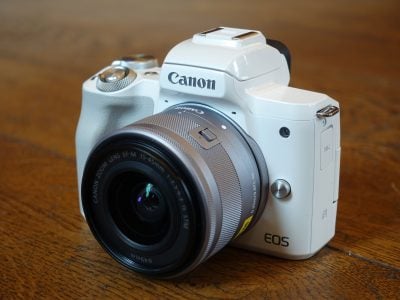
Canon PowerShot A2000IS
-
-
Written by Gordon Laing
Intro
Canon’s PowerShot A2000 IS is a 10 Megapixel compact with a 6x optically-stabilised zoom and 3in screen. Announced in August 2008 and replacing the PowerShot A720 IS, it’s the new flagship of the PowerShot A range. Canon’s kept the 6x lens range, stabilisation and AA battery power, but upgraded the screen and sensor, while redesigning the body.
Much of its predecessor’s manual control has however been dispensed with, so the question is whether the new A2000 IS can satisfy the creative desires while still delivering the decent quality previous models in the range have been known for. Find out in our review where we’ll detail the A2000 IS’s new features and compare its quality against rival compact cameras.
Measuring 102x64x32mm and weighing 190g without batteries, the A2000 IS around 25% smaller than its predecessor, but remains a fairly chunky compact that’s best suited to bags and larger coat pockets than shirt or trouser pockets.
Like many smaller compacts on the market, the only thing stopping your right middle finger from slipping is a cross-hatched Canon logo, backed-up by a small but surprisingly effective ridge for your thumb on the rear. There’s definitely less to get your fingers round than before though which is a step-backward in ergonomics, but it does bring the new PowerShot A models more in-line with what rival manufacturers are doing – presumably Canon’s older designs didn’t score well in market research groups.
 |
Build quality is roughly similar to previous A-series models: the A2000 IS’s body feels quite plasticky with a slippery finish and the controls are at the budget-end of the scale, but the construction is fine and certainly no worse than other models at this price-point. Remember even as the flagship PowerShot A model, the A2000 IS is considerably more affordable than the mid to high-end compacts we normally review at Cameralabs. We should also mention the cheap plastic tripod thread that was wedged in the far corner of its predecessor has been switched for a metal version that’s more sensibly located in the middle of the body. So the traditional grip may have gone, but at least it’s not all bad news.
Like its predecessor, the A2000 IS is powered by a pair of AA batteries and Canon supplies a set of disposable Alkalines to get you started. While you could continue to supply the A2000 IS with Alkalines, it makes much more sense to use a set of rechargeable NiMHs, not just for environmental reasons, but also because they’ll last about twice as long – approximately 500 shots compared to 240 with Alkalines according to Canon. There’s pros and cons to both AAs and Lithium Ion packs, but the former are definitely easier to find in remote areas if you get caught short on power – and most people already own an AA charger and a spare set they can use.
The SD memory card slot shares the compartment with the batteries and behind a small flap on the right side you’ll find a combined USB and TV output alongside a DC input.
Canon may have shrunk the A2000 IS’s body, but has kept the 6x optical zoom range of its predecessor, although the specification is a little different. The A2000 IS now has an equivalent range of 36-216mm, compared to the 35-210mm of the A720 ISO, although you’re unlikely to notice any difference in practice. This means the A2000 IS is still sadly lacking the 28mm wide angle coverage of several higher-end models (most notably in Panasonic’s range), but the 6x reach equips it with decent telephoto capabilities which are great for portraits or bringing-in distant detail. You can see an example of its coverage below, and further examples of how you can use it in our sample images Gallery. The maximum aperture is f3.2-5.9.
|
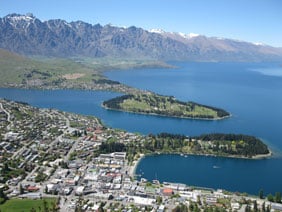
Canon PowerShot A2000 IS coverage | ||
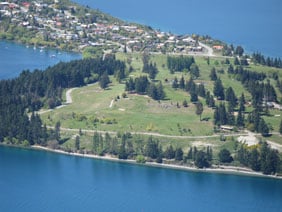 | ||
6.4-38.4mm at 6.4mm (36mm equivalent) |
6.4-38.4mm at 38.4mm (216mm equivalent) | |
The lens extends rapidly upon power-up with the camera ready for action in around 1.5 seconds. A rocker around the shutter release operates the zoom motor with the A2000 IS lurching fairly coarsely between increments – we counted 12 steps between wide angle and telephoto. The closest focusing distance in macro mode remains just 1cm with the lens zoomed-out, which allows for some very impressive close-up shots – although obviously at that distance it’s difficult not to cast shadows on the subject.
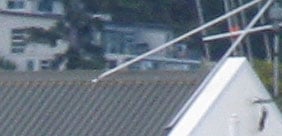
The IS in the camera’s title stands for Image Stabilisation, which helps combat camera shake. It’s an optical system and Canon offers three modes: Continuous where the system operates all the time, Shoot Only which only applies stabilisation as you take the photo, and Panning which only stabilises in the vertical axis for when you’re moving the camera horizontally as you take the photo – for an example of using the latter, see the Blurring Action tutorial at our sister site, DSLR Tips.
Canon PowerShot A2000 IS Image Stabilisation off / on (Continuous) | ||
 |  | |
100% crop, 6.4-38.4mm at 38.4mm, 1/10, 100 ISO, IS off |
100% crop, 6.4-38.4mm at 38.4mm, 1/10, 100 ISO, IS on | |
Above are examples taken with and without Continuous stabilisation with the A2000 IS fully zoomed-into its maximum equivalent of 216mm. Traditional photographic advice would recommend a shutter speed of at least 1/200 to eliminate camera shake, so by achieving it at 1/10 with stabilisation proves the system is good for around four stops of compensation – a great result for the A2000 IS.
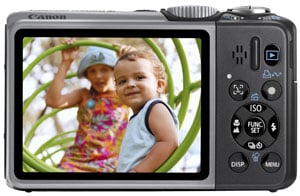 |
Canon’s upgraded the screen on the A2000 IS from the 2.5in 115k pixel model of the earlier A720 IS to a larger and more detailed 3in model with 230k pixels. The boost in screen pixels won’t make a difference to the final image quality, but it certainly makes using the camera much more pleasant with a more detailed view when composing and replaying images, not to mention smoother fonts in the menus.
 |
It’s a big improvement over the screen on the A720 IS, and also larger than many at this price point, but it can become hard to see when not viewed face-on. So if you’re holding it above your head or at low angles, you may need to take a few shots before you get it right; it’s certainly not as good as the screen on the pricier IXUS 870IS / SD 880IS in this respect. Note, the larger screen also means there’s no longer room for the optical viewfinder of its predecessor, so composition on the A2000 IS is with its screen only – interestingly the slightly lower-end A1000 IS still manages to squeeze an optical viewfinder in though, thanks to its smaller 2.5in screen.
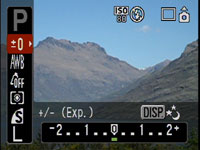
Like other recent Canon compacts, the A2000 IS features a useful superimposed Function menu which runs vertically down the left side of the screen when you press the FUNC SET button. Pressing the up and down buttons will highlight each setting available in the current mode, with the options shown in a strip running along the bottom of the screen; you then simply press the left and right buttons to set the desired value. This system allows you to quickly and easily adjust aspects like the image quality, white balance, metering and exposure compensation.
 |
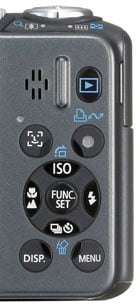
The direction buttons double-up outside of the Function menu to offer direct adjustments over the ISO sensitivity, flash, drive and focus modes. Above these you’ll find a dedicated button for face detection. In use, the A2000 IS locked-onto faces almost instantly and easily tracked them around the frame. Face detection can also be exploited to frame the eyes of subjects in playback and apply red-eye correction if desired. It’s not perfect though – in our tests, the A2000 IS lost recognition once faces approached complete profile. Canon’s improved this capability with its latest DIGIC 4 processor, but you’ll need to pay more for a model which features it, such as the IXUS 870IS / SD 880IS.
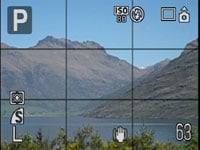
Below the main group of buttons on the back of the A2000 IS is the DISP button which adjusts the viewing options. When taking photos, it’ll switch shooting details on and off; there’s no live histogram, but you can enable a three-by-three alignment grid in one of the menus.
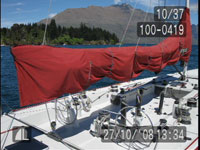 |
 |
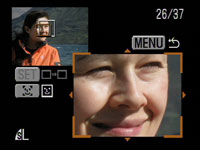 |
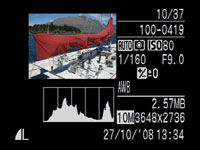
During playback, the DISP button cycles between basic and detailed shooting information, the latter including a brightness histogram. A third page in playback shows a thumbnail of the image alongside an enlarged portion showing the active focus area. If the photo was taken with Face Detection, then the enlargement will show the primary subject’s face, allowing you to quickly check their expression and confirm the focus. You can also zoom-in further on the detail if desired, or switch between other focus points – it’s a handy feature in practice. And finally, like most Canon compacts, if you turn the A2000 IS on its side during playback, the image rotates to stay upright – great for filling the screen with portrait aspect shots.
The PowerShot A2000 IS has access to shutter speeds from 1/1600 to 15 seconds along with two aperture settings, and happily displays what settings it’s going to use in most of its modes, but annoyingly there’s no means for you to manually adjust them. In a significant and disappointing mode from its predecessor, the Manual, Aperture and Shutter Priority modes have sadly departed and in their place is a much more automatic camera. Program and Auto are still here, but are now accompanied by a new ‘Easy’ mode indicated by an icon of a heart in a camera outline.
The A2000 IS’s Easy mode takes Auto one step further by eliminating the Function menu and disabling all buttons on the rear apart from being able to switch the flash between Auto and off; so there’s no exposure compensation, not even a self-timer or macro mode, nor any means to adjust the image quality or enter the menu system. Even playback options are restricted.
To a typical enthusiast this sounds like insult over injury following the shock removal of Manual, Aperture and Shutter Priority modes, but the Easy mode is designed for complete beginners, and remember that may not necessarily be the owner of the camera. If you’ve ever handed over your camera to someone to take a snap of you, or perhaps let the kids have a go, then you’ll see the merit of a foolproof mode which locks-out various options.
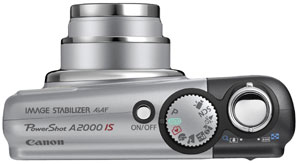 |
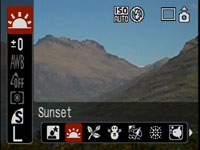
Along with Program, Auto and Easy, the A2000 IS’s command dial features Portrait, Landscape, Night Snapshot, Kids & Pets and Indoor scene presets, along with a SCN position which offers eight additional presets accessible through the Function menu. Like other Canon compacts it’s also possible to select a colour and either change it to something different (such as turning a red London bus green) or make it the only colour in an otherwise black and white image (like the girl with the red balloon in Schindler’s List).
All neat tricks, but ultimately unlike the A720 IS and several PowerShot A series models before it, there’s no way to manually adjust the aperture or shutter speed on the A2000 IS. If you want a Manual mode on a new Canon compact you’ll need the IXUS 980IS / SD 990IS, and if you want Manual, Aperture and Shutter Priority, you’ll need the PowerShot G10. It’s also worth noting while the Auto modes are very good, Canon still doesn’t offer the intelligent scene recognition of several (admittedly pricier) rivals. We should additionally note the flash recycling time on the A2000 IS can often take several seconds, which can be a little annoying when taking multiple group shots.
 |
There is of course a movie mode on the A2000 IS, with several quality options. You can capture 640×480 pixel VGA video at 30fps in standard or long play (the latter using higher compression to double the recording time), 320×240 pixels at 30fps, or in a compact mode at 160×120 pixels and 15fps. Sadly the optical zoom can’t be adjusted once you start filming, but a digital zoom is available in all but the lowest compact mode. The maximum length is around one hour or when the file size reaches 4GB.
Set to the best quality 640 mode in Standard play, the A2000 IS delivered crisp, smooth video. This mode records video in the Motion JPEG standard and consumes around 1.8MB/s; compare this to the similar quality achieved by the pricier IXUS 870IS / SD 880IS at around 1.2MB/s thanks to its newer DIGIC 4 processor offering the more efficient H.264 compressor. The A2000 IS’s audio recording capability can also be used to attach a sound clip lasting up to one minute to existing photos.
The A2000 IS offers a basic continuous shooting mode that may fire until you run out of memory, but at a relatively slow rate of 1.3fps which isn’t really appropriate for any kind of action photography. It’s a shame there’s no faster option, either with a reduced number of frames or at a lower resolution.
Sticking with drive modes, along with the usual 10 and two second self timers is a custom option which lets you set the countdown to as long as 30 seconds and have the camera take one to ten shots at the end. This is handy for maximising your chance of successful poses and expressions in timed group shots.
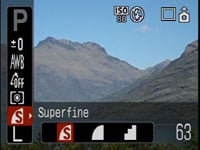
At the heart of the A2000 IS is a 10 Megapixel CCD sensor measuring 1/ 2.3in – the same sensor as the higher-end IXUS 870IS / SD 880IS, albeit with the older DIGIC III processor behind the scenes. This delivers images with a maximum resolution of 3648×2736 pixels, which can be printed up to 12x9in at 300dpi. Four lower resolutions and a cropped 3:2 mode are available, and images can be recorded with the choice of three JPEG compression levels: Normal, Fine and Superfine.
 |
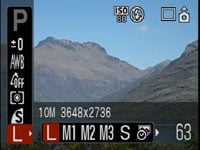 |
Set to 10 Megapixel resolution, these compression settings deliver files that typically measure 1.2, 2.5 and 4.3MB respectively. Like other PowerShots, there’s no built-in memory, but Canon supplies a 32MB SD card to get you started – since this is only good for about seven or 12 Superfine or Fine JPEGs though, you’ll be wanting to fit a bigger card sooner rather than later.
The sensitivity ranges from 80 to 1600 ISO at full resolution, with a 3200 ISO Scene Preset operating at a greatly reduced resolution of 2 Megapixels.
To see how the quality of the PowerShot A2000 IS measures-up in practice, take a look at our real-life resolution and high ISO noise results pages, browse the sample images gallery, or skip to the chase and head straight for our verdict.