Canon EOS Rebel T3 / 1100D
-
-
Written by Gordon Laing
Intro
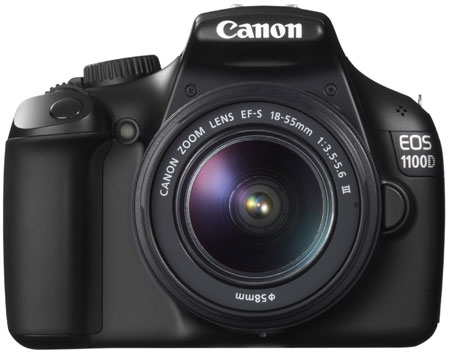
The EOS Rebel T3, or 1100D, is Canon’s latest entry-level DSLR. Announced in February 2011, it comes no less than two and a half years after its predecessor, the EOS Rebel XS / 1000D; indeed it’s such a long time in the digital camera industry, especially for Canon, that many wondered if the company had abandoned the true budget DSLR market for good.
That’s certainly not the case: the EOS T3 / 1100D manages to hit a respectably low price point, while comfortably undercutting its major rival, the Nikon D3100. As such, while the specification of the latest Canon is solid and boosts most of its predecessor’s numbers, it’s not surprising to find most of the technology has been lifted from previous models.
At the heart of the camera is a 12 Megapixel sensor which is almost certainly inherited from the earlier EOS XSi / 450D. The previous 7-point AF system has been upgraded to Canon’s standard 9-point system, and the metering now features the company’s latest 63-zone sensor, deployed across most of its current DSLRs. The screen’s bigger than before, and crucially there’s now HD Movie capabilities which were absent on its predecessor, albeit at a maximum of 720p. Interestingly there’s also a new body which houses the SD memory card slot alongside the battery under the camera. So again, it’s a good, solid specification for an entry-level DSLR, and one which meets a competitive price-point considering the big brand name. The question then is how it compares against other budget DSLRs.
|  |
In particular, the biggest rival for the Canon T3 / 1100D is Nikon’s D3100, and both cameras certainly make for a very interesting comparison. Canon’s aimed at hitting as low a price point as possible with the T3 / 1100D, whereas Nikon has opted to up-sell budget-buyers with a stronger specification for a higher price. In my review I’ve closely compared the features, performance, photo and movie quality between both models to see which will be best for you – and whether it’s worth spending the extra on the Nikon or saving your cash on the Canon.
Canon EOS Rebel T3 / 1100D design and controls
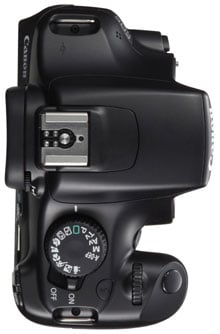 |
At first glance the Canon EOS Rebel T3 / 1100D looks a great deal like its predecessor, and shares similar dimensions and weight, which just for the record is 495g for the body including battery. Take a closer look though and a number of key differences become apparent. Most obviously the finish feels completely different: it’s very plasticky and bereft of rubber coatings around grip areas. This inevitably gives it a cheaper look and feel compared to many DSLRs, but it’s no different to Sony’s and Panasonic’s budget interchangeable lens cameras.
Nikon’s D3100 is a classy exception with a small amount of rubber deployed on the grip and thumb rest, but to be fair it does cost $100 USD more than the Canon for the kit, which at this end of the market is almost 20% more. In terms of weight, the D3100 body plus battery is within a few grams of the T3 / 1100D, and while it’s actually a few mm smaller in every dimension, the kit lens is a little longer, so you’ll still need similar-sized bags to accommodate either camera.
The second major body change concerns the memory card slot which, for the first time on any Canon DSLR, is now located within the battery compartment. This is to save the cost of fitting a side door, and some may actually find it neater, although obviously the compartment will become blocked when the camera’s fitted to all but the smallest tripods. The T3 / 1100D takes SD cards and is compatible with SDXC along with Eye-Fi cards; Canon recommends using Class 6 or faster to support the HD movie mode.
Canon’s also equipped the T3 / 1100D with a new LP-E10 Lithium Ion battery pack, which despite having around 20% less capacity than the pack in its predecessor, actually squeezes out more shots: around 700 shots with 50% flash usage versus 500 on the XS / 1000D. As before though, switching to Live View or filming videos will deplete your battery much sooner. Sadly unlike its predecessor, there’s no optional battery grip for the T3 / 1100D.
On the left side of the camera you’ll find three ports behind a rubber flap: a socket for the optional RS-60E3 remote switch (there’s no IR ports on the T3 / 1100D for wireless remote control), a USB port, and a Mini HDMI port. The latter allows you to connect the T3 / 1100D to an HDTV, but it’s interesting to note Canon is now following Sony in dropping analogue AV output on this model; so owners of older non-HDMI equipped TVs won’t be watching slideshows with the T3 / 1100D.
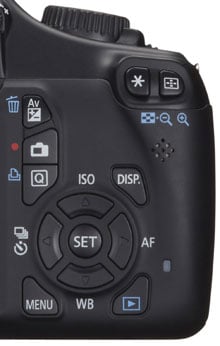 | |
Moving onto the controls, Canon clearly believes bigger buttons are better for an entry-level DSLR, although unlike Nikon, it hasn’t shied-away from labelling. All of the T3 / 1100D’s rear controls are to the right of the screen, represented by chunky buttons with clear labelling. Unlike the Nikon D3100, the cross keys double-up to offer direct (and welcome) access to the ISO, AF mode, White Balance and Drive mode. These work in addition to the already capable Q.Menu system to offer quick and easy access to a wide variety of setting without wading through an unnecessarily laborious interface like the D3100.
To be fair, the Nikon D3100 takes a minor tactile advantage with a spring-loaded lever to enter live view and the surprising addition of a rotary switch around the mode dial to set the drive mode. On the Canon, entering Live View is via another chunky button on the rear, while the drive mode is set by pushing the left cross-key, but overall, as I’ll discuss later, I found it quicker and easier to adjust a wide variety of settings on the Canon than the Nikon.
Turning to the top of the camera, the earlier XS / 1000D’s dedicated ISO button has been switched for one to control the popup flash – a curious relocation from the traditional side of the viewfinder head; clearly some focus group couldn’t find it there. This button can be customised to set the ISO if you prefer, although that in turn makes the flash harder to operate. The SET button in the middle of the cross keys can also be customised, although one casualty of the T3 / 1100D’s cost-cutting is the absence of a depth-of-field preview button, in line with other entry-level DSLRs from the likes of Nikon and Sony. As those manufacturers discovered, few if any of their target audience will miss the capability.
The T3 / 1100D’s popup flash has a modest guide number of 9.2 at 100 ISO, making it noticeably weaker than the GN 12 of the Nikon D5100 and GN 13 of the earlier XS / 1000D. It’s sufficient for close-range fill-ins or portraits, but for anything stronger you’ll need to look into sliding an external Speedlite onto the hotshoe; popular options for the T3 / 1100D include the Speedlite 270EX II and 320EX, the latter for those who also want video lighting. The T3 / 1100D can control compatible Speedlites and its fastest sync speed is 1/200; suffice it to say there’s no wireless flash control though.
The T3 / 1100D employs an EF lens mount and is fully compatible with both Canon EF and EF-S lenses. Thanks to its APS-C sensor size, all lenses effectively have their field of view reduced by 1.6 times.
The camera is typically sold in one of two kits with either the non-stabilised EF-S 18-55mm f/3.5-5.6 III or the stabilised EF-S 18-55mm f/3.5-5.6 IS II. Since both lenses have the same focal range and the same focal ratio, it’s important to pay attention when buying to make sure you get the one you want. The cheapest kit is unsurprisingly with the unstabilised version. I’ve become so used to having stabilisation, I’d always spend the extra on a stabilised lens, but it is of course a personal choice, and if your hands are rock-steady or you shoot in fair light conditions, it may be a non-issue. Note the standard Nikon D3100 kit comes with a stabilised 18-55mm lens.
As for buying extra lenses, check out my Canon lens guide. The EF-S 55-250mm f/4-5.6 IS II is an affordable telephoto zoom option which perfectly complements the kit lens, while also offering stabilisation. Meanwhile if you’d like to take portraits with a blurred background or shoot in low light, then go for one of Canon’s 50mm lenses – the EF 50mm f1.8 represents particularly good value.
Canon EOS Rebel T3 / 1100D viewfinder, screen and menus
The Canon EOS T3 / 1100D is equipped with an optical penta-mirror viewfinder with the industry-standard coverage of 95%, and a magnification of 0.8x, which is essentially identical to the 0.81x magnification of its predecessor. The Nikon D3100 shares the same viewfinder specification as the Canon, but thanks to its fractionally bigger sensor, technically delivers a fractionally larger view; that said, they’re so close in practice I’m happy to describe them as delivering an identical image size.
 | |
Like all recent Canon DSLRs, the EOS T3 / 1100D always shows the ISO value through the viewfinder alongside the usual exposure information, unlike many rivals, which force you to choose between the ISO and, say, the shots remaining or buffer size. Looking through the Canon viewfinder you’ll also see nine rectangles in a diamond pattern representing the AF points; each rectangle has a red dot in the middle which illuminates when active.
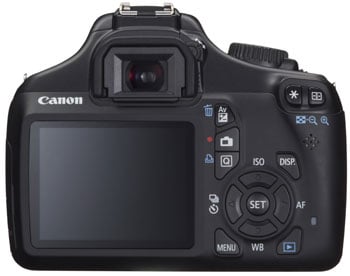
Canon’s fitted the T3 / 1100D with a fairly modest-sized 2.7in / 230k screen, which may be larger than the 2.5in screen of its predecessor, but falls below the 3in of the Nikon D3100, not to mention other budget DSLRs. Like all of Canon’s recent screens, the quality is certainly very good, with a bright image and wide viewing angle, but the screen is still looking a little small next to most modern cameras. Like the D3100, there’s no eye-sensors to detect when the camera is held to your face, so if the screen is proving distracting, you’ll need to press the DISP button to turn it off.
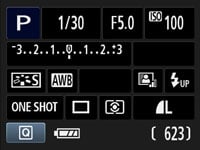
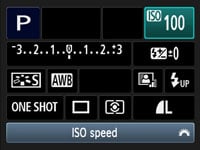
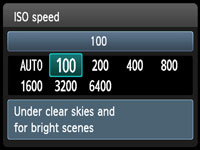
Like previous Canon DSLRs, the screen is used to display and adjust a wide variety of settings, including the AF mode and area, drive mode, picture style, quality and sensitivity. As before, just press the dedicated Q button to highlight an option, then press SET to see a menu for it or simply turn the finger dial to adjust it directly. If you want to change a different setting, just move the highlighter using the four cross-keys. In use I found it much quicker than the two-axis menu system of the Nikon D3100, and there’s also the alternative of using dedicated buttons to enter menus for the ISO, AF mode, White Balance and drive mode.
 |
 |
 |
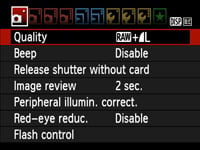
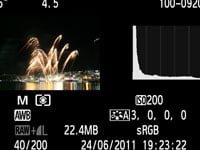
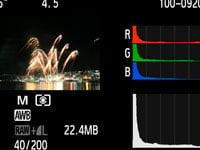
Pressing the Menu button presents ten tabbed pages which are easy to follow, albeit with the text looking quite small compared to other models due to the modest screen size. During playback, the DISP button cycles through four different page of information including thumbnails with brightness and RGB histograms. The D3100 slightly beats the Canon in this regard by also offering views with flashing highlight areas and more detailed shooting information.
 |
 |
 |
Like most modern DSLRs, the T3 / 1100D’s screen can be used for composition by entering Live View mode. The implementation is much-improved over its predecessor which first needed to have the feature enabled in a menu, before then forcing you to press the AE / AF lock button to autofocus. Thankfully the T3 / 1100D follows Canon’s latest DSLRs to have Live View enabled as standard, and there’s a dedicated button to enter or exit the mode. Once within Live View, an intuitive half-press of the shutter release will autofocus; you have to wonder why Canon didn’t do this from day-one.
Live View on the T3 / 1100D is essentially the same as other recent Canon DSLRs, and I’ll detail the AF options in the section below. As before you can cycle through display options which include a live histogram, exposure simulation (take that Nikon!) and an optional alignment grid. Pressing the magnify button zooms-in on the image first by five, then ten times, giving a detailed view that makes it easy to confirm the focus. The fully zoomed-in image in Live View is not just tighter than that offered by the Nikon D3100, but much sharper too making it the preferred choice for those who need precision focusing checks in Live View.
Canon EOS Rebel T3 / 1100D Shooting and focusing modes
The Canon EOS T3 / 1100D’s main mode dial lets you choose from the traditional PASM modes, along with Green Square Auto, Auto with no flash, Canon’s Creative Auto, five presets and a Movie position. Shutter speeds between 1/4000 to 30 seconds are available, along with a Bulb option in Manual. Exposure Compensation is offered in a broad range of +/-5EV, but as expected on a model of this class, Auto Exposure Bracketing only available in the usual three frames with up to 2EV between them. That said, it’s better than the Nikon D3100 in this regard, which offers no exposure bracketing at all.
 |
 |
 |
 |
 |
Three metering modes are available: Center-weighted, Partial (10% of viewfinder at center) and Evaluative, which uses the same 63-zone system introduced with the EOS 7D. While Nikon’s 420-segment sensor in the D3100 is numerically superior, I shot pretty much exclusively with the T3 / 1100S set to Evaluative metering and found no cause for complaint. You can see examples in the Gallery page.
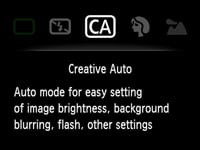
Green Square Auto takes care of all the settings if you desire, and can switch the AF mode to continuous if it detects a subject in motion, but that’s about the extent of its cleverness. Even when deployed in Live View, there’s no apparent scene detection in action, so it’s possible to find a situation which can fool it into under or over-exposing. In contrast, 100% live view cameras like the Panasonic Lumix G3 simply do a better job at adapting to different conditions in full Auto, and in terms of hand-holding, the T3 / 1100D is lacking the excellent goal-oriented Guide mode of the Nikon D3100. Beginners will however find Canon’s Creative Auto mode useful, as it offers an easy approach to controlling the depth-of-field, but again the degree of hand-holding is nowhere near as comprehensive as the D3100’s Guide mode.
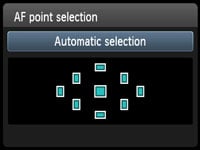
Turning to autofocus, Canon’s upgraded the 7-point AF system of the earlier XS / 1000D to its standard 9-point system with a single cross-type sensor in the middle. I believe this is the same AF system you’ll find in models up to the T3i / 600D, and like those models you can set the AF point manually, or have the camera choose it automatically. You can also choose from One Shot AF, or AI Servo AF, or AI Focus AF which automatically switches between them depending on the conditions.
Set to AI Servo AF and automatic AF selection, the T3 / 1100D will track a subject which was initially placed under the central AF point. So long as the subject falls under one of the nine AF points and there’s sufficient contrast to focus on, the T3 / 1100D can track it fairly successfully. I tried it with the kit lens zoomed-in to photograph the Shotover Jet boats zooming past.
Nikon’s D3100 is slightly more sophisticated when it comes to autofocusing, not so much for the addition of two extra AF points, but for dynamic area which considers adjacent AF points around the selected one, and the 3D Tracking mode which also exploits colour information to better track a subject. In practice these gave the D3100 a slight edge in subject tracking over the T3 / 1100D, but it’s certainly not the difference of night and day. You’ll need to move up to a higher DSLR category to enjoy superior AF performance.
In Live View, the T3 / 1100D offers the choice of three AF modes: the default Live Mode employs a leisurely but accurate contrast-based system, to which Face Live mode adds face detection; finally there’s Quick mode, which temporarily flips down the mirror to take an AF reading with the phase-change system before returning to a live image a second or so later.
In practice Quick mode can be faster than Live mode, but if your subject is relatively static, I’d recommend using Live mode as it’ll eliminate any lens calibration (front or rear-focusing) errors. Unfortunately the leisurely speed of the Live mode renders the Face-detect option essentially useless for anything other than waxworks. If you want fast face detection on a camera with a big sensor, look to one of the mirror-less ‘EVIL’ models, such as the Sony Alpha NEX 5 or Panasonic Lumix G3. Likewise if you’d like effective continuous autofocusing while in Live View, as on the Canon it’s single AF only. Note the Nikon D3100 also offers continuous AF in its Live View, but it’s not as quick or discreet as the EVIL models.
Canon EOS Rebel T3 / 1100D sensor and processing
 |
|
 |
 |
 |
Canon has upgraded the 10.1 Megapixel sensor in the earlier XS / 1000D to a 12.2 Megapixel model for the T3 / 1100D, which I believe is essentially the same as that in the XSi / 450D. So it’s nothing new, but delivers adequate performance for the price point.
The T3 / 1100D captures images with up to 4272×2848 pixels, allowing prints to be made at up to 14.2×9.5in (at 300 dpi). Nikon’s D3100 features a new 14.2 Megapixel sensor, delivering images with 4608×3072 pixels, in turn allowing you to make prints measuring 15.2×10.2in at 300dpi. I’ve compared their resolution and noise levels in the results pages.
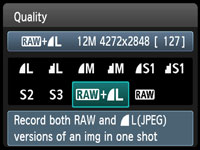
You can save JPEGs at five different resolutions, and the top three of them with the choice of Fine or Normal compression. You can also record 14-bit RAW files with or without a Large Fine JPEG; note the D3100’s RAW files are only saved with 12-bits of data, giving the Canon RAW files a little extra tonal latitude to play with.
The sensitivity runs between 100 and 6400 ISO, and you can set an upper limit for the Auto ISO option. Nikon’s D3100 goes one step further with a 12,800 ISO option, but as you’ll see in the results pages, it’s nothing to be particularly envious of.
Pressing the White Balance button allows you to choose from Auto, Daylight, Shade, Cloudy, Tungsten, White Fluorescent, Flash and Custom – there’s no option to manually select a colour temperature in Kelvin, but there are White Balance shift and bracketing options available.
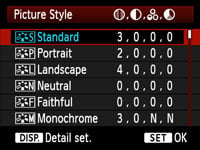
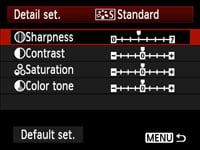
Sharpness, Contrast, Saturation and Colour Tone are applied using a number of Picture Styles: there’s five presets, three user options and a Monochrome mode which offers four filter and four toning effects. I used the default Standard Picture Style for most of my sample images, and found it delivered very smooth images, albeit ones which could handle a little additional sharpening. This is bucking the trend for punchy output from entry-level DSLRs, but you can easily boost the settings in-camera, or shoot in RAW for the best results, as shown in our Results pages.
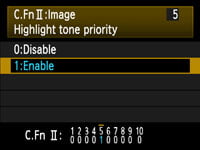
The presence of 14-bit processing allows the T3 / 1100D to offer Highlight Tone Priority facilities which were absent on its predecessor. Like other recent Canon DSLRs, Highlight Tone Priority remains buried away in one of the custom function menus and disabled by default. According to Canon, this improves the highlight detail by expanding the dynamic range from the standard 18% grey to bright highlights. This option is only available between 200 and 6400 ISO and Canon warns noise could be increased in shadow areas. ‘D+’ icons in the viewfinder or on the screen indicate when Highlight Tone Priority is enabled, so there’ll be no surprises.
Below you can see crops taken from my main results image, taken with and without Highlight Tone Priority, HTP. If you have a fairly good monitor, you may able to spot subtle tonal differences in the snowy mountain ridge on the HTP version which has become burnt-out on the version without HTP; interestingly the difference in the histograms is quite dramatic, reflecting more than just a tonal compression. On the actual image itself though, it’s pretty subtle and when measuring actual values in Photoshop, you’re only looking at a difference of around 10 levels. As with previous HTP tests, it remains a subtle effect, but one which could still benefit subjects with bright highlights, such as snowy scenes, or wedding dresses.
Canon EOS T3 / 1100D JPEG Highlight Tone Priority Disabled (default) |
Canon EOS T3 / 1100D JPEG Highlight Tone Priority Enabled | |
 |  | |
 |  | |
100% crop, 1/500, f8, 200 ISO |
100% crop, 1/500, f8, 200 ISO |
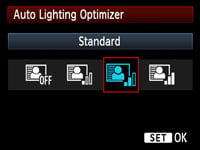 |
The EOS T3 / 1100D additionally inherits the Auto Lighting Optimizer from recent models, which adjusts the brightness and contrast of images with dark areas (such as backlit portraits).
The camera offers the same four settings as the T3i / 600D: Standard, Low, Strong and Disable. The Standard setting is always applied when the T3 / 1100D is set to Auto or the Scene presets, and is also applied by default in PASM modes, although you can adjust it to one of the other three settings if preferred.
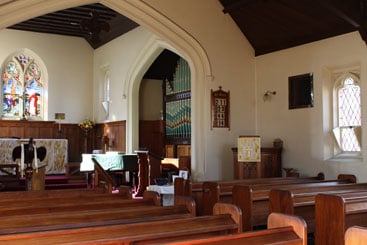
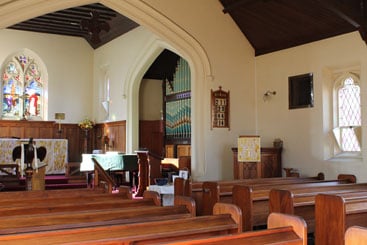
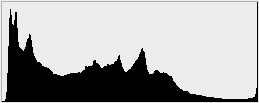
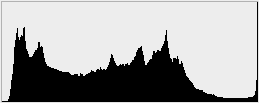
In the composition below, Auto Lighting Optimiser has lifted the shadow and mid-tones, revealing detail in the roofing, although it hasn’t made any difference to the bright highlight areas. These changes are reflected in the histograms below each image.
Canon EOS T3 / 1100D JPEG Auto Lighting Optimiser: Off / Strong | ||
 |  | |
 |  | |
1 sec, f8, 100 ISO |
1 sec, f8, 100 ISO | |
Like other recent Canon DSLRs, the T3 / 1100D can automatically correct vignetting (darkening in corners) using internal data for up to 40 lenses, but it still won’t do anything about coloured fringing. You can remove fringing from RAW files using software after the event, but Nikon’s D3100 will actually remove them from JPEGs in-camera. This can make a big difference to the quality when viewed up-close as you’ll see in my results pages.
The T3 / 1100D allows you to store copyright data on images, but is lacking the Creative Filters or in-camera RAW processing of the higher-end models in the range. I appreciate the strategy of leaving some features for more sophisticated models, but surely filters and special effects are perfect for the T3 / 1100D’s target market. That said, there aren’t any on the D3100 either.
Canon EOS Rebel T3 / 1100D Movie mode
 |
 |
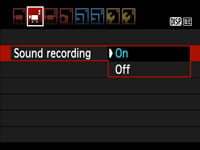 |
In a major upgrade over its predecessor, the T3 / 1100D is equipped with HD movie facilities. The implementation is pretty simple though: you can only record video in 720p which captures a 1280×720 frame at either 25 or 30fps, depending on the TV region setting. There’s no 1080p option, nor, unusually, any lower resolution options.
Audio is recorded using a built-in mono microphone, and as you’d expect, there’s no external microphone input; there’s also no manual control over exposure. Like all Canon DSLRs before it, you can focus before or during a clip, but it’s a single-shot process which can take a few seconds at a time and is quite distracting if recorded in the video. So like those Canon DSLRs before it, the T3 / 1100D should really be considered as manual focus once you start filming video.
Again like other Canon DSLRs, video is encoded using H.264 with uncompressed PCM audio (at 16 bit 48KHz), and stored in a QuickTime MOV wrapper. The maximum time per file remains 29 minutes and 59 seconds or 4GB, whichever happens first. Canon has however increased the compression from earlier models by about 50% to squeeze more footage onto cards: you’re now looking at about 200MB per minute. So that 4GB file limit will actually be reached after approximately 17 minutes, around five minutes longer than previous models. A fully charged battery should last for just under two hours worth of recording and you’ll need a Class 6 (or higher) SD card to support the maximum recording times.
Here are a selection of sample videos filmed with the Canon EOS Rebel T3 / 1100D using its EF-S 18-55mm III kit lens and 720p movie mode; all were filmed at 30fps, although there’s a version of the first clip at 25fps if you’re interested. Registered members of Vimeo can download the original files by clicking the links below each window; these take you to the Vimeo page where the video is hosted and the link to download the actual file can be found under the ‘About this video’ section in the lower right.
| |
|---|---|
|
In the clip above the first thing to notice is some wobbling in the image. This is because I shake a little and the standard EF-S 18-55mm III kit lens sadly does not have image stabilisation; for that you’ll need to pay more for the kit with the EF-S 18-55mm IS II, or of course go for the body alone and choose a different stabilised lens from day-one. If you have very steady hands, or intend filming from a tripod, then the lack of stabilisation in the cheapest T3 / 1100D kit won’t be an issue, but for others it might. The clip itself though shows a good detailed image, and while the camera doesn’t attempt to autofocus while filming, it doesn’t need to here and avoids the distracting searching process of models which do. I have another version of this clip filmed in 25fps for those from PAL regions.
| |
|---|---|
|
In my second clip above, I locked the T3 / 1100D to a tripod where of course the lack of stabilisation on the kit lens is no longer an issue. Once again a sharp and detailed image here, even if it is ‘only’ in 720p.
| |
|---|---|
|
Moving on, my third clip above was filmed handheld in a relatively dim bar. The large sensor of the T3 / 1100D has ensured the minimum of noise in this clip, delivering a nice, clean result, but again the absence of stabilisaion on the kit lens has resulted in some undesirable wobbles.
| |
|---|---|
|
So far all the clips have shown the focus locked, but while the T3 / 1100D won’t autofocus while filming, there’s nothing stopping you from manually focusing. In the final clip above, I set the focus to manual and ‘pulled-focus’ between the coffee cup and the background of the cafe. There’s no manual control over movie exposures, but in dim conditions like these, the camera will select a large aperture, which combined with a close focusing distance will allow you to achieve attractive shallow-depth-of-field effects. By the way, that’s a coffee at Queenstown’s excellent Vudu Cafe I’m drinking, and if you found this review useful, feel free to buy me another using the link at the top right of this page! Cheers!
The T3 / 1100D is certainly capable of delivering some good-looking video footage, but the continued lack of continuous AF (not to mention the absence of a stabilised lens in the cheapest kit) will make it less appealing to beginners, while enthusiasts will miss the microphone input and manual exposure control of higher-end models. Those driven by numbers may also feel cheated not to have a 1080p option, although if it meant only offering a ‘hobbled’ version at 20fps like the T1i / 500D, then I think Canon did the right thing by sticking with 720p.
Nikon’s D3100 is also more sophisticated in a number of respects. While it too doesn’t have manual exposure control or a microphone input, it does offer 720p at three frame rates, 1080p at 24fps and a standard definition option too. It also attempts to continuously autofocus while filming, although to be fair what it’s actually doing is more like triggering a Single AF process every few seconds with the audible and visible searching that entails. The bottom line is while the D3100 will try and autofocus while you’re filming, the results can be so distracting you’ll soon switch to manual focus for some relief. If you want true continuous AF that’s fairly quiet and discreet, you’ll need to go for one of the mirror-less EVIL cameras, like a Sony NEX or Panasonic Lumix G3.
Note the D3100’s maximum recording time in HD is ten minutes, so the Canon offers around 70% longer per clip.
Canon EOS Rebel T3 / 1100D Drive modes and remote control
The EOS T3 / 1100D offers one Continuous Shooting mode, rated at 3fps for JPEGs, 2fps for RAW or around 0.8fps for RAW plus JPEG. To put it to the test I fitted a formatted Lexar Professional 133x 16GB Class 10 SDHC card, and set the camera to 1/500 at 400 ISO.
Set to Large Fine JPEG, the T3 / 1100D seemed happy to keep shooting at a constant speed while memory remained available: I fired-off 50 frames in 18 seconds, corresponding to a speed of 2.8fps. Set to RAW, the camera began to stall after just four frames, which in turn took about two seconds, confirming the 2fps rate.
In my earlier tests with the D5100, I measured its JPEG speed at about 2.9fps, which essentially matches the T3 / 1100D. The Nikon does however maintain this speed when shooting RAW, and didn’t stall until 16 frames had been captured. This gives it an edge over the T3 / 1100D, but remember both are still shooting at sub-3fps speeds, which is still too slow for serious action photography. Three frames per second is pretty basic, and most action or sports sequences will be over before you’ve managed to fire-off more than a couple of shots. So if action photography is your thing, I’d recommend going for the Nikon D5100, or spending a little more on one of Sony’s models instead.
Moving onto self-timers, the EOS T3 / 1100D offers the choice of two or ten second countdowns, along with a Continuous option which can fire-off between 2 and 10 shots after a ten second delay.
One of the best things about buying a Canon DSLR is the free EOS Utility software supplied with every model. This works on Macs and PCs, and allows you to remote control the camera over a USB cable, adjusting almost any setting which doesn’t involve a physical turn of a dial, triggering the shutter with your mouse, and even focusing the image via a live preview on your computer’s screen. As with previous versions, still photos can be stored on the memory card and or your computer’s hard disk, but movie files can only be stored on the memory card.
Remote control software is available from other manufacturers, but of the big names, only Canon supplies it free of charge with its DSLRs. The T3 / 1100D also comes with Canon’s Digital Photo Professional, which is a very capable RAW processor, again more sophisticated than the usual bundled software.
Now check out my Canon EOS Rebel T3 / 1100D image quality results.