Support Cameralabs by shopping at our partner stores or donating via Paypal
 

Follow me!
Camera Labs RSS Feed
Gordon Laing and Cameralabs on Google+
Camera Labs on Facebook
Camera Labs on Twitter

 
  Latest camera reviews

Olympus E-PM1
Nikon V1
Sony NEX-5N
Canon 100HS / 115HS
Canon 300HS / 220HS
Canon S100
GoPro HD Hero 2
Canon 510HS / 1100HS
Canon 310HS / 230HS
Canon SX150 IS
Olympus E-PL3
Canon SX40 HS
Sony NEX-C3
Panasonic GF3
Fujifilm HS20 EXR
Panasonic FZ150
Olympus E-P3
Panasonic FZ47 / FZ48
Nikon COOLPIX S9100
Sony Cyber-shot HX100V
Sony Cyber-shot HX9V
Panasonic FX77 / FX78
Canon SX230 HS
Canon EOS T3 / 1100D
Panasonic Lumix G3
Sony Cyber-shot TX10
Canon 500HS / 310HS
Nikon D5100
Sony Cyber-shot W510
Nikon COOLPIX L24
Canon PowerShot A1200
Panasonic FS18 / FH5
Canon PowerShot A800
Panasonic TZ18 / ZS8
Canon PowerShot A3300IS
Canon EOS 600D / T3i
Panasonic TZ20 / ZS10
Canon IXUS 1000/SD4500
Sony Alpha SLT-A33
Panasonic Lumix GH2
Nikon D7000
Canon PowerShot G12
Canon PowerShot S95
Panasonic Lumix LX5
Nikon D3100
Canon EOS 60D
Canon EOS 550D / T2i
Canon EOS 7D
Nikon D300s
Canon EOS 5D Mark II
Nikon D90

All reviews ....


  Best Buys: our top models
   
  Best Canon lens
Best Nikkor lens
Best Sony lens
Best budget DSLR
Best mid-range DSLR
Best semi-pro DSLR
Best point and shoot
Best superzoom
Best camera accessories


Camera Labs Forum

Any questions, comments or a great tip to share? Join our Forum and let everyone know.
   
 
  DSLR Tips


Support me by shopping at Amazon!
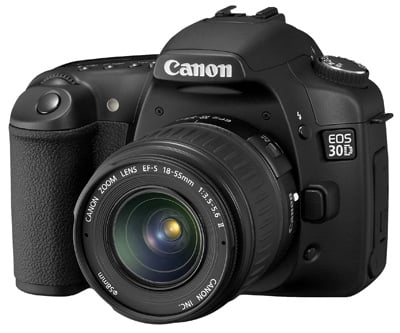
Canon EOS 30D review Gordon Laing, July 2006

Canon EOS 30D features continued... Lenses / Screen and menus / Sensor and processing
 

Canon EOS 30D screen and menus

The Canon 30D follows the 5D by sporting a decent-sized 2.5in colour screen with 230K pixels. Like the spot-metering feature, it’s a welcome addition to the 30D, but one which was already long overdue. We expect the 350D / Digital Rebel XT’s successor to also share the same screen.

Canon EOS 30D RGB histogram
 

During playback you can zoom-in on images by up to ten times and scroll around using a small joystick above the command wheel on the back. Pressing the Info button cycles between pages showing the image alone, the image with basic exposure info or a thumbnail with detailed information along with a histogram. It’s possible to switch between luminance and separate RGB histogram views using an option in the menu. Pressing the Info button during shooting displays a wealth of information about the present settings.

Canon EOS 30D Main menu screen
 
Support this site by price checking below

Canon EOS 30D

The menus are essentially identical to the 20D and 5D with a few subtle differences. They’re arranged as a long page with 31 options arranged into three sections; this sounds like a lot, but spinning the command wheel allows you to quickly find the one you want, while pressing the Jump button takes you directly to the beginning of each section. Your position in the overall menu is also indicated on a vertical scroll bar on the right.

Canon EOS 30D Auto rotate function
 

The three sections are colour coded red for the ten shooting options, blue for the eight playback options and yellow for the 13 configuration options. Compared to the 5D, the 30D’s menus include red-eye options for the popup flash, auto rotate options which include camera and or PC, and a communication option which specifically mentions the wireless WFT-E1 module.

Canon EOS 30D Custom functions
 

The 5D does however allow you to select a recording folder and has 21 custom functions compared to the 30D’s 19. Of those 19 on the 30D though, you’ll still find noise reduction on long exposures, mirror lockup and shutter curtain sync for flash usage. Like other Canon DSLRs, the extreme ISO modes are only offered if you enable ‘ISO expansion’ in one of the custom options, although unlike the 5D, this only offers a High option equivalent to 3200 ISO. Again like the 5D though, we reckon hiding the full ISO range is unnecessary nannying.

Canon EOS 30D Screen brightness


Like previous Canon DSLRs, we found the 30D’s screen was a little dim by default, requiring an increase of a notch in the menu. Even then though it was often difficult to evaluate exposures under bright conditions, forcing us to check the histograms to be sure. It also seemed above averagely susceptible to residues, often proving hard to wipe clean completely.


Canon EOS 30D features continued...

Lenses / Screen and menus / Sensor and processing


If you found this review useful, please support us by shopping below!


All words, images, videos and layout, copyright 2005-2012 Gordon Laing. May not be used without permission.

/ How we test / Best Cameras / Advertising / Camera reviews / Supporting Camera Labs